Openshot-qt: error message popup everytime openshot starts
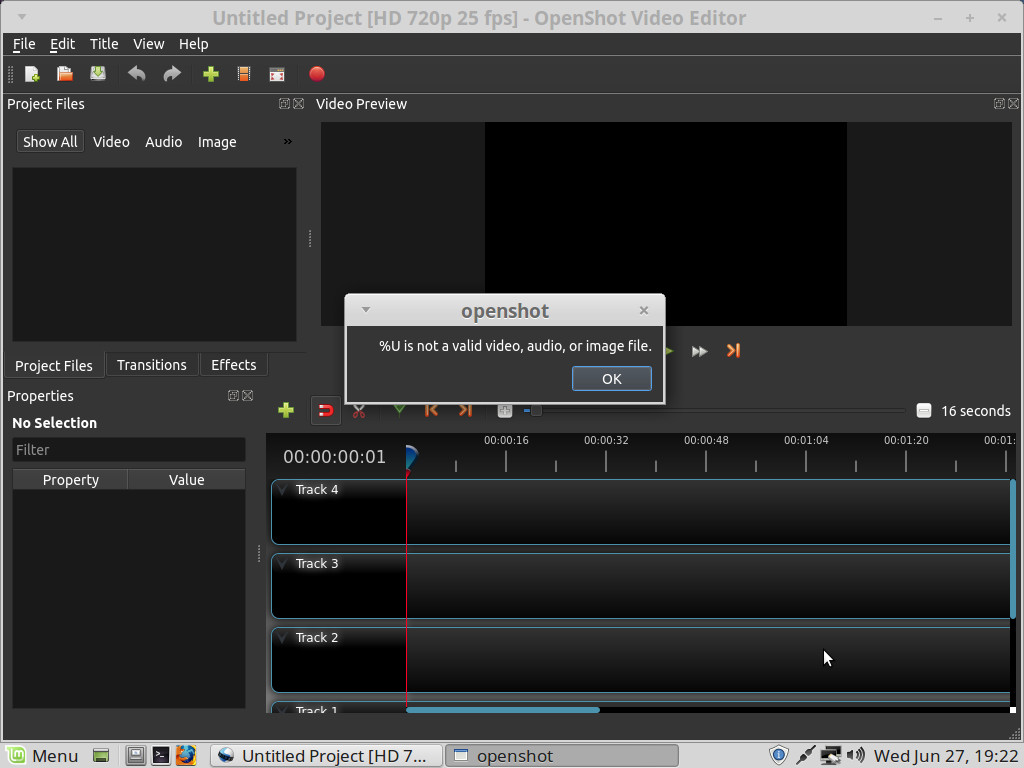
Hello can any dev's tell me why this pop up error message box always comes on screen
every time i start openshot linux mint 18.3 and it doesnt do this on my ubuntu laptop only on mint.
I asked to jonathan about this problem but he never replied.
any ideas guys?
thanks
bob
 bobcrikey
All 14 comments
I would advise that you ask these problems to us here at GitHub. Mr. Thomas is always very busy and hardly ever has the time to reply to mails and stuff.
I wonder if you're opening OpenShot from the terminal. At any rate, I've seen this issue happen when I open OpenShot from terminal with $ openshot-qt non-existant-file and the error it throws is pretty similar "non-existant-file is not a valid video, audio, or image file". So, I think, even if you're not running OpenShot from the terminal (or are but without the argument), somehow, the command that runs OpenShot is somehow configured to be $ openshot-qt '%U' for some strange reason. Perhaps $ type openshot-qt or $ which openshot-qt could give you some insight into this? I wouldn't consider this a major problem. Just a nuisance. Hope this helps. :+1:
 peanutbutterandcrackers
on 28 Jun 2018
peanutbutterandcrackers
on 28 Jun 2018
I DO NOT RUN OPENSHOT IN A TERMINAL WINDOW MATE. WHY WOULD YOU THINK THIS?
its been installed from the app image itself
and yes its a damm nuisance this pop up message
bobcrikey
on 28 Jun 2018
Because it is one plausible reason behind this.
I suggest you try out another AppImage from the daily builds. Or, even better yet, switch to using the latest PPA.
peanutbutterandcrackers
on 28 Jun 2018
Also, please be a little more patient with the program. This is not a commercial program but a labour of love of a single man - Mr. Jonathan Thomas. And we are all just trying to help him out with this. Nobody receives any compensation for the work they do on this amazing software. We all do it because of our love for the program. That is why the bugs won't be fixed fast, the replies will be tardy, and enhancements won't be able to be made on a regular basis. You will have to be a bit more kind to the project, good sir.
If OpenShot, in it's current form, isn't what you're looking for, you could try out one of the following:
- KdenLive - https://kdenlive.org
- Shotcut - https://shotcut.org
- Pitivi - https://pitivi.org
- Lives Video Editor - http://lives-video.com/
Hope that helps.
peanutbutterandcrackers
on 28 Jun 2018
@bobcrikey - I would recommend to try a daily build and see if it still happens. Try to stay calm if possible. 😉
 DylanC
on 28 Jun 2018
DylanC
on 28 Jun 2018
hello everyone, i just might had solved this problem, i was looking through some of the earlier
problems with openshot and both dylan and peanuts were discussing libsodium18, so i checked in the terminal and it was already installed and the latest, ok then i remembered about ppa so i installed
ppa and it downloaded the latest dev and installed it, well this time it ran without that pop up message box, so i reset the computer and this latest ppa dev worked again no popup message box, however, i did notice a bit of stuttering or noise in the audio at the end of the short clip , and the forward and reverse play buttoms are blacked out no colour to them, thats ok but at least iv gotten this far
and just before i close here, i put the same little short clip one wave file and 2 png's
into open shot 1.43 and it played back no audio stuttering or noise in it. but this is about version 2.4.1
and dylanc the daily build app images wernt even running only the normal 2.4.1 app on its on was
the only app image that was working,
cheers
bob
bobcrikey
on 29 Jun 2018
@bobcrikey - OpenShot version 2.4.2 is also out now. Maybe it'll work, too. You might notice a bit of problems if you upgrade the daily PPA right now. But please be patient. Mr. Thomas is working on fixing the PPA at the moment. :+1:
Hope you create awesome videos using OpenShot!
peanutbutterandcrackers
on 1 Jul 2018
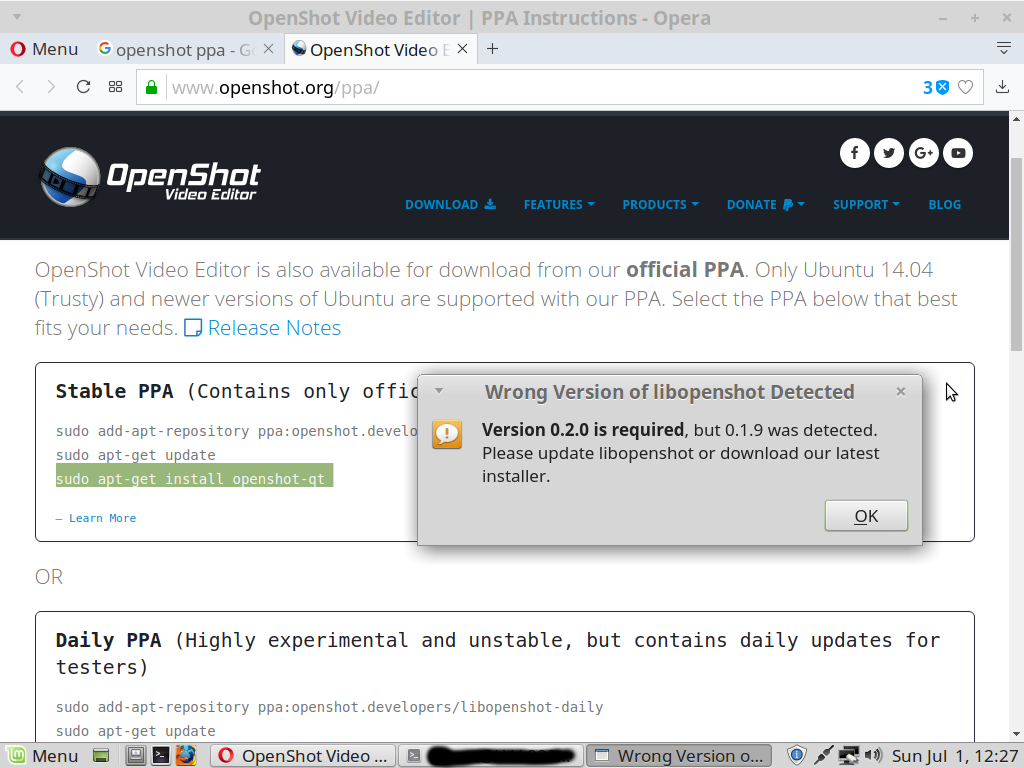
Well since trying to upgrade to the latest final release via ppa this is the error box message i just got
and now not even the previous dev version wont run now.
not happy i can tell you that. i just lost 12 hours work on some animations since this final release
error wont even start not even the appimage will work either on linux mint
bobcrikey
on 1 Jul 2018
Please remove openshot and the ppa and then use the stable ppa. That will fix it.
peanutbutterandcrackers
on 1 Jul 2018
Or, should, at least.
$ sudo apt remove openshot-qt
$ sudo add-apt-repository -r ppa:openshot.developers/libopenshot-daily
$ sudo add-apt-repository ppa:openshot.developers/ppa
$ sudo apt update
$ sudo apt upgrade
$ sudo apt install openshot-qt
And if even that doesn't work, we'll just figure out a new way. :+1:
peanutbutterandcrackers
on 1 Jul 2018
hold on im doing this now as i type to you
bobcrikey
on 1 Jul 2018
holding
peanutbutterandcrackers
on 1 Jul 2018
horray, its working now thanks peanuts, i had to wait while the system updated itself and on a 2.5mb speed its not fast enough at times, no pop up messages either :)
cheers
thanks mate.:)
bobcrikey
on 1 Jul 2018
@bobcrikey - Awesome! I'm glad that the issue has been resolved. Mind if I close this one, sir?
Also, please do remember that OpenShot is a labour of love and we can all do our part (albeit small) in helping us grow to become a lot better. :)
Closing this one for now. Hope you create amazing videos using OpenShot!
peanutbutterandcrackers
on 1 Jul 2018
Related issues
 carlosnewmusic
·
3Comments
carlosnewmusic
·
3Comments
 audioclown
·
3Comments
audioclown
·
3Comments
 adswan
·
3Comments
adswan
·
3Comments
 Obed9
·
3Comments
Obed9
·
3Comments
 TavernSenses
·
3Comments
TavernSenses
·
3Comments
Most helpful comment
horray, its working now thanks peanuts, i had to wait while the system updated itself and on a 2.5mb speed its not fast enough at times, no pop up messages either :)
cheers
thanks mate.:)