Openshot-qt: White lines on the left border of undocked tabs
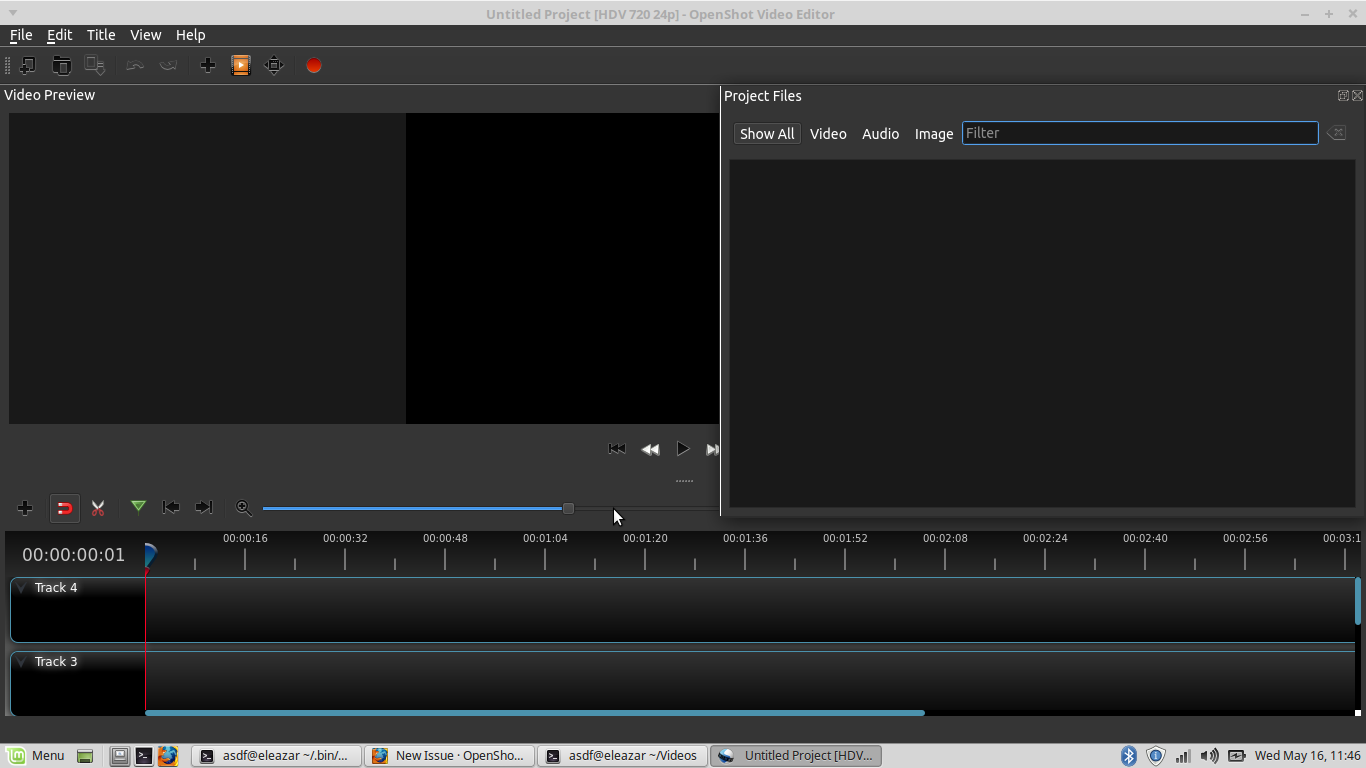
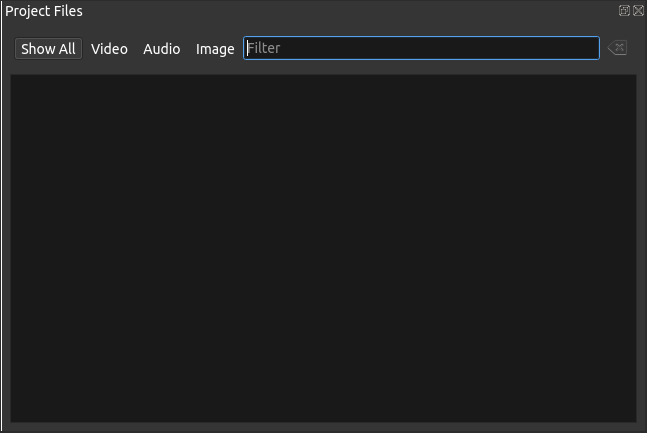
So, when the 'Video Preview', 'Project Files', or any other tabs are undocked from the main window, a white border appears at the left side of them.
System Details
- Linux Mint 17.3 using the latest daily PPA
Steps to reproduce the behavior:
Undock any of the tabs
Expected behavior
The white border should not be present.
 peanutbutterandcrackers
All 13 comments
@ferdnyc - Here. Sorry it took so long for me to open this issue. Hope you'll be able to fix it, soon.
Also, while we're at it, I think the undocked tabs are too attracted to the main window. One wrong move and boom, it back as a docked tab. Perhaps the magnetism needs to be a little less? o.O
peanutbutterandcrackers
on 16 May 2018
No worries! I actually did go digging around a little, back when this came up, trying to track down that white line. ...Wasn't successful. I think I concluded that I was going to have to learn the entire Qt widget-decorating system, in order to really comprehend the code I was reading well enough to try and spot flaws. I haven't given myself that crash-course yet.
Also, while we're at it, I think the undocked tabs are too attracted to the main window. One wrong move and boom, it back as a docked tab. Perhaps the magnetism needs to be a little less? o.O
Somewhat surprisingly, it doesn't _appear_ we have any control over that. At least, I couldn't find any parameter anywhere that would allow the area or attraction-distance of the docks' dropzone to be changed.
In experimenting with it myself, though, I can't really say that I'm getting the same "one wrong move" feeling. If I have the Properties list undocked and floating to the left of the main window, and I start dragging it around, it doesn't attempt to re-dock until my mouse pointer has physically passed INTO the main-window area. And when it is planning to dock, the other dockable widgets animate out of the way and leave a hole for it, so it doesn't ever really feel like a surprise. Is it behaving differently for you?
Ooh, or... one thing: Any possibility you're double-clicking the floating dock's titlebar? That's a shortcut for "re-dock" (and "un-dock", actually, when it's docked), and that'll work no matter where the dockable widget is positioned on the screen.
 ferdnyc
on 16 May 2018
ferdnyc
on 16 May 2018
So, it seems I can undock it pretty well and move it around - as long as I am doing it outside of the main window. Even inside of it, if I put it around the timeline, it works rather well. But I was trying to put it in the upper half, and perhaps that it why it was behaving like that (which appeared to me to be erratic, but turns out, that's just normal - after reading your comment).
I didn't know about the double-clicking stuff. Thanks! Pretty neat!
peanutbutterandcrackers
on 17 May 2018
Ah, yeah, floating panels aren't really meant to be floated _inside_ the main window border, because then they obscure some other part of the interface. Undocking is more intended to be used when moving panels beyond the main window borders entirely.
ferdnyc
on 17 May 2018
Oh... I see. My bad. hehe
peanutbutterandcrackers
on 18 May 2018
@peanutbutterandcrackers @ferdnyc - Is this still an issue guys?
 DylanC
on 2 Jul 2018
DylanC
on 2 Jul 2018
Yes, unchanged.
On Mon, Jul 2, 2018, 5:51 AM DylanC notifications@github.com wrote:
@peanutbutterandcrackers https://github.com/peanutbutterandcrackers
@ferdnyc https://github.com/ferdnyc - Is this still an issue guys?—
You are receiving this because you were mentioned.
Reply to this email directly, view it on GitHub
https://github.com/OpenShot/openshot-qt/issues/1591#issuecomment-401741280,
or mute the thread
https://github.com/notifications/unsubscribe-auth/AAg1pH1WxFpRxFc_X2i3yqBAi4LxRMjXks5uCe0ggaJpZM4UAsU-
.
ferdnyc
on 2 Jul 2018
I don't see this as issue at all (Win7 x64, OpenShot 2.4.4 custom build, Qt 5.12.3). Is this OS dependent bug?
 SuslikV
on 2 Aug 2019
SuslikV
on 2 Aug 2019
@SuslikV
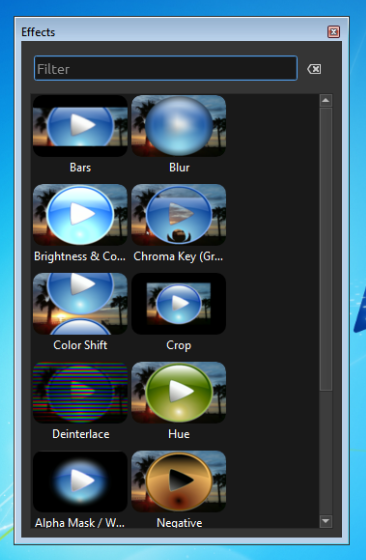
I suppose it is, in the sense that the standard Windows decorations either hide or eliminate it. On Windows a floated dock looks like this, complete with ugly, non-matching system borders:
On Linux, though, the OS stays out of Qt's way, so a floated dock looks like this:
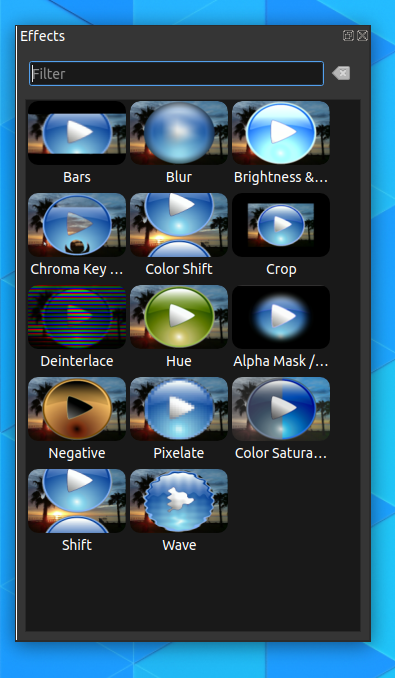
Complete with stupid white line down the left edge, because we clearly have one of the 3D-effect color shading values for the window borders/frame set wrong in the application palette.
(No idea what the floating dock window-decoration situation is on MacOS.)
ferdnyc
on 2 Aug 2019
So, panels is not flat.
SuslikV
on 3 Aug 2019
@ferdnyc can you try to modify line
https://github.com/OpenShot/openshot-qt/blob/4dbf58936349ae5498f0f9b2f423b8859dda59db/src/classes/app.py#L196
the with the:
self.setStyleSheet("QToolTip { color: #ffffff; background-color: #2a82da; border: 0px solid white; } QDockWidget { background-color:red; }")
is it still white on the left?
SuslikV
on 3 Aug 2019
The issue is fixed in #2916.
ferdnyc
on 4 Aug 2019
(The QPalette::Light color of the QPalette::Active color group was being used for the 3D-effect shading of the floating dock, and it wasn't set when generating darkPalette.)
ferdnyc
on 4 Aug 2019
Related issues
 GrandpaBill3006
·
3Comments
GrandpaBill3006
·
3Comments
 Geoff0627
·
3Comments
Geoff0627
·
3Comments
 TavernSenses
·
3Comments
TavernSenses
·
3Comments
 gbbbbb
·
3Comments
gbbbbb
·
3Comments
 lukashajek78
·
3Comments
lukashajek78
·
3Comments