Openshot-qt: AppImage libs are out of date
System Details:
- Linux Mint 18.3 Cinnamon 64-bit, Cinnamon version 3.6.7, Linux Kernel 4.13.0-36-generic
- OpenShot Version: 2.4.1
- _Please attach log files if crash_
Drag an MP4 file into the Project Files area and get "
 mbmast
All 20 comments
It would be helpful if you could provide full details about the file using a query tool like mediainfo.
Regardless, even if you were able to import it (HEVC), and drag it on the timeline, it would be so slow that is would be unusable. I think you would be farther ahead to convert it to h264 first.
 gary9872
on 24 Mar 2018
gary9872
on 24 Mar 2018
@mbmast -
Edit - I can reproduce this issue using the AppImage version. It doesn't appear to affect my dev version.
What device was the file created/recorded on? I'm also running Linux Mint 18.3 and OpenShot 2.4.1-dev1 and have just tested importing a HEVC-encoded file filmed on an iPhone 7, and encountered no issues at all other than slightly laggy playback. (Most editing software on Windows didn't even recognise this file.)
Here are the details from MediaInfo if you would like to use it as a comparison:
$ mediainfo IMG_2111.MOV
General
Complete name                            : IMG_2111.MOV
Format                                   : MPEG-4
Format profile                           : QuickTime
Codec ID                                 : qt   0000.00 (qt  )
File size                                : 21.1 MiB
Duration                                 : 24s 767ms
Overall bit rate mode                    : Variable
Overall bit rate                         : 7 135 Kbps
Encoded date                             : UTC 2018-02-09 22:03:44
Tagged date                              : UTC 2018-02-09 22:04:09
Writing library                          : Apple QuickTime
com.apple.quicktime.location.ISO6709     : <...>
com.apple.quicktime.make                 : Apple
com.apple.quicktime.model                : iPhone 7
com.apple.quicktime.software             : 11.2.5
com.apple.quicktime.creationdate         : 2018-02-10T09:03:43+1100

Video
ID                                       : 1
Format                                   : HEVC
Format/Info                              : High Efficiency Video Coding
Format profile                           : Main@L4@Main
Codec ID                                 : hvc1
Codec ID/Info                            : High Efficiency Video Coding
Duration                                 : 24s 767ms
Bit rate                                 : 7 026 Kbps
Width                                    : 1 920 pixels
Height                                   : 1 080 pixels
Display aspect ratio                     : 16:9
Frame rate mode                          : Constant
Frame rate                               : 30.000 fps
Color space                              : YUV
Chroma subsampling                       : 4:2:0
Bit depth                                : 8 bits
Bits/(Pixel*Frame)                       : 0.113
Stream size                              : 20.7 MiB (98%)
Title                                    : Core Media Video
Encoded date                             : UTC 2018-02-09 22:03:44
Tagged date                              : UTC 2018-02-09 22:04:09
Color range                              : Limited
Color primaries                          : BT.709
Transfer characteristics                 : BT.709
Matrix coefficients                      : BT.709

Audio
ID                                       : 2
Format                                   : AAC
Format/Info                              : Advanced Audio Codec
Format profile                           : LC
Codec ID                                 : 40
Duration                                 : 24s 765ms
Source duration                          : 24s 822ms
Bit rate mode                            : Variable
Bit rate                                 : 96.0 Kbps
Channel(s)                               : 1 channel
Channel positions                        : Front: C
Sampling rate                            : 44.1 KHz
Frame rate                               : 43.066 fps (1024 spf)
Compression mode                         : Lossy
Stream size                              : 287 KiB (1%)
Source stream size                       : 288 KiB (1%)
Title                                    : Core Media Audio
Encoded date                             : UTC 2018-02-09 22:03:44
Tagged date                              : UTC 2018-02-09 22:04:09

Other #1
Type                                     : meta
Duration                                 : 24s 767ms
Bit rate mode                            : CBR

Other #2
Type                                     : meta
Duration                                 : 24s 767ms
Bit rate mode                            : CBR
 bnieuwveld
on 24 Mar 2018
bnieuwveld
on 24 Mar 2018
Have done a little more digging. This is what happens (instantly) when trying to import a HEVC-encoded video into the latest AppImage:
files_listview:INFO Adding file: /home/beau/Downloads/IMG_1793.MOV
[mov,mp4,m4a,3gp,3g2,mj2 @ 0x2dc3d20] max_analyze_duration reached
[mov,mp4,m4a,3gp,3g2,mj2 @ 0x2dd1c20] max_analyze_duration reached
files_listview:INFO Adding file: /home/beau/Downloads/IMG_1790.MOV
[mov,mp4,m4a,3gp,3g2,mj2 @ 0x2dcf740] max_analyze_duration reached
[mov,mp4,m4a,3gp,3g2,mj2 @ 0x2f623c0] max_analyze_duration reached
This is what happens on the PPA/daily build (which imports successfully):
files_listview:INFO Adding file: /home/beau/Downloads/IMG_1790.MOV
project_data:INFO _set key: ['files'] values: {'audio_stream_index': 1, 'vcodec': 'hevc', 'path': '/home/beau/Downloads/IMG_1790.MOV', 'width': 1920, 'interlaced_frame': False, 'duration': 21.22303771972656, 'id': 'LRULRNJE5I', 'height': 1080, 'pixel_format': 0, 'type': 'FFmpegReader', 'video_length': '635', 'audio_bit_rate': 95594, 'file_size': '20851063', 'has_video': True, 'channel_layout': 4, 'fps': {'num': 30, 'den': 1}, 'audio_timebase': {'num': 1, 'den': 44100}, 'media_type': 'video', 'metadata': {'encoder': 'HEVC', 'compatible_brands': 'qt', 'language': 'und', 'handler_name': 'Core Media Data Handler', 'creation_time': '2018-02-05 22:48:22', 'major_brand': 'qt', 'minor_version': '0'}, 'has_single_image': False, 'has_audio': True, 'video_stream_index': 0, 'display_ratio': {'num': 16, 'den': 9}, 'acodec': 'aac', 'pixel_ratio': {'num': 1, 'den': 1}, 'video_bit_rate': 7880716, 'video_timebase': {'num': 1, 'den': 600}, 'sample_rate': 44100, 'top_field_first': True, 'channels': 1} add: True partial: False remove: False
timeline_webview:INFO SortItems
timeline_webview:INFO UpdateLayerIndex
 files_model:INFO updating files model.
 main_window:INFO updateStatusChanged
It seems like the root cause is to do with ffmpeg, but I will leave it to someone more in-the-know than me to explain the reason for this one.
bnieuwveld
on 24 Mar 2018
@N3WWN @ferdnyc @DylanC - Perhaps you could help out here?
@bnieuwveld - Thank you for the detective work. :+1:
I wonder if it has to do with the latest ffmpeg3.2 support (on the reader side) being implemented and the ffmpeg_writer side still awaiting the patch? o.O
 peanutbutterandcrackers
on 24 Mar 2018
peanutbutterandcrackers
on 24 Mar 2018
If anyone needs a video to illustrate @mbmast issue, here is a link.
https://s3.amazonaws.com/x265.org/video/Tears_400_x265.mp4
@peanutbutterandcrackers I think it stems alot farther back. From what I can see the Appimage uses libraries from ffmpeg 1.2 which is a couple years old so hevc is not going to be supported.
@mbmast Are you using an Appimage or a distro release?
gary9872
on 24 Mar 2018
@gary9872 - Oh... I see. So, we have to upgrade the AppImage Builds. Both ffmpeg and qt (because of another issue) needs to be updated in the appimages, it seems.
peanutbutterandcrackers
on 25 Mar 2018
@mbmast So based on what we've found, the AppImage contains an outdated library, which was released before the HEVC codec really even existed. Thus, it doesn't know what you're trying to import. This has been brought to the developer's attention and hopefully we can fix this soon :)
Given that the PPA uses a more up-to-date version of this library, which imports HEVC without issue, my recommendation to you would be to install that instead of the AppImage. Instructions can be found here: https://www.openshot.org/ppa/
Hope this helps you.
bnieuwveld
on 27 Mar 2018
So, we have to upgrade the AppImage Builds. Both ffmpeg and qt (because of another issue) needs to be updated in the appimages, it seems.
Well, I don't know if updating Qt will fix the native-dialogs issue. I'm _hoping_ it will at least make it possible. I know that there's no realistic way to fix it without updating Qt past 5.7. But in general the AppImage is _waay_ out of date on all of its bundled libraries and needs to be brought current, yes.
 ferdnyc
on 27 Mar 2018
ferdnyc
on 27 Mar 2018
@peanutbutterandcrackers Perhaps a good candidate for _The List_ due to #1391 (closed as dupe to this issue) and #1408 (this issue) both mentioning the libraries are very out-of-date?
 N3WWN
on 1 May 2018
N3WWN
on 1 May 2018
@N3WWN @peanutbutterandcrackers - I agree. I think this should be sorted soon!
 DylanC
on 1 May 2018
DylanC
on 1 May 2018
@N3WWN @DylanC - Aye, Aye, sirs!
peanutbutterandcrackers
on 2 May 2018
I feel this _may_ affect Windows too, because trying in both 2.4.1 and 2.4.2 rc6 I get the "not valid" message as well. This is from my NVR, and unfortunately it's somewhat urgent (I just want to crop out all the irrelevant footage). Here's my MediaInfo output:
General
Complete name                            : IP Camera4_20180623042212.avi
Format                                   : AVI
Format/Info                              : Audio Video Interleave
File size                                : 681 MiB
Duration                                 : 26 min 1 s
Overall bit rate                         : 3 657 kb/s

Video
ID                                       : 0
Format                                   : HEVC
Format/Info                              : High Efficiency Video Coding
Codec ID                                 : HEVC
Duration                                 : 26 min 1 s
Bit rate                                 : 3 521 kb/s
Width                                    : 2 592 pixels
Height                                   : 1 944 pixels
Display aspect ratio                     : 4:3
Frame rate                               : 29.970 (30000/1001) FPS
Bits/(Pixel*Frame)                       : 0.023
Stream size                              : 655 MiB (96%)

Audio
ID                                       : 1
Format                                   : PCM
Format settings                          : Little / Signed
Codec ID                                 : 1
Duration                                 : 25 min 40 s
Bit rate mode                            : Constant
Bit rate                                 : 128 kb/s
Channel(s)                               : 1 channel
Sampling rate                            : 8 000 Hz
Bit depth                                : 16 bits
Stream size                              : 23.5 MiB (3%)
Alignment                                : Aligned on interleaves
Interleave, duration                     : 42  ms (1.24 video frame)
 tomck
on 24 Jun 2018
tomck
on 24 Jun 2018
I feel this may affect Windows too, because trying in both 2.4.1 and 2.4.2 rc6 I get the "not valid" message as well. This is from my NVR, and unfortunately it's somewhat urgent (I just want to crop out all the irrelevant footage).
Hmm, no, it doesn't seem like it. I'm not certain why OpenShot isn't recognizing your video, but it isn't due to outdated libs.
Both 2.4.1 and 2.4.2-rc6 use libavformat-57.dll from ffmpeg 3.4.1, which was just released back in December. The Linux AppImage builds, by contrast (both 2.4.1 and 2.4.2-rc6) use libavformat.so.54 from libav-9.20, which was released back in September 2016.
(And that's relatively recent, vs. the AppImage versions of other components):
- Qt == 5.2.4; released February 2014.
- Python == some 3.4.x series release, can't quite tell which, but 3.4.0 came out March 2014 and 3.5.0 in August 2015, so it's from roughly the same time frame as Qt.
The Windows images have always been kept fairly up to date, when it comes to bundled components. There must be some other factor that's causing your video not to be recognized.
ferdnyc
on 24 Jun 2018
(I wonder if the issue could be the fact that the HEVC video is contained in an AVI file, rather than -- as one would expect -- an MP4 container? That _might_ be throwing FFMpeg and/or libopenshot a curve. Purely a wild theory based on pretty much nothing at all, mind you.)
ferdnyc
on 24 Jun 2018
I tested that theory by using mkvtoolnix to repackage it as mkv and still
had issues, I do have a 5 meg file I could send for test purposes.
On Sun, Jun 24, 2018 at 1:33 AM Frank Dana notifications@github.com wrote:
(I wonder if the issue could be the fact that the HEVC video is contained
in an AVI file, rather than -- as one would expect -- an MP4 container?
That might be throwing FFMpeg and/or libopenshot a curve. Purely a wild
theory based on pretty much nothing at all, mind you.)—
You are receiving this because you commented.
Reply to this email directly, view it on GitHub
https://github.com/OpenShot/openshot-qt/issues/1408#issuecomment-399733351,
or mute the thread
https://github.com/notifications/unsubscribe-auth/AATzqUBkV1NqpRnDrLsRIyMAe2E7NMxoks5t_zLIgaJpZM4S5Y4c
.
tomck
on 24 Jun 2018
Couldn't hurt to have it available, if you can ZIP it up an upload it. (I _think_ GitHub will accept 5MB uploads, that's pretty small.) I'd open a new Issue, though, because whatever problem you're having is definitely not related to the AppImage library versions. :grin:
ferdnyc
on 24 Jun 2018
@ferdnyc - Correct me if I'm wrong but I think this is fixed now?
DylanC
on 12 Oct 2018
@DylanC :
Correct me if I'm wrong but I think this is fixed now?
Well... that's a good question, and unexpectedly complex to answer, in a way.
Digression, largely
I noticed a bit ago that the OpenShot-v2.4.3-x86_64.AppImage release contained what appeared to be _two_ different versions of the FFMpeg libs. I've since discovered that, not only is this true, it's actually loading both versions:
$ ./OpenShot-v2.4.3-x86_64.AppImage &
Loaded modules from current directory: /tmp/.mount_gPUGat/usr/bin
      launch:INFO ------------------------------------------------
      launch:INFO    OpenShot (version 2.4.3)
      launch:INFO ------------------------------------------------
         app:INFO openshot-qt version: 2.4.3
         app:INFO libopenshot version: 0.2.2
         app:INFO platform: Linux-4.18.12-200.fc28.x86_64-x86_64-with-fedora-28-Twenty_Eight
         app:INFO processor: x86_64
         app:INFO machine: x86_64
         app:INFO python version: 3.4.3
         app:INFO qt5 version: 5.2.1
         app:INFO pyqt5 version: 5.2.1
[...]
$ sudo lsof -p `pidof launch` |grep -i libav |cut -c1-12,70-
lsof: WARNING: can't stat() fuse.OpenShot-v2.4.3-x86_64.AppImage file system /tmp/.mount_gPUGat
      Output information may be incomplete.
launch  24143 /tmp/.mount_gPUGat/usr/bin/libavutil.so.52 (stat: Permission denied)
launch  24142 /tmp/.mount_gPUGat/usr/bin/libavcodec.so.54 (stat: Permission denied)
launch  24141 /tmp/.mount_gPUGat/usr/bin/libavutil.so.55 (stat: Permission denied)
launch  24140 /tmp/.mount_gPUGat/usr/bin/libavformat.so.57 (stat: Permission denied)
launch  24149 /tmp/.mount_gPUGat/usr/bin/libavcodec.so.57 (stat: Permission denied)
I just dug around, and it appears to be the bundled libchromaprint.so.0 that's still linked with the old versions:
$ for lib in *.so*; do echo "===$lib"; (ldd $lib|egrep 'lib(av|sw)'); done
[...]
===libchromaprint.so.0
    libavcodec.so.54 => not found
    libavutil.so.52 => not found
libavutil.so.52 could be almost any FFMpeg 1 - 2, but libavcodec.so.54 brands the version as no newer than FFMpeg 1.8. libavcodec.so.57 is FFMpeg 3.2 - 3.4, but based on markers in the file the AppImage is using FFmpeg version 3.4.4-1~14.04.york0.
It turns out libchromaprint.so.0 is being pulled in because it's a dependency of libavformat.so.57 from FFMpeg 3.4.4! So the FFMpeg 3.4.4 version in the AppImage is linked with a chromaprint library that was built with a _completely_ different version of FFMpeg from 2-3 years earlier. That's... weird, but not impossible. But the point is, libopenshot.so.16 in the appImage is linked with FFMpeg 3.4.4, so yes the FFMpeg version is updated since this report.
The _real_ point
I guess the real question is, does that fix the reported problem? Borrowing one of the HEVC samples from the Kodi wiki listing — this H.265 1080p (medium bitrate) Test #1 MKV file in Google Drive, specifically — I downloaded it and imported it into OpenShot 2.4.3 running from the AppImage. It imported and played without incident:
(Oops, forgot to clear my interface configuration experiments before taking this screenshot.)
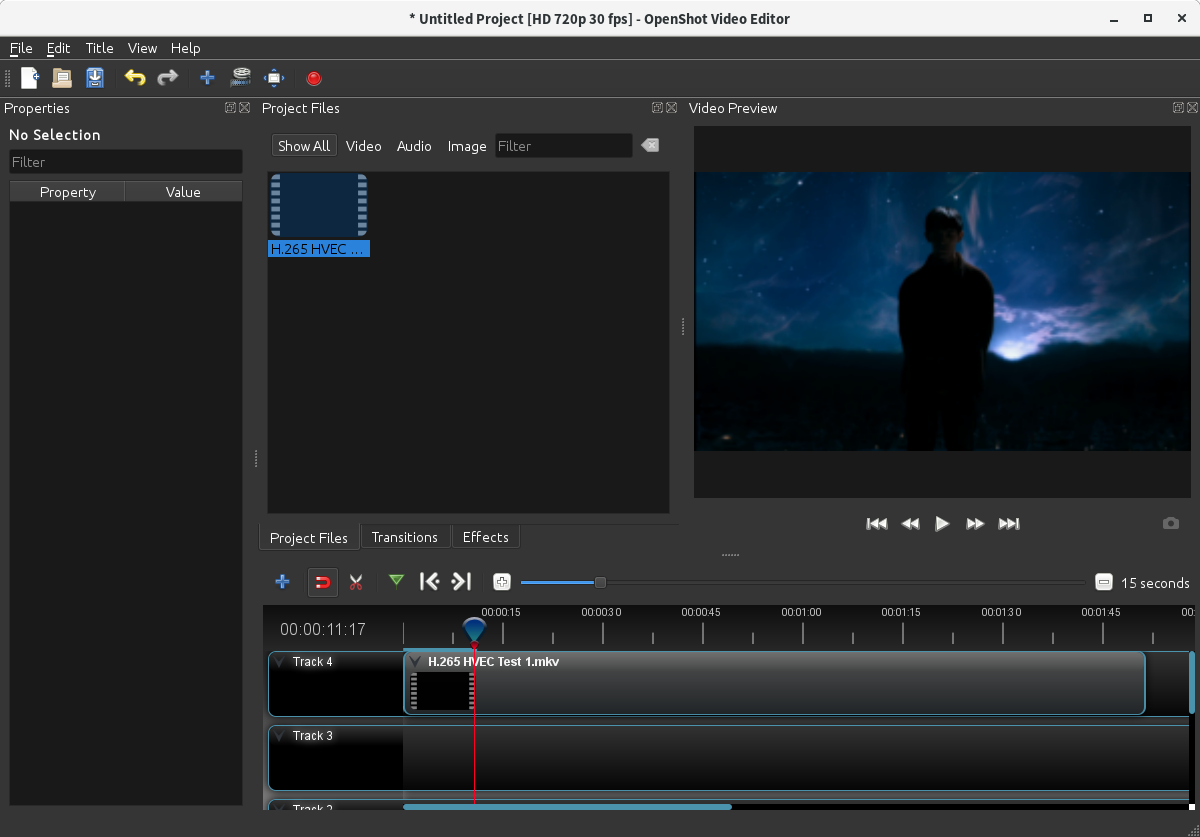
So, yes, it _appears_ this is fixed. Can @mbmast confirm that the file that originally failed to load is now supported in the 2.4.3 AppImage?
Summary
Yes, The AppImage is updated to FFMpeg 3.4.4, and appears to now support HEVC-encoded video, at least in an MKV container. (I would expect the same of MP4, and probably any valid container.)
The libchromaprint.so.0 dependency on ancient FFMpeg 1.x is a bit strange, and I'll open a new issue about that, but it isn't directly an issue here.
The _other_ libs in the AppImage are still wildly out of date (PyQt & Qt 5.2.1, the old fontconfig that's causing all of that parsing spew on startup, etc.), but there's a separate issue already open for that broader concern.
ferdnyc
on 12 Oct 2018
@ferdnyc -
Borrowing one of the HEVC samples from the Kodi wiki listing — this H.265 1080p (medium bitrate) Test #1 MKV file in Google Drive, specifically — I downloaded it and imported it into OpenShot 2.4.3 running from the AppImage. It imported and played without incident:
Wow, the level of your detailed posts are quite amazing. Its great to know that HEVC encoded video seems to import and play now. Really I should have tested this before asking you but I'm a bit of a video lib noob and I don't know the differences really between ffmpeg versions/supported formats. 😆
The other libs in the AppImage are still wildly out of date (PyQt & Qt 5.2.1, the old fontconfig that's causing all of that parsing spew on startup, etc.), but there's a separate issue already open for that broader concern.
My own project runs on Qt 5.6 at a minimum. So yeah, Qt 5.2 is pretty damn old. I think my project possibly started on that version but most of the development was during Qt 5.4/5.5. Using newer versions in my experience rarely causes issues, so it would be nice to upgrade it.
DylanC
on 12 Oct 2018
@mbmast - Following the discussion above, can you try the original file or a similar file in Openshot v2.4.3?
DylanC
on 17 Oct 2018
Related issues
 Geoff0627
·
3Comments
Geoff0627
·
3Comments
 ppkakkar
·
3Comments
ppkakkar
·
3Comments
 adswan
·
3Comments
adswan
·
3Comments
 Yesideez
·
3Comments
Yesideez
·
3Comments
 GrandpaBill3006
·
3Comments
GrandpaBill3006
·
3Comments
Most helpful comment
@mbmast So based on what we've found, the AppImage contains an outdated library, which was released before the HEVC codec really even existed. Thus, it doesn't know what you're trying to import. This has been brought to the developer's attention and hopefully we can fix this soon :)
Given that the PPA uses a more up-to-date version of this library, which imports HEVC without issue, my recommendation to you would be to install that instead of the AppImage. Instructions can be found here: https://www.openshot.org/ppa/
Hope this helps you.