Openshot-qt: It's impossible to edit Volume clip property by hand (on Mac?)
System Details:
- Operating System / Distro: Mac OS X 10.13
- OpenShot Version: 2.4.1
- Add a clip to new project.
- Open clip's Properties.
- Edit Volume field, change it to 0.7 or 3.0 or whatever.
- Press Enter.
Expected result: The entered value stays in the field.
Actual result: the field keeps the previous value.
Note: I found this while looking for a way to increase volume above 100%. I have some really quiet clips where I need to set volume to 300-500%. Looks like there's no way to do it now?
P.S. Thanks for your hard work!
 singalen
All 17 comments
I also have Mac OSX. Raising volume above 100% is a crucial feature for me in a video editor.
Came here to encourage this query bc I'd like to try an Open Source solution again.
 FunnyLadyMars
on 23 Jan 2018
FunnyLadyMars
on 23 Jan 2018
@DylanC - Can you please give this issue a cookie ('bug' label) please? It seems we have ourselves some friends from macville. :)
 peanutbutterandcrackers
on 12 Feb 2018
peanutbutterandcrackers
on 12 Feb 2018
@singalen @FunnyLadyMars Please do continue to submit issues here. It seems that we generally have a lack of mac-related issues here. Pretty sure it's not because OpenShot is very stable on macs. Openshot will continue to get better. It's up to us to make it better. Our little efforts do make a difference. (whoa I sound like a corny motivational-video speaker. lol)
peanutbutterandcrackers
on 12 Feb 2018
@peanutbutterandcrackers - I don't think raising volume above 100% is supported on any platform? This is likely why the value is staying the same and not updating. May not be Mac specific.
 DylanC
on 12 Feb 2018
DylanC
on 12 Feb 2018
@DylanC - Turns out, it is possible. (Almost ruined my speaker, I think, while testing this. lol)
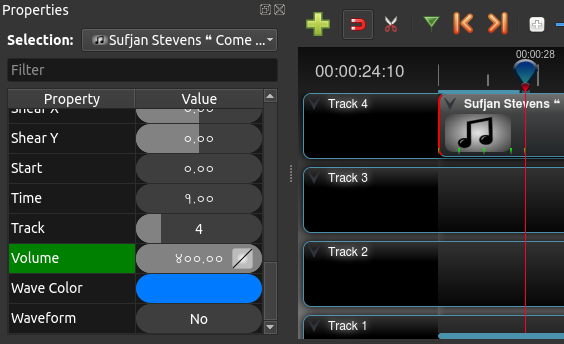
peanutbutterandcrackers
on 12 Feb 2018
I think I should add this too. 1 seems to be default. I think 2 is like double the default volume (200% ?)
Wouldn't it be wonderful if we had a more sensible parameter? Like... the documentation says that it is "Curve representing the volume (0 to 1)". I think someone else was talking about having other values set to more meaningful ones like 'True' or 'False' or 'None' instead of -1 or 0 and stuff. Perhaps, that request should be considered really well? I hope @jonoomph sees this, too. :)
peanutbutterandcrackers
on 12 Feb 2018
Pretty neat feature, though. :D
peanutbutterandcrackers
on 12 Feb 2018
@singalen @FunnyLadyMars - Does setting the volume using the value 2 work? (2 should possibly be 200%)
DylanC
on 12 Feb 2018
Tested it again, and suddenly it worked! In the same 2.4.1.
Either my scenario was flawed, or an OS update rolled out.
I don't have the project I worked on before though, but only a simplistic one with one clip.
It worked not exactly the way I expected - even though the properties view claims to apply to a particular clip, it creates a "keyframe" and displays the keyframe's volume.
@FunnyLadyMars, keyframe is shown as a green tick on the timeline.
Right-click menu on the properties view has a item that removes these keyframes.
singalen
on 14 Feb 2018
Hurrah! I'm happy for you, man!
High Five!
peanutbutterandcrackers
on 14 Feb 2018
@singalen - Excellent! Does the volume increase affect the whole clip or just the keyframe. (I'm a little confused by your description)
DylanC
on 14 Feb 2018
The volume increases at the keyframe and stays that till the next one, or till the end of a movie. Looks right.
My point was, the properties view says it's a property of a clip, and never mention a keyframe, while in reality the volume is a property of the keyframe. It's confusing.
singalen
on 15 Feb 2018
It is actually a property of a clip, that can be keyframed. So, with OpenShot, you can do all sorts of neat stuffs like have the volume increase (using different curves - linear or bezier) throughout the clip itself. An area of application would be volume keyframes for background music. You can have the music accompany another clip, or completely engulf it. The artistic possibilities are endless. Plus, Mr. Thomas plans to work on interactive keyframes animation curves ON THE TIMELINE ITSELF. The day that is implemented, we would have limitless possibilities.
Please do continue to support OpenShot.
P.S: If you are still confused about keyframes, please do look up 'OpenShot Keyframes' on YouTube and also take a look at the online user guide at openshot.org.
peanutbutterandcrackers
on 15 Feb 2018
@singalen - Ah I see. I understand now. Are we ready to close this ticket then?
DylanC
on 15 Feb 2018
Also, @FunnyLadyMars and @singalen , could you please also take a look at another mac related issu at #1274 and see if you too are affected? If yes, @DylanC can pronounce it, by the power vested in him by the great Mr. Jonathan Thomas, a bug.
peanutbutterandcrackers
on 16 Feb 2018
@peanutbutterandcrackers - I could try that one on my old crappy Mac if you like but it would be best for users with more modern machines to test this #1274
DylanC
on 16 Feb 2018
@DylanC - Well, it might be of some consolation if you did try... even though it is a "old crappy Mac" :)
peanutbutterandcrackers
on 16 Feb 2018
Related issues
 Obed9
·
3Comments
Obed9
·
3Comments
 Yesideez
·
3Comments
Yesideez
·
3Comments
 BofingerRick
·
3Comments
BofingerRick
·
3Comments
 mnally8
·
3Comments
mnally8
·
3Comments
 carlosnewmusic
·
3Comments
carlosnewmusic
·
3Comments
Most helpful comment
Tested it again, and suddenly it worked! In the same 2.4.1.
Either my scenario was flawed, or an OS update rolled out.
I don't have the project I worked on before though, but only a simplistic one with one clip.
It worked not exactly the way I expected - even though the properties view claims to apply to a particular clip, it creates a "keyframe" and displays the keyframe's volume.
@FunnyLadyMars, keyframe is shown as a green tick on the timeline.
Right-click menu on the properties view has a item that removes these keyframes.