Openshot-qt: Open shot is broken because its stuck on a missing file.
System Details:
- Operating System / Distro: Windows 10
- OpenShot Version: v2.4.1
- _Please attach log files if crash_
Issue Description and steps to reproduce:
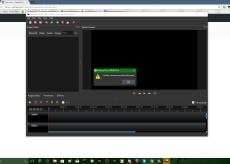
I was editing a video that was very reliant on keyframing lots of pngs, and open shot crashed. no big deal, I thought, because normally it has an autosave feature. but when I go back on to open shot, it is stuck on missing files (which are not actually missing) and cannot get off of the subject. I don't need my project back, I just want to be able to use the software again.
 Green52705
All 24 comments
@Green52705 - Do you have a bigger screenshot?
 DylanC
on 13 Dec 2017
DylanC
on 13 Dec 2017
@DylanC here you go, why is this closed?

Green52705
on 20 Dec 2017
@Green52705 - It looked like this had become inactive. Reopened now.
DylanC
on 21 Dec 2017
Ever get a fix for this? I'm having the same problem, as well as others. I did delete the file, purposely, but Open Shot keeps trying to reload it, creating an endless loop. I deleted the program and reloaded it--same result.
 bizzymonkey
on 16 Jan 2018
bizzymonkey
on 16 Jan 2018
I brought this to our IT guy at work and he fixed it in like two minutes. Basically, there's a file on your computer probably called ".openshot_qt" that you need to delete. Once deleted, Open Shot will think it's the first time it has been opened.
bizzymonkey
on 16 Jan 2018
An enhancement item exists for this #1061 but I will also mark this as a bug since it affects so many people. I will try to get the guys to work on it.
DylanC
on 16 Jan 2018
Great thank you! This is a terrific program by the way.
Sent from my iPhone
On Jan 16, 2018, at 11:42 AM, DylanC <[email protected]notifications@github.com> wrote:
An enhancement item exists for this #1061https://github.com/OpenShot/openshot-qt/issues/1061 but I will also mark this as a bug since it affects so many people. I will try to get the guys to work on it.
—
You are receiving this because you commented.
Reply to this email directly, view it on GitHubhttps://github.com/OpenShot/openshot-qt/issues/1118#issuecomment-358044175, or mute the threadhttps://github.com/notifications/unsubscribe-auth/Ah2rLxe16AEi8ngH7P6yAbkKc9bjZHWyks5tLN-EgaJpZM4RABh3.
bizzymonkey
on 17 Jan 2018
Is there any way to get your project back, I was working on a school project for a long time and it crashed so is there any way to get it back?
 warre70
on 20 Feb 2018
warre70
on 20 Feb 2018
I was also working on a project last night and now openshot doesn’t want to open the file is there any way to recover this file as messages keep popping up that files cannot be found
 Aseeah23
on 21 Feb 2018
Aseeah23
on 21 Feb 2018
For me it was an SVG file, I created an empty one with Inkscape and I could open the project.
You could try the same or similar if it's a JPEG etc.
 shiftee
on 21 Feb 2018
shiftee
on 21 Feb 2018
Some of the files I have put are there but it seems to be opening an older version of the project
Aseeah23
on 21 Feb 2018
@shiftee @Aseeah23 Could you please try @bizzymonkey's solution please? Try and see if deleting the .openshot_qt folder does the trick for you guys...
 peanutbutterandcrackers
on 25 Feb 2018
peanutbutterandcrackers
on 25 Feb 2018
I was actually troubleshooting for another user so have extremely limited experience with OpenShot.
I have created a basic project and have tried killing the process but I have failed to reproduce the issue.
As far as I remember I tried bizzymonkeys method first but it did not work.
I then just tried to create the missing file which resolved the issue (as best as I remember).
Let me know if you want me to try anything
shiftee
on 26 Feb 2018
I've just found out that the file may have been created as part of an animated title using OpenShot 1.4.3 (as found in Ubuntu 16.04).
We think the project worked fine initially after upgrading to a recent appimage but then the issue happened.
I have tried deleting generated svg files without success
shiftee
on 26 Feb 2018
I don't think OpenShot 2.x series is made to handle OpenShot 1.x files that well. OpenShot 1.x was based on MLT framework, whereas OpenShot 2.x has got it's own multimedia framework - libopenshot. Perhaps that has got something to do with it? Probably not because animated titles are just videos in the end... but still.....
peanutbutterandcrackers
on 28 Feb 2018
@DylanC - I think this needs your attention, good sir.
peanutbutterandcrackers
on 28 Feb 2018
@Green52705 - You need to either recreate a file with the same name or delete your OpenShot preferences folder. ".openshot_qt"
DylanC
on 28 Feb 2018
If you click OK and then just close the file selector, it'll work.
 redvoltron
on 15 May 2018
redvoltron
on 15 May 2018
I too am having the problem that Openshot will not let me re-open projects, in some cases projects I've been working on for hours.
I tried to delete .openshot_qt, according to the advice here. That did not work. Here's what I did:
I did a search for .openshot_qt using File Explorer, and three instances came up.
I tried to delete them and the computer did something a bit like what open shot is doing -- my computer says the files are not located in some spot, so can't be deleted -- yet the computer just searched and found them! here's a screen shot:

Thanks very much for any assistance.
 edwardudell
on 19 May 2018
edwardudell
on 19 May 2018
Now another problem. I saw a discussion thread that said to move files to another directory that openshot uses. I put a sound recording in the open shot "assets" folder, and now that sound recording has disappeared. Nothing seems to be in the "assets" folder. When I search my PC for the file, it comes up in "recent" -- but if I then click on the title, the computer says "the file has been moved and these short cuts will no longer work." Then I look in all the other openshot folders I can find, and do not find the audio file. I look in the recycle bin, and do not find the audio file there. Any clues to where it might be? Thanks very much for any assistance.
edwardudell
on 19 May 2018
If you click OK and then just close the file selector, it'll work.
Not an option when you have a few dozen pngs it can't find.
 graham8
on 7 Feb 2019
graham8
on 7 Feb 2019
I clicked OK, and it brought up the file selector, and I closed it, and it just keeps giving me the dialog over and over for every file.. It wasn't until I came to this bug that I realized if I kept doing it long enough maybe it would start. Sure enough, 20 clicks later it finally started up.
This is a really bad bug.. because it bascially makes Open Shot -seem- stuck and unusuable.
Please just put a "cancel reloading project" button on the same window with the error loading file...
 jeske
on 1 Mar 2019
jeske
on 1 Mar 2019
This was fixed in commit bdd2135 which will be included in the next release of OpenShot. Once you select the directory where your disconnected file can be found, all files in that directory will be recovered automatically.
 ferdnyc
on 20 Jul 2019
ferdnyc
on 20 Jul 2019
I got the solution i was in the same problem if your on windows just hold ALT+F4 don't just press it hold it the deleting somehow is faster than the loop and will delete the loop
 RayCodeMaster
on 26 Mar 2020
RayCodeMaster
on 26 Mar 2020
Related issues
 Obed9
·
3Comments
Obed9
·
3Comments
 BofingerRick
·
3Comments
BofingerRick
·
3Comments
 carlosnewmusic
·
3Comments
carlosnewmusic
·
3Comments
 Yesideez
·
3Comments
Yesideez
·
3Comments
 CarlBicknell
·
3Comments
CarlBicknell
·
3Comments