Openshot-qt: Can't remove Track 0
This is not a bug, merely an issue.
OpenShot-v2.2.0-x86_64.AppImage
When a NEW PROJECT is created, 4 tracks appear by default.
This is inelegant and irritating but not a bug.
When the surplus tracks are removed, they are renamed from track 0 upward.
This could be confusing.
When Track 0 is removed, Track 1 is renamed Track 0.
When only 1 track remains is is named Track 0.
This is not a BUG, it is the DESIGN!
This is the sort of design which BUGS users.
Please reconsider this part of the design (which probably "just happened"
and was never actually designed I hope.)
 P-Woods
All 21 comments
@P-Woods - whoa! This one reminds me of Steve Jobs movie portrayals. If you can submit a patch, would you be kind enough to do it, sir? Or, perhaps enable renaming of a track?
@DylanC - what do you think about this, el capitano?
 peanutbutterandcrackers
on 16 Feb 2018
peanutbutterandcrackers
on 16 Feb 2018
@peanutbutterandcrackers - I think that when you create a new project it should start with one track callled "new track". Then the user should be able to set a track name and then later add more tracks.
I don't like the track 0, track 1 etc. So perhaps this should be raised with the devs.
 DylanC
on 16 Feb 2018
DylanC
on 16 Feb 2018
@DylanC - Perhaps, let's have the ability to chose the track naming scheme! That'd be neat.
I'm pretty sure Mr. Richard Stallman and the entire free software foundation and every Unix hacker out there who would like to edit their grandchild's kindergarten graduation ceremony would love the fact that the tracks start from 0 and not 1, though. 😄
peanutbutterandcrackers
on 16 Feb 2018
The internals of the software will identify "things" in their own way.
In my experience, using 0 for the first item instead of indicating null caused as many bugs as most common errors. (I worked on mending some really old software.)
However, PEOPLE need help. Software changing the names of the tracks is not helpful.
The user should be able to name the track and know the name will not change.
Starting with "New Track" would be good, but "New Track 1" would be better, with auto indexing for "New Track 2" etc, if the track name had not been changed. (Unless intended to force a naming event, devs - see user interface guides.)
P-Woods
on 23 Feb 2018
@P-Woods - Actually, we only have a single developer so far. Mr. Jonathan Thomas. OpenShot is his labour of love. And because there are a truck load of issues to fix and a truck more of enhancements to be made and a pile of effects to be ported from 1.x series to 2.x series and all the other stuffs that comes with the baggage of running an Open Source project. I think it would be awesome if you could try and work on this feature and submit a PR soon. Or maybe write first to Mr. Thomas and discuss the thing with him and offer to help? We really need some more volunteer programmers!
peanutbutterandcrackers
on 25 Feb 2018
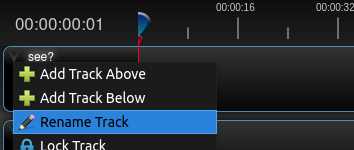
@P-Woods - Turns out, one can rename tracks. At least on my latest daily build of OpenShot, I can... Is that what you're talking about, good sir? o.O
peanutbutterandcrackers
on 6 Mar 2018
@peanutbutterandcrackers - Wow! I actually never knew this myself! :)
DylanC
on 6 Mar 2018
@DylanC - Neither did I! Just found out today. :) I don't think this is a recent change though. Either ways, I am on the daily PPA.
peanutbutterandcrackers
on 6 Mar 2018
@peanutbutterandcrackers - Thanks for pointing out "Rename Track"; however, it's not a lot of help.
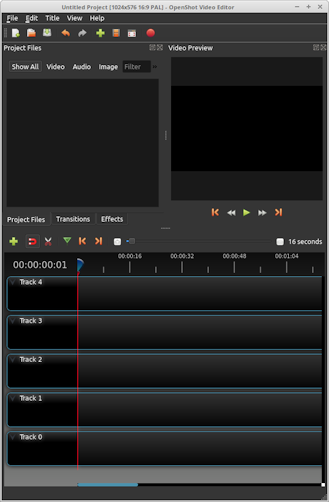
If we open a fresh blank project, we find 5 blank tracks - "Track 0" to "Track 4".
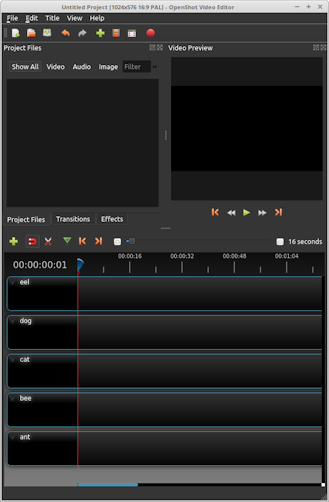
If we rename these to eg. ant, bee, cat, dog, eel; all is well.
If we "Remove Track" eel, then all is well.
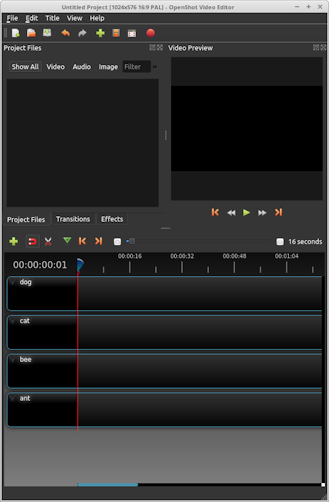
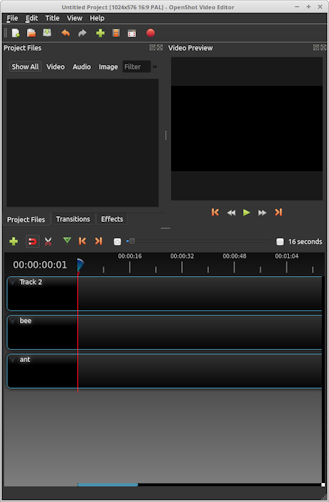
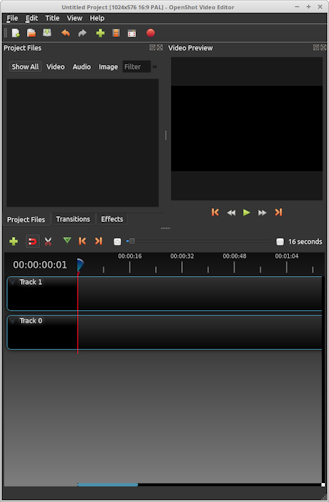
If we now "Remove Track" cat, then all is confusion:- "Track 2" appears.
Similarly if we now "Remove Track" ant, we are back to "Track 0" & "Track 1"; which represent bee & dog.
If I were better with the graphics, I'm sure it would be clearer.
P-Woods
on 7 Mar 2018
@peanutbutterandcrackers - Regarding help with programming; I'm sorry, but I'm not a programmer. I spent most of my career trying to persuade programmers to make the machine comply with the requirements of the users, as well as the specifications and standards. That's why I take an interest in user interfaces in FLOSS software.
I try to contribute, in my small way, by feeding back a few niggles.
P-Woods
on 7 Mar 2018
@P-Woods - Ah. I see it now. It's removing 2 tracks at the same time for some reason. When I remove 'eel', it is well. When I remove 'dog', too, it is well. But once I have 3 tracks remaining and delete the 2nd track - i.e. 'bee', I see that 'track 1' appears.
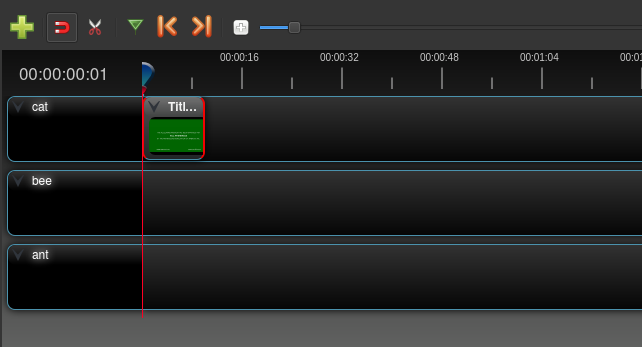
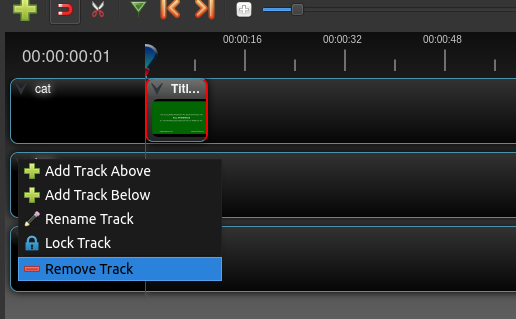
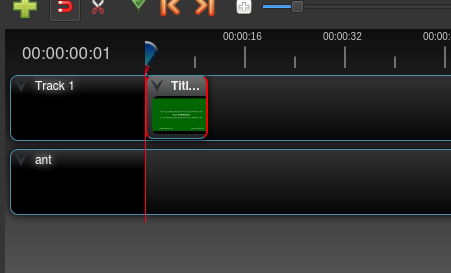
So basically, it is deleting track 'bee', it is also going ahead and renaming the track directly above 'bee' - 'cat' - to 'track x' where x would be the default name for the track.
However, if I 'undo' the action, 'track x' - in this case 'track 1' is renamed back to 'cat'. So, basically, what it was doing was going 2 steps ahead. For some strange reason.
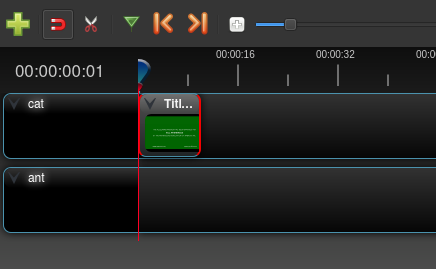
And hitting Ctrl+z would take us back to the 'bee':
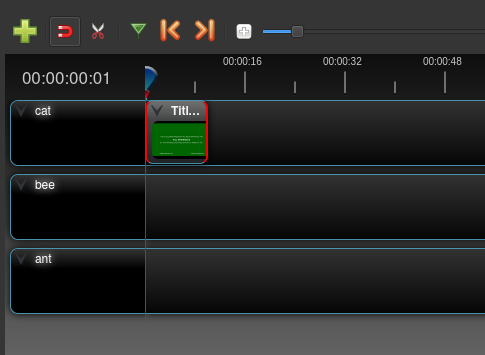
@DylanC - I think we've got a bug here.
peanutbutterandcrackers
on 8 Mar 2018
Well, at least it's just renaming, and not deleting the track and bringing a new 'default' track. :+1:
Also, @P-Woods, good sir, I hope you keep on continuing to help make OpenShot better. :)
Viva La Libre Software!
peanutbutterandcrackers
on 8 Mar 2018
@P-Woods - Hi there, can you try a daily build? This fix went in and should be available to you.
DylanC
on 8 May 2018
Have tried todays:
OpenShot-v2.4.1-115-ge7a99e9-59-697-x86_64.AppImage
The behavior seems logical, now; once a track has been named, it seems to persist correctly.
Regarding the initial premise of this Issue, it is really about the interface displaying the internal name of track to the user.
If you wish to confuse yourself, I suggest renaming Track 0 to Track 0 and so on, (instead of ant, etc.)
Add and delete a few tracks and you will soon boggle at the confusion wrought.
Perhaps no name should be displayed until one is typed in, or a name forced at creation.
This is all user i/f stuff, not technical but policy.
Hope this helps
P-Woods
on 8 May 2018
@P-Woods - Thanks for the feedback. I know what you mean by your comment about the Track 0 scenario. However, I'm glad the renaming of the tracks seems to be much better for you. I hope you don't mind me closing this. As a team we will discuss the comments on track 0 and decide if further changes are required.
DylanC
on 8 May 2018
@DylanC Perhaps we could look into adding a separate track number that is always displayed and also position dependent (Track 0 is always the bottom track) and greying out the default track name. Keeping the track number visible is important, I think, because there are items which reference the tracks by name or number: Properties (number) and Add To Timeline (name) come to mind. The track name could become un-grey when it is set to anything more than an empty string.
As @P-Woods stated, rename some tracks and see how confused you can get! 😉 Start with a project that has 3 tracks, swap the names of Track 0 and Track 2, leaving Track 1 the same, and now figure out which track you are actually referencing. Alternatively, rotate the track names by 1 space 0->1, 1->2, 2->0 to accomplish the same headache.
 N3WWN
on 8 May 2018
N3WWN
on 8 May 2018
Somebody call captain @jonoomph!
peanutbutterandcrackers
on 10 May 2018
@peanutbutterandcrackers If you wouldn't mind adding this to "the list" for future quickref, I'd appreciate it! 😁 This should be relatively easy to implement, I just need time/opportunity to do so.
N3WWN
on 10 May 2018
@N3WWN - Done, Sir! Looking forward to seeing another awesome PR from you!
peanutbutterandcrackers
on 11 May 2018
The "Add to Timeline" track name issue is just a bug. It is not using the labels correctly, and just defaults to the number instead. I will fix this in my new "improved-tracks" branch. Same with "properties"... same general issue... since it ignores the track labels.
 jonoomph
on 29 Dec 2018
jonoomph
on 29 Dec 2018
Okay, both of these issues mentioned in my previous comment are fixed in develop branch
jonoomph
on 30 Dec 2018
Related issues
 lukashajek78
·
3Comments
lukashajek78
·
3Comments
 adswan
·
3Comments
adswan
·
3Comments
 TavernSenses
·
3Comments
TavernSenses
·
3Comments
 Sefran007
·
3Comments
Sefran007
·
3Comments
 Emma3993
·
3Comments
Emma3993
·
3Comments