Openra: Game crash while starting (BadWindow (invalid Window parameter))
Hi guys!
System Information
- Operating System: Lubuntu 18.04 (fresh install)
- OpenRA Version:
release-20200503 - OpenRA Mod: Red Alert and Tiberian Dawn
- Source: Official AppImage
Exception log
epoc@Laptop-Epoc:~/Documents$ chmod a+x OpenRA-Red-Alert-x86_64.AppImage
epoc@Laptop-Epoc:~/Documents$ ./OpenRA-Red-Alert-x86_64.AppImage
Platform is Linux
Engine version is release-20200503
X Error of failed request:  BadWindow (invalid Window parameter)
  Major opcode of failed request:  4 (X_DestroyWindow)
  Resource id in failed request:  0x360001d
  Serial number of failed request:  281
  Current serial number in output stream:  282
Red Alert has encountered a fatal error.
Please refer to the crash logs and FAQ for more information.

Log files are located in ~/.openra/Logs
The FAQ is available at http://wiki.openra.net/FAQ
Same error log for Tiberian Dawn.
Additional information
The aforementioned logs location (~/.openra/Logs) doesn't exist. I found them in ~/.config/openra/Logs/, however everything's empty:
epoc@Laptop-Epoc:~/Documents$ ll ~/.config/openra/Logs/
total 8
drwxrwxr-x 2 epoc epoc 4096 mai    8 21:43 ./
drwxrwxr-x 3 epoc epoc 4096 mai    8 21:43 ../
-rw-rw-r-- 1 epoc epoc    0 mai    9 11:09 debug.log
-rw-rw-r-- 1 epoc epoc    0 mai    9 11:09 geoip.log
-rw-rw-r-- 1 epoc epoc    0 mai    9 11:09 graphics.log
-rw-rw-r-- 1 epoc epoc    0 mai    9 11:09 nat.log
-rw-rw-r-- 1 epoc epoc    0 mai    9 11:09 perf.log
-rw-rw-r-- 1 epoc epoc    0 mai    9 11:09 server.log
-rw-rw-r-- 1 epoc epoc    0 mai    9 11:09 sound.log
 EpocDotFr
All 52 comments
Same here on one machine running Ubuntu 20.04. I have two other machines on Ubuntu 20.04 that run the release-20200503 AppImage just fine, and the previous release ran on all three. It may be unrelated, but I've had some video issues with the machine in question relating to it having/using 1st generation Intel Core i3 graphics. This also could be unrelated, but if I run the AppImage with sudo, I get an additional message:
Bail out! Gtk:ERROR:../../../../gtk/gtkiconhelper.c:494:ensure_surface_for_gicon: assertion failed (error == NULL): Failed to load /org/gtk/libgtk/icons/48x48/status/image-missing.png: Unrecognized image file format (gdk-pixbuf-error-quark, 3)
Let me know what I can do to troubleshoot further.
 bggardner
on 10 May 2020
bggardner
on 10 May 2020
Are either of you using laptops with integrated+dedicated GPUs, and dynamic GPU switching? I recall seeing a comment somewhere about this kind of error being caused by the OS switching GPU out from under the application.
 pchote
on 10 May 2020
pchote
on 10 May 2020
Mine is a desktop running an Intel Core i3 540 (w/integrated Intel HD Graphics) and no additional/dedicated video card.
bggardner
on 10 May 2020
Mine is an Asus laptop powered by an Intel Core i3, with Intel HD Graphics chipset, without graphic card.
EpocDotFr
on 10 May 2020
Bump, I'd really like to play OpenRA on my laptop. Please let us know how we could help debugging this issue 😃
EpocDotFr
on 14 May 2020
Unfortunately the error above comes from your xserver, and suggests that the bug may be in your window manager or desktop environment rather than OpenRA. I haven't seen this before, and our standard OpenRA debugging won't help, so I don't know how we can debug this.
My best advice will be to search the internet to find any discussion of this error and potential fixes from other projects.
pchote
on 14 May 2020
Are you using a wayland session, or x11?
pchote
on 14 May 2020
x11. To reiterate, the previous OpenRA release runs with no problems, so the issue is probably caused by a change since the last release of OpenRA. I'm guessing it has to do with hardware acceleration, since both of us have the Core i3 integrated graphics. To make Kodi play streams properly, I had to disable MPEG-2 VAAPI. There is a long discussion about it here.
bggardner
on 14 May 2020
My best advice will be to search the internet to find any discussion of this error and potential fixes from other projects.
I of course already searched for this error on the internet, ~there are discussions here and there but nothing that really helps. Looks like it's a rare one~. There's actually a lot of discussions about this error. Looks like it's SDL-related.
Are you using a wayland session, or x11?
x11.
Edit: sorry for the mail spam, I miss-clicked.
EpocDotFr
on 14 May 2020
Are either of you familiar with how to tweak/compile software from source and willing to help with some tests to try and fix this?
The first test would be to add some logging to https://github.com/OpenRA/OpenRA/blob/bleed/OpenRA.Platforms.Default/Sdl2PlatformWindow.cs#L497-L521 to find out whether SDL_GL_CreateContext or SDL_GL_MakeCurrent is failing, causing the inner SDL_DestroyWindow to run, or succeeding and causing the outer SDL_DestroyWindow to run.
pchote
on 14 May 2020
SDL_GL_CreateContext returns IntPtr.Zero, so the inner SDL_DestroyWindow is run.
bggardner
on 15 May 2020
Can you try logging SDL.SDL_GetError() before the ClearError call and report the output here?
pchote
on 15 May 2020
Could not create GL context: GLXBadFBConfig
bggardner
on 15 May 2020
Running OpenGL 2.1 / OpenGL ES 2.0. It looks like the latest release changed the default rendering API from OpenGL 2.1 to OpenGL 3.2 / OpenGL ES 3.0 The Core i3-540 GPU maxes out at OpenGL 2.1.
bggardner
on 15 May 2020
Thank you @bggardner, I have no idea how to compile software 😅
EpocDotFr
on 15 May 2020
What is supposed to happen is that the game probes your system to work out which OpenGL versions (2.1, 3.2+, ES 3+) are available, then picks the best to start with. The CanCreateGLWindow is what tests the GL version, by creating an invisible window, checking whether the context is created, and then closing/cleaning up the window.
The problem here seems to be that some combination of SDL2/window manager/X11/GPU driver on your system doesn't just fail to create the context but also corrupts low-level state in a fatal way.
There is one potential easy fix: Can you try adding another SDL.SDL_ClearError(); call after the two SDL.SDL_DestroyWindow(window);? If the context creation is "just" also destroying the window then it may be sufficient to suppress the error flag that DestroyWindow will be setting.
If this doesn't help then we can add a commandline workaround to let you pass the supported GL profiles directly, bypassing the automatic check.
pchote
on 15 May 2020
It still crashes with the SDL.SDL_ClearError() after each SDL.SDL_DestroyWindow(). However, if I remove GLProfile.Embedded from the supportedProfiles array, the game is able to launch successfully. So yes, please add the command line workaround.
bggardner
on 15 May 2020
However, if I remove GLProfile.Embedded from the supportedProfiles array, the game is able to launch successfully.
This was the key piece of information to identify the problem!
A quick search reveals https://hg.libsdl.org/SDL/rev/6e17e1a6cf2e which explains that SDL2 was incorrectly destroying the window if (and only if) GLES is not available in the driver.
Updating SDL2 to 2.0.12 will fix this issue.
pchote
on 15 May 2020
Any suggestions on how to verify this? 2.0.12 doesn't exist in the Ubuntu repositories yet, so I compiled libSDL2-2.0.so.0.12.0 and changed the symbolic link in my system to point to it, but it doesn't seem to make a difference (problem still exists). I see there's an SDL2.so in build directory after compiling, and it appears to be 2.0.8 no matter what version my system is using. Thanks.
bggardner
on 15 May 2020
The simplest way to test the fix is to run the appimage with the --appimage-extract argument, which will create a squashfs-root directory with its contents. Replace ./squashfs-root/usr/lib/libSDL2-2.0.so.0 with a symlink to your libSDL2-2.0.so.0.12.0 version (or the actual library itself) and run the game by executing ./squashfs-root/AppRun.
pchote
on 15 May 2020
No dice. However, I'm not confident that libSDL2-2.0.so.0.12.0 compiled correctly, even though there were no obvious errors. I'm not fluent with compiling.
stdout:
Platform is Linux
Engine version is release-20200503
Renderer initialization failed. Check graphics.log for details.
Renderer initialization failed. Check graphics.log for details.
Exception of type `System.InvalidOperationException`: Failed to initialize platform-integration library. Check graphics.log for details.
  at OpenRA.Game.Initialize (OpenRA.Arguments args) [0x00162] in <935747805c924a31bc5fa5fcaf2e207c>:0
  at OpenRA.Game.InitializeAndRun (System.String[] args) [0x00006] in <935747805c924a31bc5fa5fcaf2e207c>:0
  at OpenRA.Program.Main (System.String[] args) [0x00044] in <935747805c924a31bc5fa5fcaf2e207c>:0
graphics.log:
```
System.InvalidOperationException: No supported OpenGL profiles were found.
at OpenRA.Platforms.Default.Sdl2PlatformWindow..ctor (OpenRA.Primitives.Size requestEffectiveWindowSize, OpenRA.WindowMode windowMode, System.Single scaleModifier, System.Int3>
at OpenRA.Platforms.Default.DefaultPlatform.CreateWindow (OpenRA.Primitives.Size size, OpenRA.WindowMode windowMode, System.Single scaleModifier, System.Int32 batchSize, Syste>
at OpenRA.Renderer..ctor (OpenRA.IPlatform platform, OpenRA.GraphicSettings graphicSettings) [0x00057] in <935747805c924a31bc5fa5fcaf2e207c>:0
at OpenRA.Game.Initialize (OpenRA.Arguments args) [0x00204] in <935747805c924a31bc5fa5fcaf2e207c>:0
System.InvalidOperationException: No supported OpenGL profiles were found.
at OpenRA.Platforms.Default.Sdl2PlatformWindow..ctor (OpenRA.Primitives.Size requestEffectiveWindowSize, OpenRA.WindowMode windowMode, System.Single scaleModifier, System.Int3>
at OpenRA.Platforms.Default.DefaultPlatform.CreateWindow (OpenRA.Primitives.Size size, OpenRA.WindowMode windowMode, System.Single scaleModifier, System.Int32 batchSize, Syste>
at OpenRA.Renderer..ctor (OpenRA.IPlatform platform, OpenRA.GraphicSettings graphicSettings) [0x00057] in <935747805c924a31bc5fa5fcaf2e207c>:0
at OpenRA.Game.Initialize (OpenRA.Arguments args) [0x00204] in <935747805c924a31bc5fa5fcaf2e207c>:0
bggardner
on 15 May 2020
I'll add that I get the same results as my previous post when I run any AppImage I created with Nevermind. I can get other AppImages to run. I'm compiling on a different machine than the one in question, so of course it doesn't work when I try to launch it on a remote machine. Replacing the packaging/linux/buildpackage.sh, regardless of the version (virgin release-20205030, latest bleed, or removing GLProfile.Embedded). So, the above error seem to be more related to the AppImage, since I can get ./launch-game.sh to work. Am I missing something?libSDL2-2.0.so.0 still throws the error, but I can run the patched AppImage (with GLProfile.Embedded removed). So, I still haven't verified libSDL2-2.0.so.0.12.0 will fix the problem. Is there another way?
bggardner
on 15 May 2020
I get the same error running Red Alert 20200503 on Debian Bullseye in VirtualBox with a Windows 10 host. The previous version of Red Alert works just fine.
 dwo0
on 21 May 2020
dwo0
on 21 May 2020
The Flatpak release (https://flathub.org/apps/details/net.openra.OpenRA) includes the latest version of SDL2, so should work as a fallback until we can fix the AppImages in the next release / a hotfix.
pchote
on 21 May 2020
Also note that on Ubuntu you could try upgrading Mesa to support OpenGL4.6.
https://stackoverflow.com/questions/21565680/how-to-enable-opengl-3-3-using-mesa-10-1-on-ubuntu
https://launchpad.net/~oibaf/+archive/ubuntu/graphics-drivers
I've successfully added the oibaf repo and upgraded Mesa on Ubuntu 18.04 bionic.
Use at own risk. At the risk of ending up with dependency issues and/or your graphics card not being supported. And if you are not using vendor over open source drivers, which you probably won't if you have Intel cards.
 anvilvapre
on 26 May 2020
anvilvapre
on 26 May 2020
Mesa added OpenGL 3.3 support back in 2014 with version 10.1. Are there really people out there still running systems older than this?
pchote
on 26 May 2020
I'm running Mesa 20.0.4. Even though Mesa may support OpenGL3+, some older hardware (in the case of this issue, the Core i3-540) does not.
bggardner
on 26 May 2020
Can you please test the appimages from https://github.com/pchote/OpenRA/releases/tag/release-20200503-graphicstest1 ?
pchote
on 31 May 2020
It's still crashing, but the error is different:
epoc@Laptop-Epoc:~/Téléchargements$ chmod a+x OpenRA-Red-Alert-x86_64.AppImage
epoc@Laptop-Epoc:~/Téléchargements$ ./OpenRA-Red-Alert-x86_64.AppImage
Platform is Linux
Engine version is release-20200503
Renderer initialization failed. Check graphics.log for details.
Renderer initialization failed. Check graphics.log for details.
Exception of type `System.InvalidOperationException`: Failed to initialize platform-integration library. Check graphics.log for details.
  at OpenRA.Game.Initialize (OpenRA.Arguments args) [0x00162] in <5a005dcb821c4636b0e9287eb3efa701>:0
  at OpenRA.Game.InitializeAndRun (System.String[] args) [0x00006] in <5a005dcb821c4636b0e9287eb3efa701>:0
  at OpenRA.Program.Main (System.String[] args) [0x00044] in <5a005dcb821c4636b0e9287eb3efa701>:0

Red Alert has encountered a fatal error.
Please refer to the crash logs and FAQ for more information.

Log files are located in ~/.openra/Logs
The FAQ is available at http://wiki.openra.net/FAQ
graphics.log:
epoc@Laptop-Epoc:~/Téléchargements$ cat ~/.config/openra/Logs/graphics.log
System.InvalidOperationException: No supported OpenGL profiles were found.
  at OpenRA.Platforms.Default.Sdl2PlatformWindow..ctor (OpenRA.Primitives.Size requestEffectiveWindowSize, OpenRA.WindowMode windowMode, System.Single scaleModifier, System.Int32 batchSize, System.Int32 videoDisplay, OpenRA.GLProfile requestProfile) [0x000df] in <e448e97fd76b4030a165acce25395580>:0
  at OpenRA.Platforms.Default.DefaultPlatform.CreateWindow (OpenRA.Primitives.Size size, OpenRA.WindowMode windowMode, System.Single scaleModifier, System.Int32 batchSize, System.Int32 videoDisplay, OpenRA.GLProfile profile) [0x00000] in <e448e97fd76b4030a165acce25395580>:0
  at OpenRA.Renderer..ctor (OpenRA.IPlatform platform, OpenRA.GraphicSettings graphicSettings) [0x00057] in <5a005dcb821c4636b0e9287eb3efa701>:0
  at OpenRA.Game.Initialize (OpenRA.Arguments args) [0x00204] in <5a005dcb821c4636b0e9287eb3efa701>:0
System.InvalidOperationException: No supported OpenGL profiles were found.
  at OpenRA.Platforms.Default.Sdl2PlatformWindow..ctor (OpenRA.Primitives.Size requestEffectiveWindowSize, OpenRA.WindowMode windowMode, System.Single scaleModifier, System.Int32 batchSize, System.Int32 videoDisplay, OpenRA.GLProfile requestProfile) [0x000df] in <e448e97fd76b4030a165acce25395580>:0
  at OpenRA.Platforms.Default.DefaultPlatform.CreateWindow (OpenRA.Primitives.Size size, OpenRA.WindowMode windowMode, System.Single scaleModifier, System.Int32 batchSize, System.Int32 videoDisplay, OpenRA.GLProfile profile) [0x00000] in <e448e97fd76b4030a165acce25395580>:0
  at OpenRA.Renderer..ctor (OpenRA.IPlatform platform, OpenRA.GraphicSettings graphicSettings) [0x00057] in <5a005dcb821c4636b0e9287eb3efa701>:0
  at OpenRA.Game.Initialize (OpenRA.Arguments args) [0x00204] in <5a005dcb821c4636b0e9287eb3efa701>:0
exception-2020-05-31T194503Z.log:
epoc@Laptop-Epoc:~/Téléchargements$ cat ~/.config/openra/Logs/exception-2020-05-31T194503Z.log
OpenRA engine version release-20200503
Date: 2020-05-31 19:45:03Z
Operating System: Linux (Unix 5.3.0.53)
Runtime Version: Mono 6.4.0.198 (tarball Tue Sep 24 01:20:30 UTC 2019) CLR 4.0.30319.42000
Exception of type `System.InvalidOperationException`: Failed to initialize platform-integration library. Check graphics.log for details.
  at OpenRA.Game.Initialize (OpenRA.Arguments args) [0x00162] in <5a005dcb821c4636b0e9287eb3efa701>:0
  at OpenRA.Game.InitializeAndRun (System.String[] args) [0x00006] in <5a005dcb821c4636b0e9287eb3efa701>:0
  at OpenRA.Program.Main (System.String[] args) [0x00044] in <5a005dcb821c4636b0e9287eb3efa701>:0
[dwo@dreadnaught:~/.config/openra/Logs]
$ cat graphics.log
System.InvalidOperationException: No supported OpenGL profiles were found.
  at OpenRA.Platforms.Default.Sdl2PlatformWindow..ctor (OpenRA.Primitives.Size requestEffectiveWindowSize, OpenRA.WindowMode windowMode, System.Single scaleModifier, System.Int32 batchSize, System.Int32 videoDisplay, OpenRA.GLProfile requestProfile) [0x000df] in <e448e97fd76b4030a165acce25395580>:0
  at OpenRA.Platforms.Default.DefaultPlatform.CreateWindow (OpenRA.Primitives.Size size, OpenRA.WindowMode windowMode, System.Single scaleModifier, System.Int32 batchSize, System.Int32 videoDisplay, OpenRA.GLProfile profile) [0x00000] in <e448e97fd76b4030a165acce25395580>:0
  at OpenRA.Renderer..ctor (OpenRA.IPlatform platform, OpenRA.GraphicSettings graphicSettings) [0x00057] in <5a005dcb821c4636b0e9287eb3efa701>:0
  at OpenRA.Game.Initialize (OpenRA.Arguments args) [0x00204] in <5a005dcb821c4636b0e9287eb3efa701>:0
System.InvalidOperationException: No supported OpenGL profiles were found.
  at OpenRA.Platforms.Default.Sdl2PlatformWindow..ctor (OpenRA.Primitives.Size requestEffectiveWindowSize, OpenRA.WindowMode windowMode, System.Single scaleModifier, System.Int32 batchSize, System.Int32 videoDisplay, OpenRA.GLProfile requestProfile) [0x000df] in <e448e97fd76b4030a165acce25395580>:0
  at OpenRA.Platforms.Default.DefaultPlatform.CreateWindow (OpenRA.Primitives.Size size, OpenRA.WindowMode windowMode, System.Single scaleModifier, System.Int32 batchSize, System.Int32 videoDisplay, OpenRA.GLProfile profile) [0x00000] in <e448e97fd76b4030a165acce25395580>:0
  at OpenRA.Renderer..ctor (OpenRA.IPlatform platform, OpenRA.GraphicSettings graphicSettings) [0x00057] in <5a005dcb821c4636b0e9287eb3efa701>:0
  at OpenRA.Game.Initialize (OpenRA.Arguments args) [0x00204] in <5a005dcb821c4636b0e9287eb3efa701>:0

 cat exception-2020-05-31T231139Z.log
OpenRA engine version release-20200503
Date: 2020-05-31 23:11:39Z
Operating System: Linux (Unix 5.6.0.2)
Runtime Version: Mono 6.4.0.198 (tarball Tue Sep 24 01:20:30 UTC 2019) CLR 4.0.30319.42000
Exception of type `System.InvalidOperationException`: Failed to initialize platform-integration library. Check graphics.log for details.
  at OpenRA.Game.Initialize (OpenRA.Arguments args) [0x00162] in <5a005dcb821c4636b0e9287eb3efa701>:0
  at OpenRA.Game.InitializeAndRun (System.String[] args) [0x00006] in <5a005dcb821c4636b0e9287eb3efa701>:0
  at OpenRA.Program.Main (System.String[] args) [0x00044] in <5a005dcb821c4636b0e9287eb3efa701>:0
FWIW,
I am on an ancient Dell D630 laptop and:
- the workaround of "remove GLProfile.Embedded from the supportedProfiles array" works great
- the latest flatpaks (the current and beta) did not work
- the latest current snap did not work
Both flatpaks, the snap and the locally compiled program both had the same error as the one displayed here.
I attach a small file containing some minor details.
embedded-removed.txt
Thanks for the great game!
 albrro
on 2 Jun 2020
albrro
on 2 Jun 2020
@pchote I modified the Sdl2PlatformWindow.cs of the release-20200503 code by adding your if-else code from the graphicstest1 release (and that's the only change I made). The crash occurs here when GLProfile.Legacy is passed to CanCreateGLWindow(). If I remove the GLProfile.Embedded case altogether, it runs just fine. So, the crash occurs if and only if GLProfile.Embedded is passed to CanCreateGLWindow before GLProfile.Legacy. Sounds like an error needs cleared...
I added another SDL.SDL_ClearError() after this line, and now it's happy. It seems like the Where() method doesn't make the send the profiles in the order they were defined in the array (or maybe concurrently - which is why the extra SDL.SDL_ClearError() didn't fix it before?), and the if-else structure obviously forces the order.
bggardner
on 2 Jun 2020
good catch! I'll create a new test build with that fix ASAP.
pchote
on 2 Jun 2020
pchote
on 7 Jun 2020
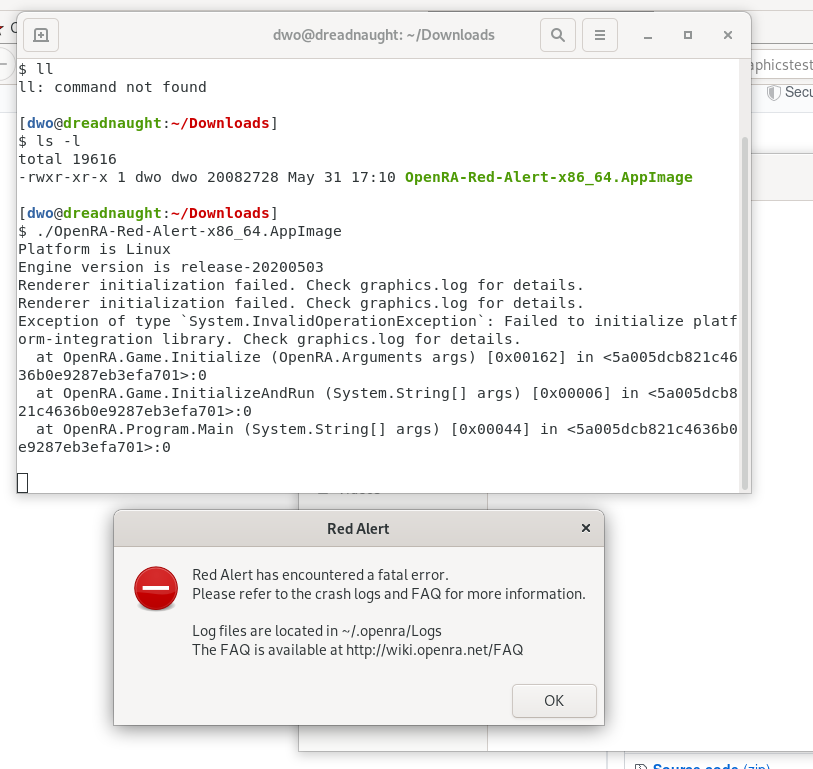
[dwo@dreadnaught:~/Downloads]
$ ./OpenRA-Red-Alert-x86_64.AppImage
Platform is Linux
Engine version is release-20200503
Renderer initialization failed. Check graphics.log for details.
Renderer initialization failed. Check graphics.log for details.
Exception of type `System.InvalidOperationException`: Failed to initialize platform-integration library. Check graphics.log for details.
  at OpenRA.Game.Initialize (OpenRA.Arguments args) [0x00162] in <5a005dcb821c4636b0e9287eb3efa701>:0
  at OpenRA.Game.InitializeAndRun (System.String[] args) [0x00006] in <5a005dcb821c4636b0e9287eb3efa701>:0
  at OpenRA.Program.Main (System.String[] args) [0x00044] in <5a005dcb821c4636b0e9287eb3efa701>:0
[dwo@dreadnaught:~/.config/openra/Logs]
$ cat exception-2020-06-07T215857Z.log
OpenRA engine version release-20200503
Date: 2020-06-07 21:58:57Z
Operating System: Linux (Unix 5.6.0.2)
Runtime Version: Mono 6.4.0.198 (tarball Tue Sep 24 01:20:30 UTC 2019) CLR 4.0.30319.42000
Exception of type `System.InvalidOperationException`: Failed to initialize platform-integration library. Check graphics.log for details.
  at OpenRA.Game.Initialize (OpenRA.Arguments args) [0x00162] in <5a005dcb821c4636b0e9287eb3efa701>:0
  at OpenRA.Game.InitializeAndRun (System.String[] args) [0x00006] in <5a005dcb821c4636b0e9287eb3efa701>:0
  at OpenRA.Program.Main (System.String[] args) [0x00044] in <5a005dcb821c4636b0e9287eb3efa701>:0


[dwo@dreadnaught:~/.config/openra/Logs]
$ cat graphics.log
System.InvalidOperationException: No supported OpenGL profiles were found.
  at OpenRA.Platforms.Default.Sdl2PlatformWindow..ctor (OpenRA.Primitives.Size requestEffectiveWindowSize, OpenRA.WindowMode windowMode, System.Single scaleModifier, System.Int32 batchSize, System.Int32 videoDisplay, OpenRA.GLProfile requestProfile) [0x000df] in <909f7b44c68f45d98789cb2f6dba31b3>:0
  at OpenRA.Platforms.Default.DefaultPlatform.CreateWindow (OpenRA.Primitives.Size size, OpenRA.WindowMode windowMode, System.Single scaleModifier, System.Int32 batchSize, System.Int32 videoDisplay, OpenRA.GLProfile profile) [0x00000] in <909f7b44c68f45d98789cb2f6dba31b3>:0
  at OpenRA.Renderer..ctor (OpenRA.IPlatform platform, OpenRA.GraphicSettings graphicSettings) [0x00057] in <5a005dcb821c4636b0e9287eb3efa701>:0
  at OpenRA.Game.Initialize (OpenRA.Arguments args) [0x00204] in <5a005dcb821c4636b0e9287eb3efa701>:0
System.InvalidOperationException: No supported OpenGL profiles were found.
  at OpenRA.Platforms.Default.Sdl2PlatformWindow..ctor (OpenRA.Primitives.Size requestEffectiveWindowSize, OpenRA.WindowMode windowMode, System.Single scaleModifier, System.Int32 batchSize, System.Int32 videoDisplay, OpenRA.GLProfile requestProfile) [0x000df] in <909f7b44c68f45d98789cb2f6dba31b3>:0
  at OpenRA.Platforms.Default.DefaultPlatform.CreateWindow (OpenRA.Primitives.Size size, OpenRA.WindowMode windowMode, System.Single scaleModifier, System.Int32 batchSize, System.Int32 videoDisplay, OpenRA.GLProfile profile) [0x00000] in <909f7b44c68f45d98789cb2f6dba31b3>:0
  at OpenRA.Renderer..ctor (OpenRA.IPlatform platform, OpenRA.GraphicSettings graphicSettings) [0x00057] in <5a005dcb821c4636b0e9287eb3efa701>:0
  at OpenRA.Game.Initialize (OpenRA.Arguments args) [0x00204] in <5a005dcb821c4636b0e9287eb3efa701>:0
Sorry, now I can't reproduce my previous success, so I must have been mistaken. It still fails at SDL.SDL_CreateWindow() when setting Legacy attributes after Embedded attributes. I verified the error is cleared before it is called. Sorry again.
However, I am able to verify that SDL2 2.0.12 prevents the BadWindow hard crash, but CreateWindow() returns IntPtr.Zero when used with Legacy attributes after Embedded attributes, and SDL.SDL_GetError() is empty. So, SDL2 2.0.12 still doesn't fix the problem, it just fails gracefully now.
Anything else I can try to help debug?
bggardner
on 8 Jun 2020
I've had the same issue that the Release 20200503 OpenRA-Red-Alert-x86_64.AppImage worked perfectly on one machine, but failed with System.InvalidOperationException: No supported OpenGL profiles were found. on another, despite both using the same software versions (Debian unstable with Wayland and XWayland). As Debian unstable already ships SDL2 version 2.0.12, I tried the --appimage-extract and replace libSDL.so trick mentioned above, which solves the issue.
 carstenandrich
on 14 Jun 2020
carstenandrich
on 14 Jun 2020
@bggardner unfortunately that sounds now like a driver bug on your system, and I don't think there is anything more that we can do inside OpenRA to work around it that wouldn't negatively impact other systems.
pchote
on 15 Jun 2020
I've installed the Ubuntu upstream pre-compiled libSDL2-2.0.12 and am now compiling OpenRA on the problematic system. I still get the same errors as others have posted, both with compiling from source and using the --appimage-extract method, so I'm curious as to why @carstenandrich got it to work. My belief now is that something still breaks (and cannot recover) when SetSDLAttributes() sets SDL_GL_CONTEXT_PROFILE_MASK to SDL_GL_CONTEXT_PROFILE_ES _and_ SDL_GL_CONTEXT_*_VERSION is set to a version incompatible with the hardware. For the Embedded profile, using version 2.0 with the ES profile mask works, as does version 3.0 with CORE or COMPATIBILITY profile masks. So, while SDL2-2.0.12 did correct a problem, I feel like there is still a bug with SDL2 and hardware that only supports GLES 2.0. For others who have this issue, please post the output of glxinfo -B, specifically the Max GLES[23] profile version:
$ glxinfo -B
name of display: :0
display: :0  screen: 0
direct rendering: Yes
Extended renderer info (GLX_MESA_query_renderer):
    Vendor: Intel Open Source Technology Center (0x8086)
    Device: Mesa DRI Intel(R) HD Graphics (ILK) (0x42)
    Version: 20.0.8
    Accelerated: yes
    Video memory: 1536MB
    Unified memory: yes
    Preferred profile: compat (0x2)
    Max core profile version: 0.0
    Max compat profile version: 2.1
    Max GLES1 profile version: 1.1
    Max GLES[23] profile version: 2.0
OpenGL vendor string: Intel Open Source Technology Center
OpenGL renderer string: Mesa DRI Intel(R) HD Graphics (ILK)
OpenGL version string: 2.1 Mesa 20.0.8
OpenGL shading language version string: 1.20

OpenGL ES profile version string: OpenGL ES 2.0 Mesa 20.0.8
OpenGL ES profile shading language version string: OpenGL ES GLSL ES 1.0.16
Furthermore, simply switching the order of supportedProfiles to call CanCreateGLWindow() on Legacy before Embedded results in the following error:
Platform is Linux
Engine version is release-20200503
Using SDL 2 with OpenGL (Legacy) renderer
Desktop resolution: 1920x1080
No custom resolution provided, using desktop resolution
Using resolution: 1920x1080
Using window scale 1.00
Exception of type `System.InvalidOperationException`: Can not create OpenGL context. (Error: Invalid window)
  at OpenRA.Platforms.Default.Sdl2GraphicsContext.InitializeOpenGL () [0x0005f] in <004436c29d37490ba278b053e61e98ae>:0
  at OpenRA.Platforms.Default.ThreadedGraphicsContext.RenderThread (System.Object contextObject) [0x0002a] in <004436c29d37490ba278b053e61e98ae>:0
  at System.Threading.ThreadHelper.ThreadStart_Context (System.Object state) [0x00025] in <a17fa1457c5d44f2885ac746c1764ea5>:0
  at System.Threading.ExecutionContext.RunInternal (System.Threading.ExecutionContext executionContext, System.Threading.ContextCallback callback, System.Object state, System.Boolean preserveSyncCtx) [0x00071] in <a17fa1457c5d44f2885ac746c1764ea5>:0
  at System.Threading.ExecutionContext.Run (System.Threading.ExecutionContext executionContext, System.Threading.ContextCallback callback, System.Object state, System.Boolean preserveSyncCtx) [0x00000] in <a17fa1457c5d44f2885ac746c1764ea5>:0
  at System.Threading.ExecutionContext.Run (System.Threading.ExecutionContext executionContext, System.Threading.ContextCallback callback, System.Object state) [0x0002b] in <a17fa1457c5d44f2885ac746c1764ea5>:0
  at System.Threading.ThreadHelper.ThreadStart (System.Object obj) [0x0000f] in <a17fa1457c5d44f2885ac746c1764ea5>:0

[ERROR] FATAL UNHANDLED EXCEPTION: System.InvalidOperationException: Can not create OpenGL context. (Error: Invalid window)
  at OpenRA.Platforms.Default.Sdl2GraphicsContext.InitializeOpenGL () [0x0005f] in <004436c29d37490ba278b053e61e98ae>:0
  at OpenRA.Platforms.Default.ThreadedGraphicsContext.RenderThread (System.Object contextObject) [0x0002a] in <004436c29d37490ba278b053e61e98ae>:0
  at System.Threading.ThreadHelper.ThreadStart_Context (System.Object state) [0x00025] in <a17fa1457c5d44f2885ac746c1764ea5>:0
  at System.Threading.ExecutionContext.RunInternal (System.Threading.ExecutionContext executionContext, System.Threading.ContextCallback callback, System.Object state, System.Boolean preserveSyncCtx) [0x00071] in <a17fa1457c5d44f2885ac746c1764ea5>:0
  at System.Threading.ExecutionContext.Run (System.Threading.ExecutionContext executionContext, System.Threading.ContextCallback callback, System.Object state, System.Boolean preserveSyncCtx) [0x00000] in <a17fa1457c5d44f2885ac746c1764ea5>:0
  at System.Threading.ExecutionContext.Run (System.Threading.ExecutionContext executionContext, System.Threading.ContextCallback callback, System.Object state) [0x0002b] in <a17fa1457c5d44f2885ac746c1764ea5>:0
  at System.Threading.ThreadHelper.ThreadStart (System.Object obj) [0x0000f] in <a17fa1457c5d44f2885ac746c1764ea5>:0
I'll keep digging, but any suggestions are welcome.
bggardner
on 25 Aug 2020
in the old days "BadWindow" is what you could get if 32 bits per pixel were not supported, i.e. xorg not running in 32 bpp depth.
i assume all carstenandrich did was to copy the ubuntu shipped libsdl over the game provided one. perhaps after the upgrading libmesa using a non official ubuntu apt source (i.e. https://launchpad.net/~oibaf/+related-packages)
anvilvapre
on 25 Aug 2020
I'm running an (as of ~15 minutes ago) up-to-date Debian unstable without any libraries from experimental or any 3rd party sources. I haven't changed anything in my extracted OpenRA directory since my original post (its libSDL2-2.0.so.0 is still a symlink to my system's libsdl) and the game still starts perfectly.
Here's the output of glxinfo -B:
name of display: :0
display: :0  screen: 0
direct rendering: Yes
Extended renderer info (GLX_MESA_query_renderer):
    Vendor: Intel (0x8086)
    Device: Mesa Intel(R) HD Graphics P530 (SKL GT2) (0x191d)
    Version: 20.1.5
    Accelerated: yes
    Video memory: 3072MB
    Unified memory: yes
    Preferred profile: core (0x1)
    Max core profile version: 4.6
    Max compat profile version: 4.6
    Max GLES1 profile version: 1.1
    Max GLES[23] profile version: 3.2
OpenGL vendor string: Intel
OpenGL renderer string: Mesa Intel(R) HD Graphics P530 (SKL GT2)
OpenGL core profile version string: 4.6 (Core Profile) Mesa 20.1.5
OpenGL core profile shading language version string: 4.60
OpenGL core profile context flags: (none)
OpenGL core profile profile mask: core profile

OpenGL version string: 4.6 (Compatibility Profile) Mesa 20.1.5
OpenGL shading language version string: 4.60
OpenGL context flags: (none)
OpenGL profile mask: compatibility profile

OpenGL ES profile version string: OpenGL ES 3.2 Mesa 20.1.5
OpenGL ES profile shading language version string: OpenGL ES GLSL ES 3.20
Hope it helps.
carstenandrich
on 25 Aug 2020
I've created a simple gist that demonstrates the problem and a possible solution. Similar to Sdl2PlatformWindow.cs, this code loops through the settings for the three GL profiles. When SDL_CreateWindow() is called using the ES profile mask, subsequent calls with other profile settings always return IntPtr.Zero, even after calling SDL_ClearError(). The only solution I could get to "work" as expected is to call SDL_Quit(), then SDL_Init() between switching profile settings.
bggardner
on 25 Aug 2020
Unfortunately the SDL_Init()/SDL_Quit() solution does not work on bleed, even though it works on release-20200503. On my system, the call to SDL_Quit() after attempting to create a window using the Embedded profile causes the mono process to stall and use 100% CPU, sometimes not stoppable with Ctrl+C or SIGTERM (requires SIGKILL). What change between release-20200503 and bleed would cause this? Note: Removing the Embedded profile workaround still works with bleed, even with the SDL_Init()/SDL_Quit() patch.
bggardner
on 27 Aug 2020
What version is your system mono install?
The main difference is that the appimages ship an internal version of mono 6.4, while bleed (and any other source build) relies on your system mono.
pchote
on 27 Aug 2020
6.10.0.104 (latest stable-focal release). I'm building from source in both cases (release-20200503 and bleed).
| Branch | Commit | Patched | Result |
|---|---|---|---|
| prep-2003 | 5943ecc (release-20200503) | N | BadWindow |
| prep-2003 | 5943ecc (release-20200503) | Y | Runs |
| bleed | ad20597 | N | BadWindow |
| bleed | ad20597 | Y | Stalls here |
Since the branches diverged at df4c363, trying to locate what commit is causing the stall will be tricky.
bggardner
on 27 Aug 2020
I patched prep-2003 then rebased with subsequent commits from bleed and found that e13fd69 causes the stall. In that commit, the SDL2 library is now downloaded (from the OpenRA/SDL2-CS repo?) instead of using the system library. Replacing the downloaded library with the system library (libSDL2-2.0.so.0.12.0) makes things work again. So, resolving this issue requires my patch AND a compatible SDL2 library. My guess is that the downloaded version is less than 2.0.12.
@pchote My patch is otherwise ready for a PR. Please advise for updating the repo to use SDL 2.0.12.
bggardner
on 29 Aug 2020
Ping @teinarss. Can you update the nuget package to use the libSDL2 from https://github.com/OpenRA/AppImageSupport/releases/tag/20200222-hotfix, and update the package description to mention which versions of the native libraries are packaged?
We may also want to revert to 2.0.5 on Windows as per https://github.com/pchote/OpenRA/commit/aa32513eed6b09b7e1566a53c3fa71ca21c7e71e - the small amont of very unscientific feedback I was able to get suggested that this may help with some of the software cursor fallbacks, but i'm not entirely convinced.
pchote
on 29 Aug 2020
From the pull request:
Here are test builds to verify that the fix works: https://github.com/pchote/OpenRA/releases/tag/devtest-20200829
Please test!
bggardner
on 30 Aug 2020
Please test!
works for me on Ubuntu 20.04.
Thanks!
 hmollercl
on 30 Aug 2020
hmollercl
on 30 Aug 2020
Sorry to reply in a closed, it's just that with this version I can not multiplay, I don't see servers and I can't direct connect with ip.
hmollercl
on 25 Sep 2020
You can only see/connect to servers that are running the same version of OpenRA. So, to connect to servers running release-20200503, you will need to compile from this source with this workaround. Otherwise, you'll have to wait until the next release that incorporates the fix.
bggardner
on 28 Sep 2020
Related issues
 Mailaender
·
5Comments
Mailaender
·
5Comments
 KOYK
·
4Comments
KOYK
·
4Comments
 SoScared
·
3Comments
SoScared
·
3Comments
 Punsho
·
4Comments
Punsho
·
4Comments
 FRenzy-OpenRA
·
4Comments
FRenzy-OpenRA
·
4Comments