Openra: Show locations of oil derricks on map previews with a $ sign/dot/etc
Want to back this issue? Post a bounty on it! We accept bounties via Bountysource.
 ScottNZ
All 8 comments
Other tech buildings too - heal icon for hospital, bio sign for biological lab, etc.
 pchote
on 1 Jun 2013
pchote
on 1 Jun 2013
The implementation of this overlaps with #3012. Both cases require maps to define UI artwork that must be loaded and displayed in the lobby, which isn't supported by our current setup.
I think the best way of doing this is to add a Glyphs section to the map format that can define texture rectangles within a single magic-named texture file (possibly also with a mod.yaml-limited max size) which are then used for faction flags and map overlays.
pchote
on 22 Nov 2015
I implemented this for my engine, but i'm not sure how good would it be for upstream. It is currently manually define everything in map.yaml (with format as below) and not realated to actors. Left is location, right is chrome.yaml reference under map-preview-icons:.
Icons:
    4,53: pile
    4,55: pile
    5,33: derrick
    10,19: dock
    23,56: pile
    25,54: pile
    27,53: pile
    29,40: dock
    37,7: pile
    39,9: pile
    57,36: derrick
    60,20: derrick
    65,5: dock
    65,52: pad
    65,69: hospital
    69,20: derrick
    72,36: derrick
    90,9: pile
    92,7: pile
    99,40: dock
    101,53: pile
    103,54: pile
    105,56: pile
    119,19: dock
    124,33: derrick
    125,53: pile
    125,55: pile
    64,63: dock
    64,33: soviet
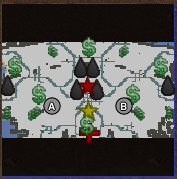
 MustaphaTR
on 6 Sep 2018
MustaphaTR
on 6 Sep 2018
I'd like to see these glyphs support tooltips as well as simply showing artwork (which could otherwise be baked into the map preview).
To start with IMO we can ignore custom map-defined icons, which is where most of the complexity lies. We can define a LobbyMapIcon trait that defines the artwork, tooltip text, and a "is spawn point" bool. This trait can then be added to any actor types that should be shown (including spawn points). The code that extracts spawn point positions can then be generalized to pull out all icons (first query the ruleset for all actor types that define LobbyMapIconInfo, then look for actors with these types in the actors list).
Doing it this way saves us from having to revise the map format or adding complexity to the map editor.
pchote
on 6 Sep 2018
The one major issue with my suggested approach is preventing overlap when multiple tech structures are placed next to eachother. If this is a problem then we should instead define dummy "marker" actors that can be placed in the editor instead of putting the traits directly on the normal actors.
pchote
on 6 Sep 2018
I have coded this as trait and made it show tooltips, but there are still some problems. I'm not at home rn and haven't uploaded the code to internet yet, so bo code to show but wanted to say here.
I'm checking ModData.DefaultRules rn. I couldn't get it to properly read map rules and show the icons according to anything that may be changed.
It is taking too long to create the previews for first time. It takes 5 to 10 seconds of moving the scrollbar of map list up and down to get everything loaded. It shows mod load screen in the menu while this happens. Recorded a video of it but couldn't get enough time with internet to upload, may show today evening.
MustaphaTR
on 9 Sep 2018
Here is video showing the loading process: https://youtu.be/k3r46m3kXFc
MustaphaTR
on 9 Sep 2018
I would need to see your code before I could properly comment, but it does seem like you are trying to load the rules from each individual map which will indeed be excruciatingly slow. Take the definitions from the mod rules instead.
pchote
on 9 Sep 2018
Related issues
 MlemandPurrs
·
4Comments
MlemandPurrs
·
4Comments
MlemandPurrs
·
4Comments
MlemandPurrs
·
4Comments
 SoScared
·
3Comments
SoScared
·
3Comments
 KOYK
·
4Comments
KOYK
·
4Comments
 TheMightyAltroll
·
3Comments
TheMightyAltroll
·
3Comments
Most helpful comment
The one major issue with my suggested approach is preventing overlap when multiple tech structures are placed next to eachother. If this is a problem then we should instead define dummy "marker" actors that can be placed in the editor instead of putting the traits directly on the normal actors.