Openfoodnetwork: Tax on line items displays incorrectly in tax invoice
Description
The tax invoice generated in bulk invoice print is showing the wrong amount of tax, both at the line item level and in the total. The email confirmation matches the total and the amount of tax but doesn't show the breakdown at line item
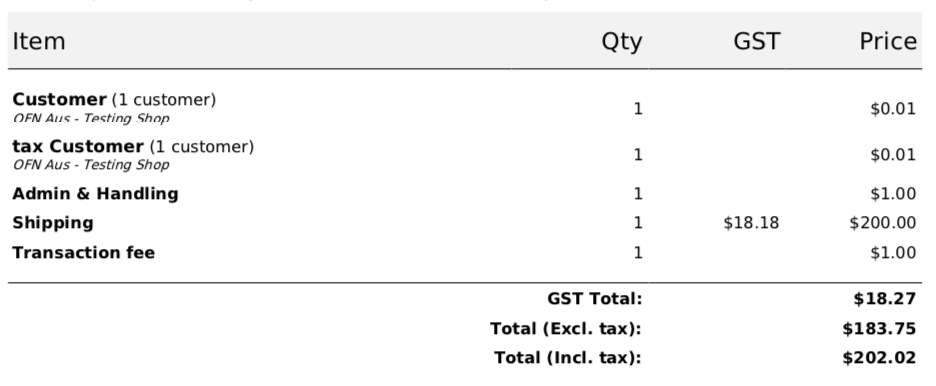
Conveniently this is my order so I know everything about it. Here is the tax invoice (generated from bulk invoice print)

Here is the spreadsheet where I compare what is on the invoice with what the correct tax calculation should be. I have checked and this is not a rounding issue (not #2522) - if I do the calculation with 2 decimal places it gives me the same calculated result - which is not what is on the invoice.
https://app.zenhub.com/files/6257856/a5248645-895c-405a-a184-678b1b724f51/download
_[This is Aus 10% GST, OFN Aus is set to have taxes included in price, so to get the included tax from the line item amount you divide by 11.]_
The email confirmation shows the same order total and same (incorrect) amount of tax

There are no payment or shipping adjustments and there have been no changes to the order. This is one of three in this order cycle that appear incorrect.
UPDATE: After much investigation I have worked out what is happening. There is a transaction fee on the line item that includes tax. The 'Price' on the tax invoice includes both the item cost and the fee, but the GST/Tax column only includes the tax on the item itself, NOT the tax on the fee
So the tax on the fee isn't visible until it magically appears in the total tax at the bottom
Expected Behavior
The amount of tax showing on each line item correctly includes tax included in the item cost as well as tax in the fee. So a tax amount will appear even when the item itself is not taxable
It would be possible to revisit the entire format of this invoice but I don't think that's necessary, we can remove the immediate confusion and incorrect tax information by including the tax from the fee in the tax shown on the line item
Actual Behaviour
The amount of tax shown at each line item is incorrect
Steps to Reproduce
- Create a product with tax included and a product without
- Create a fee with tax included
- Create an order cycle with those products and the fee on all line items (i.e. coordinator fee)
- Place an order
- Tax shown on line items that are taxable should be clearly calculably correct
- Tax shown on line items that are NOT taxable should show the tax from the fee
- Tax shown at the bottom of the invoice should be the sum of the taxes shown in the line items
Workaround
Work around the correct taxes and explain to user - I don't think this is a satisfactory workaround? The user may be able to work it out from reports but the customer can't - the customer has incorrect tax information
Severity
S3
Possible Fix
As above in expected behaviour
 kirstenalarsen
All 6 comments
Hey @kirstenalarsen
"UPDATE: After much investigation I have worked out what is happening. There is a transaction fee on the line item that includes tax. The 'Price' on the tax invoice includes both the item cost and the fee, but the GST/Tax column only includes the tax on the item itself, NOT the tax on the fee
So the tax on the fee isn't visible until it magically appears in the total tax at the bottom"
I wonder if this update doesnt move this to an S3. As far as I understand what you write here, the tax on the invoice is after all correct (we need to update the issue title if that is the case) and there's a hidden tax entry (tax on the fee) that needs to be added to the invoice description in some way so that users dont get confused. Is this correct understanding?
 luisramos0
on 12 Jun 2020
luisramos0
on 12 Jun 2020
thanks @luisramos0 - I have updated the title, but I think it is still correct that the tax is incorrect. Because the tax is incorrect on the line items the amount of tax shown in the line items does not add up to the tax shown at the bottom. So for a user it is impossible to know which is the correct one.
kirstenalarsen
on 12 Jun 2020
I understand, this is specific to fees applicable to line items :+1:
I assume that for order level fees, the tax would also not be displayed but included in the total tax and the order total.
We can solve this issue by adding the tax on the fee to the line item or, maybe easier, add an extra line to the invoice with tax on fees (for both tax on fees that are line item specific and tax on fees that are order specific).
In both cases, the order total is correct and total tax is also correct. It doesn't look like an S2 to me. Do you still think this is an S2?
luisramos0
on 12 Jun 2020
Looks like there is a line item for fees that are order specific already (as well as shipping and payment) - and the same issue occurs i.e. the tax in the Admin & Handling fee is not displayed. So I'd be inclined to leave the line items as they are but display the tax correctly, and do the same thing in the 'Admin & Handling' fees line item i.e. display the included tax.
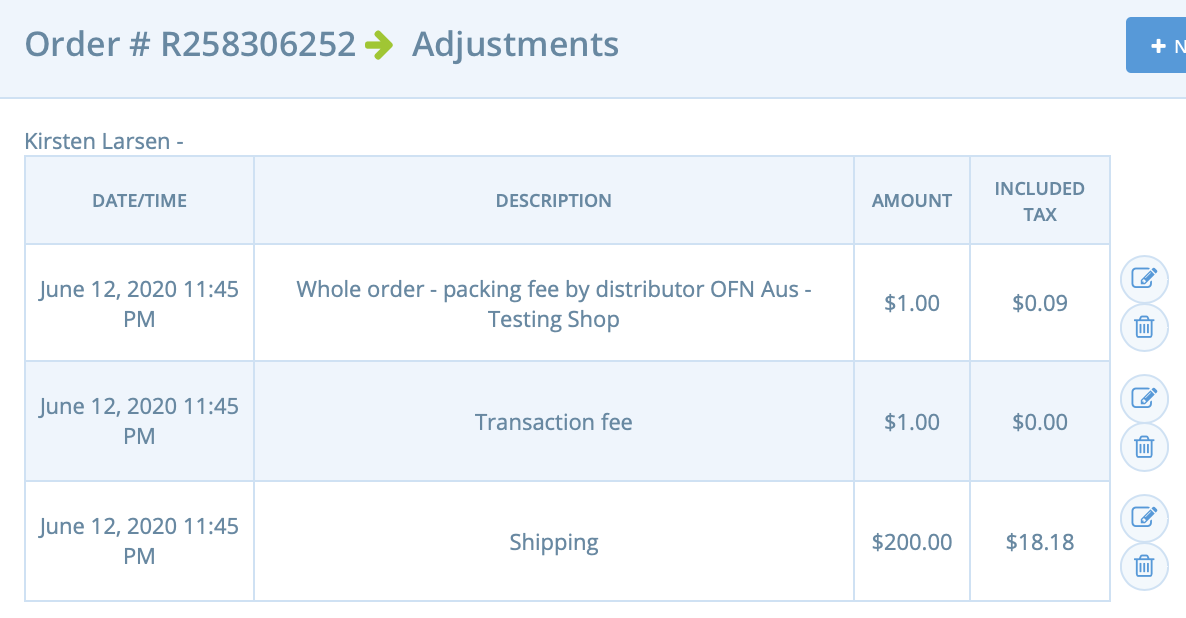
That way the line item tax amounts will add up to the total tax amount
I asked @lin-d-hop and @RachL about S2ing it in our special private product 'tax-hell' channel where we try and deal with confused and frustrated users who are sure that the tax calculations are wrong and we have to try and work out whether they are right - which they sometimes are (you are welcome to join ;) and was ok'd as an S2
The critical difference S2-S3 is the workaround. What is the workaround here for the customer to have the correct tax information? I guess we could say that the Tax Invoice is a non-critical feature. But if we're providing a tax invoice as a feature having clear reporting of tax on it seems quite critical?
My user is ok for now having been reassured that the total is correct but Rachel said this is a major headache for her too
kirstenalarsen
on 12 Jun 2020
This is clearly an annoying issue. Its also something that has always existed and one of a million tax related issues in the system.
I would argue that now that we can see the tax total is correct that we do have a workaround. The workaround is to tell the user that the tax in lineitems is incorrect so use the total.
Obviously its not perfect, no workarounds ever are. But as the tax total is correct I struggle to justify this as an S2. I believe @luisramos0 and @RachL and myself are in agreement here. Sorry!
 lin-d-hop
on 17 Jun 2020
lin-d-hop
on 17 Jun 2020
So just to clarify:
- does this need to be near the top of
dev-readynow that it's not an S2? - is there a final decision on what would need to be done to improve/resolve the issue, and if so: can someone give a clear description of it?
 Matt-Yorkley
on 17 Jun 2020
Matt-Yorkley
on 17 Jun 2020
Related issues
 sauloperez
·
3Comments
kirstenalarsen
·
3Comments
sauloperez
·
3Comments
kirstenalarsen
·
3Comments
 sstead
·
4Comments
sauloperez
·
3Comments
kirstenalarsen
·
3Comments
sstead
·
4Comments
sauloperez
·
3Comments
kirstenalarsen
·
3Comments
Most helpful comment
So just to clarify:
dev-readynow that it's not an S2?