Openfoodnetwork: When creating a variant with on hand value, on demand is selected when saving
Description
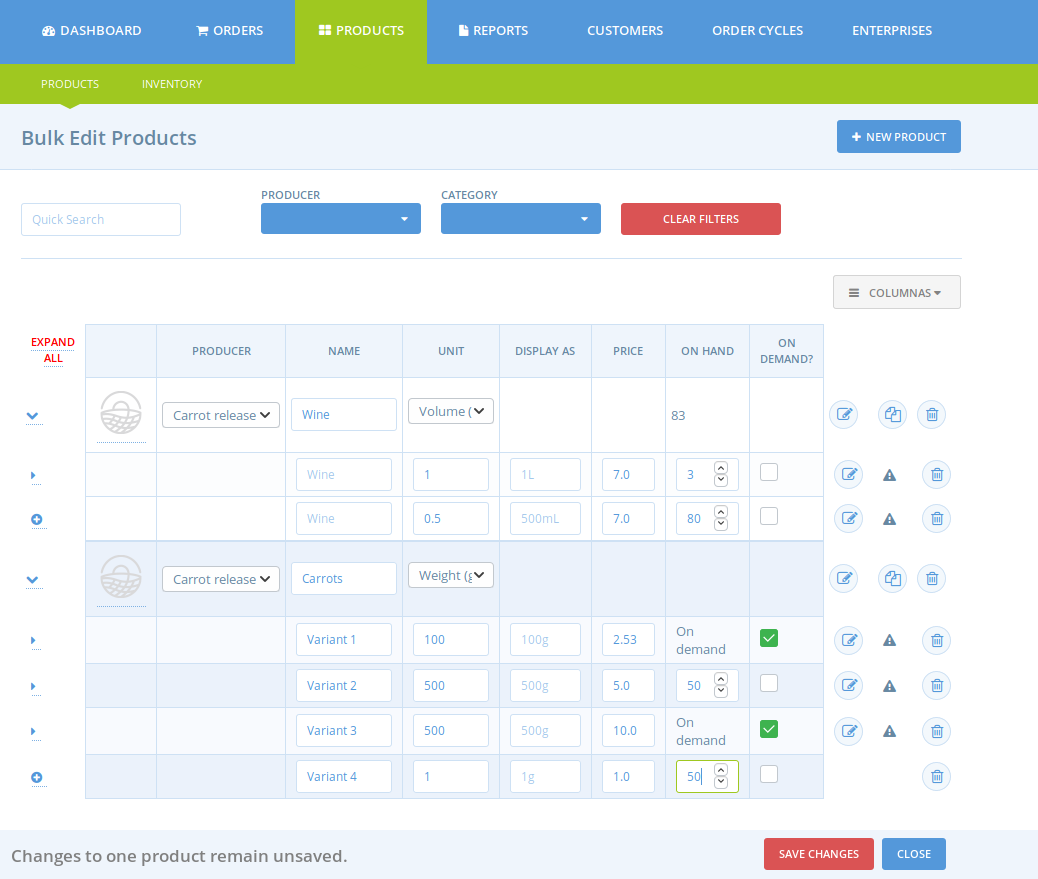
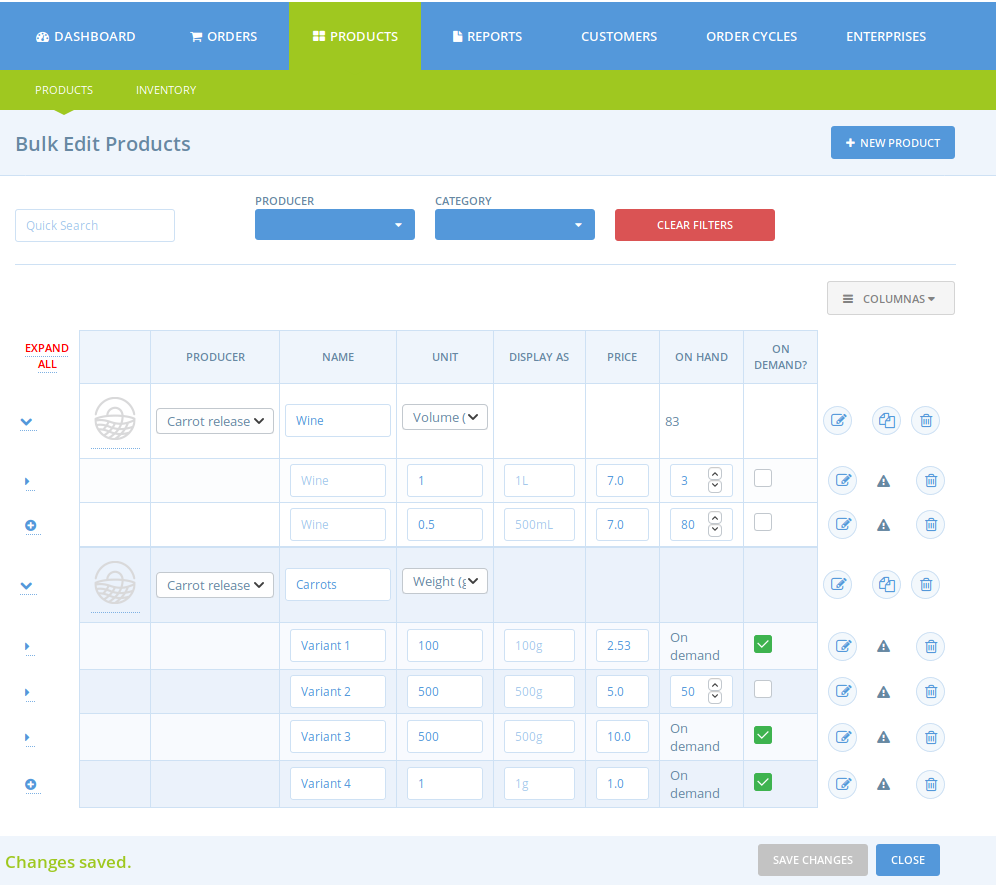
When adding a new variant with the bulk edit page. If you add a stock level, saving it will check on demand. Only editing the variant can help putting back the on-hand value.
This does not happened when creating a product neither through the edit page.
Steps to Reproduce
- Log in as an admin and go to the product page
- Create a variant for a product using the bulk edit page
- On the variant put an on hand value without checking on demand
- Save
- You should see that now on demand is checked
- You need to edit it to remove on demand
Animated Gif/Screenshot
Short video: https://www.loom.com/share/0a9e92bbfba04a06ad1ab0c5fb470b47
Before saving:
After saving:
Severity
bug-s3: a feature is broken but there is a workaround
Your Environment
- Version used: v2
- Browser name and version: Firefox 66
- Operating System and version (desktop or mobile): Desktop
 RachL
RachL
All 12 comments
I cant replicate this in stg FR @RachL
 luisramos0
on 6 May 2019
luisramos0
on 6 May 2019
@luisramos0 did you tried on the carrots product? For Carrots release producer? I just reproduced it. I will record a video and share it.
RachL
on 6 May 2019
oh stg FR is on v1.31, I think you are testing elsewhere right? it's v2 on stg ES, right?
luisramos0
on 6 May 2019
@luisramos0 ah yes sorry this is testing v2 on katuma staging sorry I read your comment too quickly
RachL
on 6 May 2019
yeah, sorry to make you create the video...
I can replicate in katuma.
I'll fix it now.
luisramos0
on 6 May 2019
I found the problem and fixed the DB. but we need to check/do something about it.
stock_location.backorderable_default DB field was true but must be false always
I thought this line was ensuring that… but stg katuma had true in the field...
the question is: why was stock_location.backorderable_default true in staging katuma and will this happen in other deploys?
luisramos0
on 6 May 2019
I tested and the problem is fixed on staging. However it would be safer to close the issue once we have the answer to your question right @luisramos0 ?
RachL
on 6 May 2019
yes, it requires further investigation and maybe a PR. lets not close it yet.
luisramos0
on 6 May 2019
ok, I checked the db schema and backorderable_default has default false as well there, so the line
Does create the location with that attribute as false, therefore, we must be updating it somewhere by mistake.
 sauloperez
on 6 May 2019
sauloperez
on 6 May 2019
yeah, thanks for looking into this!
actually, these are the migrations
/Users/luisramos/dev/ofn/openfoodnetwork/db/migrate/20180426145659_add_backorderable_default_to_spree_stock_location.spree.rb:
    2  class AddBackorderableDefaultToSpreeStockLocation < ActiveRecord::Migration
    3    def change
    4:     add_column :spree_stock_locations, :backorderable_default, :boolean, default: true
    5    end
    6  end

/Users/luisramos/dev/ofn/openfoodnetwork/db/migrate/20180426145665_set_backorderable_to_default_to_false.spree.rb:
    3    def change
    4      change_column :spree_stock_items, :backorderable, :boolean, :default => false
    5:     change_column :spree_stock_locations, :backorderable_default, :boolean, :default => false
    6    end
    7  end
could it be the seeding process? does the db gets seeded in the migration?
seeds.rb does this and could be doing it before the migrations are executed?
DefaultStockLocation.find_or_create
luisramos0
on 6 May 2019
ok, I think I understand.
stock_location table is created and a default entry is put here (there's no backorderable_default column at this point):
https://github.com/openfoodfoundation/openfoodnetwork/blob/b443f5ece9490539c6e1b55cdefe2291317b02ea/db/migrate/20180426145632_create_default_stock.spree.rb#L13-L14
only THEN the two migrations mentioned above are executed, with the record in the table already.
the first migration creates the column backorderable_default and sets the existing stock location record to the default true. but the second migration (defining a new default for that column) does nothing because the record is already populated with true after the first migration.
next comment will be about possible solutions ;-)
luisramos0
on 6 May 2019
Related issues
 shen-sat
·
3Comments
shen-sat
·
3Comments
 sstead
·
4Comments
shen-sat
·
3Comments
sstead
·
4Comments
shen-sat
·
3Comments
 Matt-Yorkley
·
3Comments
Matt-Yorkley
·
3Comments
 filipefurtad0
·
3Comments
filipefurtad0
·
3Comments