Openfoodnetwork: Inventories broken: changes to inventory don't save
Description
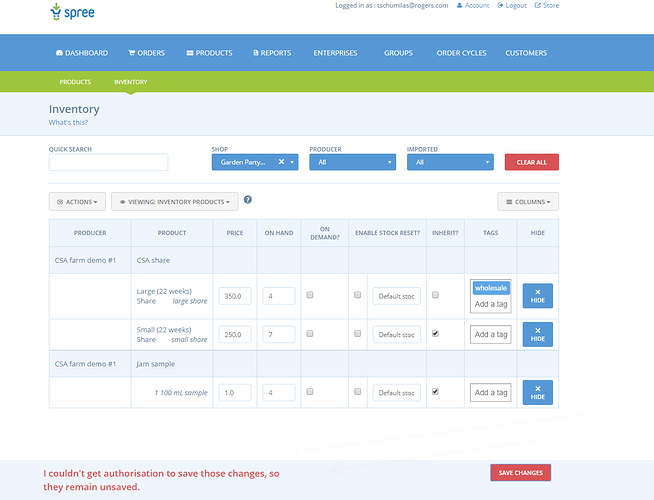
It's not possible anymore to update a price, stock, etc. in inventory, we get the following error message:
Expected Behavior
Inventory work and hub manager can save changes to prices, stock, etc.
Actual Behavior
Not working.
Steps to Reproduce
- As a super admin or hub manager, go to products > inventories, choose a hub
- Try to update a price, see the error message
Context
Reported by a user in Canada, reproduced by Myriam on french instance
Severity
S2 it doesn’t seem there is any workaround, other than modifying source info in product catalog (but not possible in some uses of inventory) or creating a new producer catalog to replace inventory but it’s not a quick workaround… not really usable.
Your Environment
- Version used: v1.18 on French instance (not sure which version it is in Canada) so it's not linked to the last v1.19 release.
- Browser name and version: Firefox Quantum 62.0
- Operating System and version (desktop or mobile): Ubuntu 18.04.1 LTS
Possible Fix
No idea...
 myriamboure
All 59 comments
From @luisramos0 on Slack:
looks like an authorization problem (401) on the variantoverides controller action bulk_update
And more details:
lets read together :joy:
   can [:admin, :index, :read, :update, :bulk_update, :bulk_reset], VariantOverride do |vo|
     next false unless vo.hub.present? && vo.variant.andand.product.andand.supplier.present?
     hub_auth = OpenFoodNetwork::Permissions.new(user).
       variant_override_hubs.
       include? vo.hub
     producer_auth = OpenFoodNetwork::Permissions.new(user).
       variant_override_producers.
       include? vo.variant.product.supplier
     hub_auth && producer_auth
   end
this is the logic used to validate if a user is authorized to bulk_update variantoverrides
These are things you can check on the instance, to see if some data config is broken:
- first line, the VO must have hub and the product of the VO must have a supplier
- last line - both hub_auth and producer_auth must be TRUE to grant authorization to this action
- hub_auth - user must be a manager of VO hub and VO.hub must be a distributor (sells != ‘none’)
- producer_auth - this one is more complicated but is related to permissions set in EnterpriseRelationships
myriamboure
on 18 Sep 2018
Luis Ramos [1:02 AM]
super admin is not always the best profile to get around authorization isssues
I’d check the enterprise relationships and permissions set between “Garden Party …” and “CSA farm demo…”
myriamboure
on 18 Sep 2018
Thanks @luisramos0 for the investigation ! It seems though that we have found a bug :-)
It doesn't seem to be related to enterprise permission, let's see what Theresa found on her side, will share that discussion with her. As a hub if I can see in my inventory a product it means the producer has given me the authorization to "add to inventory", else I wouldn't be able to add the product.
On the "hub demo Open Food France" I tried two things:
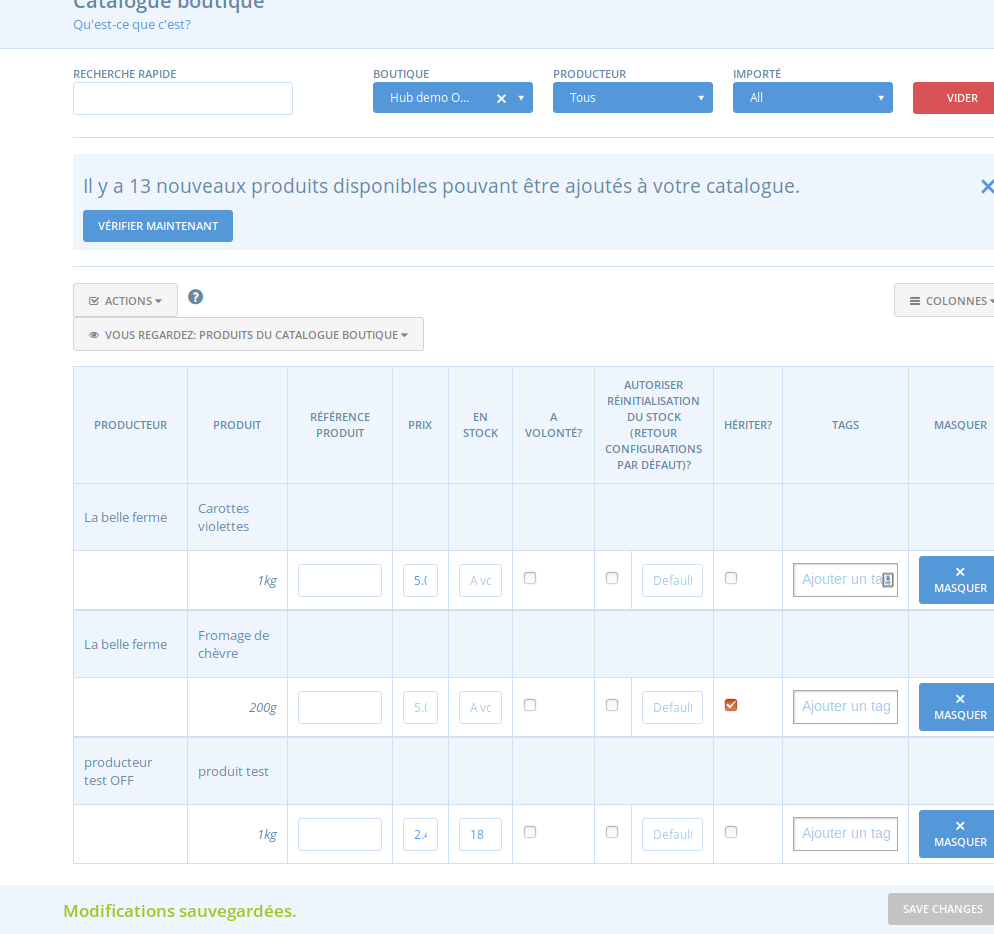
- First logged in as a hub manager (not super admin) : I can update the "La belle ferme" carrots price
- Then logged in as a super admin : I can't update the "La belle ferme" carrots price
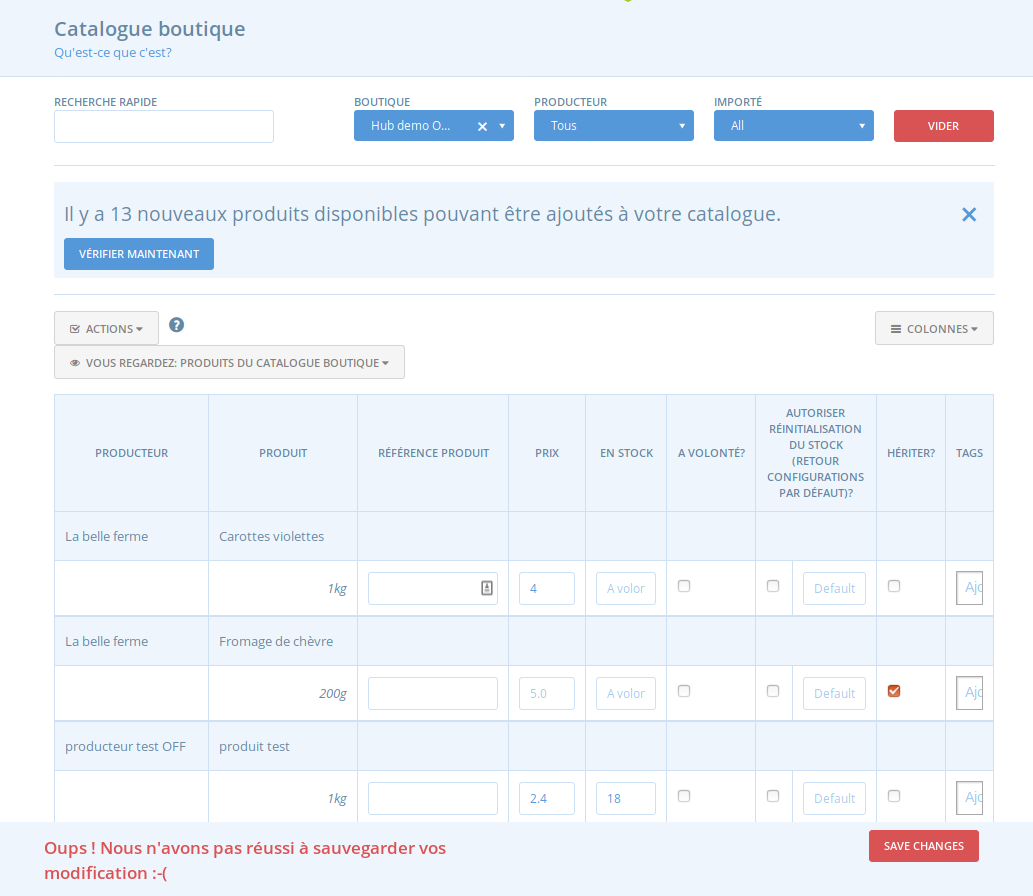
What seems strange though is that on Canadian instance it seems that the hub manager couldn't update the inventory price. I'll ask confirmation from Theresa.
myriamboure
on 18 Sep 2018
this is not a permissions issue - I've checked that.
As a hub user (not super admin) I receive the error message as I posted at the top of this issue.
However, as a super-admin user, I am able to update and save inventory without problem. So right now, I'm doing this task for our users who can't do it for themselves.
This was not an issue 10 days ago - so something changed recently.
 tschumilas
on 21 Sep 2018
tschumilas
on 21 Sep 2018
Ok so there is something really stranger here... @mkllnk what version is Canada on at the moment? In France we are on v1.18. It seems I have the reverse behavior compared to @tschumilas .
I just retested so I am sure that a non super admin user can update inventory.
BUT with a super admin user:
1- the inventory is suuper long to charge, I see in one minute the number of product available to raise. I'm not even sure it manages to load all products...
2- I can't update inventory then on a given product.
Here are the consol and network info:
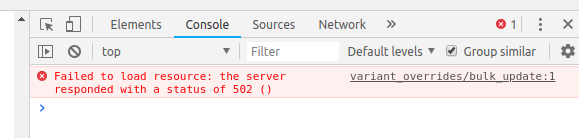
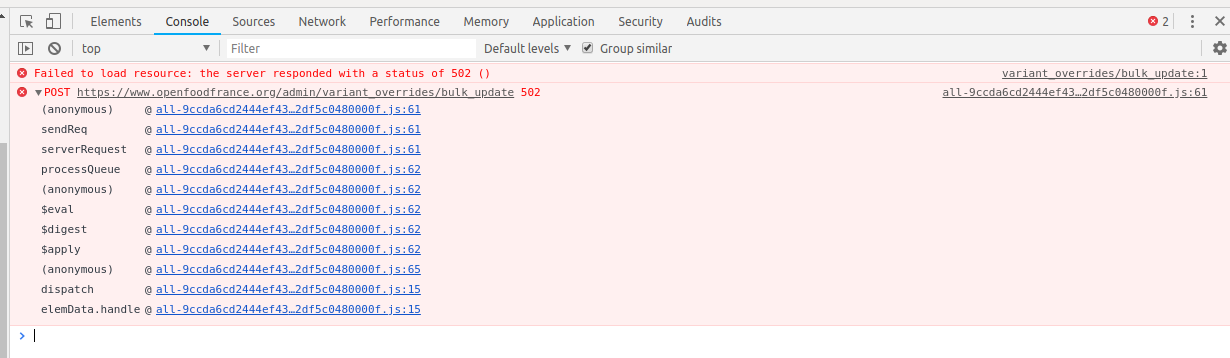

I changed label to S3 though as there is a workaround (someone can update inventory...) but we should fix that quickly as it's pretty annoying as a workaround...
myriamboure
on 21 Sep 2018
now you are seeing a 502 error, not an authorization problem... something else...
@myriamboure those reports with dev tools are really useful!!! We should get everyone to do this when they report a problem.
After you click in network you can still click on the line with the request (in this case where it says bulk_update in red), if you do that you get an extra window on the right and you will see a tab called response, click on it: that is usually where the gold is :-)
 luisramos0
on 21 Sep 2018
luisramos0
on 21 Sep 2018
Canada uses commit 0312bf93dde2bb9e976ccfaae954c991d6a0852f which is between v1.18 and v1.19.
 mkllnk
on 21 Sep 2018
mkllnk
on 21 Sep 2018
@mkllnk the commit you point to is a change (added sleeps) in the cookies spec, it's not relevant, correct?
luisramos0
on 21 Sep 2018
Yes, I was just answering @myriamboure's question which version Canada is using. That is the commit that was deployed.
mkllnk
on 23 Sep 2018
After a slack message exchange with @myriamboure and further testing - I am confirming the description of this problem at the outset of this issue : It's not possible anymore to update a price, stock, etc. in inventory. So the error message (screenshot above) occurs - on the Can instance - when a user tries to make any overrides in inventory (eg. changes to price, changes to on-hand amount, or adding a product/variant tag). As super-admin, I CAN save changes to overrides, but other users cannot. Further - this is NOT a general tagging problem. Tagging on payment method, delivery method... seem to work fine. Its only a tagging problem when trying to add a product/variant tag - which requires overrides in inventory. So - right now on the Can version, users cannot make changes to any overrides in inventory.
tschumilas
on 24 Sep 2018
Ok. So can we consider "ask an admin to do it" a satisfying workaround? I'm not sure, so I am tempted to put to S2 as from the user perspective the feature is broken and there is no workaround. Changing to S2, there is probably some investigation needed to understand why we have reverse behaviors between CAN and FR...
myriamboure
on 25 Sep 2018
I retested on UK production running V1.20.
Logged in as a USER I can update the price, tag, etc of a product in the hub inventory.
Logged in as SUPER ADMIN I can update the price, tag, etc. as well...
Ok so it needs even more investigation, apparently it doesn't seem to be connected to the user permission...
myriamboure
on 25 Sep 2018
New test:
For a given product, I'm a super admin but not a manager of the producer enterprise. I try to change price in inventory for a hub working with that producer: NOT SAVING INFO
Then I add myself as a manager of the producer enterprise and try to do the same from third party hub inventory (same as before): NOT SAVING INFO
Then I add myself as a manager of the hub and try to do the same: STILL NOT SAVING INFO
Here is what the console shows:
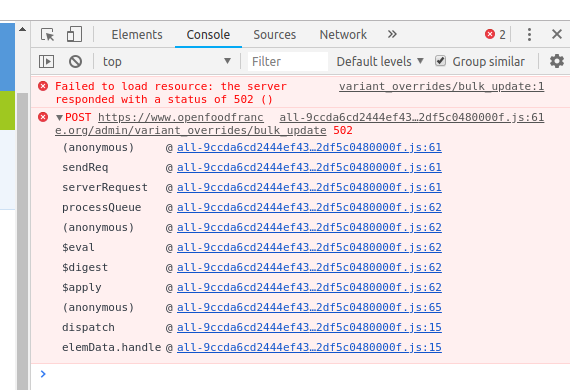
I guess that the failed loading product first issue is linked to https://github.com/openfoodfoundation/openfoodnetwork/issues/2773, I'm not sure the system manages to load all the data as a super admin.
But the second error is different and might give us a clue of the problem?
Can both issues be connected? Like as a super admin, as the system doesn't manage to fully load inventory, if I try to update something in it it just fails?
That could be a clue, as it is working with a regular user... but in that case the problem would be the same on UK production as the loading problem seems to be there as well... any idea when reading the console info devs?
@tschumilas as you can see the problem you describe is not happening either on UK production. I created an account on Can production, can you make me admin ? I promess I won't break anything. Tell me which "test" enterprise I can use to do some more extensive testing... Hard to give that to a dev if we have no consistent way to reproduce the bug... so I want to try to do more testing.
myriamboure
on 25 Sep 2018
Also here is the network tab from French instance.
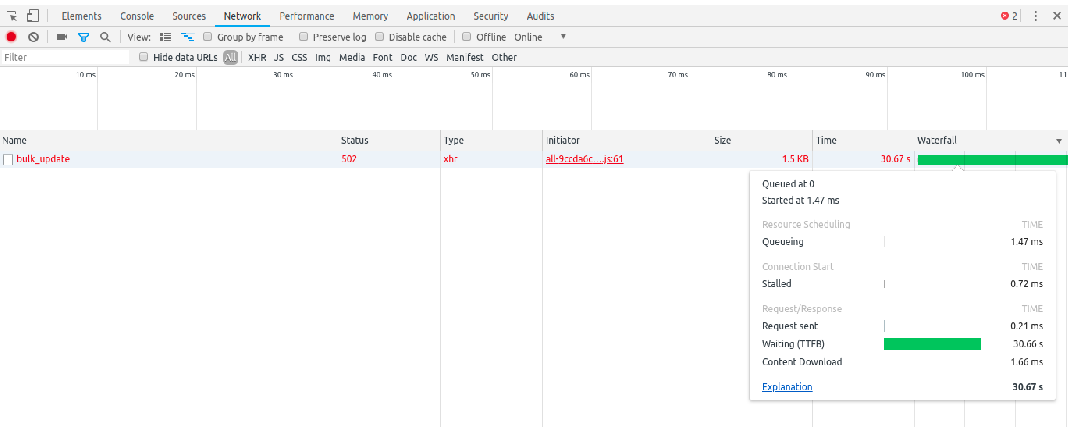
So if I sum up:
- no problem in UK
- problem with super admin in FR
- problem with non super admin in CAN
myriamboure
on 25 Sep 2018
I will give you admin status now. I've been using 3 hubs to test: Garden Party Flower FArm, Garden Party On-line, CSA demo (use any combo of those - they are all not actively trading). I was doing more testing today and found it really strange that with the same login, I had different results. I now THINK that one problem is that it seems that you need to click logout twice -- so in some of my tests, I'm not sure I was totally logged out as user A before testing user B..... So - I need to do re-testing but being way more careful about fully logging out. You might see what I mean if you do some testing. I have to teach now - but I will get back to this Wednesday pm my time. Maybe you will have something to report before that. @myriamboure
tschumilas
on 25 Sep 2018
From the screenshots I can tell that an error is raised that should be logged (in a file or Bugsnag). A developer with access to the logs can probably tell you much quicker what's going wrong here.
mkllnk
on 27 Sep 2018
I just went into the inventory as super admin on the Canadian server. There are lots of Javascript errors:
Error: hubPermissions[hub_id] is undefined
@https://openfoodnetwork.ca/assets/admin/all-bf6f138a4a38cdd401ea8c2a21569454.js:186:30410
Changing the on hand value works though. And I can't find any related errors in the log file. I also just checked the French log file and I can't find any related errors.
Oh, I'm just realising that the status code of the error response is 502 - Bad Gateway. That probably means that the request timed out. It's a performance problem! That's why your testing has been so difficult.
Yes, thank you @myriamboure for sharing the screenshots. In your last one I can see that the request waited for 30 seconds which is the default timeout. Because of these performance problems, we set the timeout to 120 seconds on our servers.
The French nginx configuration contains this line:
keepalive_timeout 60;
Apparently that doesn't work, because it's timing out after 30 seconds, not 60. This setting could help:
   location @unicorn {
     # ...
     proxy_read_timeout 120;
   }
I added that temporarily. But I don't know with which inventory I could test it. There might be another timeout setting that we have to use in order to make this work.
Another theory: maybe that code needs a lot of memory. If it runs out of memory, it could crash. The French server doesn't have any swap file configured to avoid this. I still think that the timeout issue is much more likely though. I didn't see any log message about memory errors with dmesg.
mkllnk
on 27 Sep 2018
really well spotted Maikel! the 30s on @myriamboure screenshot :-)
luisramos0
on 27 Sep 2018
I haven't been able to reproduce the issue in dev both with super admin and hub manager profiles. So it may be a performance problem in prod indeed. @myriamboure with @mkllnk changes can you try again if it crashes ?
 HugsDaniel
on 27 Sep 2018
HugsDaniel
on 27 Sep 2018
I think this issue is related: https://github.com/openfoodfoundation/openfoodnetwork/issues/2776 ... It's likely that those variants are failing a validation check, so the changes made to other attributes also cannot be saved.
@myriamboure Could you share a screenshot of these products in the product bulk edit page, with details for the variants also visible?
 kristinalim
on 27 Sep 2018
kristinalim
on 27 Sep 2018
that hubsPermissions error was seen here:
https://github.com/openfoodfoundation/openfoodnetwork/issues/2502
I believe it's related to being a super admin and accessing hubs without any permissions.
luisramos0
on 27 Sep 2018
If there are other javascript errors on the page related to something else, it could definitely cause other elements on the page to not work.
The French server doesn't have any swap file configured to avoid this.
No, but it has way higher specs than it needs. It's the turbocharged hotrod of OFN instances.
 Matt-Yorkley
on 27 Sep 2018
Matt-Yorkley
on 27 Sep 2018
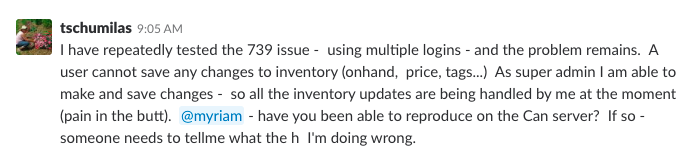
Posting Theresa's update from Slack on this thread so it doesn't get lost.
@HugsDaniel @myriamboure @luisramos0 @Matt-Yorkley hoping you have access to CAN servers as @mkllnk is away this week.
 daniellemoorhead
on 1 Oct 2018
daniellemoorhead
on 1 Oct 2018
Ok so I think there are two different issues, so I propose to keep the performance 502 bad gateway issue out of this discussion, I opened https://github.com/openfoodfoundation/openfoodnetwork/issues/2773. So if I exclude that it seem I'm not able to reproduct the issue on French instance and I believe @kristinalim found the origin of the problem, I will try to test on Can instance with "clean inventories" without invalid variants and make then some variants invalid to see if I can reproduce the error.
myriamboure
on 1 Oct 2018
on OFN Can:
- as an admin I created a new user (non admin)
- I added it as a manager of Garden Party Flower Farm
- Then in another browser I login with that user and go to product. I add a new variant to the item product following https://github.com/openfoodfoundation/openfoodnetwork/issues/2776. It works "changes saved".
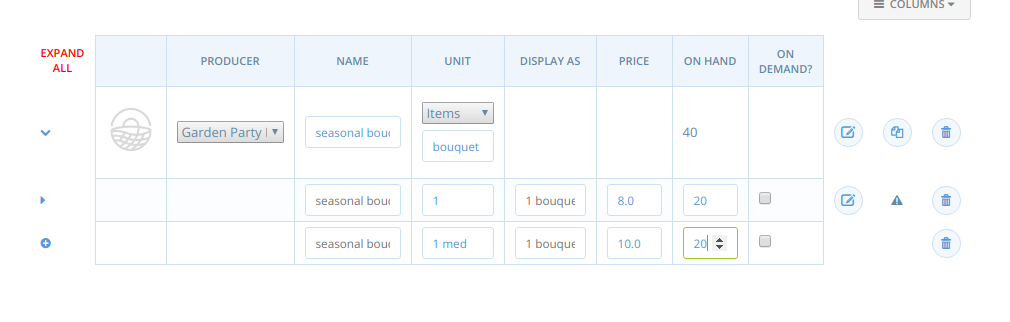
- Then in the browser where I am logged in as super admin, add permission "Garden Party Flower Farm" to add to inventory and OC for "CSA demo". Add the new user as manager of CSA demo as well. And then go back to the regular user browser.

- When in inventory of CSA demo, I can update without issue the price of the new variant I created.
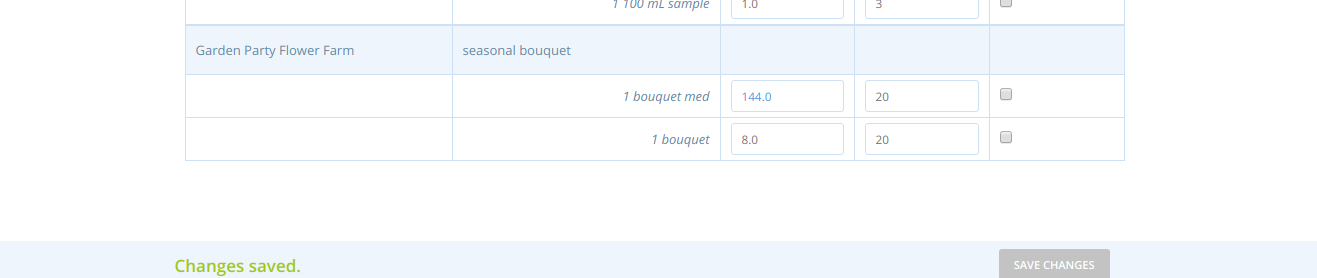
- Then I change the unit type to "weight" for that product and don't touch anything else. It saves without any issue (is it expected behavior???)

- I go back to inventory and it works... I can change the price for the inventory...
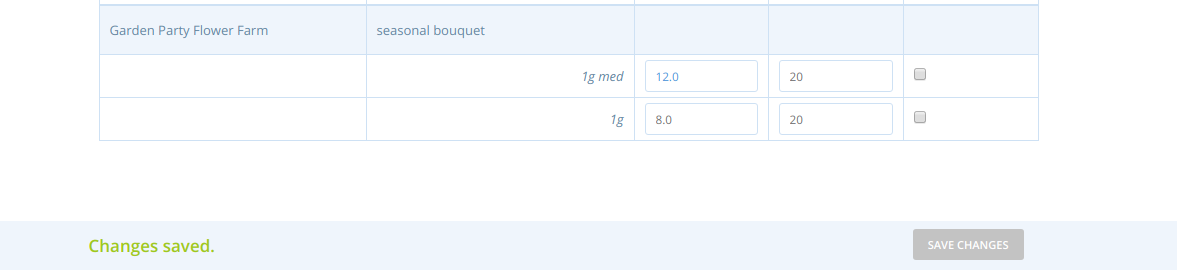
Hum, so the problem in this case doesn't seem to come from the invalid variant thing... actually I'm not even able to reproduce what you describe in #2776 @kristinalim :-(
myriamboure
on 1 Oct 2018
I think I have some clue...
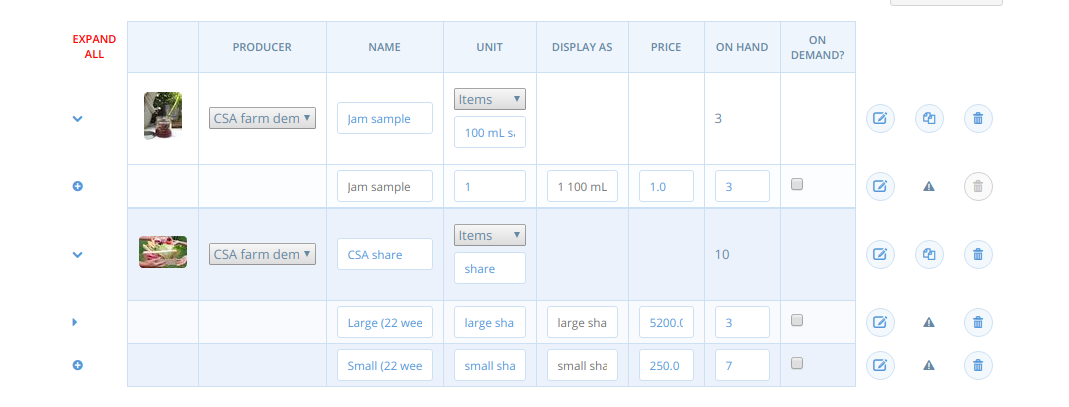
The CSA shares have non-numeric values in "unit" !
And indeed when I try to update inventory info I get the same error as you @tschumilas
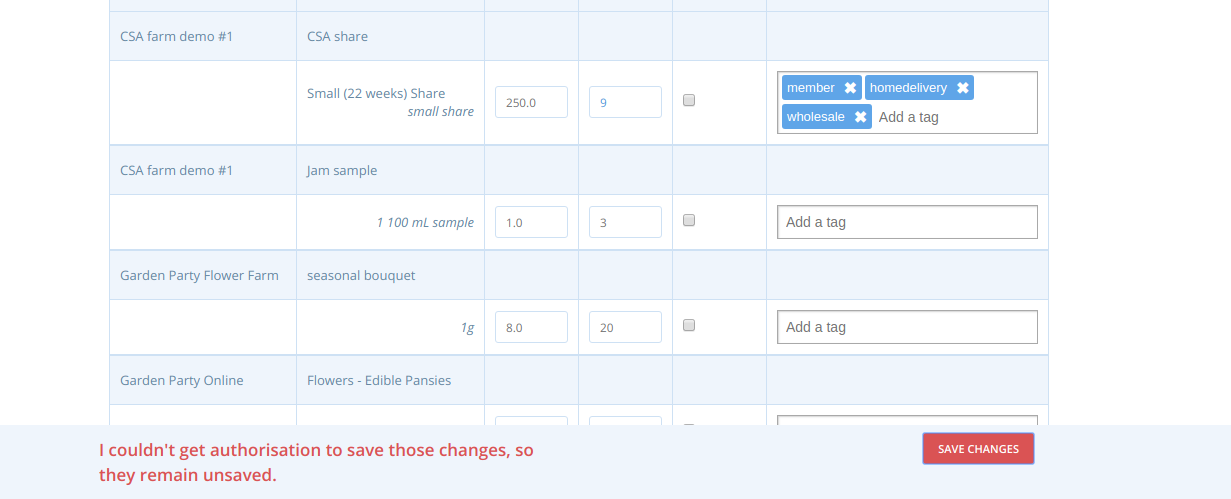
I change the unit to numeric value in CSA share product:

Then try to update inventory but I still get the same error... I suspect some previous action on the product that made some invalid data.
Here is what I get in the console
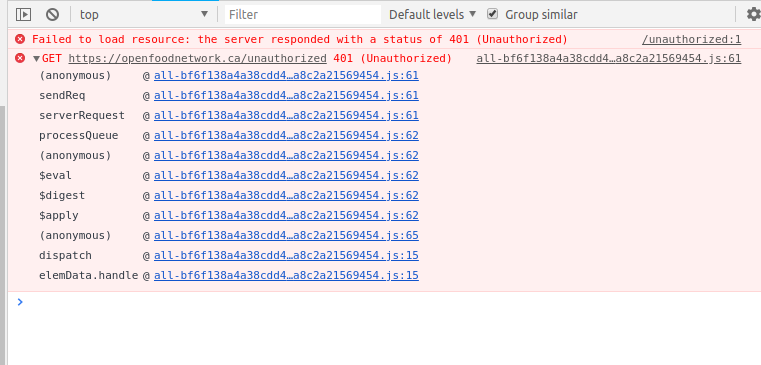
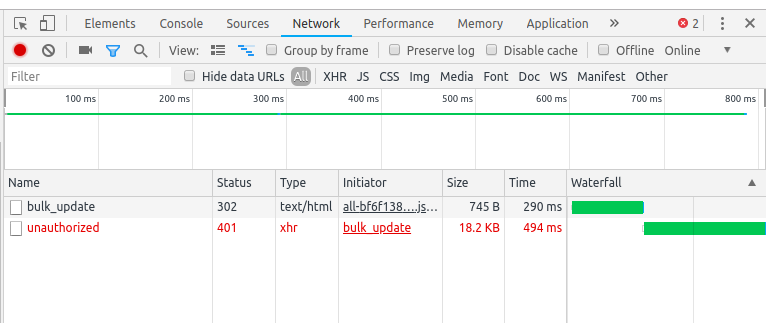
myriamboure
on 1 Oct 2018
Given @kristinalim analysis in #2769 it doesn't seem to be the same issue, it seems to be a normal authorization issue: 401
myriamboure
on 1 Oct 2018
I found the bug ! I'm able to reproduce it. But still don't understand why...
I am a manager of CSA demo hub and Garden Party Flower Farm (GPFF). I can update GPFF products info in CSA farm inventory.
Then a super admin adds me as a manager of Garden Party Online. Now I can't update GPFF products info in CSA farm inventory.
I don't know why, but it seems adding the user as a manager of Garden Party Online make updating all inventories for that user impossible... how can that be?
myriamboure
on 1 Oct 2018
myriamboure
on 1 Oct 2018
I'm wondering if that is not related to the tag rules set up by Garden Party Online on inventory variants, saying they are invisible by default...
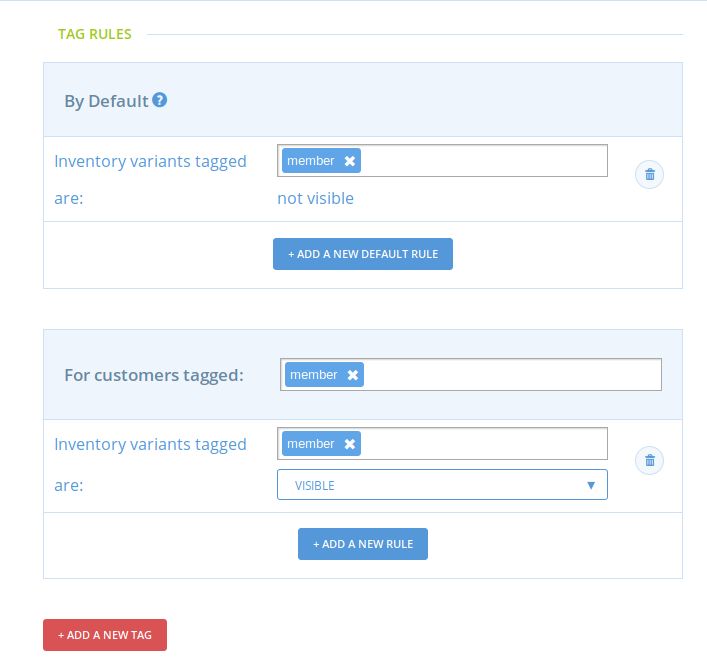
It seems like a strange coincidence no? I don't know... but now we have a way to reproduce it.
myriamboure
on 1 Oct 2018
@HugsDaniel let's see with @kristinalim if she sees where the problem comes from given her previous investigation on potentially related issues. Of course if you have a clue yourself share it !
myriamboure
on 1 Oct 2018
I had the same error as @mkllnk 502 - Bad Gateway on french prod. I think I would need access to the french server at least to be able to go further in my investigation. @myriamboure can this work ?
HugsDaniel
on 4 Oct 2018
@HugsDaniel please read my last posts, I suggested to not take into account the 502 issue as the original issue is a 401 one, and let's deal with performance issue separately... I said I opened another issue for it. But still you will have access to French prod soon when you open the PR @HugsDaniel ;-)
myriamboure
on 4 Oct 2018
I found out a couple of things on Canada prod :
(Garden Party Flower Farm = GPFF ; Garden Party Online = GPO ; CSA farm demo #1 = CSA)
- As a manager of CSA only, I can manager my own products and GPFF products
- As a manager of GPFF only, I can manage my own products
- As a manager of GPO, I can't manage anything, not even my own products
Also in "Enterprise permissions", I have the following :
Garden Party Flower Farm | permits | CSA farm demo #1 | to add to order cycle & to add products to inventory
So it appears that CSA is not supposed to have permissions to manager GPFF products right ? But it can.
@Matt-Yorkley @kristinalim @myriamboure @mkllnk thoughts ?
HugsDaniel
on 5 Oct 2018
"As a manager of CSA only, I can manager my own products and GPFF products" you are right the permission to manage products is not allowed, it shouldn't work. I have no idea where it comes from but it looks bad. @Matt-Yorkley @kristinalim can you reproduce similar permission issues?
myriamboure
on 5 Oct 2018
@HugsDaniel - I see right now that you are a manager on both CSA and GPFF - so that is why you can manage GPFF - right? those products are associated with your login . If you remove yourself from GPFF as a anager, but leave yourself as a CSA demo manager - are you still able to manage GPFF products?
I was also testing this previously - but didn't finish. I was trying to see if sharing a common hub extends permissions. So:
CSA gives GPO permission for everything.
GPFF also gives GPO permission for everything.
So GPO should be able to manage products (and everything else) for CSA and GPFF.
But CSA does not have permission to manage GPFF.
So is this happening because CSA and GPFF 'share' GPO? They have both given GPO permissions - does this somehow entangle them.
Sorry - not explaining this well. Plan to do more testing tonight and on the weekend - tell me if there is a specific series of questions you want me to test.
I'll start by seeing if this permissions issue you found with CSA is present in any other hubs/logins.
tschumilas
on 5 Oct 2018
I've confirmed that #2769 and #2776 are both unrelated to this issue.
kristinalim
on 5 Oct 2018
I'm just leaving these notes here for now.
In the back-end, below are the current authorization rules for saving inventory data (VariantOverride). Is this consistent with how this is expected to behave?
permissions for variant overrides
  when admin
    should have permission
  when user of the producer
    should not have permission
  when user of the distributor
    should not have permission
  when user of the distributor which is also the producer
    should have permission
  when owner of the distributor with add_to_order_cycle permission to the producer
    should not have permission
  when owner of the enterprise with create_variant_overrides permission to the producer
    should not have permission
    when the enterprise is not a distributor
      should not have permission
I submitted WIP PR #2833 that adds tests outlining this behaviour. If the implemented rules are not consistent with the specifications, changes will have to be made most likely in app/models/spree/abilitiy_decorator.rb or lib/open_food_network/permissions.rb.
kristinalim
on 6 Oct 2018
@HugsDaniel - I see right now that you are a manager on both CSA and GPFF - so that is why you can manage GPFF - right? those products are associated with your login . If you remove yourself from GPFF as a anager, but leave yourself as a CSA demo manager - are you still able to manage GPFF products?
Yes I am
I was also testing this previously - but didn't finish. I was trying to see if sharing a common hub extends permissions. So:
CSA gives GPO permission for everything.
GPFF also gives GPO permission for everything.
So GPO should be able to manage products (and everything else) for CSA and GPFF.
But CSA does not have permission to manage GPFF.
So is this happening because CSA and GPFF 'share' GPO? They have both given GPO permissions - does this somehow entangle them.
Sorry - not explaining this well. Plan to do more testing tonight and on the weekend - tell me if there is a specific series of questions you want me to test.
I'll start by seeing if this permissions issue you found with CSA is present in any other hubs/logins.
I'll test this right now
HugsDaniel
on 8 Oct 2018
Thanks @kristinalim for the PR ! That's going to be very useful :)
HugsDaniel
on 8 Oct 2018
@HugsDaniel I can't reproduce what you mentioned above, when I am a manager of only Garden Party Online I can manage my own products without any problem.
I'm wondering though if there can't be some conflicts that we have not anticipated. I did another test that can give a clue:
I put my test user as a manager of GPO, GPFF and CSA but I made sure non of those three enterprises have any relationship with one another.
When I login with that use, I can access and modify producers of the three enterprises (as expected), but if I go to the inventory of one of them, let's say GPO, I can't update any info on my own producers in the inventory, I get the authorization error.
So it doesn't seem to come from permission issue... ? How could that be, there is no permission, unless some permissions are attached to my user... so when I'm adding to that enterprise as a manager it touches something as me as a user...?
Maybe that will give ideas to @kristinalim as well...
myriamboure
on 8 Oct 2018
It would really help me a lot to have access to production logs to see what's exactly going on here
HugsDaniel
on 8 Oct 2018
How can you? Does someone need to give you access to Can server logs? @mkllnk I think you are still the only one to have access? If that's right you need to add other devs btw ;-) But maybe I'm wrong.
myriamboure
on 8 Oct 2018
I'll confirm it with Theresa.
mkllnk
on 9 Oct 2018
@HugsDaniel @kristinalim this is S2 and you are both assigned to it, but it has not moved forward in the last 7 days ! If you miss something, like @mkllnk didn't give you access to the logs, ask again, but this should not stay here without moving ! Thanks :heart:
myriamboure
on 15 Oct 2018
I really don't get it. In canadian prod no matter what I do now (manager or owner of any enterprise) I have the unauthorized error message, and in the logs I have this :
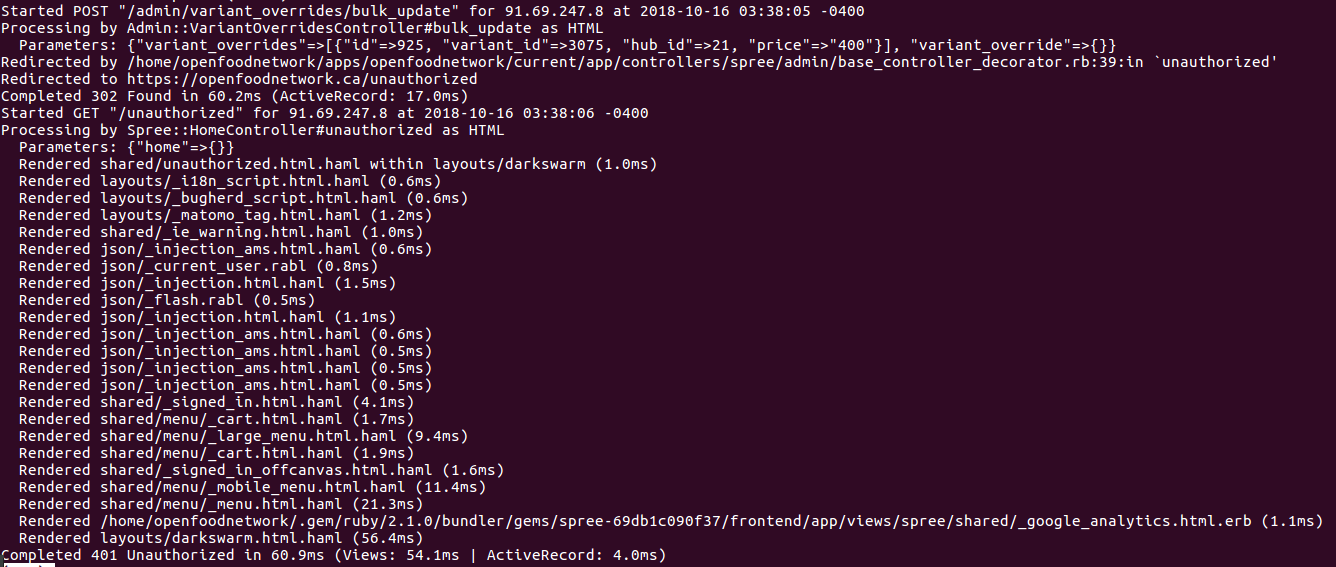
@luisramos0 @sauloperez @Matt-Yorkley would you have a clue what's going on ? Seems like CanCan is struggling to put the right authorizations to the right user
HugsDaniel
on 16 Oct 2018
I'm helping @HugsDaniel sorting this one out.
In case he cant sort it out, can I get access to canada live instance? (apparently this is the only place this bug is replicatable)
luisramos0
on 16 Oct 2018
can I also get my user (luisramos0) promoted to access level similar to what Hugo has so I can replicate and debug the issue as well? in canada live instance
luisramos0
on 16 Oct 2018
@luisramos0 I made you an admin on can instance (@tschumilas for you to know), please be careful and only user the three entities we have mentioned here to do testings (Garden Party Flower Farm = GPFF ; Garden Party Online = GPO ; CSA farm demo #1 = CSA) We will remove both @HugsDaniel and Luis from admin when this is sorted out Theresa to avoid any random mistake in the future, better be cautious with admin rights ;-) But for now we need them to find the problem ! If you need access to the logs as well @mkllnk needs to add you to Can server, but I think you should have access already as you are Ha in the sys admin global team :-)
myriamboure
on 16 Oct 2018
thanks @myriamboure
I'll try to test/replicate.
Yes, I need access to the server to be able to debug. I dont have access yet. Even if ofn-install has been updated with the new sysadmins list, I believe the servers need to be reprovisioned so that the list gets updated on the server.
luisramos0
on 16 Oct 2018
all right Canada! I have access to the backoffice and also to the server. Nothing cant be done now 🎉
There are many data scenarios in this permissions world, so, when we report a case we need to report exact state of the data in which the scenario appeared. And by state of data I mean every detail, and there are too many in this context...
First enterprise acronyms:
GPO - garden party online
GPFF - garden party flower farm
CSA - csa demo farm #1
ZZ - zz - organic produce (I'll tell you more about this one in a sec :-))
I will describe the scenario I "replicated" and why it is "broken", here it is:
- There are no related enterprise permission between the enterprises of the test
- I am a manager of GPO, GPFF and CSA
- I go to inventory and I cannot update inventory for CSA
When we save this inventory,even if only one entry, permissions are validated for every variant override of every hub we can see! Note the word "all" in this code comment.
So, when I try to save inventory of a variant override of CSA, it is actually validating all my permissions against all variant overrides of all the hubs I manage! SO, it gets to a variant override in GPO, that is produced by ZZ, SO, it checks if I have access to this producer and fails.
So, I could fix this problem in two different ways:
- make myself a manager of ZZ and make ZZ a seller != none
- give enterprise permissions to CSA to manage ZZ inventory
Does this make sense?
This could just be a data problem. We just need to find what variant override is blocking the access. If it's not the one I have seen above, could be another one.
One hypothesis is that you have given enterprise permission to a hub to manage a specific producer, created variant overrides for those products and afterwards REMOVED enterprise permissions to manage that producer. After this, I believe you will be unable to update _any_ inventory data because the variant override of the producer will still be there.
luisramos0
on 19 Oct 2018
ok, I think got it. I can reproduce this process locally.
I have a producer and hub in my test.
- For this test, there are two distinct users, one manages Hub, the other manages Producer ("Hub does this" should be read "User that manages Hub does this")
- For a base to test, Hub creates some inventory data for their own products or some Other Producer
- Producer creates Product X
- Producer permits Hub to sell their stuff: enterprise permission "Producer permits Hub to add products to inventory".
- Hub adds product X to inventory and sets the inventory data
- Producer removes permission to Hub
- product X disappears from Hub inventory and Hub CANNOT update any inventory data
- Producer adds Hub permission back
- product X reappears in Hub inventory and Hub CAN update all inventory data including the product X inventory
- Producer deletes product X from their products (permission is still in place)
- product X disappears from Hub inventory and Hub CAN update all inventory data (except product X that has been deleted)
- At this point, Hub is not selling any Products from Producer and (apparently) there are no inventory items in Hub related to Producer SO:
- Producer removes "useless" permission to Hub sell their products
- Hub CANNOT update any inventory data (because inventory entry is still in the database being checked for permissions)
Workaround: Producer adds back permission to Hub sell their stuff (even if there's none, there's the deleted product X underlying breaking the Hub's inventory page)
Root cause: It looks like that the root cause is that inventory permissions do not ignore soft deleted products.
Fix: Inventory management page has to ignore inventory items from deleted products. Fix drafted in this PR #2893
Lesson learnt: next time you want to implement soft deletes on your database table because it's so much better, think if you really need it.
This is the SQL to fetch existing broken cases in any OFN db:
select distinct hub.id, hub.name, supplier.id, supplier.name from variant_overrides vo, spree_variants v, spree_products p, enterprises hub, enterprises supplier where vo.variant_id = v.id and hub.id = vo.hub_id and supplier.id = p.supplier_id and v.product_id = p.id and v.deleted_at is not null and vo.hub_id != p.supplier_id and (p.supplier_id, vo.hub_id) not in (select er.parent_id, er.child_id from enterprise_relationships er, enterprise_relationship_permissions erp where er.id = erp.enterprise_relationship_id and erp.name = 'create_variant_overrides') order by hub.id;
In Canada, GPO, xxx - test enterprise 10, xxx - test enterprise 9 and Hilray WG (this last one is lacking a lot of permissions from a lot of producers for which it has overrides to deleted products).
The same query for existing products "and v.deleted_at is null" will also list a few cases in Canada where permissions are broken: hubs that have inventory items of products they don't _currently_ have permissions from the producer.
Note: these problems can only be seen by users who manage one side of the game, if user manages both hub and producer, this problem will not be seen.
luisramos0
on 19 Oct 2018
Apart from the management of inventory items of deleted products, another follow up issue that could come out of this is: if a hub is selling a producers products and the producer removes hubs's permission to their products, the Hub's inventory page should still work :-)
luisramos0
on 19 Oct 2018
Thanks @luisramos0 for figuring this out. It explains why my testing was going so wonky. And thanks for drafting the fix. Unfortuantely - producers add and delete products ALL THE TIME - they have to. The are using OFN because it handles their product list and inventory changes (or we we thought). And permissions change ALL THE TIME because hubs come and go, and producers to those hubs come and go and come again.... These relationships and products lists are VERY vibrant and constantly changing. I don't see how we can not do deletes of either products or permissions.
tschumilas
on 19 Oct 2018
Yeah, I agree. We need to make this inventory management page a bit more resilient.
luisramos0
on 20 Oct 2018
I've double checked the situation where the permission is removed and the product is NOT deleted. If the product is available on the shopfront in a order cycle of the hub and the producer removes permission to the hub, the product remains available in the shopfront. Although the hubs inventory page is broken, the hub can go to the order cycle page and remove the items from the shop (even if the producer removed the "add to order cycle" permission to the hub).
luisramos0
on 20 Oct 2018
ok, I have found a good solution for this issue (#2893). In the VariantOverrides there's already a field for this called permission_revoked_at. The problem was that this field was not being updated when the permission is deleted. The fix is to update this field on every variant_override when the permission is removed.
So, in more accessible language (thanks @tschumilas for the feedback to use accessible language when possible :-)) when the producer deletes the permission for the hub, all the inventory items of the hub sourced from this producer will be updated with a stamp (permission_revoked_at). This stamp will remove the items from the hub's inventory page and its permissions checks (the cause of this issue).
luisramos0
on 20 Oct 2018
@luisramos0 check https://github.com/openfoodfoundation/openfoodnetwork/issues/1630 about one of your last comments, it is a known issue but has not been worked on yet...
What a great detective work !!! So grateful to have you in the team @luisramos0 :-)
myriamboure
on 22 Oct 2018
I think this issue is happening again... I can see broken data in UK and CAN...
Just posting here the updated SQL query that takes the PR into account (adding vo.permission_revoked_at):
select distinct hub.id, hub.name, supplier.id, supplier.name from variant_overrides vo, spree_variants v, spree_products p, enterprises hub, enterprises supplier where vo.variant_id = v.id and hub.id = vo.hub_id and supplier.id = p.supplier_id and v.product_id = p.id and v.deleted_at is not null and vo.hub_id != p.supplier_id and (p.supplier_id, vo.hub_id) not in (select er.parent_id, er.child_id from enterprise_relationships er, enterprise_relationship_permissions erp where er.id = erp.enterprise_relationship_id and erp.name = 'create_variant_overrides') and vo.permission_revoked_at is null order by hub.id;
luisramos0
on 16 Apr 2019
Related issues
 filipefurtad0
·
3Comments
filipefurtad0
·
3Comments
filipefurtad0
·
3Comments
filipefurtad0
·
3Comments
 andrewpbrett
·
3Comments
Matt-Yorkley
·
3Comments
andrewpbrett
·
3Comments
Matt-Yorkley
·
3Comments
 shen-sat
·
3Comments
shen-sat
·
3Comments