Openfoodnetwork: Broken tooltips in simple, producer-shop order cycle
Description
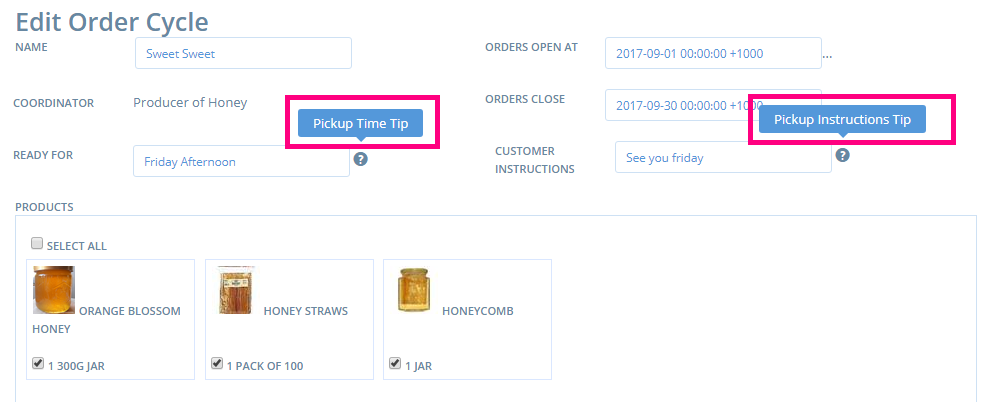
In producer shop order cycles 2 tooltips have lost their content.
Actual Behavior
For the 2 tooltips below the content is not shown:
Expected Behavior
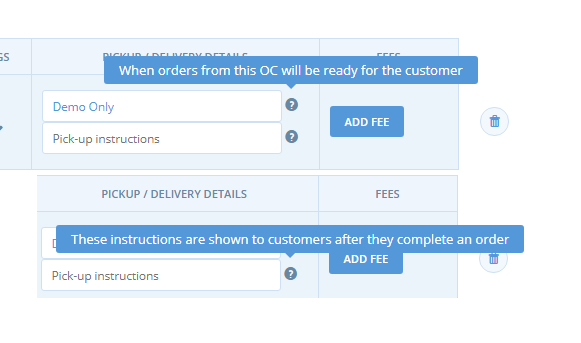
Here's what the content should be... (the image comes from a non-producer shop order cycle, where the given tooltips have their content)
Steps to Reproduce
- Connect as a manager of a "producer shop" type of entreprise
- Go to order cycle and create a new one
- You will see given the images or the video below, the 2 given tooltips don't have any content
Animated Gif/Screenshot
https://www.useloom.com/share/e0cd9704183547f0a86ef5825d80320f
Context
?
Severity
5
Your Environment
- Version used: 1.10.1
- Browser name and version: Chrome 53.0.2785.116 (64-bit)
- Operating System and version (desktop or mobile): Ubuntu 16.04 LTS
Possible Fix
 sstead
All 5 comments
Hi, I took a look and was unable to reproduce this issue. The tooltips seem to be working correctly for me, could you check once more ?
 HugsDaniel
on 9 Jan 2018
HugsDaniel
on 9 Jan 2018
Hi @HugsDaniel ! I just reproduced the bug, it's still there: https://www.useloom.com/share/e0cd9704183547f0a86ef5825d80320f
To reproduce, make sure you use an entreprise profile that is a producer shop only, otherwise you can't reproduce it. And you have to create an order cycle, the "permanent demo" one is not working the same way apparently.
 myriamboure
on 12 Jan 2018
myriamboure
on 12 Jan 2018
@myriamboure @sstead could we please add specific steps in the issue description on how to reproduce it? Thanks!
 enricostano
on 12 Jan 2018
enricostano
on 12 Jan 2018
Done @enricostano sorry I'm still on holidays, trying to keep up but doing the bare minimum :-p
myriamboure
on 13 Jan 2018
Do yourself a favour and shut the pc down @myriam :sweat_smile:
 sauloperez
on 13 Jan 2018
sauloperez
on 13 Jan 2018
Related issues
 filipefurtad0
·
3Comments
filipefurtad0
·
3Comments
 andrewpbrett
·
3Comments
filipefurtad0
·
3Comments
andrewpbrett
·
3Comments
filipefurtad0
·
3Comments
 luisramos0
·
3Comments
luisramos0
·
3Comments
 shen-sat
·
3Comments
shen-sat
·
3Comments
Most helpful comment
Do yourself a favour and shut the pc down @myriam :sweat_smile: