Openfoodnetwork: One tooltip is off the page on OC edit page
Updated by Myriam 21.05.2018
Description
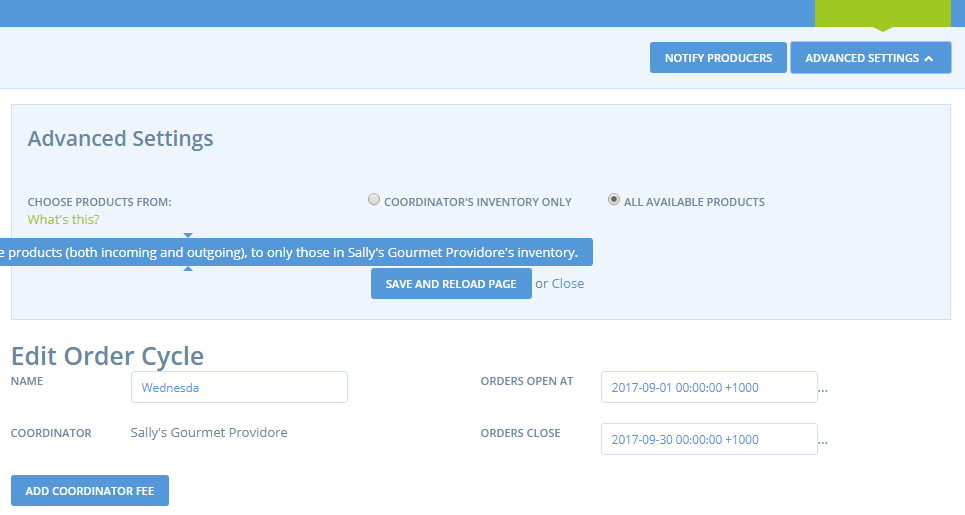
One tooltip on order cycle edit page / "advance settings" can't be seen
Expected Behavior
Tooltip can be read properly
Actual Behavior
Tooltip can't be seen (Myriam just retested in 13inch screen for instance, so "regular" screen)
Steps to Reproduce
- You need to have one order cycle created already, then click on "edit"
- Click on "advance settings" button below the main menu
- On this advance setting zone there is a tooltip below "choose products from", this tooltip is on one line only an can't be read properly.
Context
Retesting to clean and specify old issues.
Severity
S5
Your Environment
PC, Aus production (+ French production), Chrome
Possible Fix
Display tooltip on two lines?
 sstead
All 4 comments
Hi there!
We are first-time contributors and we're hoping to help out with this issue. We noticed that nobody was assigned to it, but if there’s already a solution in progress we are happy to try helping out elsewhere.
Thanks!
 Ecksi
on 2 Jul 2018
Ecksi
on 2 Jul 2018
Hey @Ecksi welcome here! You are most welcome to work on this, no one is working on it at the moment :-) Check the wiki, you'll find everything about how to commit a great PR, etc. Thanks in advance for your contributions!
 myriamboure
on 3 Jul 2018
myriamboure
on 3 Jul 2018
This is free for someone to take!
myriamboure
on 31 Aug 2018
It looks like @tonyr729 has proposed a fix for this in https://github.com/Ecksi/openfoodnetwork/pull/1, but it has been merged into a separate fork of the code. Perhaps it can simply be pulled in?
 jonleighton
on 19 Jun 2019
jonleighton
on 19 Jun 2019
Related issues
 kristinalim
·
3Comments
kristinalim
·
3Comments
 shen-sat
·
3Comments
shen-sat
·
3Comments
 filipefurtad0
·
3Comments
filipefurtad0
·
3Comments
 kirstenalarsen
·
3Comments
filipefurtad0
·
3Comments
kirstenalarsen
·
3Comments
filipefurtad0
·
3Comments
Most helpful comment
Hey @Ecksi welcome here! You are most welcome to work on this, no one is working on it at the moment :-) Check the wiki, you'll find everything about how to commit a great PR, etc. Thanks in advance for your contributions!