Openbci_gui: BUG: Cannot see the numbers,
Problem
I want to be able to see the numbers, but they are black background on the individual channel numbers.
Expected
to be able to read the channel numbers on the time series widget.
Operating System and Version
macOS/Windows/Linux
GUI Version
Latest
Running standalone app
Both
Type of OpenBCI Board
Cyton/Cyton+Daisy/Ganglion
Are you using a WiFi Shield?
Yes
 andrewjaykeller
All 15 comments
https://developer.paciellogroup.com/resources/contrastanalyser/ is a good tool to check colors and accessibility to make sure the largest sample size of people can read the new color choices (and the tool is free!)
 MobileRez
on 17 Jul 2018
MobileRez
on 17 Jul 2018
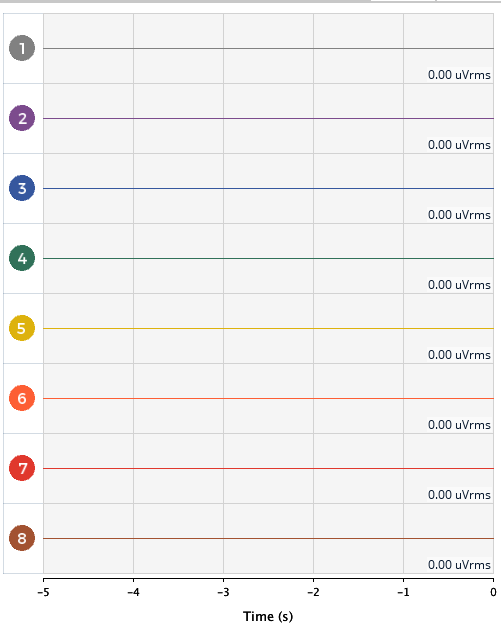
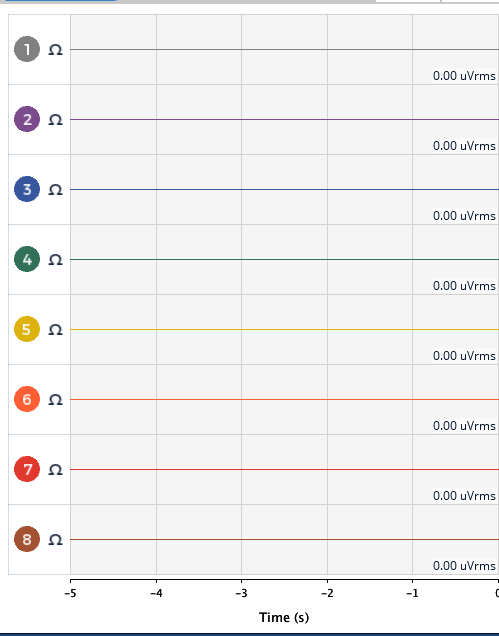
This bug addressed in Development 3.4.0 Alpha 3! https://github.com/OpenBCI/OpenBCI_GUI/pull/362
 retiutut
on 18 Jul 2018
retiutut
on 18 Jul 2018
better but white used with High DPI screens still causes it to be hard to see for channel 5 & 6. 7 is easier then those two. also what does it look like when you shut off the channels or turn on the bendy Caterpillar symbol (ohm?)
MobileRez
on 23 Jul 2018
The current solution is the best option for readability based on my knowledge of special education literacy practices. To increase accessibility, use built-in operating system tools or 3rd party tool (e.g. f.lux Darkroom mode). Try inverting the whole screen colors or using magnification and/or a different screen resolution. There is already an issue regarding High DPI screens: https://github.com/OpenBCI/OpenBCI_GUI/issues/145.
retiutut
on 23 Jul 2018
I deal with neurodiversity and most standards for accessibility only address physical needs (screen readers, blindness, low vision, etc). I am also aware of that open issue, but the current windows 10 scaling fix to solve the channel readability, compresses the actual info and makes it hard to read.
MobileRez
on 23 Jul 2018
It's still a separate issue from what was mentioned here. This minor bug has already been resolved. You are welcome to share results from the contrast analyzer and submit helpful suggestions that would improve the results from the analysis. Try using a monitor resolution of 1920x1080 until https://github.com/OpenBCI/OpenBCI_GUI/issues/145 is resolved.
retiutut
on 23 Jul 2018
ill just keep working with Andrew on the mobile app test I have started with the BIC boards and the WiFi shield, was more asking questions, but it seems ill have to open more tickets and its not worth the extra work when I'm starting off on the losing end.
MobileRez
on 23 Jul 2018
I'm not sure what that has to do with this thread? Please post helpful comments and suggestions.
retiutut
on 23 Jul 2018
Context for why I am even bothering with posting here
I was on the call with Andrew when he opened this, which is why i added my notes above. what i was suggesting/asking about with the selected channels in deactivate state and the ohm button(i think that's its name) (gray background, black text in that sate) since it was not shown in the screenshots above. an answer i was looking for was "that was not part of this fix" or "it was addressed just no screenshot shown" the second comment by the way, would solve any High dpi concerns I have while the fix happens, and will help still when that High DPI fix does go out. the comment just before this one was made in frustration, and seeing that i was getting the feeling that you did not want to spend any more time on this issue, i was attempting to drop it, but since that was not valid...
Back to my original questions which seems to have gotten lost. did you just update only those numbers in their active state, or did this fix the issue of readability when the channels and other buttons are in their deactive state? if not, do I need to open more issues against that, or since they will be related issues to this., can they be addressed in this fix and no need to open related tickets and add the extra administrative tasks?
MobileRez
on 23 Jul 2018
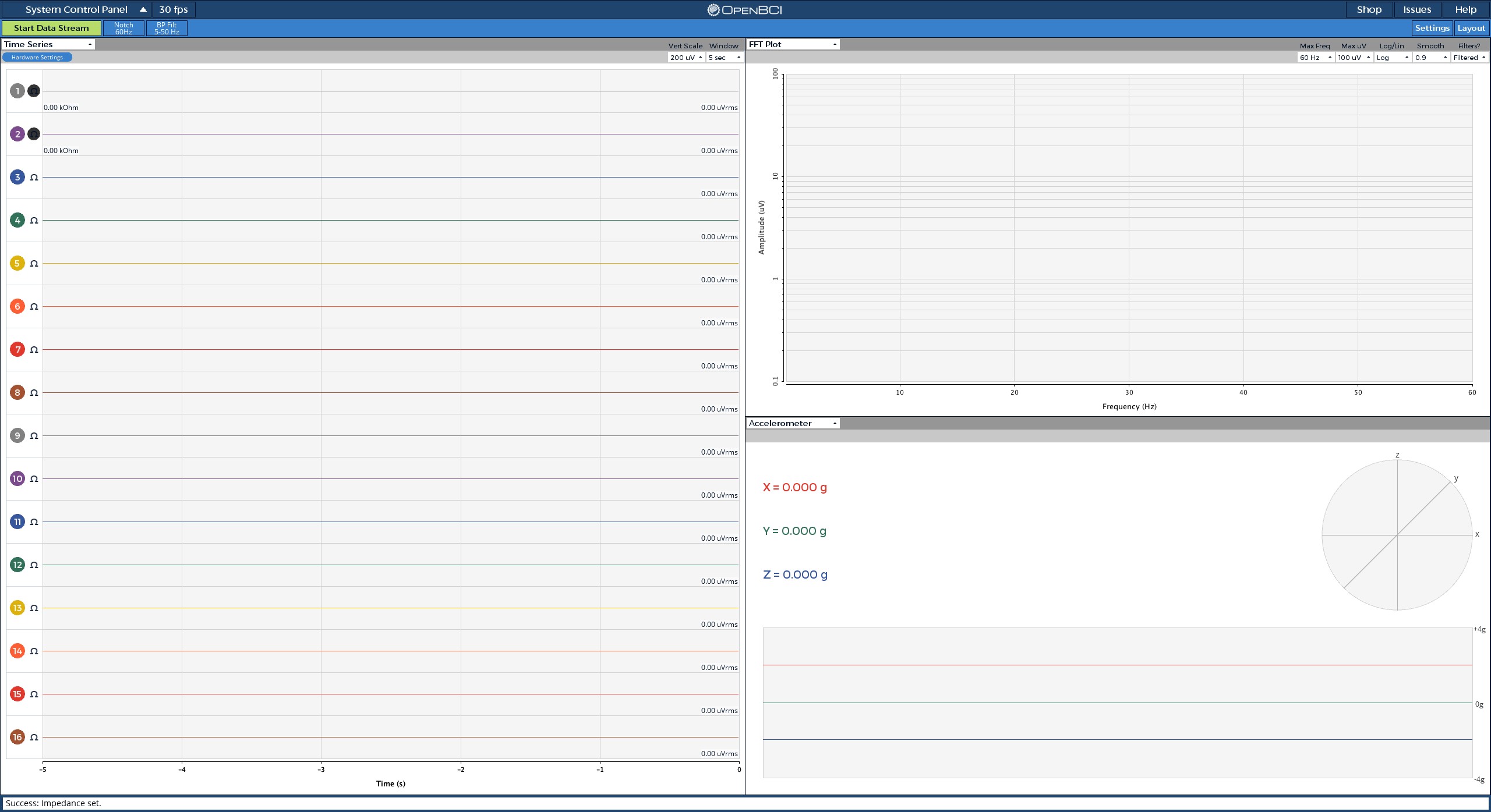
The Omega symbol is a button used to check impedance for each channel on Cyton mode. There is a dedicated widget when using Ganglion mode. _When clicked, it still shows black text on black background ~ gross_. I'll see if I can change the color of the Omega symbol when impedance check is active.
__The channel buttons when deactivated are grey with white text.__ This still works fine using Darkroom mode with f.lux (changes desktop appearance).
The High DPI issue applies to the whole GUI scaling, not the color of the channel settings buttons. Trying not to mix issues so that things get done eventually. Starting to scale the channel activate/deactivate buttons might be a good start to issue https://github.com/OpenBCI/OpenBCI_GUI/issues/145 ... I can see the room to fix the button sizes even on my 2560 x 1440 monitor in full screen.
__Tradeoff: if we make the buttons bigger in time series, we lose space to show EEG data!__
retiutut
on 23 Jul 2018
thank you, if you are able to change that, it will help a lot! If not I understand, at least you looked into it.
The version of the GUI i currently have: (3.3.1) all button text (like the Omega button, channel buttons, etc.) or otherwise is black when deactivated, which is why I ask if you fixed this, great, if not, then let me know and I will. if I am misunderstanding what you are saying i.e. the channel button should not be black, or should be fixed in this next update) let me know.
MobileRez
on 23 Jul 2018
Yes, this stuff is very fixable! On the other hand, scaling the app for larger resolutions takes more time. I hope these changes can increase accessibility for everyone and we can extend the best parts of the GUI, like Time Series, to mobile with similar styles. @MobileRez Do you think the channel button size in 3.3.1 is large enough?
retiutut
on 23 Jul 2018
sorry about the confusion earlier. I'm a little scared porting over some of these features since I am trying to convert this all to .net and everything currently coded for open BCI is in languages i don't know or cant easily port. so... small steps. https://github.com/MobileRez/MobileRezOpenBCI is the repo where the app code will show up once I get it checked in.
MobileRez
on 23 Jul 2018
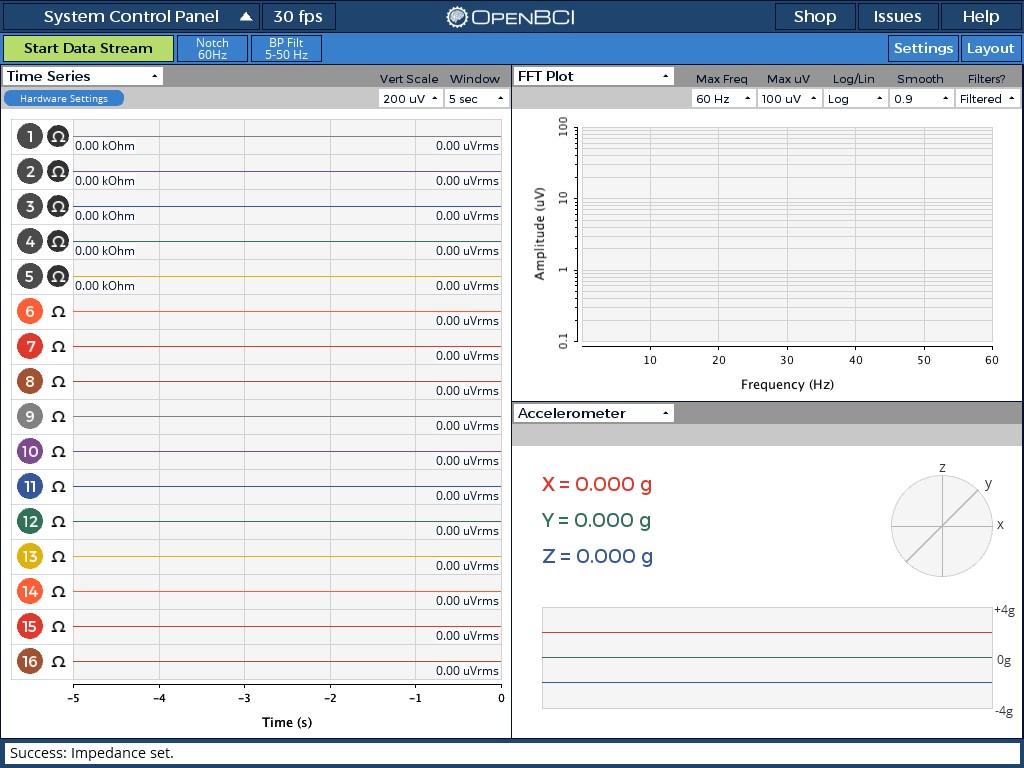
Done! Also, here are the color codes found in WidgetManager.pde. that match the __physical__ ribbon cable:
//Channel Colors -- Defaulted to matching the OpenBCI electrode ribbon cable
color[] channelColors = {
color(129, 129, 129),
color(124, 75, 141),
color(54, 87, 158),
color(49, 113, 89),
color(221, 178, 13),
color(253, 94, 52),
color(224, 56, 45),
color(162, 82, 49)
};
It's used like this in W_TimeSeries.pde:
onOffButton.setColorNotPressed(channelColors[(channelNumber-1)%8]); //Set channel button background colors
onOffButton.textColorNotActive = color(255); //Set channel button text to white
retiutut
on 23 Jul 2018
@daniellasry This issue has been resolved. See above.
retiutut
on 5 Jan 2019
Related issues
 Elisabeth-github
·
3Comments
Elisabeth-github
·
3Comments
 rakansha
·
5Comments
rakansha
·
5Comments
 daniellasry
·
8Comments
daniellasry
·
8Comments
 jps2000
·
8Comments
jps2000
·
8Comments
 coreygo
·
9Comments
coreygo
·
9Comments
Most helpful comment
Done! Also, here are the color codes found in WidgetManager.pde. that match the __physical__ ribbon cable:
//Channel Colors -- Defaulted to matching the OpenBCI electrode ribbon cable
color[] channelColors = {
color(129, 129, 129),
color(124, 75, 141),
color(54, 87, 158),
color(49, 113, 89),
color(221, 178, 13),
color(253, 94, 52),
color(224, 56, 45),
color(162, 82, 49)
};
It's used like this in W_TimeSeries.pde:
onOffButton.setColorNotPressed(channelColors[(channelNumber-1)%8]); //Set channel button background colors
onOffButton.textColorNotActive = color(255); //Set channel button text to white