Open-shell-menu: All Programs/Administrative Tools
I would like to see All Programs not display the Administrative Tools for standard local user accounts. I have seen where hiding the start menu folders or changing permissions will accomplish this, but that also changes it for local Administrator users.
Please note that I'm not talking about the setting under Customize Start Menu.
 KCEOC
KCEOC
All 6 comments
I understand what you're stating but, I would like to know exactly what you're referring to specifically (please excuse my ignorance) as the "Administrative" reference can apply to a few items/topics and I prefer not to assume anything.
Thank you! :-)
~Ibuprophen
 Ibuprophen
on 29 Aug 2019
Ibuprophen
on 29 Aug 2019
Sure, understood...
I'm trying to replicate an things they way they used to be before Microsoft turned their start menu into a marketing machine. Here's a screenshot of the area I'm referring too,
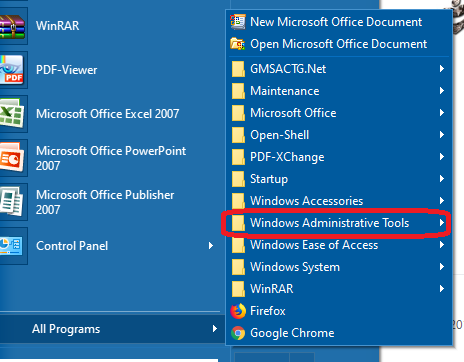
Windows XP and 7 did not display Administrative Tools for users outside the Administrators group.
Really appreciate your help!
KCEOC
on 29 Aug 2019
Thanks for your response. I'm understanding what you're referring to now but, what are you ultimately/specifically asking?
why it's there?, It doesn't work?, How to remove it?, Etc...
Thanks! :-)
~Ibuprophen
Ibuprophen
on 29 Aug 2019
This is not controlled by Classic/OpenShell. In the future - Google is your friend. :open_mouth:
Two ways to disable:
Methos 1 - GUI/Manual (per user):

Method 2 - Automatic (per user or load their hive or via GPO or via logon script):
reg ADD "HKEY_CURRENT_USER\Software\Microsoft\Windows\CurrentVersion\Explorer\Advanced" /V Start_AdminToolsRoot /T REG_DWORD /F /D 0
reg ADD "HKEY_CURRENT_USER\Software\Microsoft\Windows\CurrentVersion\Explorer\Advanced" /V StartMenuAdminTools /T REG_DWORD /F /D 0
 CollinChaffin
on 30 Aug 2019
CollinChaffin
on 30 Aug 2019
Thank you very much @CollinChaffin!
@KCEOC, if the previous post does work out for you, please close this issue as being resolved.
Thank you very much! :-)
~Ibuprophen
Ibuprophen
on 30 Aug 2019
I'm just going to close this issue as a resolution was clarified by member contribution.
If you have this issue after trying what @CollinChaffin had provided, please open a new issue with a detailed explanation regarding it.
Thank you very much for your time and understanding with this! :-)
~Ibuprophen
Ibuprophen
on 11 Sep 2019
Related issues
 nyanpasu64
·
22Comments
nyanpasu64
·
22Comments
 amartini
·
46Comments
amartini
·
46Comments
 coddec
·
25Comments
coddec
·
25Comments
 Braxusz
·
23Comments
Braxusz
·
23Comments
 buddybu
·
20Comments
buddybu
·
20Comments
Most helpful comment
This is not controlled by Classic/OpenShell. In the future - Google is your friend. :open_mouth:
Two ways to disable:
Methos 1 - GUI/Manual (per user):
Method 2 - Automatic (per user or load their hive or via GPO or via logon script):