Open-shell-menu: Not working properly on Windows Insider build
I will attach screenshots shortly, but it works initially, but eventually it does not display the entire menu, and then a little while after that it stops responding completely.
Has anyone else experienced this?
 buddybu
All 20 comments
I got a taste of what that looks like in the classic-shell forums and frankly that's quite worrying. I hope it's simply a bug. I am really not looking forward learning how to re-create the menu entirely if they indeed removed the API for that.
The fact it displays correctly at least once is giving me hope.
From http://www.classicshell.net/forum/viewtopic.php?p=35875&f=17#p35875:
Win7 Style:

Classic 2 columns:

Classic 1-column

 XenHat
on 20 Jun 2018
XenHat
on 20 Jun 2018
I got a taste of what that looks like in the classic-shell forums and frankly that's quite worrying. I hope it's simply a bug. I am really not looking forward learning how to re-create the menu entirely if they indeed removed the API for that.
Yes... Hopefully it's bug.... But based on feedbacks from forum, looks like other alternatives also have some weird issues..... so.... It can be worse... but I don't have hard data on that ❓ ❓
Need to be figured out...
 coddec
on 20 Jun 2018
coddec
on 20 Jun 2018
Original of #18
XenHat
on 30 Jun 2018
From dupe:
@Matjaz65
Same issue in 17704.
@vultureman
I've been on fast ring release for a few months - no issues with classic start.Just broke today - fails to come up, or only the bottom inch of the menu comes up. Restart does not resolve it.
Newest version as of today is Build 17692.rs_prerelease.180609-1317
Note - I'm not expecting a fix from this, as anyone running fast ring should expect stuff to break. I'm just giving you a heads up that it's going to probably break again with the next major consumer release, as the original author expected, and that you might be able to get ahead of it by looking at the most recent fast ring release.
XenHat
on 30 Jun 2018
Unfortunately this is not a bug within CS. Here is why it is not playing nice:
If you read Winaero regularly, you might be familiar with the awesome Classic Shell application. It became famous thanks to an excellent Start menu implementation with several styles from classic Windows 95-like to modern Windows 7-like. Classic Shell also provides a number of very useful fixes to significantly improve Explorer's behavior and revive its must have features like customizable toolbars or status bar size.
The latest Windows IP 17704.180623-1611 and the previous version do not like Classic Shell. You can install it, however, it will work ONCE and then it will do nothing. If you have two monitors like myself, you can switch between both start buttons and go back and forth as it seems to reset something, however, you will be presented with a menu that is only a few centimeters tall.
NOTE: Restarting 'explorer.exe' will allow you to use it ONCE. You can repeat this process to get it to run 1/2 ass LOL if you wish.
The reason why it happens is very simple: Microsoft needs your feedback on the Start menu they implemented from scratch in Windows 10. Also, they want you to test the Continuum feature which will be enabled out-of-the-box in upcoming builds. The Windows team wants to learn your use cases for the Start menu and what they did wrong in the current implementation of the menu.
But since the Classic shell app replaces the Start menu, they will not be able to collect the required data to change bits. So that's our guess why Microsoft is preventing you from installing third party menu apps.
> If you cannot imagine your life without the Classic Shell menu or other features it offers, here is a workaround to install Classic Shell. Just rename its installer and use some random name for the installer file, i.e. name it abcdef.exe. Then launch the renamed installer and Classic Shell will be installed. That's it, you are done.
Now...I have not tried that re-naming idea just above so I cannot report on that.
Tim
ARS N9NU
P.S. For those who cannot wait, download 'Start10'. It is another CS type app. I believe it's payware however.
 n9nu
on 2 Jul 2018
n9nu
on 2 Jul 2018
Wow, that got blacklisted quickly.
Renaming the menu executable did not solve the issue, I will try with the installer.
XenHat
on 3 Jul 2018
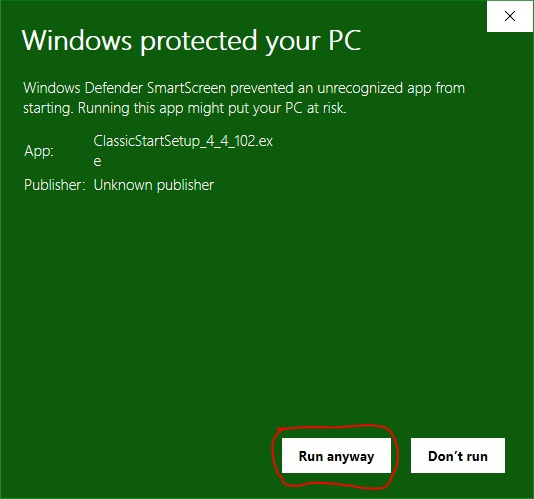
Renaming the installer did not work. I tried to first rename the downloaded executable, but that didn't work. Then I started the installer, went to C:ProgramData, found the CS MSI file, made a copy, and renamed it to CSS.MSI. I then cancelled out of the original installer and started the CSS.MSI installer. It installed as expected, but the problem remains. When you run the original downloaded EXE, you will get a dialog that wants to prevent you from running the executable.
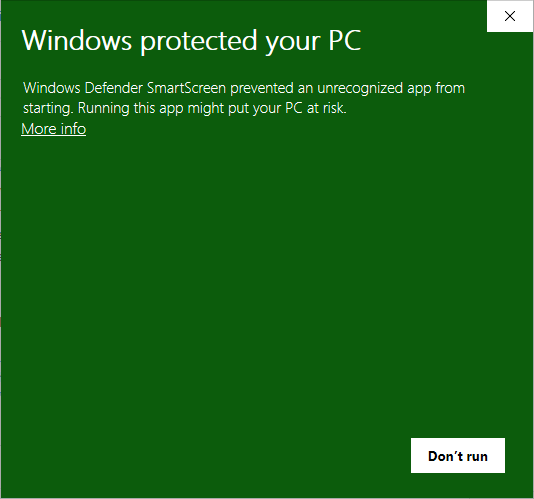
You can click the More Info link in the text, and another dialog will appear which will allow you to select "Run Anyway".
buddybu
on 4 Jul 2018
That looks like an NAS block from Windows Defender... Oh Boy...
I knew that renaming it wouldn't work because the NAS isn't looking at the file name nor the extension. It's a challenge to explain.
I'm familiar with this from a little while ago and, it would take me a little bit to type out a possible solution, so I had decided to locate a comparable one on the web.
See if the following helps stop the NAS block...
https://www.tekrevue.com/tip/windows-defender-nas/
I'm not a fan of Windows 10 in general and seeing this brought back a few challenges I had to overcome in the past regarding the NAS Warning Block.
If this works, the next step would be to figure out a way to be able to bypass where the NAS is detecting the installer and go from there.
~Ibuprophen
 Ibuprophen
on 5 Jul 2018
Ibuprophen
on 5 Jul 2018
The problem is not with installing Classic Shell. It installs flawlessly.
The problem is that once installed, the start menu works just the first time it's used. The second time, only the top half appears. All subsequent times, nothing appears.
I just had the problem after an upgrade to build 17692. This is the slow ring, not the fast ring. The slow ring is supposed to be far less risky, and so far more people use it and will be affected.
Given the symptom, it seems that there is something wrong with the screen coordinates. As if the ones used by the Start Menu to display its window were drifting slowly off of the actual screen.
 JFLarvoire
on 5 Jul 2018
JFLarvoire
on 5 Jul 2018
@JFLarvoire, I took a look at my post and did realize that I could have worded it a bit differently/better on a few areas.
I apologize for this...
The Windows Defender NAS Block is, in fact, regarding Software that IS installed and NOT regarding the installation itself.
The information i had provided is, in fact, correct for this situation with this minor clarification.
I hope that this helps... :-)
~Ibuprophen
Ibuprophen
on 5 Jul 2018
Using the NAS idea, I added an exclusion to Windows Defender for the ClassicStart folder in Program Files, and the problem remains the same. Is there another folder or specific file(s) that may need to be excluded?
buddybu
on 5 Jul 2018
@buddybu , Try Adding the Following.
I don't believe that the Second option applies but, it wouldn't hurt is you had added it (your choice).
1: %LocalAppData%ClassicStart
That is the Variable Shortcut to the following Directory Path.
C:UsersYourProfileNameAppDataLocalClassicStart
[Replace the "ProfileName" With whatever your Profile/User Name is on your PC...]
DON'T use BOTH the Variables AND the Directory Paths... Use either/or!!!
2: %AppData%ClassicStart
That is the Variable Shortcut to the following Directory Path.
C:UsersYourProfileNameAppDataLocalClassicStart
[Replace the "ProfileName" With whatever your Profile/User Name is on your PC...]
C:UsersMongoAppDataRoamingClassicStart
DON'T use BOTH the Variables AND the Directory Paths... Use either/or!!!
~Ibuprophen
Ibuprophen
on 5 Jul 2018
I tried both paths, and the same result. :( No luck. I am interested in the fix referenced by @ge0rdi. Does this fix correct the issue on the latest insider build from the fast track?
buddybu
on 5 Jul 2018
I just pulled the branch and change proposed by @ge0rdi and built it. It is now working as expected. I have attached the zip file to this comment of the setup.
buddybu
on 5 Jul 2018
This new build fixes the problem on my system (build 17692).
Thanks a lot !!!
JFLarvoire
on 5 Jul 2018
@XenHat & @coddec...
I believe that (even though they're 2 separate issues/items regarding this development) the following issue and this one affects each other.
https://github.com/passionate-coder/Classic-Start/issues/28
I would like to highlight my last comment there made earlier as well...
Thank you very much for your time and understanding! :-)
~Ibuprophen
Ibuprophen
on 5 Jul 2018
@JFLarvoire You should go to ge0rdi's fix and add a comment that this seems to have corrected your problem.
buddybu
on 5 Jul 2018
Latest binary with fix (dev version):
https://github.com/passionate-coder/Classic-Start/releases/tag/v4.4.109-dev
coddec
on 6 Jul 2018
I have downloaded this build and so far so good. I am testing with the latest insider release. I will update after a couple days of usage.
buddybu
on 6 Jul 2018
After using build 109 on the latest insider build, it is working just peachy. Closing this issue.
buddybu
on 8 Jul 2018
Related issues
 josephpstich
·
4Comments
Ibuprophen
·
3Comments
josephpstich
·
4Comments
Ibuprophen
·
3Comments
 indyjonny
·
3Comments
indyjonny
·
3Comments
 ImZary
·
3Comments
ImZary
·
3Comments
 Hasnep
·
3Comments
Hasnep
·
3Comments
Most helpful comment
After using build 109 on the latest insider build, it is working just peachy. Closing this issue.