Open-event-frontend: Organizer Invoice Generation HTML to PDF template
We need to generate a PDF invoice using an html template. Please see the following that we can use as a basis: https://s3-eu-west-1.amazonaws.com/htmlpdfapi.production/free_html5_invoice_templates/example1.zip
- Use system fonts
- Use system website name
Use the following fields:
- Product: {Event Name}
- Description: Plan: {Plan e.g. Early Access Plan}, Ticket Sales Period: {1st Month - Last Day Month}, Sales {Amount Earned}
- Fees: {Fees owed}
- Tax: {Tax} _(currently show NA)_
- A finance charge of 5% will be made on unpaid balances after 30 days.
No need for:
- Qty
- Price

 mariobehling
All 17 comments
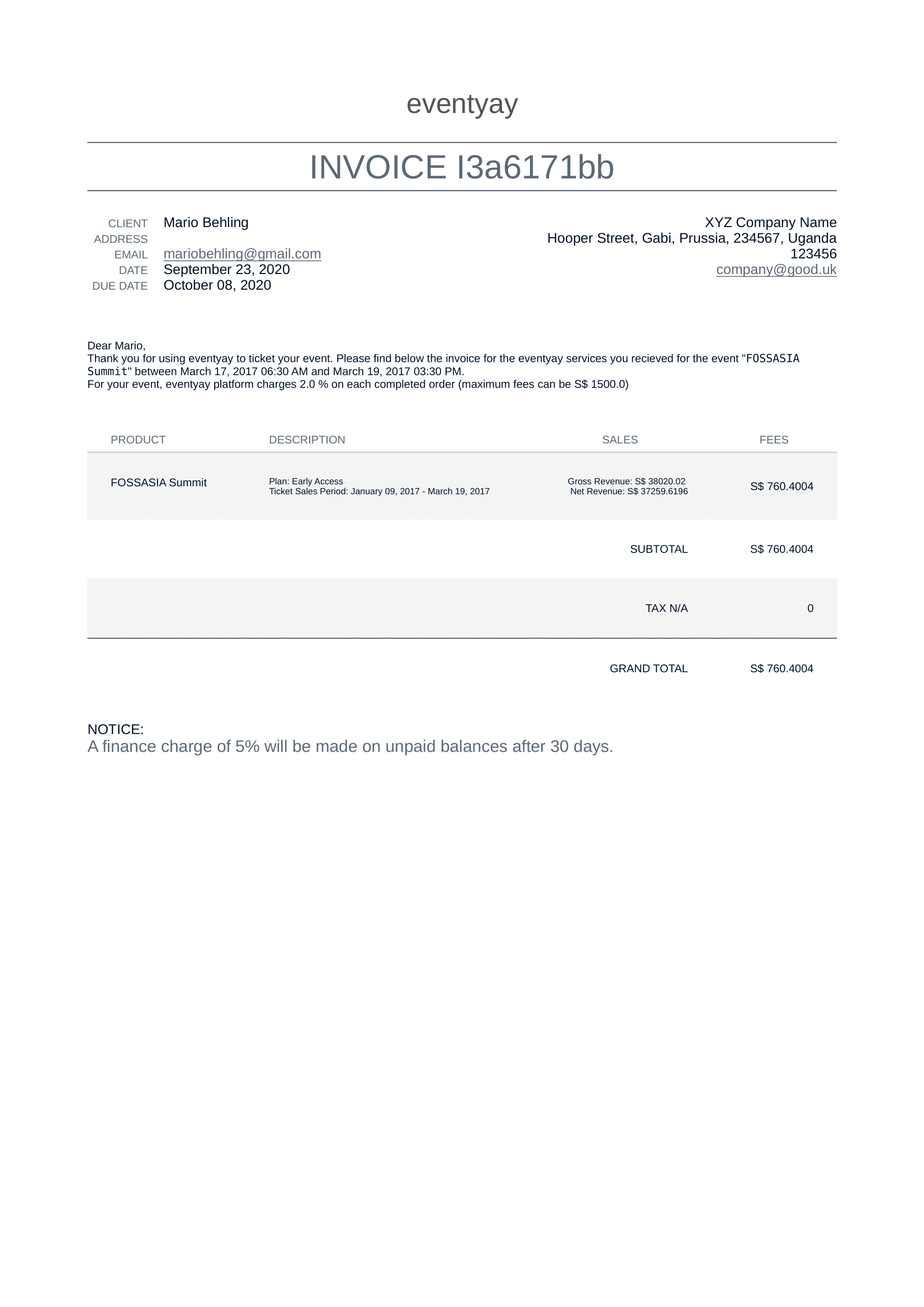
@mariobehling Please check if this is fine
 iamareebjamal
on 23 Sep 2020
iamareebjamal
on 23 Sep 2020
There is a difference between the invoice email and the actual invoice. Therefore the text does not need to be part of the invoice itself.
- No need to the text above the table
- No need for "Sales" column
- Description column should include "Amount Earned:..."
- I dont understand what is Gross Revenue and Net Revenue in our system
- Why does Net revenue has the format xxxx.xxx? I also see this appearing on some events now. Why do we calculate more than 2 digits behind the dot? Where does this calculation come from?
- Even if tax is 0 please show S$0.00
mariobehling
on 23 Sep 2020
Gross Revenue is total amount earned. Net revenue is gross - fee
Why do we calculate more than 2 digits behind the dot? Where does this calculation come from?
It reports as much digits as it needs to precisely show the sum of all amounts, I'll round it to 2 digits
iamareebjamal
on 23 Sep 2020
Ok, then please only show "Gross Revenue" but instead use "Amount Earned:.." and the fee is shown in the "Fees" column.
mariobehling
on 23 Sep 2020
According to what I see after checking other services in detail, they usually give 30 days as a due date. So, we should also follow that. Therefore please change due date to 30 days.
mariobehling
on 23 Sep 2020
I just added payment info into my account at https://eventyay.com/account/billing/payment-info
We also need to show a tax ID for the consumer/organizer as required by tax offices in many countries.
mariobehling
on 23 Sep 2020
OK
iamareebjamal
on 23 Sep 2020
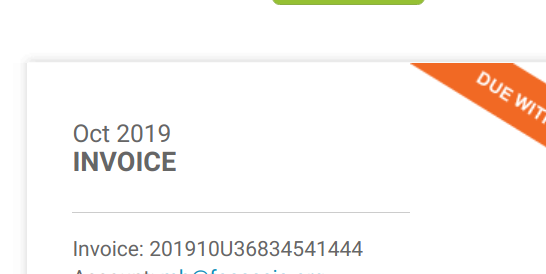
Here is the invoice format that we can use for now. It is inspired by others:
202009U-00001
Invoice Format: YYYYMMU-Running-Invoice-Number
mariobehling
on 23 Sep 2020
@mariobehling Showing the auto incrementing ID in PDF will not be possible as we only get the new ID once we save the invoice in the database, and we don't want to save the invoice in database before generating PDF, because if due to any error, the PDF is not generated, then the invoice will be in an inconsistent state. We can use a randomly generated identifier instead of running invoice number
iamareebjamal
on 23 Sep 2020
The problem is that most companies are required by law to have invoices that increment. That means in their books they need to have an invoice xxx001, xxx002, xxx003 etc. and it is not possible that they skip invoice xxx002. How to deal with that?
mariobehling
on 23 Sep 2020
Will think of something. Implementing other things for now so that this does not block other progress
iamareebjamal
on 23 Sep 2020
Even with DB autoincrementing keys, it may skip a number due to rollback of transactions, so I'm not sure how they implement it. Will search about it.
iamareebjamal
on 23 Sep 2020
Rollback meaning e.g. if we have to reimburse or revert a transaction?
In such a case a new invoice would have to be created which would be negative. Not sure if that is what you mean.
mariobehling
on 23 Sep 2020
No, I meant if there was a DB transaction error (technical), databases are rolled back to revert the changes made, this can lead to skipped numbers
iamareebjamal
on 23 Sep 2020
Reference on why it is complex to reliably generate unique incrementing numbers without a gap in a multi process environment: https://stackoverflow.com/questions/31751744/spring-jpa-with-hibernate-fiscal-sequence-generation
https://stackoverflow.com/questions/14215894/how-to-ensure-gap-free-and-safe-invoice-number-generation-legal-issues/35941522
iamareebjamal
on 23 Sep 2020
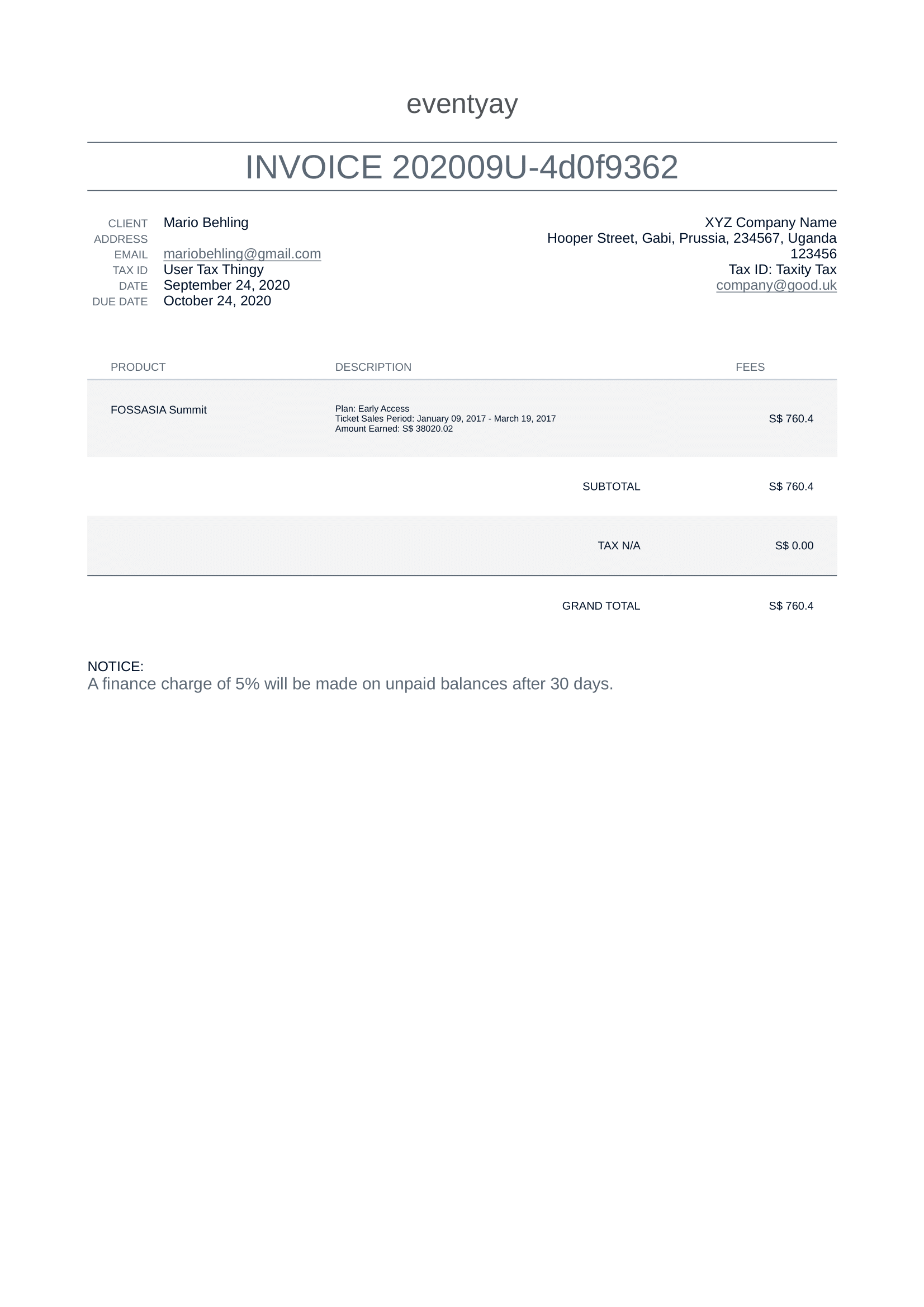
This is final PDF:
iamareebjamal
on 24 Sep 2020
Merged as PR was getting large. Please reopen if more changes are required
iamareebjamal
on 24 Sep 2020
Related issues
 hpdang
·
5Comments
mariobehling
·
3Comments
mariobehling
·
3Comments
mariobehling
·
3Comments
hpdang
·
5Comments
mariobehling
·
3Comments
mariobehling
·
3Comments
mariobehling
·
3Comments
 dilpreetsio
·
4Comments
dilpreetsio
·
4Comments