Oni: `d` in file tree deletes the whole project
I accidentally pressed d on the container project on the file tree and now the entire project is deleted. Does oni keep deleted files anywhere so I can recover from there?
 aeruhxi
All 15 comments
Hello and welcome to the Oni repository! Thanks for opening your first issue here. To help us out, please make sure to include as much detail as possible - including screenshots and logs, if possible.
![oni-bot[bot] picture](https://avatars.githubusercontent.com/u/31161891?v=4&s=40) oni-bot[bot]
on 16 May 2018
oni-bot[bot]
on 16 May 2018
If it's a reversible operation you can press u to undo the deletion.
Might be a good idea to prompt the user when deleting on folders though, this is a pretty delicate thing to happen with a single keystroke. Limit to the root directory, or configure if wants to be prompted on deletion if a nuisance for all folders.
 badosu
on 16 May 2018
badosu
on 16 May 2018
I think it would be a good idea to use trash instead of hard delete with module like https://github.com/sindresorhus/trash
aeruhxi
on 16 May 2018
@abs-zero we actually don't hard delete with the d command, what it actually does is move the folder to the operating systems temp dir under a folder called oni_backup and pressing u should undo it but if the session is over then undoablity is lost but as for the folder it should be in your tempdir.
I didn't special case the container folder since I was sure what ppl's use cases would be but given its the root maybe a notification to get confirmation before deleting in that case would be best.
 akinsho
on 16 May 2018
akinsho
on 16 May 2018
Oh.. But why does it clear oni_backup after I quit oni?
aeruhxi
on 16 May 2018
Ahh just had a brief look through the code there is a line where it clears the directory when we return to on coming back to oni i.e. on startup, tbh its a remnant from the initial implementation I actually didn't realise that line was still there, I'll open a PR to remove it as we shouldn't be clearing it 👍
Edit: Also @CrossR suggested in the initial PR allowing user to specify the backup dir which slipped through the cracks so will add an option to allow a user to specify the backup dir as "explorer.backupDirectory": "yourChoice" | null (we use the tmp dir) | "trash" we use the trash dir
akinsho
on 16 May 2018
@Akin909 Might be a good idea to use oni_backup_<timestamp> for the backup folder name as two reversible operations might corrupt the backup if they move files to the same folder, unless you already have a system for that case.
badosu
on 16 May 2018
Reading through the docs for trash @abs-zero I think that option would unfortunately mean that delete actions can't be undone by oni because of the way the trash dir works cross platform so might include it in this PR with the caveat that it breaks undo functionality and leave the default as the oni strategy so users have access to undo as default.
Re. the timestamps I actually think that possibly why I left that line in there @badosu as brute force way of preventing conflicts the issue with using that strategy would be that we'd have to persist the backup dir with time stamps and check those which I think would result in a much bigger pr as it doesn't do anything close to that at the moment
As of right now its a brute force strategy to overwrite duplicates, I could look at time stamping down the line but I'd like to get a fix for this so we aren't deleting directories irreversibly as that could be catastrophic if not version controlled etc.
Also when you say reversible operations corrupting what did you have in mind there (I'm concerned re. situations I hadn't considered)
akinsho
on 16 May 2018
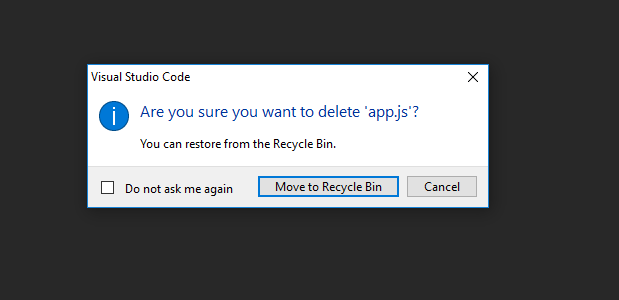
I think we should add confirmation box before deleting anything. I can see situation where user thinks they navigated out of file browser, presses d and is confused/angry as to what just happened.
For reference vscode asks for confirmation:
 dkns
on 16 May 2018
dkns
on 16 May 2018
We could do something like that, it initially occurred to me but tbh I personally am really not a fan of notifications and already feel like the explorer is a little spammy as it is but definitely as something under a config flag that is set to default to show the message and then anyone else who's a fan of minimalism at least has the option to not have it appear
akinsho
on 16 May 2018
In vscode if you tick 'Do not ask me again' it stops bugging you and deletes straight away. So we could have that along with config option (which would be basically the same setting). If you set 'deleteWarning' to false in config it doesn't show you confirmation message and also if you tick 'Do not ask me again' it sets 'deleteWarning' in your config to false.
dkns
on 16 May 2018
@dkns atm our notifications API doesn't actually include a checkbox but it might be useful to have for this sort of functionality in which case I might look at that specific thing as a side PR before or after #2214
akinsho
on 16 May 2018
FWIW NERDTree makes you type yes at the prompt to delete a directory. I personally think this is a great approach as you really do not want to accidentally delete an entire directory.
 parkerault
on 17 May 2018
parkerault
on 17 May 2018
@Akin909 Re: the corruption issue..
Suppose you remove a folder with some files, create a folder with the same name but different files and remove it.
Now since you have the same directory for backup, it will contain all files that existed, unless you're removing the folder's content with each operation.This is anologous for files with identical names.
Also helps with archiving backups, so you are sure of which folders contains the backup for a particular operation via timestamp.
badosu
on 17 May 2018
Seems like a good case to have a prompt that could be reused for https://github.com/onivim/oni/issues/264 as well.
badosu
on 21 May 2018
Related issues
 Canop
·
3Comments
Canop
·
3Comments
 zxiest
·
3Comments
badosu
·
3Comments
zxiest
·
3Comments
badosu
·
3Comments
 magopian
·
3Comments
magopian
·
3Comments
 Siilwyn
·
3Comments
Siilwyn
·
3Comments
Most helpful comment
Ahh just had a brief look through the code there is a line where it clears the directory when we return to on coming back to oni i.e. on startup, tbh its a remnant from the initial implementation I actually didn't realise that line was still there, I'll open a PR to remove it as we shouldn't be clearing it 👍
Edit: Also @CrossR suggested in the initial PR allowing user to specify the backup dir which slipped through the cracks so will add an option to allow a user to specify the backup dir as
"explorer.backupDirectory": "yourChoice" | null (we use the tmp dir) | "trash"we use the trash dir