Oni: After config.tsx is changed. config.js is not re-generated
After working for a while, changes to config.tsx no longer regenerates config.js. Tried restarting, stripping down config.tsx, touching config.js, etc. It started working again after I chose Preferences > Edit Oni config (which also help verify that I was editing the right copy of config.tsx.
Can't reproduce anymore.
v0.3.1
 hboon
hboon
All 21 comments
Can reproduce again on master (v0.3.2 / 26d015cd074fdc4f02e597725bfef9e433ad3c70).
This time Preferences > Edit Oni config doesn't fix it.
hboon
on 27 Mar 2018
@hboon Can you still reproduce this error on v0.3.4?
 badosu
on 21 May 2018
badosu
on 21 May 2018
@badosu Yes, I can reproduce it in v0.3.4, download from the Releases page.
hboon
on 21 May 2018
@hboon Are you sure there are no compilation issues in your config.tsx file?
If backup your current config and start a new one, does the new one not change the configuration?
badosu
on 21 May 2018
@badosu Here's what I just tried:
- Open config.tsx and config.js in Oni itself.
- Change config.tsx to:
import * as React from "/Applications/Oni.app/Contents/Resources/app/node_modules/react"
import * as Oni from "/Applications/Oni.app/Contents/Resources/app/node_modules/oni-api"

export const activate = (oni: Oni.Plugin.Api) => {
    console.log("config activated57")
}
- Switch to the config.js tab (it's not refreshed. I originally have
vim.setting.autoreadenabled) - Run:
bd - open config.js again and it's still not refreshed
I repeated the above after starting a new Oni window (since most of the config has been removed, this is pretty much a blank slate?) with the same result.
Maybe I missed something obvious?
hboon
on 21 May 2018
Are you editing ~/.config/oni/config.tsx?
badosu
on 21 May 2018
Yes
hboon
on 21 May 2018
I find sometimes that to get the transpilation to work I have to got via the QuickOpen menu to Edit User Config and then make the change in the split and save it.
Indicative of a bug no doubt, but maybe an interim solution?
 akinsho
on 29 May 2018
akinsho
on 29 May 2018
I just tried that (QuickOpen) and Preferences > Edit Oni Config and while the file is opened, editing it doesn't update config.js.
It's no biggie for now though, I'm not making much changes to my configuration. So if no one else is observing this issue, maybe it's just me.
hboon
on 30 May 2018
@hboon can you open Help > Developer Tools before you try to save your config.tsx file and see if it generates any error messages when you save?
It should output the following if successful:

 parkerault
on 30 May 2018
parkerault
on 30 May 2018
When I move to a tab which has config.tsx open, I see this in the console (set to verbose):
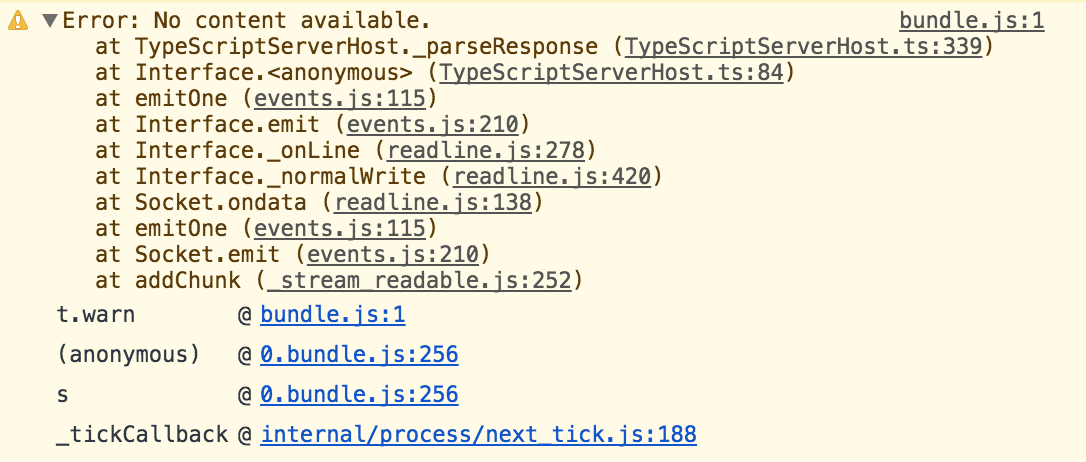
I see something similar (if not exactly the same) when I move to tab with config.js open. When I save config.tsx, nothing else gets logged to the console.
When I save config.js instead, console.log() calls in there get called correctly.
I see different messages if I go to a .swift file or .h. Something about "No language server registered". So it seems to be working otherwise.
At some point I had moved the config files from (I think) ~/.oni/ to ~/.config/.oni/. And the transpiling probably stopped working completely sometime after that. Might be related?
hboon
on 31 May 2018
I can reproduce on 0.3.4 from releases and on master as well
 elentok
on 18 Jun 2018
elentok
on 18 Jun 2018
So, is there any workaround till fix is in place?
 iamkarlson
on 20 Aug 2018
iamkarlson
on 20 Aug 2018
Getting the same issue. The language server also complains it cannot find react and oni-api modules. I am on v0.3.7-beta3.
 Towerism
on 9 Oct 2018
Towerism
on 9 Oct 2018
I figured out the problem at least for me: My ~/.config/oni directory is symlinked to my dotfiles repo. If I remove the symbolic link and copy over my config.tsx it will compile just fine.
EDIT: If only my config.tsx is symlinked, auto-compilation works! Auto-completion seems to fail only when the entire oni config directory is symlinked. I use GNU stow for symlinking files from my dotfiles repo. Stow's behaviour is to symlink the entire oni directory if it did not already exist. Therefore my solution was to remove the symlinked oni directory, start up oni so that it creates the directory again, and run stow which will only symlink the config file.
Towerism
on 24 Oct 2018
FWIW, My ~/.config/ is symlink-ed to a folder in my Dropbox.
hboon
on 24 Oct 2018
@hboon My workaround probably won't work for you. The issue still stands that oni fails to compile config.tsx properly when the ~/.config/oni directory (and therefore any of its parent directories) is symlinked.
Towerism
on 24 Oct 2018
@Towerism that's good though, a least if it's reproducible, someone can fix it :)
hboon
on 24 Oct 2018
@hboon and @Towerism one option as a workaround is to set an ENV variable in your .bashrc or .zshrc which is $ONI_CONFIG_FILE if the variable is present oni will use that as the path to your config, let me know if that helps at all, will look into getting it to follow symlinks when I (edit: or someonelse) has a chance to look into it get a chance (for reference the issue is somewhere along this path
akinsho
on 24 Oct 2018
@Akin909
Neither of this in ~/.profile helped for me:
export ONI_CONFIG_FILE=/Users/hboon/Dropbox/backup/dotconfig/oni/config.tsx
export ONI_CONFIG_FILE=/Users/hboon/Dropbox/backup/dotconfig/oni/config.js
I verified with !echo $ONI_CONFIG_FILE in Oni. Tried on 0.3.2 though. Are you expecting it to work with 0.3.2? (It's been a while, but I can't remember why I tried a few versions after 0.3.2 but stuck to it).
hboon
on 24 Oct 2018
@Akin909 This worked for me: export ONI_CONFIG_FILE=~/.dotfiles/oni/.config/oni/config.tsx.
@hboon I restarted my X11 session to make sure that the environment variable would be picked up by oni.
EDIT: This proved not to be reliable. Went back to my original workaround.
Towerism
on 24 Oct 2018
Related issues
 LucianBuzzo
·
3Comments
LucianBuzzo
·
3Comments
 bryphe
·
3Comments
bryphe
·
3Comments
 grz8
·
3Comments
grz8
·
3Comments
 zxiest
·
3Comments
zxiest
·
3Comments
 TalAmuyal
·
3Comments
TalAmuyal
·
3Comments