Using the updated release 0.2.8-1 on Arch, for some reason I can't navigate tabs using gt and gT
 badosu
All 24 comments
This might be related to #586, where the tabs opened from File > Open File will work as expected, but any opened with the quick open toolbar are opened in a new buffer rather than a new tab.
Oni opens both tabs and buffers in the Oni tabline, meaning you do get some odd functionality, where gt and gT does work for some tabs and then skips others. The quick open (at least in the version I'm running), looks like it needs updating to always open via tabs rather than in a buffer.
Its a bit of a confusing user experience, since in vim language you have a mix of buffers and tabs, but the in-Oni experience looks to just be tab based.
 CrossR
on 23 Aug 2017
CrossR
on 23 Aug 2017
This happens if I use :e or :tabnew to open a file as well as using the Fuzzy Finder.
badosu
on 23 Aug 2017
Yep, by default, we're showing the buffer list in the tabline (so you'd need to use :bprev and :bnext, by default).
I believe the issue may be related to that - there is a setting to switch to use 'vim tabs' - tabs.showVimTabs, which defaults to _false_
I've gone back and forth on this default - some discussion here: #591, #602 It has the advantage of being similiar in behavior to other editors like Atom, VSCode, but the disadvantage of being confusing to Vim users who have a tab-based workflow.
So I guess the first question is - does switching tabs.showVimTabs to true behave as you'd expect? If not, it could mean there is some other issue impacting the behavior.
 bryphe
on 23 Aug 2017
bryphe
on 23 Aug 2017
I'll check what are the occasions where it breaks because I noticed sometimes it works as expected.
badosu
on 23 Aug 2017
Ok, it seems like Fuzzy Finder is the culprit.
To reproduce the bug enter in a git versioned project folder, open two files with :e or :tabnew and check that gt works. Open a new file with the Fuzzy Finder and see that now you can only navigate the amount of tabs - 1.
badosu
on 23 Aug 2017
Interesting, thanks for the detailed repro, @badosu ! Yes, in most places, when we use the 'Open File' gesture we use :tabnew (basically open a file in a new tab), but it seems like in QuickOpen we use e:, which opens in the existing tabs. So the buffer is getting opened in one of the existing tabs.
I think it'd be reasonable to use :tabnew for this scenario in QuickOpen, if there is already an opened file - that would help alleviate some of the confusion here.
bryphe
on 24 Aug 2017
One could expect on
badosu
on 24 Aug 2017
I think it'd be reasonable to use :tabnew for this scenario in QuickOpen, if there is already an opened file - that would help alleviate some of the confusion here.
That sounds like the most sensible option. We could also just expose the choice via an option. Defaulting to tabs I think makes the most sense since any non-vim users or vim newbies will find that more intuitive. If instead they did want to change it, we could have an option to change the default open action from tab to buffer or v/h splits or similar.
CrossR
on 24 Aug 2017
@extr0py I understood now what you mean by tabs and buffers, it seems like the tabs are not an actual replacement of vim tabs, what I expected to be. I wonder if that's possible as it's the behaviour I wanted, to just be a different presentation of the tabs with the same functionality.

badosu
on 24 Aug 2017
I think it'd be reasonable to use :tabnew for this scenario in QuickOpen, if there is already an opened file - that would help alleviate some of the confusion here.
Yes if they have the show vim tabs this is reasonable otherwise have a c-t that will open a new tab much like c-s and c-v open splits, does this sound reasonable?
I can handle this easily in my PR
 cyansprite
on 24 Aug 2017
cyansprite
on 24 Aug 2017
Also there seems to be so much confusion around this I was thinking of styling the tabs differently for buffers that way people would know if it was a tab versus a buffer.
cyansprite
on 24 Aug 2017
I wonder if that's possible as it's the behaviour I wanted, to just be a different presentation of the tabs with the same functionality.
@badosu - Did you try setting the tabs.showVimTabs setting to true? (it will use the tab information instead of the buffer-list as the backing data, but same tab UI). I think that should give you the behavior you're expecting.
Yes if they have the show vim tabs this is reasonable otherwise have a c-t that will open a new tab much like c-s and c-v open splits, does this sound reasonable?
@cyansprite , sounds great to me!
Also there seems to be so much confusion around this I was thinking of styling the tabs differently for buffers that way people would know if it was a tab versus a buffer.
Yes, I was thinking about this too! Styling the tabs differently is an interesting idea. We don't really mix the buffers/tabs together though - it's either showing "buffers" or "tabs", so I guess it wouldn't look different until you change the tabs.showVimTabs to true?
I think the big problem is _discoverability_ - it's hard to know why Oni's tabs are behaving the way they are, if you expect Vim tabs. In a similiar vein, one thing I was thinking about (it was actually in my original todo list), was to have a 'buffer/tab' mode switcher in the far right of the tab line. If it was done right, it would make it obvious (once you discover that UI affordance) that it's showing buffers instead of vim tabs.
Alternatively, perhaps we could add an option in the Menu bar to allow switching between these tabs?
bryphe
on 24 Aug 2017
@badosu - Did you try setting the tabs.showVimTabs setting to true? (it will use the tab information instead of the buffer-list as the backing data, but same tab UI). I think that should give you the behavior you're expecting.
Well, it works with vim's native tabs instead of the nice looking ones from Oni.
badosu
on 25 Aug 2017
Well, it works with vim's native tabs instead of the nice looking ones from Oni.
Interesting, do you have a screenshot of what you are seeing with tabs.showVimTabs set to true? If it's working correctly, it should use the exact same UI, just be backed by the tab data instead of by the buffers (which would be different in cases where there are multiple buffers in a tab)
I also realized it's kind of a misleading name (and that I'm bad at naming configuration variables)... It's not actually changing the UI representation, but the underlying data - if it's set to false, we use the buffers as the data model, if it's set to true, we use the tabs as the data model - but the UI is the same.
Here's a quick gif I made:
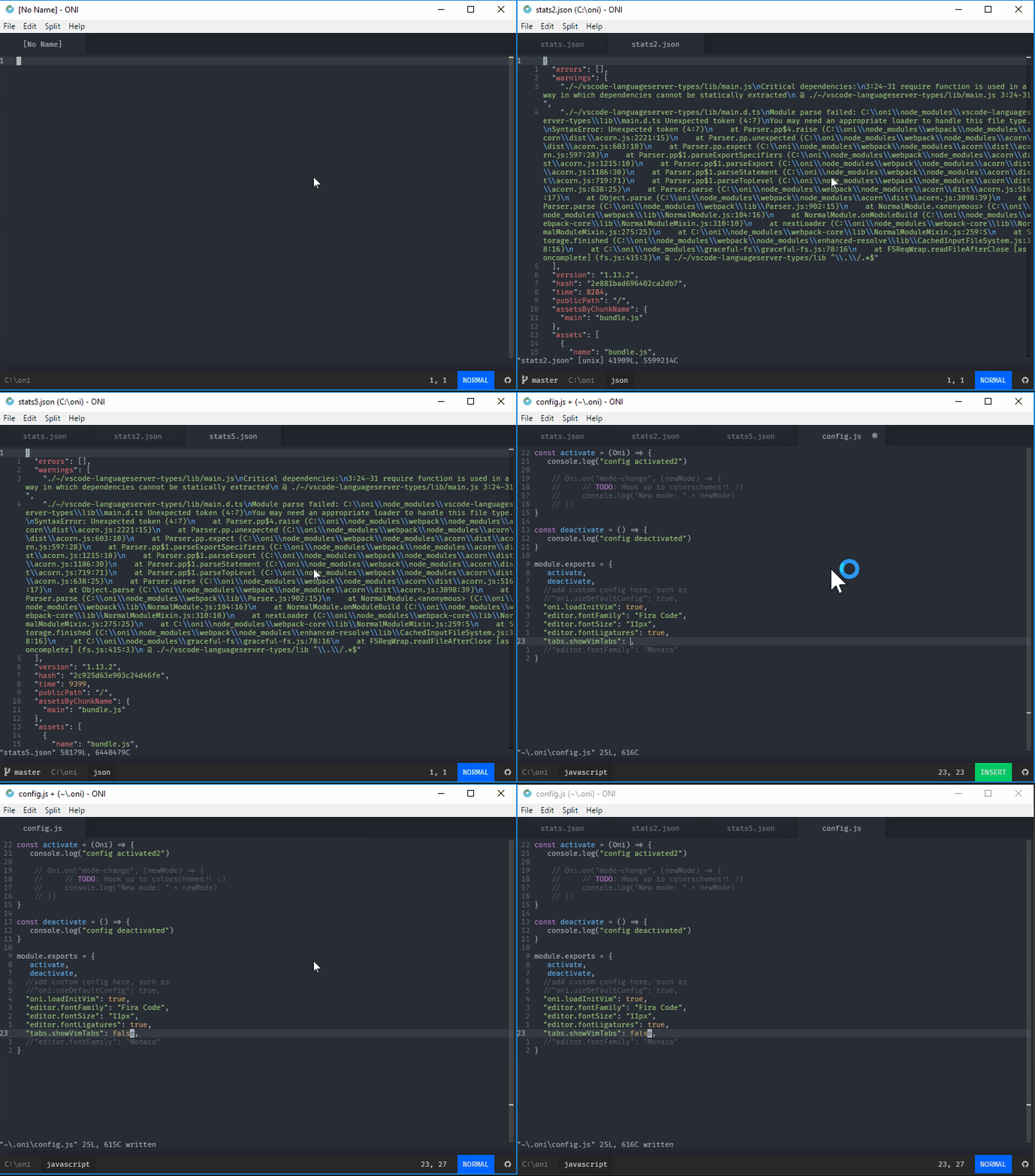
I start in the default mode "buffers-as-tab-UI", and the current behavior of QuickOpen is :e (so open in current tab) - but each file gets its own tab, since we're in the buffer mode.
Once I switch over the "vim-tabs-as-tab-UI" mode by setting tabs.showVimTabs to true - they collapse to one tab, because it's actually just one vim tab with four open buffers. With tabs.showVimTabs set to false, I see 4 tabs in the UI (since there are 4 buffers), but if I set tabs.showVimTabs set to true, I see 1 tab in the UI (since there is one vim-tab).
Hope that helps clarify a bit-
bryphe
on 25 Aug 2017
This is how it is shown on one of the places I use Oni (Arch as well).
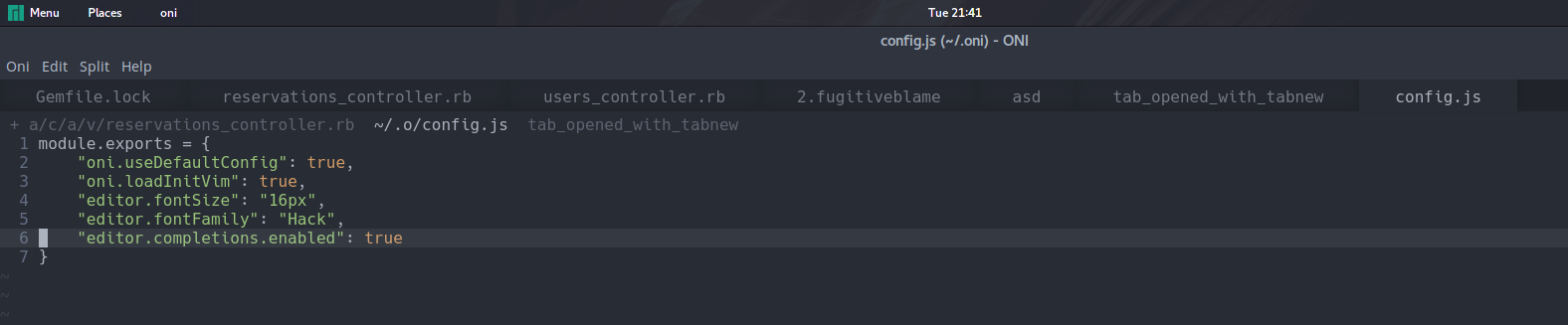
I would appreciate if there was an option to disable the tabs as buffers behaviour and use the tab layout to replace the current native vim layout that's still visible on the image above (i.e. tabs on the new UI behave exactly like native vim tabs as opposed to having both existing simultaneously).
badosu
on 13 Sep 2017
Thanks for sharing the screenshot, @badosu ! I didn't see the tabs.showVimTabs option set to true in the screenshot you posted, but I'm assuming you tried that and it still didn't work?
The fact that you still see the original tab bar suggests to me that the version of Neovim you are running doesn't support the ext_tablines option (which is needed for tabs.showVimTabs to work correctly, and for the original tab bar to be hidden).
Could you please share the Neovim version you are running via (nvim --version)? Any neovim version v0.2.1 or greater should support this option (ext_tabline), so if it is lower than that, you might consider upgrading.
bryphe
on 13 Sep 2017
@extr0py Thanks for the response, nvim reports version 0.2.0, gonna try a git release and see if these problems remain, for both use cases (showVimTabs true and false).
badosu
on 13 Sep 2017
I see now, 0.2.1 was not released yet, using the git version works. Hopefully oni will push neovim's capabilities, so that's to be expected. I think it would be good to add a remark for this on the README.
badosu
on 13 Sep 2017
Good point, I added some notes in the wiki here: https://github.com/extr0py/oni/wiki/Configuration#tabs
I'd also like to handle this more gracefully (like some sort of warning that the setting is incompatible with the current version of Neovim). It would be great to package a consistent version of Neovim across Linux too (like the one embedded for Windows & OSX)
bryphe
on 14 Sep 2017
Well, as soon as then next version of neovim is released it will be soon picked up as Arch has a rolling release model. Neovim did not release 0.2.1 yet.
badosu
on 14 Sep 2017
@extr0py At least for Arch the package is consistent, the difference being that it uses the last stable version for neovim (0.2.0). See: https://aur.archlinux.org/cgit/aur.git/tree/PKGBUILD?h=oni#n9
We can change it to reference neovim-git instead, let me know your thoughts.
badosu
on 15 Sep 2017
Excellent, thanks for the details @badosu (and all your help managing Oni in the AUR!)
I think moving to neovim-git makes sense, to provide a good out-of-the-box experience (esp for the new functionality, like tabs). It'd be nice at some point to use a consistent version between windows/OSX/linux. Windows/OSX are using: v0.2.1.4-g9847be58 - I wonder if there is a way to directly reference that in AUR as a dependency?
I noticed one other item that might need to change for the 0.2.9 release:
source=("https://github.com/extr0py/${pkgname}/releases/download/v${pkgver}/${pkgname}-${pkgver}.tar.gz"
        "oni.sh")
It looks like, after updating electron-builder, our package is now: https://github.com/extr0py/oni/releases/download/v0.2.9/Oni-0.2.9-linux.tar.gz
There might be a way we can tweak some settings on electron-builder to go back to the previous package name, if that is necessary.
Thanks again for your help!
bryphe
on 15 Sep 2017
It'd be nice at some point to use a consistent version between windows/OSX/linux. Windows/OSX are using: v0.2.1.4-g9847be58 - I wonder if there is a way to directly reference that in AUR as a dependency?
@extr0py This is weird, latest stable release I can see is 0.2.0 (see https://github.com/neovim/neovim/releases). Is there any other place where neovim states their releases?
badosu
on 15 Sep 2017
@extr0py Updated AUR for release 0.2.9 (https://aur.archlinux.org/cgit/aur.git/tree/PKGBUILD?h=oni).
Can you please take a look at electron-builder to generate a .desktop file? Or taking a look at an AppImage release. See https://www.electron.build/configuration/linux
badosu
on 15 Sep 2017
Related issues
 tcoopman
·
3Comments
tcoopman
·
3Comments
 timeyyy
·
3Comments
timeyyy
·
3Comments
 Canop
·
3Comments
badosu
·
3Comments
Canop
·
3Comments
badosu
·
3Comments
 rgehan
·
3Comments
rgehan
·
3Comments