Environment
$ sw_vers
ProductName:    Mac OS X
ProductVersion: 10.13.3
BuildVersion:   17D102
Issue
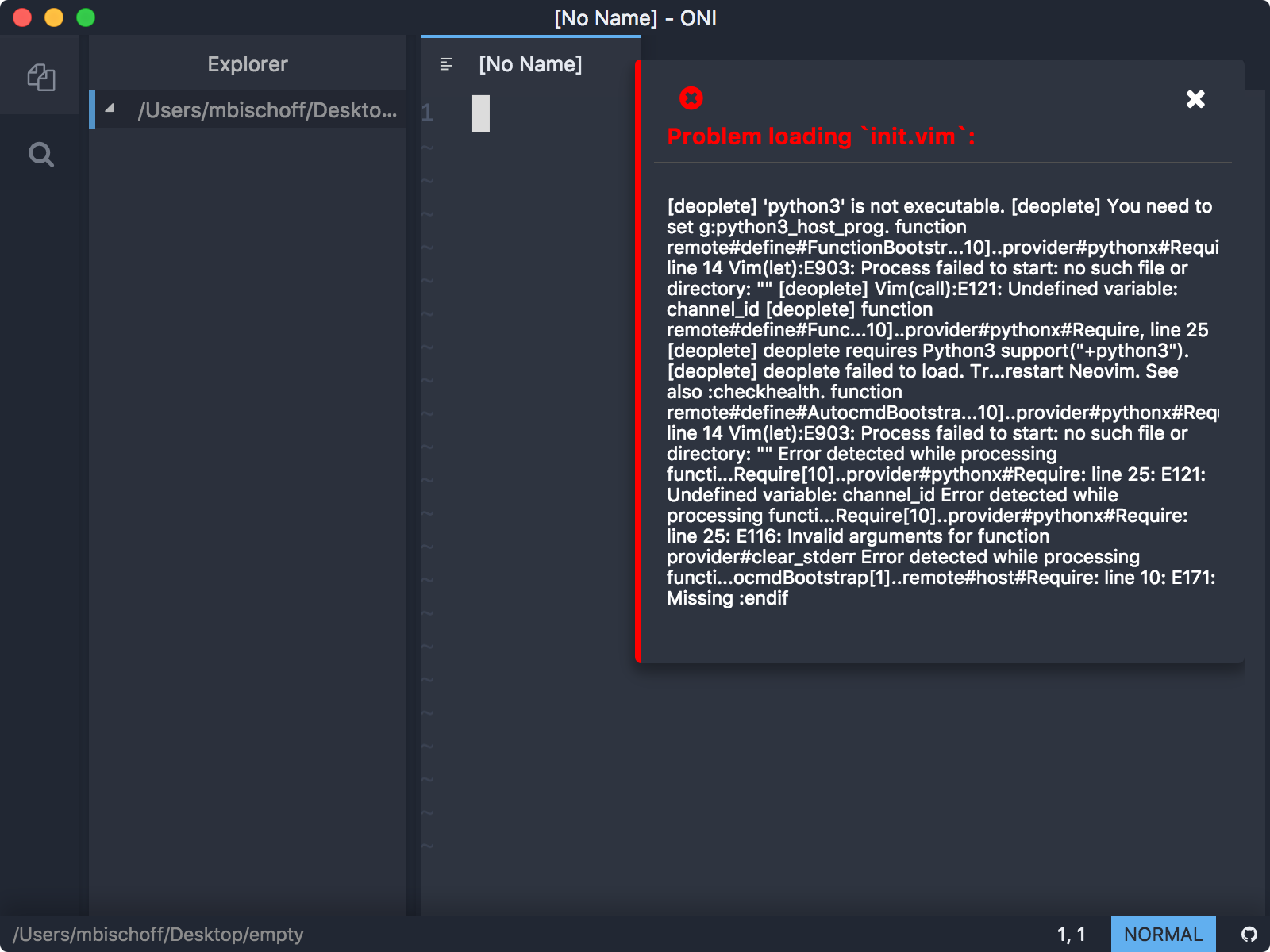
I cannot do anything useful with Oni, as on start I get this series of errors (that I couldn't even cut-and-paste):
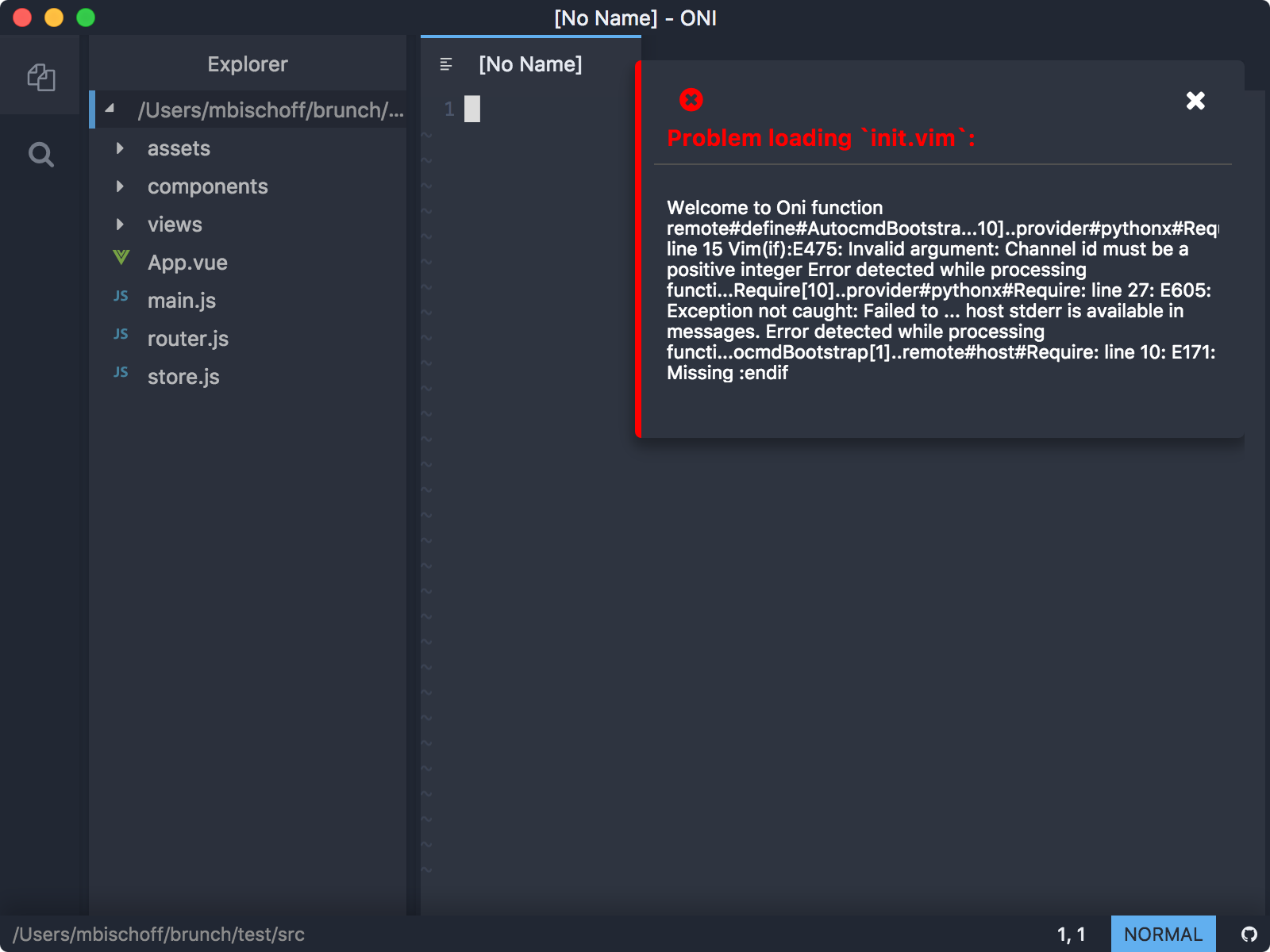
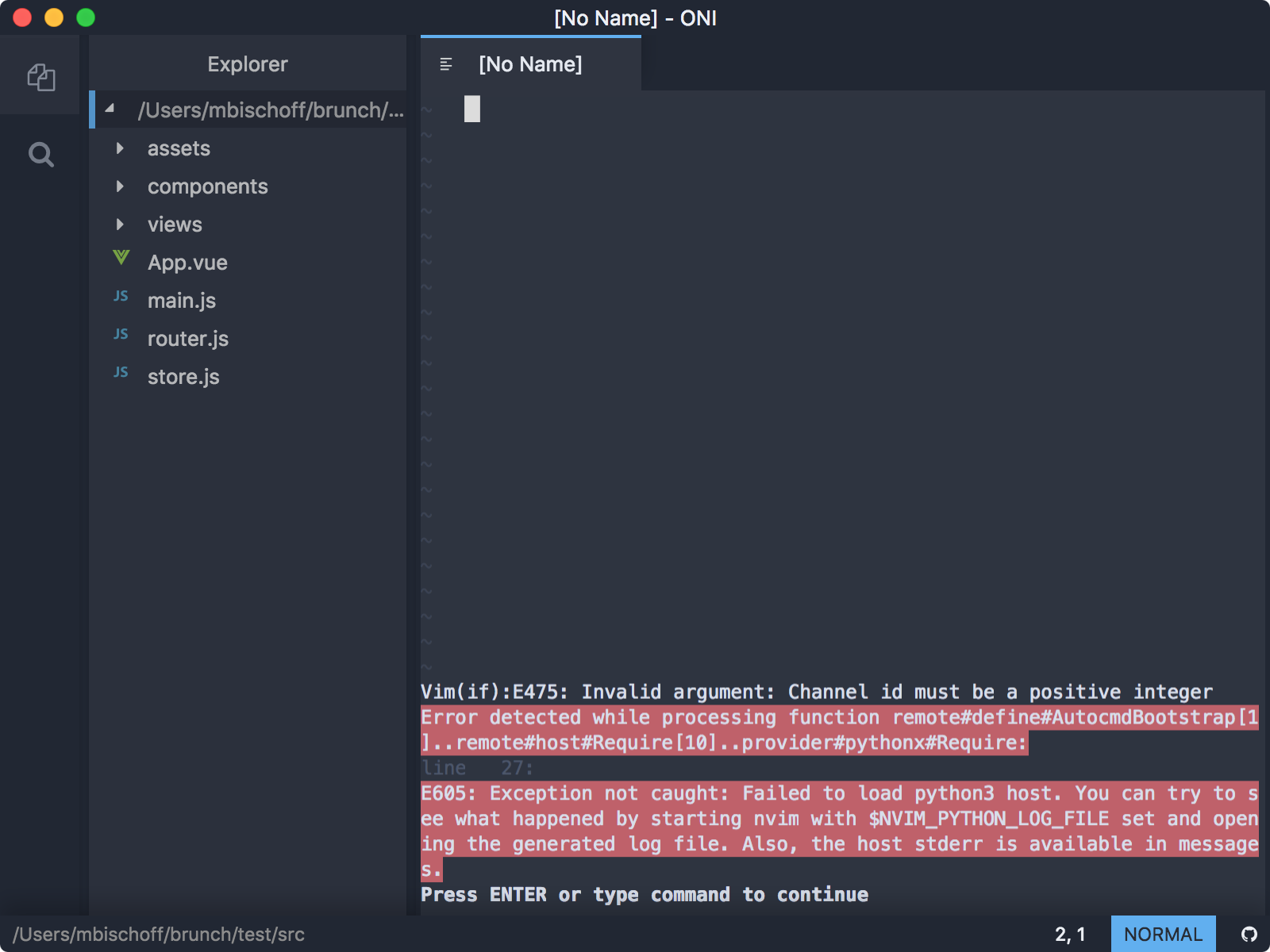
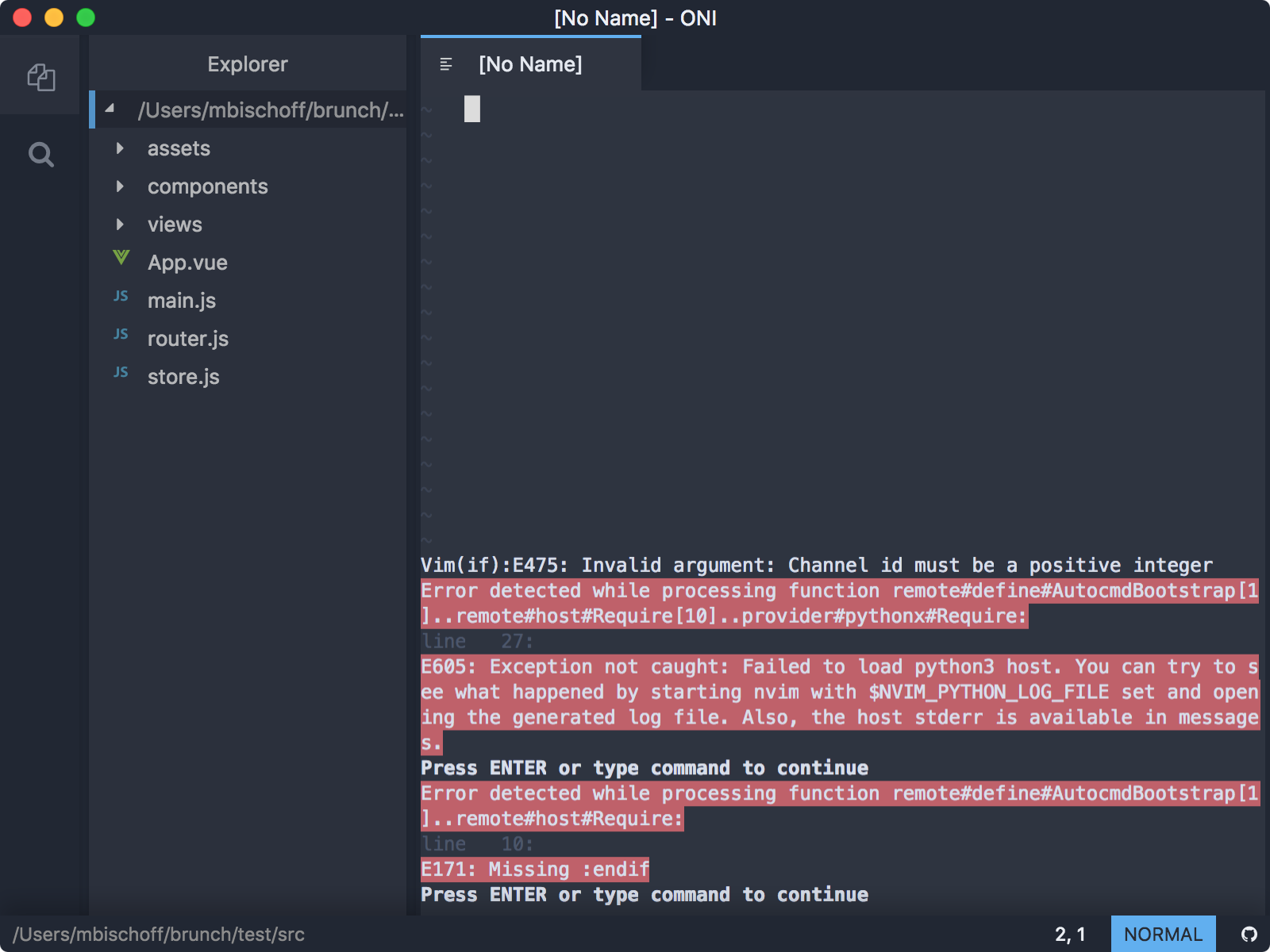
The last one repeats over and over on every keypress.
Neovim in Terminal (which I usually use as my daily development environment) works perfectly, so I would expect Oni to work as well.. There is no ~/.oni/config.js.
bundle.js:1 $env:ONI_CONFIG_FILE: undefined
bundle.js:1 [Configuration] Adding file: /Users/mbischoff/.oni/config.js
bundle.js:1 Oni.Start.Config: 87.781982421875ms
bundle.js:1 $env:ONI_CONFIG_FILE: undefined
bundle.js:1 Oni.Start.Plugins.Discover: 3.824951171875ms
bundle.js:1 Oni.Start.Themes: 69.02197265625ms
bundle.js:1 [Notifications] Setting enabled: true
bundle.js:1 [OniEditor::enter]
bundle.js:1 [NeovimEditor::enter]
bundle.js:1 [OniEditor::init] Called with filesToOpen:
bundle.js:1 [NeovimEditor::init] Called with filesToOpen:
bundle.js:1 [NeovimProcessSpawner::startNeovim] Neovim process path: /Applications/Oni.app/Contents/Resources/app/node_modules/oni-neovim-binaries/bin/nvim-osx64/bin/nvim
bundle.js:1 [NeovimProcessSpawner::startNeovim] Starting Neovim - process: 38869
bundle.js:1 Initializing neovim process using transport: stdio
bundle.js:1 NeovimInstance: Neovim started
bundle.js:1 [NeovimInstance::_checkAndFixIfBlocked] checking mode...
bundle.js:1 [NeovimInstance::_checkAndFixIfBlocked] mode is blocking, attempt to cancel.
bundle.js:1 [NeovimInstance::_checkAndFixIfBlocked] sent esc, getting command
bundle.js:1 [NeovimInstance::_attachUI] Neovim version reported as 0.2.3
bundle.js:1 [NeovimInstance::_attachUI] Using startup options: {"rgb":true,"popupmenu_external":true,"ext_tabline":true,"ext_cmdline":true,"ext_wildmenu":true} and size: 109, 34
bundle.js:1 Attach success
bundle.js:1 NeovimInstance.Start.Attach: 158.521240234375ms
bundle.js:1 NeovimInstance.Start: 2119.37890625ms
bundle.js:1 [NeovimEditor] Colors changed: nord - background: #2e3440 foreground: #d8dee9
bundle.js:1 [SharedNeovimInstance::start] Starting...
bundle.js:1 [NeovimProcessSpawner::startNeovim] Neovim process path: /Applications/Oni.app/Contents/Resources/app/node_modules/oni-neovim-binaries/bin/nvim-osx64/bin/nvim
bundle.js:1 [NeovimProcessSpawner::startNeovim] Starting Neovim - process: 38874
bundle.js:1 Initializing neovim process using transport: stdio
bundle.js:1 NeovimInstance: Neovim started
bundle.js:1 [NeovimInstance::_checkAndFixIfBlocked] checking mode...
bundle.js:1 [NeovimTokenColorSynchronizer::synchronizeTokenColors] Setting 11 highlights
bundle.js:1 [NeovimTokenColorSynchronizer::synchronizeTokenColors] Highlights set successfully
bundle.js:1 [NeovimInstance::_checkAndFixIfBlocked] mode is blocking, attempt to cancel.
bundle.js:1 [NeovimInstance::_checkAndFixIfBlocked] sent esc, getting command
bundle.js:1 [NeovimInstance::_attachUI] Neovim version reported as 0.2.3
bundle.js:1 [NeovimInstance::_attachUI] Using startup options: {"rgb":true,"popupmenu_external":true,"ext_tabline":true,"ext_cmdline":true,"ext_wildmenu":true} and size: NaN, NaN
bundle.js:1 Attach success
bundle.js:1 NeovimInstance.Start.Attach: 7.4921875ms
bundle.js:1 NeovimInstance.Start: 204.587158203125ms
bundle.js:1 [SharedNeovimInstance::start] Started successfully!
bundle.js:1 Oni.Start.Editors: 2411.703125ms
bundle.js:1 Oni.Start.Sidebar: 50.522216796875ms
bundle.js:1 [PLUGIN] Activating: oni-plugin-statusbar
bundle.js:1 [PLUGIN] Activation successful.
bundle.js:1 [PLUGIN] Activating: oni-plugin-buffers
bundle.js:1 [PLUGIN] Activation successful.
bundle.js:1 [PLUGIN] Activating: oni-plugin-git
bundle.js:1 [PLUGIN] Activation successful.
bundle.js:1 [PLUGIN] Activating: oni-plugin-typescript
bundle.js:1 [PLUGIN] Activation successful.
bundle.js:1 [PLUGIN] Activating: oni-plugin-markdown-preview
bundle.js:1 [PLUGIN] Activation successful.
bundle.js:1 $env:ONI_CONFIG_FILE: undefined
bundle.js:1 [Language Manager - Config] Registering info for language: html - command: /Applications/Oni.app/Contents/Resources/app/node_modules/vscode-html-languageserver-bin/htmlServerMain.js
bundle.js:1 [Language Manager - Config] Registering info for language: go - command: go-langserver
bundle.js:1 [Language Manager - Config] Registering info for language: python - command: pyls
bundle.js:1 [Language Manager - Config] Registering info for language: cpp - command: clangd
bundle.js:1 [Language Manager - Config] Registering info for language: c - command: clangd
bundle.js:1 [Language Manager - Config] Registering info for language: css - command: /Applications/Oni.app/Contents/Resources/app/node_modules/vscode-css-languageserver-bin/cssServerMain.js
bundle.js:1 [Language Manager - Config] Registering info for language: less - command: /Applications/Oni.app/Contents/Resources/app/node_modules/vscode-css-languageserver-bin/cssServerMain.js
bundle.js:1 [Language Manager - Config] Registering info for language: scss - command: /Applications/Oni.app/Contents/Resources/app/node_modules/vscode-css-languageserver-bin/cssServerMain.js
bundle.js:1 [Language Manager - Config] Registering info for language: reason - command: /Applications/Oni.app/Contents/Resources/app/node_modules/ocaml-language-server/bin/server/index.js
bundle.js:1 [Language Manager - Config] Registering info for language: ocaml - command: /Applications/Oni.app/Contents/Resources/app/node_modules/ocaml-language-server/bin/server/index.js
bundle.js:1 TypeError: path must be a string or Buffer
    at fs.stat (fs.js:936)
    at fs.stat (ELECTRON_ASAR.js:290)
    at internal/util.js:227
    at O.<anonymous> (0.bundle.js:537)
    at Generator.next (<anonymous>)
    at 0.bundle.js:537
    at Promise (<anonymous>)
    at I (0.bundle.js:537)
    at O.pathIsDir (0.bundle.js:537)
    at updateBranchIndicator (/Applications/Oni.app/Contents/Resources/app/vim/core/oni-plugin-git/index.js:21)
/Applications/Oni.app/Contents/Resources/app/vim/core/oni-plugin-git/index.js:77 [Oni.plugin.git]:  TypeError: Path must be a string. Received undefined
    at assertPath (path.js:28)
    at Object.dirname (path.js:1345)
    at updateBranchIndicator (/Applications/Oni.app/Contents/Resources/app/vim/core/oni-plugin-git/index.js:22)
    at <anonymous>
bundle.js:1 Oni.Start.Activate: 75.35400390625ms
bundle.js:1 Oni.Start: 3064.293701171875ms
bundle.js:1 TypeError: path must be a string or Buffer
    at fs.stat (fs.js:936)
    at fs.stat (ELECTRON_ASAR.js:290)
    at internal/util.js:227
    at O.<anonymous> (0.bundle.js:537)
    at Generator.next (<anonymous>)
    at 0.bundle.js:537
    at Promise (<anonymous>)
    at I (0.bundle.js:537)
    at O.pathIsDir (0.bundle.js:537)
    at updateBranchIndicator (/Applications/Oni.app/Contents/Resources/app/vim/core/oni-plugin-git/index.js:21)
/Applications/Oni.app/Contents/Resources/app/vim/core/oni-plugin-git/index.js:77 [Oni.plugin.git]:  TypeError: Path must be a string. Received undefined
    at assertPath (path.js:28)
    at Object.dirname (path.js:1345)
    at updateBranchIndicator (/Applications/Oni.app/Contents/Resources/app/vim/core/oni-plugin-git/index.js:22)
    at <anonymous>
A built-in Git plugin appears to be broken. However, deleting it just removes the log error, not the displayed one.
 herrbischoff
All 13 comments
Hello and welcome to the Oni repository! Thanks for opening your first issue here. To help us out, please make sure to include as much detail as possible - including screenshots and logs, if possible.
![oni-bot[bot] picture](https://avatars.githubusercontent.com/u/31161891?v=4&s=40) oni-bot[bot]
on 30 Mar 2018
oni-bot[bot]
on 30 Mar 2018
@herrbischoff thanks for filing the issue.
I think that this relates to whether the python3 host your neovim is using is in the $PATH that oni uses. I wonder if you have set g:host_prg for python in your init.vim if so what is it? and is it included in you path (echo $PATH) should show your path in the terminal.
If not you can add a path to oni by adding it to "environment.additionalPaths": [],
PS: The error message from the git plugin is actually a red herring as that error is actually caught and handled but we log it to the console currently.
 akinsho
on 30 Mar 2018
akinsho
on 30 Mar 2018
Shouldn't Oni find Python on it's own and use the current users' terminal PATH variables?
$ which python
/Users/mbischoff/.pyenv/shims/python
I haven't specified it separately through g:python3_host_prog as I use a shared configuration which would break if I did. I set "environment.additionalPaths": ["/Users/mbischoff/.pyenv/shims/python"] but this resulted in ever more errors:
Update:
It should be "environment.additionalPaths": ["/Users/mbischoff/.pyenv/shims"] of course. When I set the correct path, the errors go away.
herrbischoff
on 30 Mar 2018
@herrbischoff tbh oni doesn't do any special handling for python, we simply run an instance of neovim with certain arguments (we launch the nvim process with the same enviroment variables that a user has set and the user's PATH)
Regarding finding the python setting as someone who doesn't program much in python, its setup I've found can be somewhat complicated by the use of pyenv etc. so Oni cant reliably guess what the right python or version would be to use.
@CrossR I believe works with python a bit would you have any suggestion here?, personally I followed this link for setting up python with neovim which has been stable since.
akinsho
on 30 Mar 2018
Thank you very much for your replies. I managed to get it basically working. However, completely different issues pop up almost immediately, like doubling of auto-closing parentheses (which is something Oni must have added, as I don't use it) and no differentiation between completion sources as well as lagging performance while attempting to do "smart" things.
I found out that I don't have the patience to fiddle around with it and all its special requirements, opinionated defaults and whatnot. I think I'm going to revisit Oni in a year or so. The fact that it's Electron-based and borrows heavily from VSCode doesn't inspire too much confidence, to be honest. The cool kids will surely eat it up but I'm afraid that's not me.
herrbischoff
on 30 Mar 2018
completely different issues pop up almost immediately, like doubling of auto-closing parentheses (which is something Oni must have added, as I don't use it)
My wish with Oni is somehow on these lines... I'm hoping Oni will get good enough to be a true neovim environment, but if there isn't a way to run a clean neovim configuration, with zero extras added by default, I think it will make things very difficult for somebody migrating from vim, and I guess Oni is targeted at this kind of people, rather than somebody who looks for a pretty editor with convenient defaults.
I hope you'll get to the point that this is possible: just neovim with extra features that can be enabled on top of it, without anything enforced from the start. I'm mainly interested in quickinfos popup as a matter of fact. fzf + plugins take care of everything else in my vim installation. Thanks and keep up the good work.
 mg979
on 30 Mar 2018
mg979
on 30 Mar 2018
@herrbischoff @mg979 I am sad to hear that, as I am in the same condition.
If you want to try another spin, take a look at https://github.com/onivim/oni/wiki/How-To:-Make-Oni-closer-to-bare-Vim-experience, this should remove most of the defaults that are not desirable.
 badosu
on 30 Mar 2018
badosu
on 30 Mar 2018
@badosu Thanks, disabling auto closing pairs helped. What are those learning.enabled and achievements?
I'm also having the same issue as #1990, basically all double-width unicode symbols are cut. Also powerline fonts don't look as good as in terminal.
mg979
on 31 Mar 2018
Is there a list somewhere of all the extra non-vim bindings, so that I can remap them if I need? Eg. ctrl-p, F2, F3, etc.
mg979
on 31 Mar 2018
@mg979 These are the features @bryphe has been working on to make the transition easier for newcomers.
badosu
on 31 Mar 2018
Ah yes, I just added those because I turned them on by default in master.
The 'Achievements' feature (gated by achievements.enabled) is for helping user's learn the new capabilities of the interface, with some guided tasks:
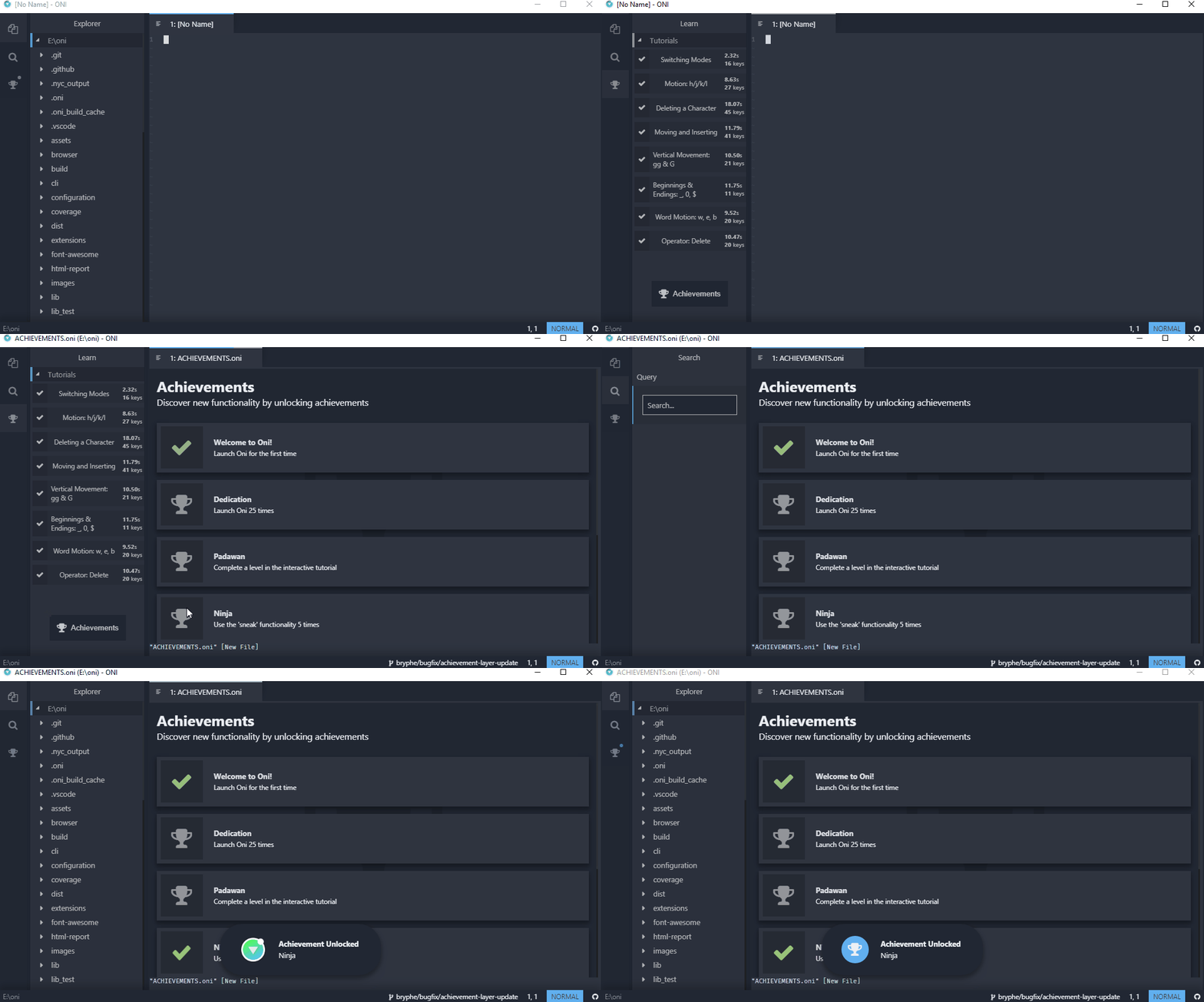
And the Learning feature (gated by learning.enabled) adds that extra sidebar item to access the tutorial experiences:

I figured they might be noisy / unnecessary for users coming from Vim - not to mention they are still really 'alpha' quality - but of course feel free to re-enable them and experiment 👍 Tutorials especially are super basic right now. Maybe once we have some vimgolf style challenges it might be more interesting for a vim pro..
@herrbischoff @mg979 I am sad to hear that, as I am in the same condition.
If you want to try another spin, take a look at https://github.com/onivim/oni/wiki/How-To:-Make-Oni-closer-to-bare-Vim-experience, this should remove most of the defaults that are not desirable.
Thanks for maintaining this config for us, @badosu ! We can think about if it makes sense to surface this more quickly. For example, we could add an option as part of our Welcome Screen in #1413 - we could explore adding some sort of option on startup that would allow the user to default to the 'minimal' config. Or explore expanding the prompt that @Akin909 is adding in #1942 - if you have an init.vim, perhaps we offer you the option to switch to 'minimal' mode? I'm open to ideas of ways to surface this.
 bryphe
on 31 Mar 2018
bryphe
on 31 Mar 2018
How about turning off all that noisy stuff and doing it Neovim-style: minimal sane defaults? Its versatility and saneness is the beauty of Vim. Having all those achievements and other plugins and features enabled actually makes it harder to use it, not easier. There are plenty of good tutorials out there. Having my editor cheering me on for having successfully copied a line annoys me and feels like it’s insulting me. Why does everything have to be a game? It does not have to be. It’s distracting. It gets in the way when it should get out of it.
The minimal configuration should actually be the default, not something you have to configure for yourself. Having it the other way around is contrary to Vim‘s overall design and therefore, in the context of Vim, you’re doing it wrong. It also makes it hard to debug what gets added where. There should only be one configuration file. My suggestion would be to expose and parse all Oni-specific settings as Vim variables, like this: g:oni_*. This way, you can wrap all those settings inside a if has('oni') statement and there's only one init.vim, the main one. If this does not exist, fall back to the built-in one. But Oni being Electron-based, it's probably easier to give it its own config.js, even if it really shouldn't have one, like at all. At the very least, make it a JSON file and don't require configurations to be mixed between Vim and Oni. This just makes it too complex and turns me away from the application almost immediately.
Vim is code from a time when people were required to learn by themselves, reading manuals and to know what they’re doing, not just browsing menus until they click on something that sounds right. Adding all this stuff feels like a completely wrong direction by trying to force Vim to be something it’s not. Vim is hard and will always be hard. It took me two months to learn it and oftentimes I was tempted to just throw the towel. No amount of „Hey, you’ve successfully copied five lines of text!“ would have made a difference. Quite the contrary: messages like that would have enraged me. They absolutely always remind me of Clippy, something I despise with the white-hot passion of 10000 suns. Editors don’t have to try to be helpful, I prefer them to be indifferent tools that just do what they are supposed to. Onboarding processes are a symptom and result of bad design decisions. Also, the eye candy effects remind me of Hyper.js, a terminal emulator implementation I still fail to see any reason for: it's slower, larger, more resource-hungy than well-established ones and offers no compelling advantages or plugins except for, well, eye candy.
If you’re looking for decent Neovim integration into an Electron-based editor that’s actually mature and rather responsive, that‘s VScode with Neovim enabled and the Vim plugin. It actually works. I just stopped using it because it’s too noisy for my taste. Modal editing and rich popups don’t mix. I found myself constantly having to push Shift-Esc to close annoying popups with „smart information“. 95% of the time those are just cluttering up the display and provide no useful information at all. And VScode requires the use of a mouse far too often — the polar opposite of why someone would be using Vim in the first place.
herrbischoff
on 31 Mar 2018
@herrbischoff , while I appreciate constructive criticism, I find your tone at this to be disrespectful, and that is not acceptable. I'll close and lock this thread.
Every editor has a different set of trade-offs - and Oni's choice of trade-offs might not be for you @herrbischoff , and that's OK! Just like Hyper.js as you mentioned - while you don't find it useful, others do. Please use whatever tool meets your requirements.
Vim is code from a time when people were required to learn by themselves, reading manuals and to know what they’re doing, not just browsing menus until they click on something that sounds right. Adding all this stuff feels like a completely wrong direction by trying to force Vim to be something it’s not. Vim is hard and will always be hard. It took me two months to learn it and oftentimes I was tempted to just throw the towel.
We're not trying to build another Vim - Vim is already the perfect Vim. But perhaps we _can_ make life easier for someone new to modal editing, or someone using to Atom/VSCode/Sublime.
bryphe
on 31 Mar 2018
Related issues
 timeyyy
·
3Comments
timeyyy
·
3Comments
 TalAmuyal
·
3Comments
akinsho
·
3Comments
TalAmuyal
·
3Comments
akinsho
·
3Comments
 grz8
·
3Comments
grz8
·
3Comments
 Siilwyn
·
3Comments
Siilwyn
·
3Comments
Most helpful comment
My wish with Oni is somehow on these lines... I'm hoping Oni will get good enough to be a true neovim environment, but if there isn't a way to run a clean neovim configuration, with zero extras added by default, I think it will make things very difficult for somebody migrating from vim, and I guess Oni is targeted at this kind of people, rather than somebody who looks for a pretty editor with convenient defaults.
I hope you'll get to the point that this is possible: just neovim with extra features that can be enabled on top of it, without anything enforced from the start. I'm mainly interested in quickinfos popup as a matter of fact. fzf + plugins take care of everything else in my vim installation. Thanks and keep up the good work.