The editor.errors.slideOnFocus setting not working even when set manually.
The error message should show up the following scenario:
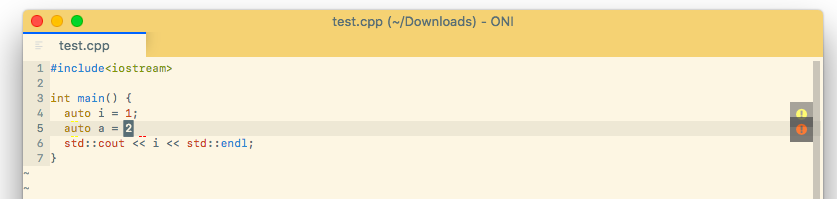
Oni version: 0.2.19
 kuglee
All 6 comments
I've done a quick check and it seems that the option is not supported at the moment. Couldn't find any code reading in the value in the codebase. @bryphe will have to correct me if I'm wrong.
@kuglee What is it exactly you are expecting the setting will do?
 ghost
on 16 Dec 2017
ghost
on 16 Dec 2017
From the wiki:
- editor.errors.slideOnFocus (default: true)
Enables / disables showing details when cursor is over an error.
It supposed to be on by default. But even if I set it the error details are not shown.
kuglee
on 16 Dec 2017
@kuglee Ah, thanks for pointing me to the wiki! I'm quite new to the project and it didn't occur to me to check it out.
This seems to be a bug. I'm currently occupied with #1134. I will look into it when I'm finished. If it is taking too long and there's someone else that would like to look into it just let me know 😄
ghost
on 16 Dec 2017
Awesome, I can give some historical context here... Originally (in older versions), we had a UI for errors that slid out from the side, like:

The major problem with this approach is it didn't handle multiple errors, or overflowing very well!
So we switched to showing it in the 'hover' UI:

However, that only shows if the _cursor is on the error range_.
In the case I see above, it looks like the error marker is off by a position (potentially):
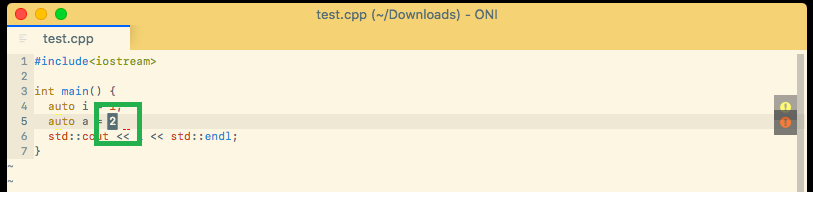
Seems like there are two things to address:
- We should remove the
editor.errors.slideOnFocusfrom the wiki, since it isn't supported anymore - sorry about the confusion there! The UI looked kind of cool for single/small errors, but didn't really 'scale' for multiple errors 😦 - We should check and see if there is a graceful way to handle those off-by-one issues. The LSP protocol calls for error ranges to be zero-based, but unfortunately I think some language servers use one-based coordinates. One quick solution here, for this case, would be to always show the errors if they are past the end of the line.
 bryphe
on 16 Dec 2017
bryphe
on 16 Dec 2017
I think some language servers use one-based coordinates.
I actually think that's not the case. I think it simply points to the location where the semicolon should be, which is beyond the line of course because it is not there.
Another solution I thought of is being able to use the mouse to hover the ~~~~~~ so that you can view the error even if you cannot get there with the cursor. But both solutions are equally good in my eyes.
ghost
on 16 Dec 2017
I actually think that's not the case. I think it simply points to the location where the semicolon should be, which is beyond the line of course because it is not there.
Good point, you're right - that makes sense.
Another solution I thought of is being able to use the mouse to hover the
~~ so that you can view the error even if you cannot get there with the cursor. But both solutions are equally good in my eyes.
👍 would be great to have that!
bryphe
on 16 Dec 2017
Related issues
 Siilwyn
·
3Comments
Siilwyn
·
3Comments
 tcoopman
·
3Comments
tcoopman
·
3Comments
 magopian
·
3Comments
magopian
·
3Comments
 badosu
·
3Comments
badosu
·
3Comments
 LucianBuzzo
·
3Comments
LucianBuzzo
·
3Comments