Oni: Menu "Oni > Close file" doesn't close the file
When I'm selecting "close file" (which I assume should close the tab?) nothing happens (the file is still opened in a tab).
Here are the logs when I select "close file" from the menu:
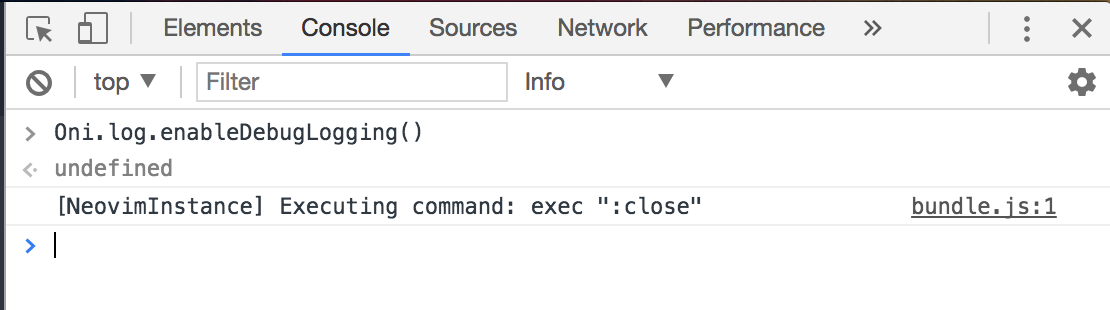
I'm using the latest released version 0.3.0 and neovim 0.2.2, and my config.js file is as follows:
// For more information on customizing Oni,
// check out our wiki page:
// https://github.com/onivim/oni/wiki/Configuration

const activate = oni => {
    console.log("config activated")

    // Input
    //
    // Add input bindings here:
    //
    oni.input.bind("<c-enter>", () => console.log("Control+Enter was pressed"))

    //
    // Or remove the default bindings here by uncommenting the below line:
    //
    // oni.input.unbind("<c-p>")
}

const deactivate = () => {
    console.log("config deactivated")
}

module.exports = {
    activate,
    deactivate,
    //add custom config here, such as

    "ui.colorscheme": "nord",

    //"oni.useDefaultConfig": true,
    //"oni.bookmarks": ["~/Documents"],
    "oni.loadInitVim": "~/.oni/init.vim",
    //"editor.fontSize": "14px",
    //"editor.fontFamily": "Monaco"

    // UI customizations
    "ui.animations.enabled": true,
    "ui.fontSmoothing": "auto",
}
And my init.vim file is:
set ruler  " show the cursor position all the time
set showcmd  " display incomplete commands
set ignorecase  " case insensitive searches
set smartcase  " case sensitive searches if there's an uppercase letter
map <F2> :nohlsearch<cr>  " disable the highlighted searches
imap <F2> :nohlsearch<cr>

" visual indication of the 80 char column
set colorcolumn=80

" visual indication of trailing and non-breaking spaces
set list

" move through tabs with CTRL+h and CTRL+l
map <C-h> :bprevious<cr>
map <C-l> :bnext<cr>
imap <C-h> <Esc>:bprevious<cr>
imap <C-l> <Esc>:bnext<cr>

" colorscheme wombat  " wombat is saved in .vim/colors/wombat.vim

" gundo: https://github.com/sjl/gundo.vim
nnoremap <F6> :GundoToggle<CR>
let g:gundo_preview_bottom = 1  " preview changes below the current windows, using full width

let mapleader=","

"ale
let g:ale_fixers = {
\   'javascript': [
\       'prettier', 'eslint',
\   ],
\   'elm': [
\       'format',
\   ],
\   'rust': [
\       'rustfmt',
\   ],
\   'reason': [
\       'refmt',
\   ],
\}
let g:ale_linters = {'rust': ['cargo']}
let g:ale_fix_on_save = 1
nmap <silent> <C-k> <Plug>(ale_previous_wrap)
nmap <silent> <C-j> <Plug>(ale_next_wrap)
 magopian
All 3 comments
Thanks for the issue and the details @magopian ! Can confirm - it seems to work okay when tabs.mode is tabs, but with the default (tabs.mode set to buffers - its problematic)
 bryphe
on 14 Feb 2018
bryphe
on 14 Feb 2018
I gave tabs.mode = "tabs" a try (i'm used to working with tabs, not buffers, and I use :q most of the time instead of :bd :P), but it has issues also. Mainly opening a file in the explorer would open it in the current active tab instead of in another tab.
I've just created a new issue: #1563
magopian
on 14 Feb 2018
@magopian Since the default was changed to tabs this should not be an issue for most users.
We can track the 'Close File' action on buffers specifically, a specific issue for that to be discussed would be a better place.
 badosu
on 21 May 2018
badosu
on 21 May 2018
Related issues
 dlee
·
3Comments
dlee
·
3Comments
 Siilwyn
·
3Comments
Siilwyn
·
3Comments
 Canop
·
3Comments
Canop
·
3Comments
 IvRRimum
·
3Comments
IvRRimum
·
3Comments
 TalAmuyal
·
3Comments
TalAmuyal
·
3Comments
Most helpful comment
@magopian Since the default was changed to tabs this should not be an issue for most users.
We can track the 'Close File' action on buffers specifically, a specific issue for that to be discussed would be a better place.