See the underline below the words searched, they persist even after :nohlsearch:

 badosu
All 10 comments
Interesting, looks like this might be a subpixel rendering issue.
We do some work to align boundaries of rectangles to the nearest pixel here:
https://github.com/onivim/oni/blob/23822545b4aaff55c61ac58a5b7e8a4906d1f3e3/browser/src/Renderer/CanvasRenderer.ts#L259
But only for the horizontal (x) coordinate... potentially we need to do a similiar normalization for the y coordinate as well.
 bryphe
on 7 Dec 2017
bryphe
on 7 Dec 2017
@badosu I'm currently looking at fixing this bug, but personally haven't really been able to reproduce it as I think it likely relates to the font you use and its font size, In order to test out the fix could I possibly get details about the font you are using in the screen shot and what the font size is?
 akinsho
on 3 Jan 2018
akinsho
on 3 Jan 2018
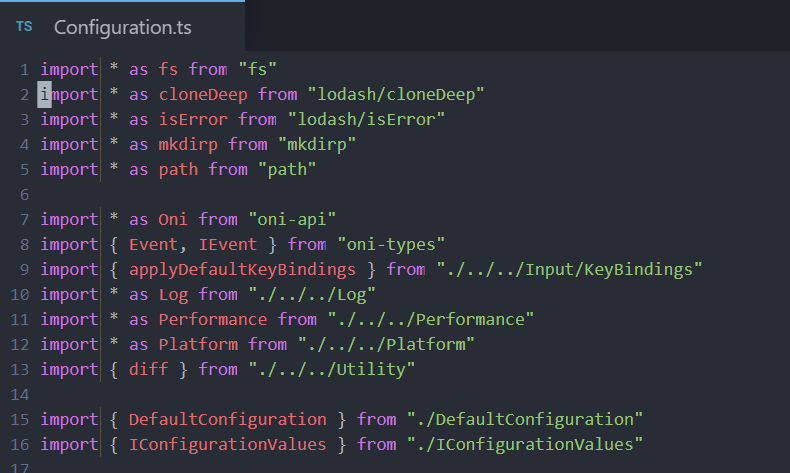
I'm able to reproduce this with the default Oni font settings, opening any Oni .ts file, pressing * on import, and then using the :nohlsearch command.
 CrossR
on 3 Jan 2018
CrossR
on 3 Jan 2018
@CrossR thanks for the tip, I've just had a quick try with the default font and the instructions you suggested but nothing (unusual) happens when I do that, although looks like the cracks youre getting in your screen shot are related to the width (which is normalised) as opposed to the height which I think means that based on font and maybe font size the normalization doesn't cover enough scenarios not that I know too much about this bug though @bryphe explained what is likely causing it in #1203.
I personally was getting a very slight visual artefact, possibly a very minimal version of @badosu's screenshot but it was occurring under words so I thought the bug only related to the lack of normalisation for the height prop 😕 , although there's also the clipping which you have at the end of words on the screen shot which I also get which I'm desperate to fix which probably also relates to width normalisation not working in some cases
akinsho
on 3 Jan 2018
@Akin909 I am not able to reproduce this issue on the last stable version (0.2.19) anymore, I'll try checking if there's a way to reproduce them again.
badosu
on 4 Jan 2018
Since moving to the new release, this has come back for me unfortunately.
Steps for me to reproduce:
- Highlight any word with
* - Use
/ahksjdfjahsdto clear the highlight (ornohlsearchwhich is less fun to type)

This happens on most searches now, though not all.
CrossR
on 8 Jan 2018
Ah bummer, just re-opened it.
Thanks for the heads up though, and for testing the latest release @CrossR ! 👍
bryphe
on 8 Jan 2018
I can't reproduce this issue anymore.
badosu
on 21 May 2018
Yep! This has been fixed in the experimental webgl renderer!
Cheers for closing.
CrossR
on 21 May 2018
Awesome news! Thanks @Cryza 😄
bryphe
on 23 May 2018
Related issues
 rgehan
·
3Comments
rgehan
·
3Comments
 IvRRimum
·
3Comments
IvRRimum
·
3Comments
 zxiest
·
3Comments
zxiest
·
3Comments
 magopian
·
3Comments
magopian
·
3Comments
 Canop
·
3Comments
Canop
·
3Comments
Most helpful comment
Yep! This has been fixed in the experimental
webglrenderer!Cheers for closing.