Oni: Using fzf as search command, command palette hangs
Using the following configuration on oni v0.2.10:
module.exports = {
  "oni.useDefaultConfig": true,
  "oni.loadInitVim": true,
  "editor.fontSize": "34px",
  "editor.fontFamily": "Hack",
  "editor.completions.enabled": true,
  "editor.fullScreenOnStart": false,
  "oni.hideMenu": true,
  "tabs.showVimTabs": true,
  "editor.quickOpen.execCommand": "fzf -f '${search}'"
}
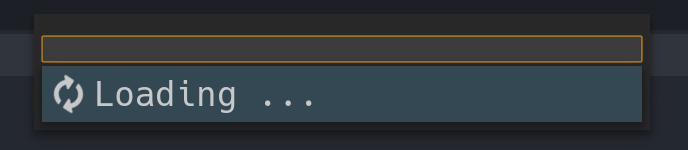
The command palette hangs:
 badosu
All 20 comments
Weird, a few questions -
- Did this work correctly prior to the v0.2.10 release?
- Are there any error message in the developer tools? Would it be possible to see the logs?
- What's the current working directory?
I'll see if I can repro it in a bit.
 bryphe
on 3 Oct 2017
bryphe
on 3 Oct 2017
@bryphe I'll try to investigate myself using your questions and will return to you ASAP.
badosu
on 3 Oct 2017
@bryphe This is the console log:
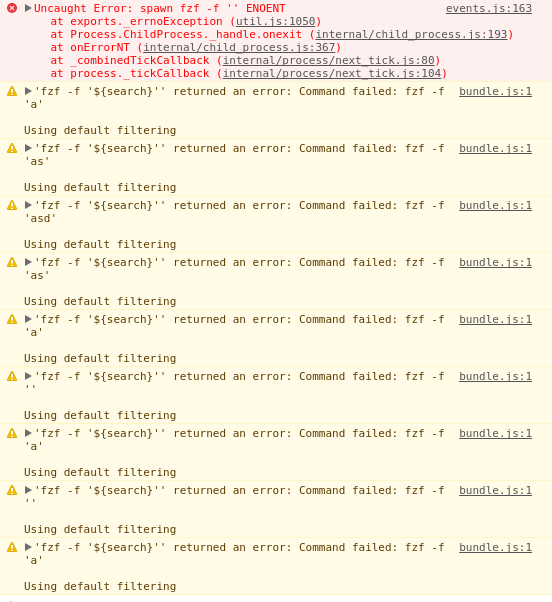
Answering your questions:
- Did not use it before
- See image above
- A project directory
badosu
on 5 Oct 2017
I've been checking this issue out on my end and it also happens for me.
In order to support specifying commands with arguments, spawn needs to be given the shell: true property at L150, but that doesn't solve the issue entirely:
It seems that node will return Command failed when you childprocess.execSync it with fzf -f 'anything', and executing it with exec just hangs node completely. This happens in the Reducer.ts at L325.
This may be related to https://github.com/nodejs/node-v0.x-archive/issues/4590
 AlexanderArvidsson
on 6 Oct 2017
AlexanderArvidsson
on 6 Oct 2017
@Metamist Thanks for investigating it deeper, do you have any insight if there's a workaround for it (using a library for spawning the process) or if we have to wait the node fix?
badosu
on 6 Oct 2017
Thanks @Metamist and @badosu for the detailed notes!
It's brutal that we make the calls in two places, and have separate strategies - spawn and execSync -
because if one works, probably the other one will have issues.
I'm working on this PR right now: https://github.com/bryphe/oni/pull/764 which is refactoring to consolidate these two calls, and enable async population of the menu (as results come in from the fuzzy-finder, we'd update the menu, vs waiting for it to complete as we do today). I was planning on consolidate to exec but it's interesting to know there is a deal breaker there. I still need to actually do the consolidation but that's on deck to wire the QuickOpen up again.
Once my PR is in, we'll only have the single call, so we can settle on one of these strategies:
execspawnwith{shell: true}
One other option with spawn is to split up the command + arguments, like:
editor.quickOpen.execCommand: 'fzf'
editor.quickOpen.execCommandArgs: ['-f', '${search}']
which means we might not need the {shell: true} parameter (that parameter doesn't always work as expected across all platforms, since the shells are different).
So there'd be three options:
execspawnwith{shell: true}spawnwith command + args separated.
Let me know if you have any feedback on the PR or the strategy we should go with for spawning the process. Thanks again for your help and investigation on this!
Once that PR is in, I'm going to switch to using ripgrep by default via those settings - so that should make those settings less fragile (they are easy to break today, because they are non-default)
bryphe
on 6 Oct 2017
If you figure out what is causing the issue that I linked from the node archive, that would pretty much solve the issue completely. But rewriting this to be completely asynchronous would provide a much better user experience.
Separating the arguments before using spawn sounds like a decent idea, but seems redundant while we can simply use exec or spawn (however, spawn is more efficient than exec without the shell: true flag, so opting to separate the arguments may be more beneficial)
AlexanderArvidsson
on 6 Oct 2017
With #764 & #793 , I refactored so that we only use spawn with shell: true. This works fine for the new ripgrep (rg) strategy, and I also tested the editor.quickOpen.execCommand with fzf, ag, and ls.
ag and ls seem to work fine as finder strategies, but unfortunately I still see issues with fzf -f '${search}'. It seems to be a more general problem - even if I run this from the node REPL:
require("child_process").spawnSync("fzf -f 'a'", [], {shell:true}).output[1].toString(), it's always empty. This is specific to fzf since ag, rg, and ls don't have the same behavior.
There might be some issues it has with the default shell (shell:true uses bin\sh on Linux), but I'm not sure.
bryphe
on 13 Oct 2017
@bryphe Just tested on 0.2.14.
It still hangs, but I guess this is related to some kind of icon fetching from Oni instead of the previous error.
See:

badosu
on 17 Oct 2017
@bryphe, try running this in node REPL instead:
require("child_process").spawnSync("fzf -f 'a'", [], { stdio: ['inherit', 'pipe', 'pipe'], shell:true }).output[1].toString()
It only returns empty (or hangs when using spawn) if stdin is not set to inherit.
AlexanderArvidsson
on 20 Oct 2017
Thanks for the tip @Metamist ! It's interesting, that gives me results now when running via the node REPL, but still not in Oni (electron renderer process). I guess process.stdin behaves differently in the electron renderer process than the node REPL.
I still don't quite understand why it isn't returning anything, while other command line utilities (like rg, ag, and find seem to be working OK).
@badosu - I wonder if that error message is being produced because fzf isn't returning anything? We can check for a null selectedOption here and bail https://github.com/bryphe/oni/blob/cf71dfcf32d32acc1c52026cc8a89b355a946cd1/browser/src/Services/QuickOpen/QuickOpen.ts#L185
But it seems like the root cause is that no results are making it from the fzf process. Setting a breakpoint here is a good spot to check if the FinderProcess is actually sending back data:
https://github.com/bryphe/oni/blob/cf71dfcf32d32acc1c52026cc8a89b355a946cd1/browser/src/Services/QuickOpen/FinderProcess.ts#L41
bryphe
on 21 Oct 2017
@bryphe Just tested here both places you suggested and those parts are never reached by Oni when using Fzf.
I checked with the default finder and could see that data is not null and it's string contents, and that selectedOption would be accessible when selected. This was not the case with Fzf, it just hangs and never reach the stdout binding for data.
My biggest gripe with the default algorithm is it being case-sensitive, if I would be able at least to change the default arguments to it I would not require having to dive into this.
badosu
on 25 Oct 2017
Hi @badosu - since we added the editor.quickOpen.caseSensitive setting, is the built-in ripgrep strategy sufficient now? I know #957 was a blocker too. Any remaining issues besides that, or is it cool to close this?
bryphe
on 25 Nov 2017
@bryphe Feel free to close it, my concerns were adressed, even though this still may be a standing issue for some.
badosu
on 25 Nov 2017
I don't like the built in ripgrep because it doesn't provide the same fuzzy search as CtrlP (order of letters doesn't matter in the default one, but does in CtrlP)
That's why I want to switch it out for fzf or something else, since I absolutely can't use the default one.
Currently I've just unbound the ctrl+p command to use vim-ctrlp instead, which works but I would like the actual gui.
AlexanderArvidsson
on 26 Nov 2017
The issue I am having with the current implementation is that if I want to enter a commonly named file nested into separate folders it is not scoped correctly.
e.g. AComponent/index.js, BComponent/index.js if I type ACoinde it actually does not filter BComponent.
I was hoping that the changes that are implemented in master would fix this, but after typing very slowly noticed this still happens.
I can provide a repro if necessary.
badosu
on 26 Nov 2017
This image demonstrates my issue with the default implementation:

It makes no sense to me, at all. Why is it matching the letters unordered?
AlexanderArvidsson
on 26 Nov 2017
Thanks @badosu & @Metamist for the feedback!
e.g. AComponent/index.js, BComponent/index.js if I type ACoinde it actually does not filter BComponent.
A repo would be great actually. I wonder if there is a folder above with an 'a' present? I created a /test/AComponent/index.js and /test/BComponent/index.js and couldn't reproduce it, but if I put another folder like /test/Aroot/AComponent/index.js and /test/Aroot/BComponent/index.js I saw the same behavior - but I'd be curious if there's a case where the root didn't behave that?
@Metamist - our filter/sort strategy is using a library called fuse, and we fuzzy-match the path and filename separately, which give us those strange results.
I'm considering having the quickopen strategy be configurable - with a 'fuse' strategy and a 'regex' strategy. For the campmod case, the regex would basically match c*a*m*p*m*d - checking those letters in order across the input path.
bryphe
on 1 Dec 2017
FYI, with #1124, there is a way to specify a regex-based strategy, by setting:
"editor.quickOpen.filterStrategy": "regex",
This is just the straight-up wildcard filter as described above. Let me know if you have any feedback. Unfortunately it didn't make it in the 0.2.19 release, but it is in master.
bryphe
on 15 Dec 2017
I'll close this out as I believe that the regex strategy handles these cases correctly now, and use #1266 to track using the regex strategy as the default. @badosu @Metamist - let me know if there are still outstanding issues with that strategy for you, though.
bryphe
on 10 Jan 2018
Related issues
 bfulop
·
3Comments
bfulop
·
3Comments
 IvRRimum
·
3Comments
IvRRimum
·
3Comments
 nwaywood
·
3Comments
bryphe
·
3Comments
nwaywood
·
3Comments
bryphe
·
3Comments
 magopian
·
3Comments
magopian
·
3Comments