Office-js: window.open creates Pop-up warning in Chrome BUT still opens window
Expected Behavior
Clicking on a button that executes a function that should open a new window via window.open(...) opens a new tab with no pop-up warnings.
Current Behavior
Clicking on a button that executes a function that should open a new window via window.open(...) opens a new tab WITH pop-up warnings.
Firefox does not raise a pop-up warning.
Steps to Reproduce, or Live Example
Create a action like this one:
                    <Action xsi:type="ExecuteFunction">
                      <FunctionName>openAWindow</FunctionName>
                    </Action>
And in commands.ts:
g.openAWindow = (e) => {
    window.open("https://domain-specified-by-user-in-addin-settings.com/stuff");
};
Context
We are not able to publish our add-in because of this.
Your Environment
- Platform [PC desktop, Mac, iOS, Office Online]: Office Online
- Host [Excel, Word, PowerPoint, etc.]: Outlook
- Office version number: latest OWA
- Operating System: Arch Linux
- Browser (if using Office Online): Chrome
Useful logs

 EneOli
All 34 comments
Opening a new window from add-in function works for me without any warning. Can you please elaborate what does the warning sign say?
 exextoc
on 12 Dec 2020
exextoc
on 12 Dec 2020
I created a completely new project via the yeoman generator. In fact I only changed the code in the "action" function in the "commands.ts" to
function action(event: Office.AddinCommands.Event) {
  window.open("https://google.de");
  event.completed();
}
And still I get in Firefox AND Chrome a pop-up warning. It says "Firefox prevented this site from opening a pop-up window"
Firefox:

Chrome:

I uploaded the project on github, so you can check it yourself: https://github.com/EneOli/OfficeAddin
The interesting part is the "action" function in src/commands.ts
EneOli
on 12 Dec 2020
P.S. as mentioned before, the site still opens BUT a warning appears. This prevents the addin from beeing approved for the store...
EneOli
on 12 Dec 2020
@Eneoli I noticed similar inconsistencies around popups -- the workaround I used was the same one that you can see in Script Lab - > Help; which is to have a button trigger the launching of the popup.
I believe the difference is how far in the stack the browser has to check before it is clear that it was triggered by user interaction (and therefore is acceptable)
 ig-jb
on 15 Dec 2020
ig-jb
on 15 Dec 2020
@ig-jb That could be a suitable workaround.
Either way I think this is a bug. In fact the user is willing to open a link by clicking on the action. Also it is strange that Chrome raises a Pop-up warning but still opens the site.
@exextoc It would be really great if you could take a look at this, thank you very much!
@ig-jb Would you mind showing the code you used to create this Button dialog. I get strange behaviour in Office Web. I'm using displayDialogAsync with the inIframe option. This causes a spinning dialog concluded by an generic error (Plugin could not be started, no errors in console, getting Dialog object). If I include the Office js Script, the site loads BUT I can't close the dialog nor get I any Dialog Messages.
EneOli
on 15 Dec 2020
@EneOli Unfortunately my example has a large amount of code irrelevant to the problem and quite a bit of abstraction; so showing you what I've done wouldn't help too much.
However, in essence what I did was:
- Pass a description of what we are looking to launch to the dialog via a query string parameter. Return a promise to the caller.
- When the dialog loads, find the query string parameter and display it e.g. "Launch Command Here"
- When the user clicks the button in the dialog, message parent resolving the promise from 1.
- When the user closes the dialog without clicking the button, message parent resolving (false) / reject the promise (depending on how you prefer to handle it)
- In the caller, when the promise gets resolved with a successful value, call window.open.
This could probably be simplified a lot to achieve the same goal -- the key parts are that you have a button that the user interacts with, which directly leads to window.open being called.
I believe I know what the problem is when you are using the dialog:
You should load Office.js in your dialog page. You should not call event.completed() on the parent until the dialog is closed -- if you do, the dialog will end up in an invalid state as you have seen.
If running from a command, there is an undocumented 5 minute limit on execution time, including a dialog being open. If the command gets terminated (because of the timeout) and your dialog is still open, it will likely be in an invalid state - see #1452. The workaround I used here is to monitor execution time in our base command class, and close any open dialogs before the command gets terminated.
Hope this helps.
ig-jb
on 16 Dec 2020
@ig-jb Thanks for outlining your steps.
I got it working now. As you mentioned, the child pages need to have office-js loaded and also the action event is not allowed to be completed before the dialog is closed.
@exextoc maybe one could add ig-jbs points to the docs, beacuse there isn't a single hint about including office-js into the child page. Instead it is qouted "optional"?
@ig-jb Thank you again for your help!
EneOli
on 16 Dec 2020
Why was this closed? In my opinion that's a bug. ig-jb's comment is just a workaround.
If pressing an action button, the user is willing to let the addin do something (open a window for example)
At least the documentation should be updated, because office-js MUST be included into the child page and is not optional as stated in the docs. Also the event is not allowed to be completed while the dialog is open.
EneOli
on 22 Dec 2020
EneOli
on 22 Dec 2020
OK good feedback, reopening. @exextoc is this on our backlog?
 lindalu-MSFT
on 22 Dec 2020
lindalu-MSFT
on 22 Dec 2020
Hey @EneOli ,
Can you point me to the exact line which you believe is ambiguous? We'll make an effort to make it more clear in our documentation. The fact that OfficeJS must be included inside the dialog page is mentioned under here:
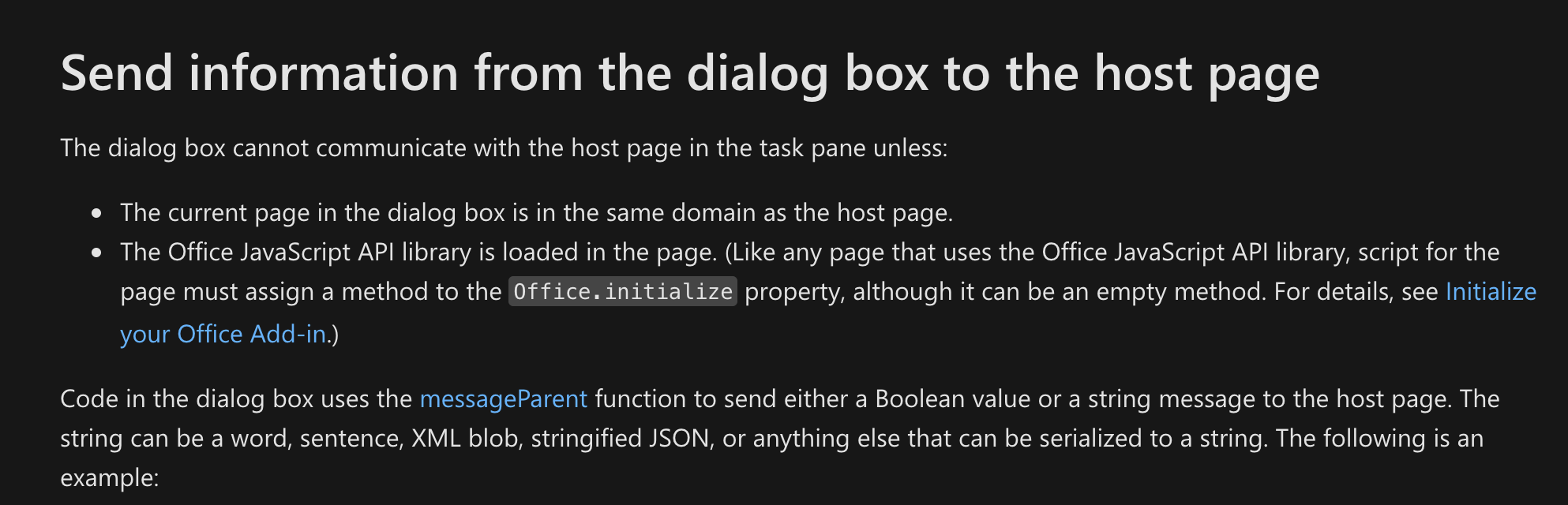
Do tell us if there's a part of the documentation which you feel can be improved.
The Documentation for event.completed is under here, which mentions that the add-in will be automatically closed.
exextoc
on 24 Dec 2020
Ok, maybe one could point out that office-js MUST be included. Because I understand it that way, that office-js only must be included if one needs the messageParent function.
Also this lines got be confused. I understand it that way, that every page can be used (no office-js needed)

What about: "The dialog box cannot display the page unless:..." (maybe in a colored box?)
The documentation for events points out that one must complete the event but I don't find anything about dialogs or the event timeout.
One could add the following warning to the dialogs docs:
"If the event is completed while a dialog box is open the box will go in an undefined state and won't be accessible by
the user our your code. Take note that every event has a 5 minute timeout after that it will be marked failed and completed by office itself."
One could also add the timeout hint to the events page.
Thank you!
EneOli
on 24 Dec 2020
P.S. Isn't there anything you could do against the pop-up warnings?
EneOli
on 24 Dec 2020
There are actually two issues here:
- The pop-up warning issue for window.open() in OWA
- displayDialog's dialog behaving weirdly (permanent spinner?) if the dialog html does not include Office.js.
We are trying to reproduce both issues and will update this thread. We appreciate your patience on this.
exextoc
on 5 Jan 2021
We tried reproducing the two issues.
The pop-up warning issue for window.open() in OWA - the warning does not ever appear for us. We tried the same code that @EneOli tried - just call window.open() followed by event.completed() in the UI-less command receiver function. We don't get a popup warning. @EneOli were you able to see this warning in this case as well, or is it only in a React scenario?
displayDialog's dialog behaving weirdly (permanent spinner?) if the dialog html does not include Office.js. - we are able to reproduce this issue in OWA. This seems to be a bug. Thanks for reporting this issue. We have put it in our backlog. Unfortunately, we don't have timelines to share at this point.
exextoc
on 6 Jan 2021
@exextoc I would suggest also that the 5 minute timeout on add-in commands should be documented.
There is strange behaviour there too - in OWA the dialog is not automatically closed on timeout, leaving the page in an invalid state; whereas in the desktop client the dialog is closed automatically successfully. This one is already logged as #1452; but it may be appropriate to enhance the documentation noting the 5 minute limit before that gets investigated/fixed.
ig-jb
on 6 Jan 2021
Thanks for the feedback @ig-jb . Could you raise a new issue for this? This one is a little confusing as it is, we're already dealing with two different problems in a single thread.
Also, please let us know the scenario where you're able to see the popup warning, as we believe that is the issue in the original post. We would like to resolve this.
exextoc
on 6 Jan 2021
@exextoc I'll add a note to #1452 that I think the 5 minute timeout on commands should be documented.
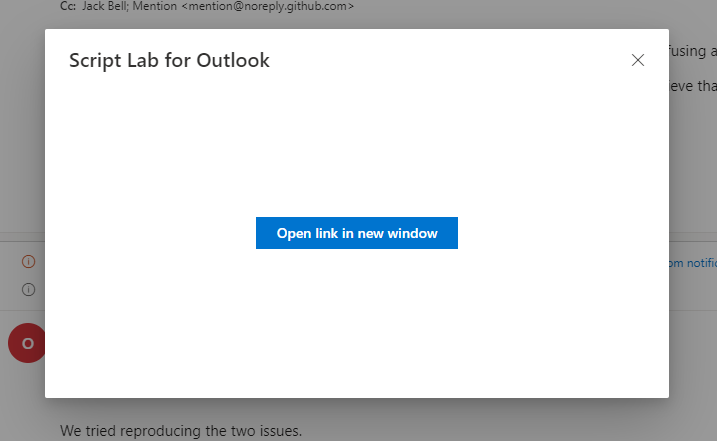
RE: the popup warning -- I was able to reproduce this in Firefox when driving window.open _directly_ from a command. The workaround was to create a button which launches the tab instead. I believe the difference may be how far up the stack Firefox searches for user interaction before blocking a popup attempt (with other browser being more lenient).
I believe the Script Lab developers have encountered this issue before, as you can see the same workaround I used in the Help command there rather than the Help link launching without additional interaction.
ig-jb
on 6 Jan 2021
ig-jb got the point. Pop-up warnings are raised by the browsers if "windows appear automatically without your permission. " How browsers make sure a window opening is raised directly by the user depends on the browser itself (probably by following the origin of the window.open call. If it is a User Event, like a click event, the browser handles the action as wanted by the user and does not raise a pop-up warning). That might be the reason why you can't reproduce this in Chrome...
See https://support.mozilla.org/en-US/kb/pop-blocker-settings-exceptions-troubleshooting
EneOli
on 6 Jan 2021
Yes, we are able to see this issue on Firefox, thanks for reporting it. We will add this to our backlog as well, and investigate what can be done here. _However_, it might be something we can't do much about. The browser treats this as a popup because it is not directly coming from a user click.
We will investigate and update this thread.
As a workaround, you can either
- Add the domain to pop-up exceptions (from the end user POV), or
- Use displayDialog as a replacement for window.open() if your scenario permits it, or
- As @ig-jb has discussed, open the window through a button click.
exextoc
on 6 Jan 2021
Side note: workaround 1 is not a good option if one want's to publish the addin. It gets rejected by the reviewer. Maybe one could communicate that to the review team?
Also personally I don't feel comfortable with 3, because it enables a third party to act under the corporate of the app and send melicious links if the gateway site does not restrict special links :(
EneOli
on 6 Jan 2021
@EneOli Yes, we will take that up with the concerned team.
Could you explain what you mean by "gateway site" here?
exextoc
on 6 Jan 2021
ig-jbs workaround works by displaying a dialog box with a button in it. Clicking on this button, redirects the user to the desired site without a warning.
The site (I call it gateway site) with the button takes a query parameter with the destination url (That's exactly how OfficeLab handles links).
A malicious third party could reverse engineer the url of that site and use it to pass links to malicious sites under the corporate id of the company offering the addin (it's like an xss Attack)
EneOli
on 6 Jan 2021
@EneOli With workaround (1), the URL should be sourced from the dialog's HTML / JS itself, to avoid this security issue. It should not be passed from the add-in as a query param. This might not work for all scenarios, and does seem like a limitation in that sense.
exextoc
on 6 Jan 2021
@exextoc @EneOli I share the concern about open redirects by passing the URL to the dialog. I avoided this by using messageParent on click to then trigger window.open from the add-in instead of the dialog. This avoids tightly coupling the 'request click' dialog to your target URL.
ig-jb
on 7 Jan 2021
Interesting... this does not trigger a pop-up warning?
EneOli
on 7 Jan 2021
@EneOli It shouldn't, unless the browsers increase their strictness later. I last verified it late last year.
ig-jb
on 7 Jan 2021
I can confirm this workaround still works. That makes 1 a suitable workaround. Thank you @ig-jb
EneOli
on 7 Jan 2021
@EneOli for the pop-up warning issue, could you give us some info about your specific scenario? We would like to understand your use case for why you need to window.open() from a UI-less command.
exextoc
on 8 Jan 2021
The end user could have some type of ticket software. When he performs an action, it gets transferred to the ticket system. After transfer the user is redirected to the ticket system to make further changes and finally save the transferred mail as ticket. The url of the ticket system is returned from the endpoint for ticket creation, called on action perform.
EneOli
on 9 Jan 2021
@EneOli can you use the dialog API instead? That is the right approach for this kind of scenario.
exextoc
on 12 Jan 2021
No, I can't, because multiple end users run the software on different servers.
EneOli
on 12 Jan 2021
@EneOli Can you please elaborate why dialog API will not work for your scenario?
exextoc
on 18 Jan 2021
Because the users set the url to open in addin settings
EneOli
on 19 Jan 2021
Related issues
 Jarch09
·
3Comments
Jarch09
·
3Comments
 dimitri-bourreau
·
4Comments
dimitri-bourreau
·
4Comments
 kushwahav
·
3Comments
kushwahav
·
3Comments
 Alturos
·
4Comments
Alturos
·
4Comments
 wsoccorsi-yw
·
4Comments
wsoccorsi-yw
·
4Comments
Most helpful comment
We tried reproducing the two issues.
The pop-up warning issue for window.open() in OWA - the warning does not ever appear for us. We tried the same code that @EneOli tried - just call window.open() followed by event.completed() in the UI-less command receiver function. We don't get a popup warning. @EneOli were you able to see this warning in this case as well, or is it only in a React scenario?
displayDialog's dialog behaving weirdly (permanent spinner?) if the dialog html does not include Office.js. - we are able to reproduce this issue in OWA. This seems to be a bug. Thanks for reporting this issue. We have put it in our backlog. Unfortunately, we don't have timelines to share at this point.