Office-js: Outlook Windows Desktop `appendOnSendAsync()` not appending to draft messages and stripping text.
Expected Behavior
Replying to an inline message appendOnSendAsync() that is not a draft appends whatever text I want. Opening an inline message that is a draft appendOnSendAsync() allows me to add new text, continue composing and insert whatever text I want.
Current Behavior
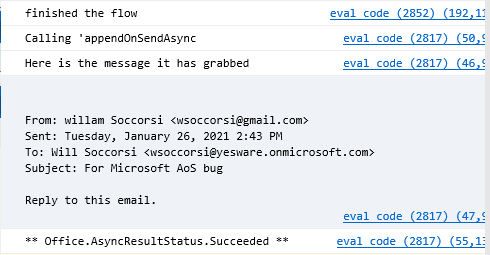
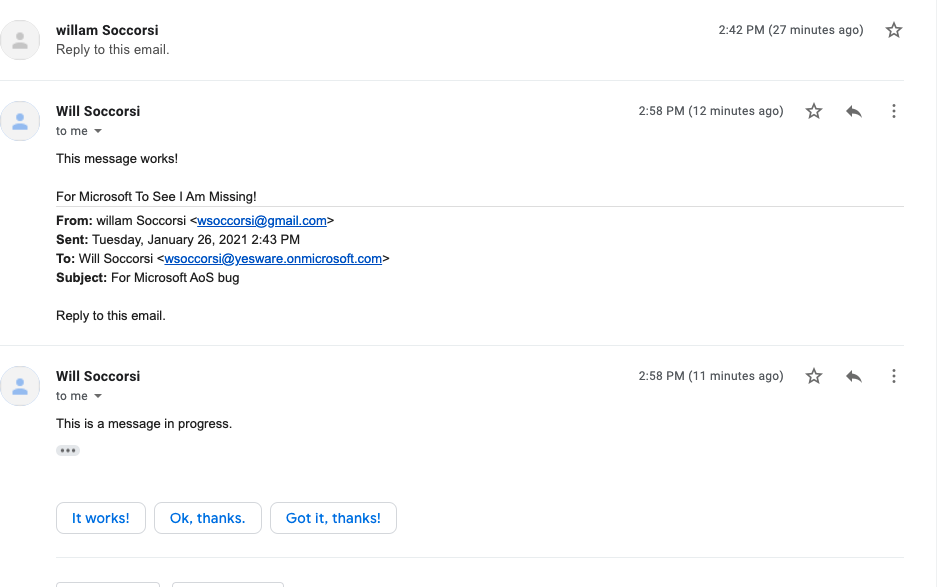
Replying to an inline message appendOnSendAsync() that is not a draft appends whatever text I want. Opening an inline message that is a draft appendOnSendAsync() doesn't allow me to finish composing a message, instead it sends the text that was originally in the draft, as shown below, and doesn't append the text in appendOnSendAsync(), even though appendOnSendAync() returns a successful resolution.
Steps to Reproduce
* Note, Logs look the same but they are two separate screenshots *
Working:
https://user-images.githubusercontent.com/61157542/105898469-76ca8500-5fe7-11eb-92f3-5f6ef012598a.mp4
Logs:
Draft Bug:
https://user-images.githubusercontent.com/61157542/105898477-79c57580-5fe7-11eb-8f69-5f252e8e5a41.mp4
Logs:
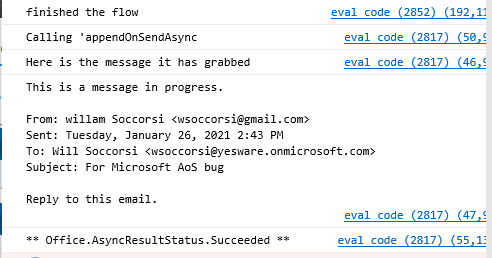
As you can see the async returns with a successful promise, but with the text and new content missing :/
Context
Here is the code I'm running:
public appendOnSend(html: string): Promise<Office.AsyncResult<void>> {
        return new Promise<Office.AsyncResult<void>>((resolve, reject) => {
            // We actually are grabbing the old body somehow?
            Office.context.mailbox.item.body.getAsync(
                "text",
                { asyncContext: "This is passed to the callback" },
                function callback(result) {
                    console.log("Here is the message it has grabbed");
                    console.log(result.value);
                });
            return new Promise<Office.AsyncResult<void>>((resolve, reject) => {
                console.log("Calling 'appendOnSendAsync");
                (Office.context.mailbox.item.body as any).appendOnSendAsync(
                    "For Microsoft To See I Am Missing!",
                    { coercionType: Office.CoercionType.Html },
                    (asyncResult) => {
                        if (asyncResult.status === Office.AsyncResultStatus.Succeeded) {
                            console.log("** Office.AsyncResultStatus.Succeeded **");
                            resolve(asyncResult);
                        } else if (asyncResult.error) {
                            reject(asyncResult.error);
                        } else {
                            reject(asyncResult);
                        }
                    }
                );
            });
        });
My Environment
Microsoft Outlook Windows Desktop, Version 2102 (Build 13714.20000)
Thanks in advance, please let me know if you need anything else!
 wsoccorsi-yw
All 4 comments
I was able to reproduce this issue as well. Like you mentioned it occurred when editing a saved draft and then sending the email after calling the appendOnSendAsync API (even when edits were made after calling the API).
The API call wasn't shown in your video, but I assume the API was called after the saved draft was opened?
I've opened a product bug for us to investigate further (internal id for tracking: 1918078)
 exextoc
on 29 Jan 2021
exextoc
on 29 Jan 2021
@exextoc Awesome thanks, looking forward to a fix! And yes the API is called after we grab the draft/item.
wsoccorsi-yw
on 29 Jan 2021
An emergency backfix was deployed for this, and the fix should have gone out by now to all Outlook clients. No download/client update is needed, however Outlook will need to be rebooted, and be connected to the internet. (Rebooting the machine should not be necessary, but could help). If you are still hitting the issue, please let us know the symptoms/cause and the Build Number of Outlook.
exextoc
on 8 Feb 2021
@exextoc Wonderful! I just gave this a test and see it now working :D. I'll reach out if certain versions experience this but for now it looks great so thanks a bunch.
wsoccorsi-yw
on 8 Feb 2021
Related issues
 mattblackdev
·
4Comments
mattblackdev
·
4Comments
 jacobx1
·
4Comments
jacobx1
·
4Comments
 binarykitchen
·
5Comments
binarykitchen
·
5Comments
 cawise
·
4Comments
cawise
·
4Comments
 rvanlaak
·
4Comments
rvanlaak
·
4Comments
Most helpful comment
I was able to reproduce this issue as well. Like you mentioned it occurred when editing a saved draft and then sending the email after calling the appendOnSendAsync API (even when edits were made after calling the API).
The API call wasn't shown in your video, but I assume the API was called after the saved draft was opened?
I've opened a product bug for us to investigate further (internal id for tracking: 1918078)