Office-js: OnChanged Event handler in Excel add-in is not invoked until mouse is hovered over TaskPane when two or more Microsoft accounts are linked to Excel.
I'm creating an add-in in Excel where I want to detect changes in the workbook and update the button ribbon when certain criteria are met. By changing the button ribbon I mean disable and enable a button that I have defined in the manifest.xml, other than the one that opens the panel.
I have a "Sync" button that's displayed in the Excel ribbon. By default the button is disabled but when the document is "out of sync" I want to enable that button. To detect if the document is "out of sync" I have added an event handler that detects if document has changed (as described in this documentation).
Excel.run(async context => {
    context.workbook.worksheets.onChanged.add(onChange);
    await context.sync().then(function() {
      console.log("Event handler on change registered!");
    });
  });
The onChange function will then be called and its purpose is to update the Sync button in the Excel ribbon.
However, the event handler does not appear to be called right away, it looks like I have to hover over the taskpane to be able to invoke the onChange function. This video will further demonstrate the issue and give you more insight.
I have noticed that this error seems to appear when Excel has been linked with two or more windows accounts (see screenshot of accounts I have linked to Excel).
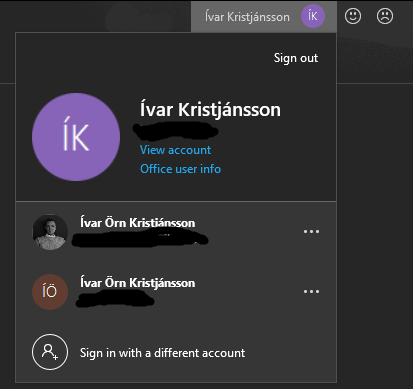
I've had several of my colleagues test this on their computers and the only time I have NOT seen this bug appear is when the there was only one account linked to Excel so that is where I draw my conclusion from. This seems to be a bug both on windows and on Mac. However, I've not confirmed that those running into this on Mac have had multiple accounts, but when I have confirmation I will post that in comments.
Please note that this seems to be just an issue in Excel desktop but not Excel online.
Expected Behavior
As soon as something has changed in the Excel document the "Sync" button should straight away be enabled
Current Behavior
When the content of the document is changed the "Sync" button does not change to enabled until the TaskPane has been hovered.
Steps to Reproduce, or Live Example
- Link to demo source: Demo of the example
*PLEASE NOTE: That to reproduce the error you may have to have two or more Windows accounts linked to your Excel application as mentioned above.
- Clone this repo to your computer
- Run command
npm iin the terminal in the root of the project - Run command
npm startin the terminal
- This should start a node js server and open Excel
- Notice how the "Sync" button in the Excel Ribbon is disabled
- Click "Show Taskpane" and wait for it to load
- If it does not load correctly (only displays a white screen) then reload the add-in via the "Personality menu"
- When the Taskpane has loaded correctly then change some cell in the Excel document and notice if the "Sync" button has been enabled or not.
- If not, try hovering the taskpane
Context
We are trying to create an Excel add-in which can be used both online and on the desktop client. It will detect changes in the worksheet and notify the user if he is out of sync with an online client through this "Sync" button by enabling it.
Your Environment
- Platform: PC, Mac
- Host: Excel
- Office version number: Version 2011 (Build 13426.20184) 64. bit
- Operating System: Windows, IOS
 ivark16
All 7 comments
@ivark16 Thanks for the reporting! Based on your description, 2 factors may be related. 1) onChanged event didn't be triggered timely. I have tried on my machine , the onChanged is always triggered on time. 2) The render for ribbon button is delayed.
Could you help confirm if the onChanged event is triggered timely in your machine?
 MandytMSFT
on 16 Nov 2020
MandytMSFT
on 16 Nov 2020
Hi @MandytMSFT, thanks for your fast reply!
I have checked and the onChanged event handler isn't triggered until the add-in is hovered. (Check this video where I demonstrate this. The mouse isn't as clear as I wanted it to be but I was trying to demonstrate that the code is not triggered until I hover the TaskPane add-in). I checked this by adding a code to my onChange function where it writes to the document when onChanged event gets called. You can check the code on the github I linked as I have updated it with the new code.
Just to be sure, didn't you run this on the Excel application instead of Excel Online? Do you have more than one account linked to your Excel application? This is a major factor as I described in the issue above.
ivark16
on 16 Nov 2020
UPDATE for Mac: It seems not to be an issue for two or more accounts. My associate that uses Mac does not have two or more accounts linked to his Excel account.
ivark16
on 23 Nov 2020
@ivark16 I can repro the issue on my machine. The cause is your addin is configured to use sharedRuntime which will use IE webview. The event issue you reported is a known issue for IE webview.
This fix is adding " " before referencing office.js in your taskpane.html as below. I have tried locally, it works for me.
_
_
Let me know if you still met this issue.
MandytMSFT
on 24 Nov 2020
@ivark16 just realized I override previous reply, Not sure if you can receive notification or not. Pls refer to the solution in last reply.
MandytMSFT
on 24 Nov 2020
@MandytMSFT thanks so much for this. In a quick glance this solution seems to be working just fine! Thanks for the help! 😄 🥳
ivark16
on 24 Nov 2020
@ivark16 Closing this issue since it seems to be resolved.
Thanks.
 ElizabethSamuel-MSFT
on 4 Dec 2020
ElizabethSamuel-MSFT
on 4 Dec 2020
Related issues
 tido-ms
·
3Comments
tido-ms
·
3Comments
 alx-andru
·
5Comments
alx-andru
·
5Comments
 Jarch09
·
3Comments
Jarch09
·
3Comments
 jacobx1
·
4Comments
jacobx1
·
4Comments
 dgrudenic
·
3Comments
dgrudenic
·
3Comments
Most helpful comment
@ivark16 I can repro the issue on my machine. The cause is your addin is configured to use sharedRuntime which will use IE webview. The event issue you reported is a known issue for IE webview.
This fix is adding " " before referencing office.js in your taskpane.html as below. I have tried locally, it works for me.
_
_
Let me know if you still met this issue.