Office-js: Fatal Memory Issue - Excel Content Pane updating a Table
Expected Behavior
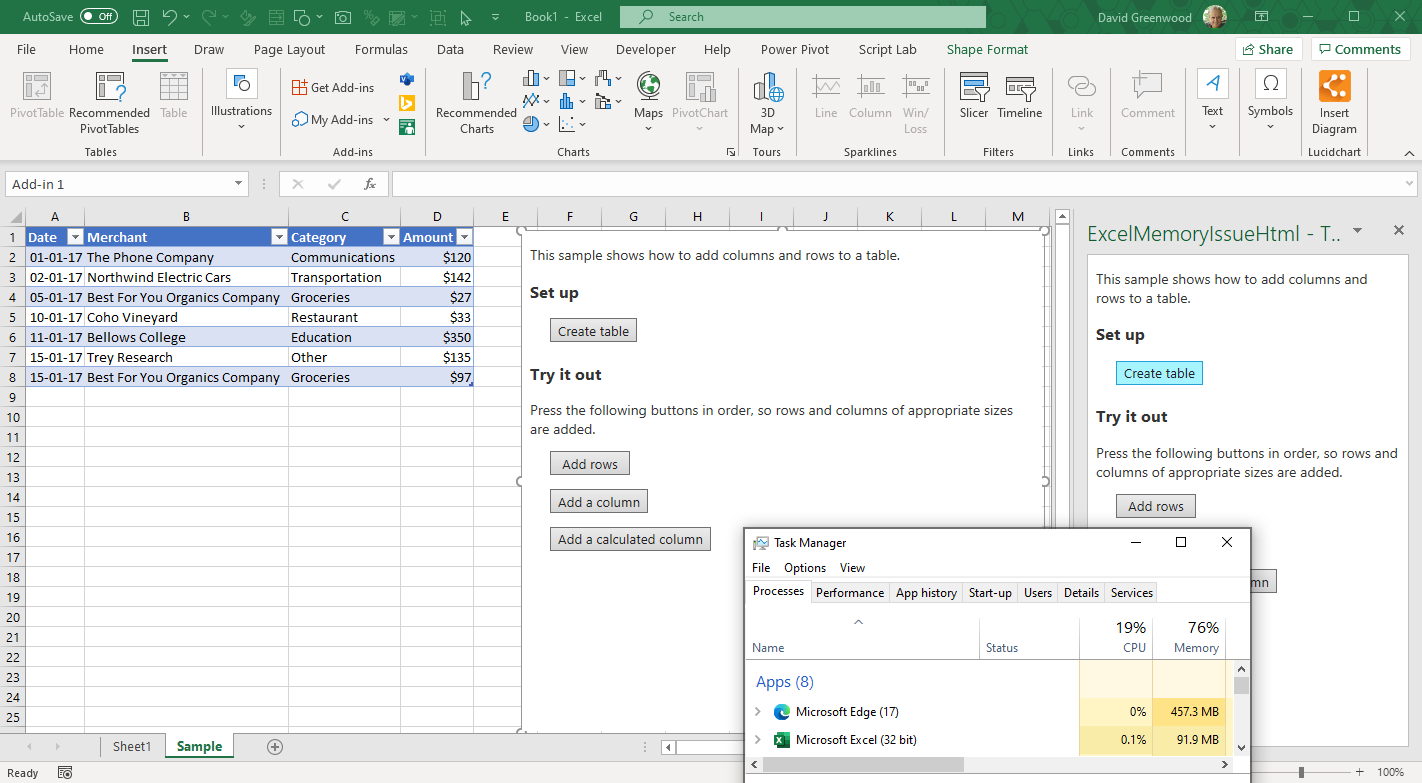
We add Rows to a Table from an Excel Content Pane Add-in and expect that any increase in the user's memory will be consistent with the size of the added data and any other memory consumed for the add process, will be minimal and/or reduce after the process is complete.
Current Behavior
Adding a Row to a Table from a Content Pane Add-in permanently increases the memory by ~3mb+ in that session and does not reduce. As additional rows are added, the memory is consumed to a point where Excel crashes.
Steps to Reproduce, or Live Example
To demonstrate the issue we are using the sample code from Scriptlab used to demo "Add rows and columns"
We have created two standalone apps using the identical Scriptlab code:
- Task Pane Add-in (attached manifest ExcelMemberIssueHtml - TaskPane.xml)
- Content Pane Add-in (attached manifest ExcelMemberIssueHtml - ContentPane.xml)
Steps
- Sideload the two attached manifests
- Open Excel
- Insert the Task Pane Add-in and open the Task Pane from the ribbon
- Click Create Table (Sample worksheet created and table added)
- Insert the Content Pane Add-in (Content Pane Add-in is displayed on Sample worksheet)
- Both Add-ins are connected to the same ExpensesTable (do not click Create Table on Content Pane)
- Open Windows Task Manager and note the memory MB used by Excel
- Click Add Rows in Task Pane _five times_ to add a series of rows
- Wait for a few moments and note the memory MB used by Excel from the Task Pane source
- Click Add Rows in Content Pane _five times_ to add a series of rows
- Wait for a few moments and note the memory MB used by Excel from the Content Pane source
- Compare the memory MB usage between the Task Pane and Content Pane Apps
Context
This is a critical issue for our project where a Content Pane add-in has been developed that adds rows and interacts with an Excel Table.
Environment
- Platform: Microsoft 365
- Host: Excel Desktop
- Excel Version 2008 (Build 13127.20408)
- Excel for Microsoft 365 MSO (16.0.13127.20266) 32-bit | Semi-Annual Enterprise Channel (Preview)
- Operating System: Windows 10 Pro 10.0.19041 Build 19041
- Browser: Edge
Screenshot and Manifests and attached
 david-ps
All 30 comments
@lumine2008 Could this bug have been introduced when #391 was resolved?
We've been working on this app for months and never noticed this issue. Now all development has come to a stop because we cannot proceed with any UAT so this is critical for us. FYI @jamilnawaz @chartnado-brian-haas
david-ps
on 1 Oct 2020
@tutieu @ElizabethSamuel-MSFT Can you please give us an estimated timing on when this bug will be investigated and the likely solution and/or workaround?
david-ps
on 2 Oct 2020
We see this error using:
Windows 10 Pro 10.0.19041 Build 19041
Excel for Microsoft 365 MSO (16.0.13127.20266) 32-bit
Semi-Annual Enterprise Channel (Preview)
On that basis, I believe the browser being used is WebView (EdgeHTML) based on documentation
_NB: The issue environment details are updated_
david-ps
on 8 Oct 2020
@keyur32 We have NOT installed Microsoft Edge WebView2 (Preview)
david-ps
on 8 Oct 2020
it looks like UX related issue, looping Lillian as well
 lumine2008
on 10 Oct 2020
lumine2008
on 10 Oct 2020
@lumine2008 Thanks for getting involved. What does UX related issue mean?
david-ps
on 10 Oct 2020
it's an internal team:)
@lumine2008 Thanks for getting involved. What does UX related issue mean?
lumine2008
on 10 Oct 2020
@lliu113 Can you please provide an update?
david-ps
on 13 Oct 2020
@keyur32 @lumine2008 Any news or ETA on this critical issue? Our development has been stopped now for 3 weeks awaiting the outcome!
david-ps
on 21 Oct 2020
Still under investigation and @lumine2008 will comment when updated. Thanks.
 keyur32
on 28 Oct 2020
keyur32
on 28 Oct 2020
Thanks for your patient, @david-ps , yes, our team is still doing the investigation, we found this issue is not related to any specific API, it may relate to the EdgeHTML webview, we are working with the related team to do further investigation.
lumine2008
on 29 Oct 2020
Thanks for keeping us updated @lumine2008 Great to hear it's not related to the API.
david-ps
on 29 Oct 2020
51 days - any news about this fatal bug investigation?
@lliu113 @keyur32 @lumine2008
david-ps
on 20 Nov 2020
Hey Guys, any news?
@lliu113 @keyur32 @lumine2008
david-ps
on 9 Dec 2020
@david-ps Sorry for the delay. We are actively working on that. I just assigned the thread to right person in order we can track better on that.
 MandytMSFT
on 9 Dec 2020
MandytMSFT
on 9 Dec 2020
@mandytmsft That's great, thank you!
david-ps
on 10 Dec 2020
@david-ps , the root cause is located. The fix is on the way.
And please confirm there is no issue if update table just from the taskpane.
 Dengshan2018
on 11 Dec 2020
Dengshan2018
on 11 Dec 2020
@Dengshan2018 No, we have not discovered any issue with updating tables/sync data from the taskpane only the contentpane.
Can you please advise as to the implications of the fix ie. will it require the use of an updated API Requirement Set? What exactly being fixed?
david-ps
on 25 Dec 2020
@david-ps Thanks for the confirmation. This is memory leak issue. The fix will be available in future release 16.0.13530.20252+. The fix might be back ported to old version. But no promise. There is no change required in your end. Thanks again for reporting the issue.
Dengshan2018
on 25 Dec 2020
@Dengshan2018 Thanks for the update. We have been developing for target ExcelApi 1.9 | Version 1903 (Build 11425.20204) or later | 16.0 or later | 16.24 or later | May 2019. Can you please port fix back to that version so that we can engage our researched target audience.
_Updated: Changed from Excel API 1.11 to 1.9 that is required_
david-ps
on 25 Dec 2020
@david-ps Oldest version we can port back is 16.0.13127.*(semiannual version which is released on July 2020). New Excel version should support ExcelApi 1.9. Can those Office users update their version to 16.0.13127+?
Dengshan2018
on 4 Jan 2021
@Dengshan2018 Is 16.0.13127.*(semiannual version which is released on July 2020) M365 Version 2002 and Excel API Requirement Set 1.11?
What is the link between Requirements Sets and M365 Version Semi Annual. Please clarify.
And, when do you expect this fix to be applied?
david-ps
on 9 Jan 2021
@Dengshan2018 @MandytMSFT We are unable to continue development or testing until we have a fixed version and can confirm backwards porting and minimum Excel version and Requirement Set. Please advise asap re previous post questions.
david-ps
on 12 Jan 2021
@david-ps the fix is already in Current Channel from M365 Version Semi Annual. Please verify. Latest office version should support all API set by default.
Dengshan2018
on 12 Jan 2021
@Dengshan2018 @AlexJerabek @alison-mk Sorry, I am not clear on what "Current Channel from M365 Version Semi Annual" means.
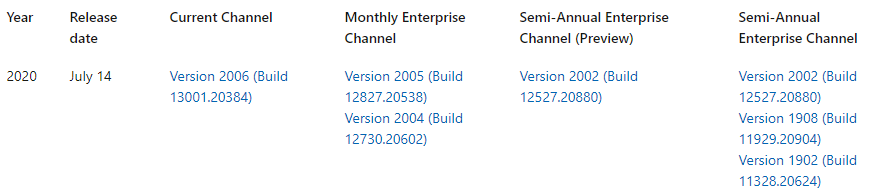
Can you please be specfic and advise Release Date, Version and Build in which the fix has been deployed and when it will be released to the Monthly and Semi Annual Enterprise Channels?
david-ps
on 12 Jan 2021
@david-ps The fix is in 2012 | 13530.20316 | January 5, 2021

Need more justification and time to port back to Semi Annual Enterprise Channels.
Dengshan2018
on 12 Jan 2021
@Dengshan2018 Thanks. What more justification do you need and how much time would it take to port back to below?
david-ps
on 12 Jan 2021
@david-ps I've created the bug for customer support. You might be contacted for more information once the supporting engineering is acknowledged. Before that, feel free to verify the fix.
Dengshan2018
on 12 Jan 2021
@Dengshan2018 ok thanks! Will get back to you with results soon.
david-ps
on 12 Jan 2021
@Dengshan2018 Yes, the problem is fixed. Thanks you :)
@AlexJerabek @alison-mk Can you please help with the questions below and any documentation where these are described?
- Which version of Excel does M365 Version 2002 (Build 12527.20988) released in the Semi-Annual 14 July 2020 channel contain?
- We know that you can check Requirement Set availability at Runtime but how can we check for Excel Version?
david-ps
on 12 Jan 2021
Related issues
 barisbikmaz
·
4Comments
barisbikmaz
·
4Comments
 tido-ms
·
3Comments
tido-ms
·
3Comments
 Jarch09
·
3Comments
Jarch09
·
3Comments
 dgrudenic
·
4Comments
dgrudenic
·
4Comments
 leoseccia
·
3Comments
leoseccia
·
3Comments