Office-js: [Outlook] `cursor` CSS styles are ignored in Mac taskpane
In the taskpane in Mac Outlook, elements with the cursor style (for example: <div style='cursor: pointer;'>Hello</div>) do not show that cursor style when hovered.
Expected Behavior
I would expect that the cursor CSS style would be displayed accurately.
Current Behavior
Hovering over any element with a cursor CSS style does not result in the mouse cursor displaying that style. It always displays the default style.
This bug does not repro in Windows Outlook 2013, Windows Outlook 2016, or OWA on any browser (including Safari). It also doesn't repro in a dialog opened by the plugin in Mac Outlook -- in a dialog, cursor CSS styles work correctly.
So far I've only tested this in a plugin running in the compose window in Outlook, so I do not know if it happens in other hosts.
Steps to Reproduce, or Live Example
- Open a taskpane on a compose window in Mac Outlook, pointed at the following HTML file:
<!doctype html>
<html lang="en">

<head>
    <meta charset="utf-8" />
    <meta http-equiv="X-UA-Compatible" content="IE=Edge" />
    <meta name="viewport" content="width=device-width, initial-scale=1" />

    <!-- Office JavaScript API -->
    <script type="text/javascript" src="https://appsforoffice.microsoft.com/lib/1/hosted/Office.js"></script>
</head>

<body>
    <div style='cursor: pointer;'>Your cursor should become a hand when you hover on me</div>
    <script>
        window.Office.initialize = function() {};
    </script>
</body>

</html>
Notice that the cursor does not become a pointer when hovering over the text in Mac, but it does in Windows and OWA. There also seems to be weird cursor behavior when moving the cursor off the text and out of the taskpane -- sometimes the cursor will become a pointer one it has left the taskpane

Context
Cursor styles (especially cursor: pointer) give users clear indication of what UI elements are clickable or interactable.
Your Environment
- Platform [PC desktop, Mac, iOS, Office Online]: Mac
- Host [Excel, Word, PowerPoint, etc.]: Outlook
- Office version number: 16.23.326.1
- Operating System: OSX High Sierra (10.13.6)
 ShannonLCapper
All 5 comments
Thanks for reporting this issue regarding cursor CSS. We are able to reproduce this issue. It has been put on our backlog. We unfortunately have no timelines to share at this point.
 exextoc
on 16 Apr 2019
exextoc
on 16 Apr 2019
Did you made any progress on this issue?
 schachdavid
on 13 Aug 2019
schachdavid
on 13 Aug 2019
I'm also interested in the status of this issue. Do you have any release plan?
 argonaultes
on 16 Aug 2019
argonaultes
on 16 Aug 2019
We're seeing a similar issue in Excel.
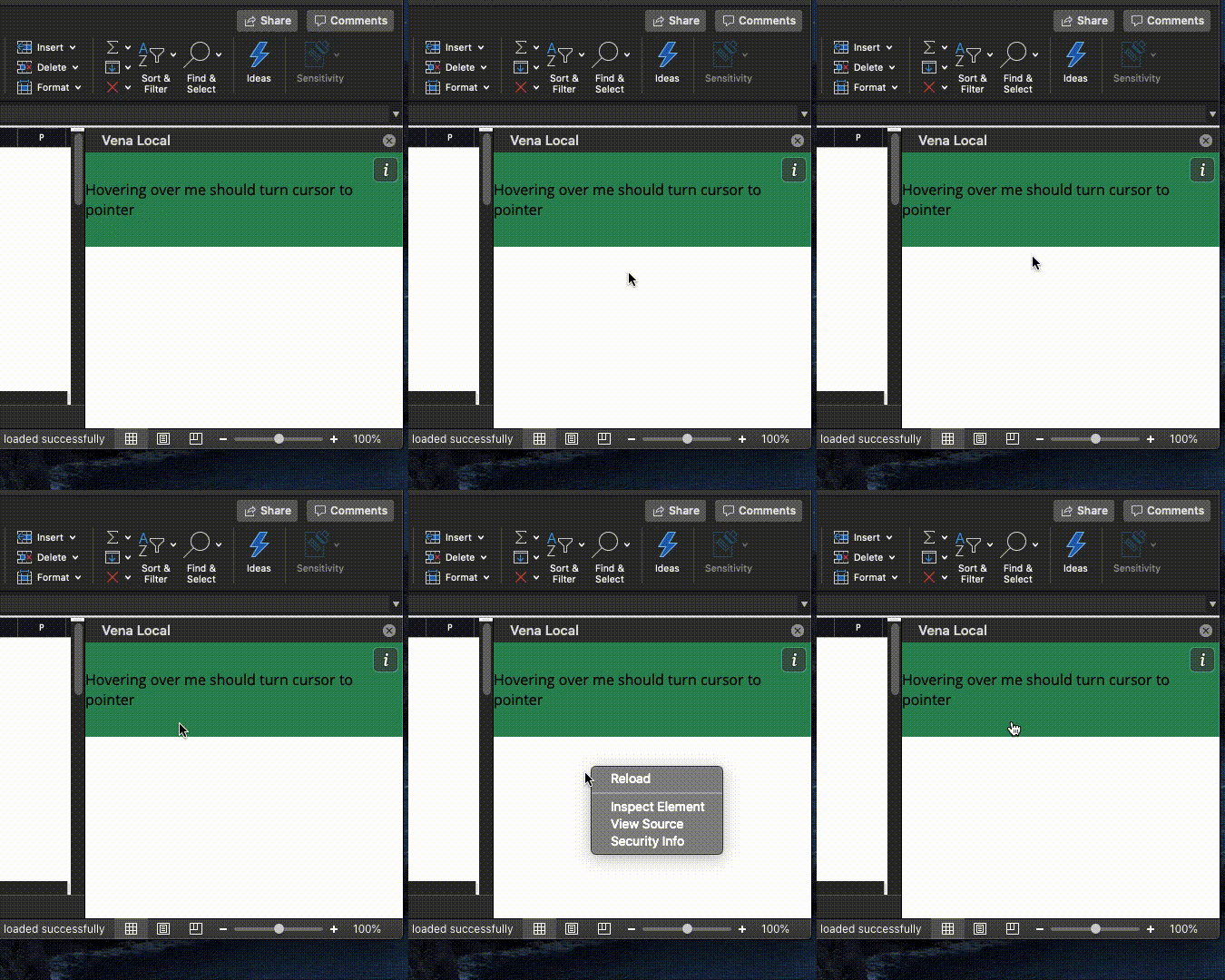
Current Behavior
On initial load, the cursor changes to pointer based on the CSS as expected.
However, if you move the mouse cursor out of the taskpane and then bring it back in, the cursor never changes from the default cursor.
If you then right-click inside the taskpane, the curor starts changing to pointer once again.
Steps to Reproduce, or Live Example
I can reproduce this by creating a simple div element with inline style of cursor: pointer.
Context
It makes it much more difficult for users to find out which parts of the UI are interactable
Your Environment
- Platform [PC desktop, Mac, iOS, Office Online]: Mac
- Host [Excel, Word, PowerPoint, etc.]: Excel
- Office version number: Version 16.30
- Operating System: macOS Catalina Version 10.15
 umar-khan
on 21 Oct 2019
umar-khan
on 21 Oct 2019
Reassigning to @lliu113 (and unassigning @exextoc) since this seems to be a platform-wide, UI-related issue. @lliu113 are you able to provide any estimate as to when customers might expect this issue to be resolved? Thanks!
 kbrandl
on 23 Oct 2019
kbrandl
on 23 Oct 2019
Related issues
 leoseccia
·
3Comments
leoseccia
·
3Comments
 KantilalJadav
·
4Comments
KantilalJadav
·
4Comments
 barisbikmaz
·
4Comments
barisbikmaz
·
4Comments
 tido-ms
·
3Comments
tido-ms
·
3Comments
 ndeeH
·
5Comments
ndeeH
·
5Comments
Most helpful comment
Reassigning to @lliu113 (and unassigning @exextoc) since this seems to be a platform-wide, UI-related issue. @lliu113 are you able to provide any estimate as to when customers might expect this issue to be resolved? Thanks!