Office-js: Office.context.mailbox.makeEwsRequestAsync not making network request.
We are attempting to get a mailbox item by id using Office.context.mailbox.makeEwsRequestAsync. The method is never succeeding and is also never erroring. From debugging network requests with Charles it appears that there is no network request being made when we call the method.
Expected Behavior
We expect the method to either return the item or throw an error.
Current Behavior
Nothing happens. We call the method and it neither returns anything nor throws an error.
Steps to Reproduce, or Live Example
const theItemId = await Office.context.mailbox.item.saveAsync(asyncValue => asyncValue);

Office.context.mailbox.makeAsyncRequest(`<?xml version="1.0" encoding="utf-8"?>
<soap:Envelope xmlns:xsi="http://www.w3.org/2001/XMLSchema-instance" xmlns:xsd="http://www.w3.org/2001/XMLSchema" xmlns:soap="http://schemas.xmlsoap.org/soap/envelope/" xmlns:t="http://schemas.microsoft.com/exchange/services/2006/types" xmlns:m="http://schemas.microsoft.com/exchange/services/2006/messages">
    <soap:Header>
        <t:RequestServerVersion Version="Exchange2013" />
    </soap:Header>
    <soap:Body>
        <GetItem xmlns="http://schemas.microsoft.com/exchange/services/2006/messages" xmlns:t="http://schemas.microsoft.com/exchange/services/2006/types">
            <ItemShape>
                <t:BaseShape>IdOnly</t:BaseShape>
                <t:AdditionalProperties>
                    <t:FieldURI FieldURI="item:Body" />
                    <t:FieldURI FieldURI="item:Attachments" />
                </t:AdditionalProperties>
            </ItemShape>
            <ItemIds>
                <t:ItemId Id="${theItemId}" />
            </ItemIds>
        </GetItem>
    </soap:Body>
</soap:Envelope>`, asyncResult => {
  console.log(asyncResult) // will never log
});
Context
We are trying to get the content for an email so that we can send the item with the office api. We need to get the content for the item so that we can make some manipulations to the content prior to sending.
Your Environment
- Platform [PC desktop, Mac, iOS, Office Online]: Mac
- Host [Excel, Word, PowerPoint, etc.]: Outlook for Mac v16.23 (190309)
- Office version number: 16.23 (190309) (is this the same as the outlook version number?)
- Operating System: Mac Mojave
- Browser (if using Office Online): ______
Useful logs
None. That is part of the problem.
 outreach-soren
All 73 comments
@macOutlookExtensibility can you please look into this issue?
 kbrandl
on 19 Mar 2019
kbrandl
on 19 Mar 2019
This started occurring for us with the 16.24 version of Outlook for Mac, although the behavior there was slightly different. The callback would be called, but with an empty value. Still no sign of an actual network request being made though. The issue as described above where the callback is never called started occurring in 16.23.
outreach-soren
on 19 Mar 2019
@macOutlookExtensibility / @kbrandl any update on this or more info we can provide?
 kkerr1
on 25 Mar 2019
kkerr1
on 25 Mar 2019
We are having trouble reproducing this issue. Could you please provide details of the account used? Is it an Exchange account? Does it happen for multiple accounts or just one?
 macOutlookExtensibility
on 26 Mar 2019
macOutlookExtensibility
on 26 Mar 2019
This is happening for all accounts we have. Our accounts are all normal o365 accounts. It does seem to be specific to mac Mojave though. We've tried to repro on a machine running Sierra, with the same Outlook version, and it does not repro there.
outreach-soren
on 27 Mar 2019
Just hit this issue in Outlook for Mac 16.23. Request is indeed never completed and according to vorlon.js even not sent.
 dmarkovtsev
on 28 Mar 2019
dmarkovtsev
on 28 Mar 2019
Just got same error (macOS 10.14.3, Outlook for Mac 16.23.1).
Callback which is second argument of Office.context.mailbox.makeEwsRequestAsync() rising error (screenshot attached).
Btw, Outlook on Windows works fine for same case.

 efim23
on 28 Mar 2019
efim23
on 28 Mar 2019
We are able to reproduce this issue in build 16.23 now (though it is inconsistent). We are working on it and will fix this ASAP.
Meanwhile, you can try updating to the latest Insider builds, as we do not see this bug on them.
macOutlookExtensibility
on 28 Mar 2019
We faced with the same issue in Mac Outlook 16.23.1(190326)
 vyazadji
on 28 Mar 2019
vyazadji
on 28 Mar 2019
@macOutlookExtensibility @kbrandl we would also like to report the same issue. Our MAC outlook addin is currently not working for all users using MAC Outlook version 16.22 and higher. Any update would be appreciated. Thank you very much!
 glr0221
on 3 Apr 2019
glr0221
on 3 Apr 2019
@glr0221 thanks for letting us know that you're also hitting this issue. @macOutlookExtensibility is there any update you can provide regarding potential timing of the fix?
kbrandl
on 3 Apr 2019
This seems to be fixed on the 16.24 builds. Please update to the latest Insider builds, or the production build when it is out, and check if the bug is fixed.
macOutlookExtensibility
on 5 Apr 2019
The fix doesn't work for me :(
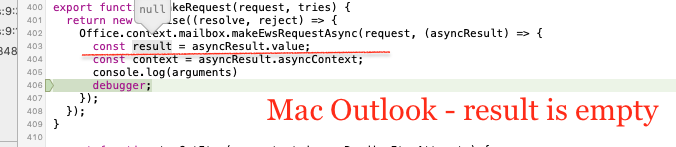
Outlook for Mac v 16.24(19040303)
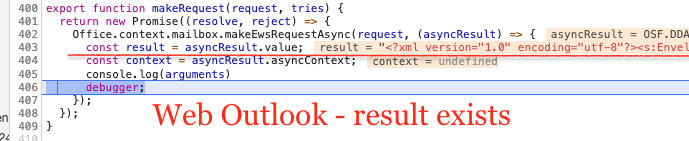
Callback was called but result is null:
The same code in web Outlook:
vyazadji
on 8 Apr 2019
Same issue here: I'm not seeing any network requests in the network tab when making this call. I'm not seeing any errors either. Appears to work OK on windows.
My Outlook version is: 16.23.1 (190326) and we're using Office 365
 cetra3
on 9 Apr 2019
cetra3
on 9 Apr 2019
@cetra3 Outlook team acknowledged that it is an issue in 16.23 and claimed that the issue is fixed on 16.24 versions
@vyazadji Can you check the value of asyncResult.status? So that we can be confirm that asyncResult.value is null but Outlook returned success as the status.
 SureshGowthamS
on 9 Apr 2019
SureshGowthamS
on 9 Apr 2019
@SureshGowthamS Now it works ! The version of Outlook is the same. I'm even didn't restart it.

Thanks !
vyazadji
on 9 Apr 2019
Do you have any estimation when 16.24 versions will be released for all users ?
vyazadji
on 9 Apr 2019
Seconding @vyazadji, when is the tentative release of 16.24 for all users? thank you.
glr0221
on 10 Apr 2019
Usually Outlook update comes in the second week of every month, so it should be out in this week.
Check out history https://macadmins.software
SureshGowthamS
on 10 Apr 2019
There is a strange behavior with this fix. In my Mac the fix works well. But when my QA tested this fix we found that it doesn't work and the issue is still reproducible in the last 16.24 version.
We enabled debug mode in QA Mac using this manual. And after the restarting Outlook and opening debug panel, the issue disappeared! After this action the issue isn't reproducible even without debug panel.
We tested it on the third Mac :) When we update Outlook from 16.22 (in this version the issue is absent) to 16.24 (and don't do any other actions) the issue is still reproducible :(
What should we do? Can it be related to some cache inside Outlook ? We can't recommend enable debug mode for all our customers!
vyazadji
on 11 Apr 2019
@vyazadji That is very unusual. Can you give us the version number that comes after "16.24" when you click Outlook -> About (in brackets)?
macOutlookExtensibility
on 11 Apr 2019
In all three cases it's 16.24(19040303). We updated via Microsoft AutoUpdate -> Join the Office Insider program ... -> Office Insider Slow.
vyazadji
on 12 Apr 2019
This is very strange. The Mac #3 (Outlook v16.24) where the issue was detected yesterday. Today works well without any actions from our side.
We took the next Mac let's mark it as #4 :) Updated to the v 16.24(19040303). Issue is reproducible.
Then we cleared Outlook cache: removed all in ~/Library/Containers/com.microsoft.Outlook/Data/Library/Caches/com.microsoft.Outlook/WebKitCache

After this the issue disappears !
So looks like this is an issue with cache.
WDYT ?
vyazadji
on 12 Apr 2019
@vyazadji Makes sense, seems like this issue was fixed but continued to reproduce because of the cache. We knew that removing the cache caused the bug to reproduce. But seems like the other way around is true as well.
Hopefully this solves the problem for you?
macOutlookExtensibility
on 12 Apr 2019
If my users will not face with this issue in 16.24 it's ok for me :)
- Can I refresh the cache via JavaScript from my add-in ?
- Do we have any another ways how we can clear cache manually? What we can recommend our customers if the will need it.
- Do we know the cache lifetime for our Outlook add-in in Mac ?
vyazadji
on 15 Apr 2019
No, unfortunately there is currently no way to remove the cache other than locating and removing the WebKitCache folder. We also cannot tell you the cache lifetime for an Outlook add-in, as it depends on several factors.
macOutlookExtensibility
on 16 Apr 2019
Thanks for the help with this issue :)
vyazadji
on 16 Apr 2019
Outlook for Mac v16.24(19041401)
Cleared folders:
~/Library/Containers/com.microsoft.Outlook/Data/Library/Caches/com.microsoft.Outlook
~/Library/Containers/com.Microsoft.OsfWebHost
makeEwsRequestAsync now gets the value, but it is always empty.
The issue looks as not fixed to me.
@macOutlookExtensibility Is there anything else I can refresh/reload/reinstall to make things working?
P.S. Everything works fine in browsers and Outlook for Windows.
dmarkovtsev
on 18 Apr 2019
Our developers and customers are experiencing the same exact symptoms as described by @dmarkovtsev on build 19041401. Please advise.
kkerr1
on 18 Apr 2019
We've applied the update, many, many of our customers have applied 16.24.19041401 and it is still broken.
We've cleared the cache as described above, tried uninstalling, reinstalling, all to no avail.
 glrassistant
on 19 Apr 2019
glrassistant
on 19 Apr 2019
@kkerr1 @dmarkovtsev Let me confirm this - both of you (and your customers) are not experiencing the earlier issue of getting back no response. You're only experiencing the null response issue now. If this is the case, could you also explain what the MakeEwsRequest is trying to do?
@glrassistant Are you getting back no response, or a null but "succeeded" response?
macOutlookExtensibility
on 22 Apr 2019
@macOutlookExtensibility this is correct for 16.24.19041401 we are now getting back a response but it is null. On Friday we shared a video recording of this behavior with Faisal J.
We use this response after calling Office.context.mailbox.item.saveAsync to confirm that the item (message) has indeed persisted to the exchange server. We include a bit of information in the message body before saving and parse the response of Office.context.mailbox.makeAsyncRequest to make sure the message made it to EWS. We call this with multiple retries to account for clients that run Outlook in cached mode. We then call Office.context.mailbox.makeAsyncRequest with an UpdateItem / SendAndSaveCopy request to send the mailing with a slightly modified body some extended properties we have set.
It's perfectly reasonable to ask how we use this API to better understand how we deploy these APIs, but its also very reasonable to expect APIs to not suddenly break with no warning. Allow me to again emphasize that this has broken our Add-In for all Mac customers using these Outlook versions and has caused a lot of pain to our customers as this issue has persisted over 30 days.
kkerr1
on 22 Apr 2019
We are also seeing the response (asyncResult.value) coming back as null with this update.
status = succeeded and errorMsg=undefined status
Any other values that you would like for us to investigate?
In the call we are attempting to retrieve the email headers. This code has been working
'as-is' for years.
On Mon, Apr 22, 2019 at 5:01 AM macOutlookExtensibility <
[email protected]> wrote:
@kkerr1 https://github.com/kkerr1 @dmarkovtsev
https://github.com/dmarkovtsev Let me confirm this - both of you (and
your customers) are not experiencing the earlier issue of getting back no
response. You're only experiencing the null response issue now. If this is
the case, could you also explain what the MakeEwsRequest is trying to do?@glrassistant https://github.com/glrassistant Are you getting back no
response, or a null but "succeeded" response?—
You are receiving this because you were mentioned.
Reply to this email directly, view it on GitHub
https://github.com/OfficeDev/office-js/issues/433#issuecomment-485369609,
or mute the thread
https://github.com/notifications/unsubscribe-auth/AL33ZDVJ636AM2YTCYUWZGDPRV5INANCNFSM4G7MAYDQ
.
--
Bret Lowry
Software Engineer
Direct Phone # (727) 230-9307
KnowBe4 USA | 33 N. Garden Ave, Ste 1200 | Clearwater, FL 33755
Please let me know if you are not the right person to contact about this.
glrassistant
on 22 Apr 2019
@macOutlookExtensibility @kbrandl
I would like to echo @kkerr1's and @dmarkovtsev's sentiments. We were totally caught off-guard by the sudden change in makeEwsRequestAsync(). We have a lot of clients already affected by this for over a month now.
WHY ISN'T IT WORKING FOR US?
I know your QA team tested this and it passed on their environments. If so, how come it worked for them and not for some of us? Same as why did it work for @vyazadji? That is the question we need to answer. After upgrading our MAC-Outlook, we cleared cache, then what did you do next to make 16.24 update work? Or are we clearing cache the wrong way?
IS IT ABOUT HOW WE USE IT?
Like @kkerr1 and @dmarkovtsev, we are getting a "succeeded" status, but value is null. Currently here is part of the soap request we use :
<ItemShape>
    <t:BaseShape>IdOnly</t:BaseShape>
    <t:BodyType>Text</t:BodyType>
    <t:AdditionalProperties>
        <t:ExtendedFieldURI PropertyTag='0x007D' PropertyType='String' />
    </t:AdditionalProperties>
</ItemShape>
<ItemIds><t:ItemId Id=' + id + '/></ItemIds>
The above has worked for us for the past few years with no issues. Well until 16.23(or 16.22) came.
WORKAROUND
Aside from REST, and without using makeEwsRequestAsync(), is there any way at all for me to get headers and mail content (from Exchange 2013) with an outlook add-in? Unfortunately, we have our own deadlines and we'd like to find alternative ways to make this work.
OTHER QUESTIONS :
Are you able to reproduce the "succeeded" but "null" problem on your end too?
Is there a timeline as to when the fix for this will be rolled out?
Thank you all.
glr0221
on 24 Apr 2019
After fix for 16.24 same behavior for us: null as response.
efim23
on 24 Apr 2019
Thanks for all the information. We are able to reproduce the null-but-succeeded issue now.
We understand the sudden nature of this regression, and we are looking into this issue on priority. Unfortunately, this issue was not reflecting on our builds for quite some time, which we are also investigating.
We will update this thread as soon as we have an update.
macOutlookExtensibility
on 24 Apr 2019
@kkerr1 @glr0221 and others:
Since this might take some time to fix from our side, we recommend a workaround. You can use the Office.context.mailbox.getCallbackTokenAsync API to get the extension callback token, then use that to make an EWS request from the add-in as an AJAX call.
The token is used as a bearer token.
macOutlookExtensibility
on 26 Apr 2019
Thanks @macOutlookExtensibility, do you have more specifics on what this timeframe could be?
I wonder if there would potentially be CORs limitations that would prevent the add-ins from making these calls since they ultimately execute from a Safari WebView? Also, to get this working we'd also need to get the ewsUrl, but unfortunately that looks to only be present in the read view? This is a compose view feature for us. https://docs.microsoft.com/en-us/office/dev/add-ins/reference/objectmodel/requirement-set-1.5/office.context.mailbox#ewsurl-string
kkerr1
on 26 Apr 2019
Thank you very much for your response @macOutlookExtensibility.
I have tried to implement your suggestion and here is what I have done so far :
- Researched all the EWS request packets via fiddler. (Ones that were generated when the makeEwsRequestAsync() succeeded on windows.)
- Got the "auth:bearer" token via Office.context.mailbox.getCallbackTokenAsync
- Got the EWS url via : Office.context.mailbox.ewsUrl.
- Using the URL, auth-bearer token, and the EWS/SOAP xml-string, I created a POST request via AJAX emulating the EWS request packets.
First question, is this the direction/flow you are advising?
Second, I am currently hitting CORS (cross-origin) issue? Like as follows :
C7120: [CORS] The origin 'xxx.yyy.zzz' did not find 'xxx.yyy.zzz' in the Access-Control-Allow-Origin response header for cross-origin resource at 'https://outlook.office365.com/EWS/Exchange.asmx'.
Thanks in advance for any help you can extend to us.
glr0221
on 29 Apr 2019
We also evaluated the workaround and unsurprisingly ran into CORs restrictions that appear to make the suggested workaround unusable. https://cl.ly/a4e448c90d54 @macOutlookExtensibility do you have an update on timing of this fix?
kkerr1
on 30 Apr 2019
@macOutlookExtensibility @kbrandl
any update as for the timeline for the MS fix on this item. Thank you.
glr0221
on 2 May 2019
@glr0221 @kkerr1 Yes, that was the route we were suggesting. Sorry about that, we ran into the same CORS issue. It looks like the token can only be used to make an EWS request from the backend (which is what some of our customers are doing), and not through an AJAX request from the browser.
The only workaround for this seems to be to make the call from the backend using the callback token, or to use the REST endpoint. Meanwhile, we are actively working on fixing this on priority, but we unfortunately do not yet have an ETA. We will update this thread as soon as we have one.
We are aware of the impact this issue is causing, we are trying to get this resolved as quickly as we can.
macOutlookExtensibility
on 2 May 2019
@macOutlookExtensibility @kbrandl
Thanks for updating us and sorry for the late response. For now, we will be waiting for any update on your end. We appreciate your prompt responses and efforts to help us find a workaround. We would also like to hear any additional updates (no matter how small) you have. Thanks again.
glr0221
on 7 May 2019
To give an update, we are still working on this. We're still having trouble reproducing this on our dev builds, which is causing the delay - we are investigating other leads. We still have this as a priority item and will update this thread as soon as possible.
macOutlookExtensibility
on 10 May 2019
@macOutlookExtensibility I have the same problem, when do you think to have an update fixing this issue? My clients are waiting...
 AlexanderSerpicoDev
on 16 May 2019
AlexanderSerpicoDev
on 16 May 2019
@kkerr1 @glr0221 @AlexanderSerpicoDev and others, this has been fixed in build 190514 onwards. We request to try out the new Insider Fast build and let us know if it's fixed on your end. Thanks!
macOutlookExtensibility
on 17 May 2019
@macOutlookExtensibility Our customers were having this issue as well, so I've been following this thread. I tried the Insider Fast build just now on my Macbook, and our add-in appears to be working properly again. (not getting the 'null-but-succeeded' response anymore from EWS)
 kbl212
on 17 May 2019
kbl212
on 17 May 2019
@kbl212 may I know the version of outlook you are using? thanks.
glr0221
on 17 May 2019
@glr0221 Version 16.26 (build 19051513)
kbl212
on 17 May 2019
thanks @kbl212, we will test with this build as well.
glr0221
on 17 May 2019
@macOutlookExtensibility so asking all my clients to update theirs outlooks won't work for me, is there any alternative to be fixed this issue on all outlook versions?
Thanks
AlexanderSerpicoDev
on 17 May 2019
Hello @macOutlookExtensibility I have the version 16.26 (19051513), And I'm having the same troubles...
what recommend you to do in this case?
 AndresMunozjs
on 17 May 2019
AndresMunozjs
on 17 May 2019
@macOutlookExtensibility can you provide some information on the schedule for when this will be included on mainline (not-insider) releases?
kkerr1
on 17 May 2019
@AlexanderSerpicoDev No unfortunately, an update is required to get the fix for this bug.
@AndresMunozjs Could you try deleting your cache and see if it solves the problem? Try removing the folder ~/Library/Containers/com.microsoft.Outlook/Data/Library/Caches/com.microsoft.Outlook/WebKitCache
or
~/Library/Containers/com.microsoft.Outlook if that doesn't work.
@kkerr1 The worldwide build releases the second week of every month, so the fix should be rolled out by the second week of June for non-insider builds.
macOutlookExtensibility
on 21 May 2019
@macOutlookExtensibility I'm not sure if this is related but one of our client using on-premise exchange is facing the same exact error on windows outlook as well as on OWA. There is no network log of EWS call being made to get email headers is returning asyncResult.value as undefined. Will the update fix this error on windows outlook and OWA as well.? I see _office.js_ is downloading outlookwebapp-15.01.debug.js , is there a bug in this file too ?
 s-pilkhwal
on 30 May 2019
s-pilkhwal
on 30 May 2019
@s-pilkhwal No, we have only investigated and fixed this on Mac Outlook. If you see this on Windows Outlook and OWA, please raise a new issue and tag the other platforms.
macOutlookExtensibility
on 30 May 2019
@SureshGowthamS Now it works ! The version of Outlook is the same. I'm even didn't restart it.
Thanks !
hey can you help me to get value from office.context in mac outlook app??
 mnnitsarvesh
on 5 Jun 2019
mnnitsarvesh
on 5 Jun 2019
@macOutlookExtensibility can you provide some information on the schedule for when this will be included on mainline (not-insider) releases?
https://macadmins.software/ the schedule is available here. We had a roll out on June 11 where the fix has gone public. Request you to check and update us. thanks!
 AnjanaValsan
on 12 Jun 2019
AnjanaValsan
on 12 Jun 2019
@AnjanaValsan May I know the roll out version? is it 16.26?
 chenghsin0722
on 13 Jun 2019
chenghsin0722
on 13 Jun 2019
yes.
Version| Build Number
16.26.0 | 16.26.19060901
You can find the version here https://macadmins.software/
AnjanaValsan
on 13 Jun 2019
@macOutlookExtensibility @kbrandl
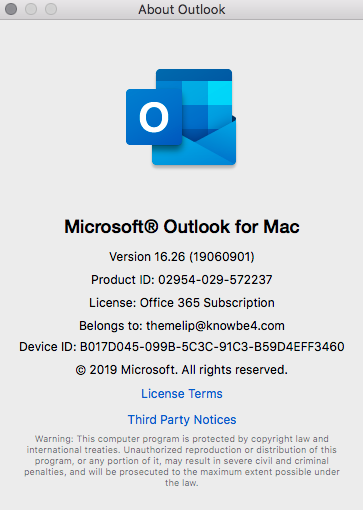
The latest version MAC-Outlook 16.26 has removed the add-in bar. Is this expected of the update too? Where can we get the release notes for this build? Right now, our add-in cannot be accessed anymore so it's affecting some of our clients. Thank you for all your help. Here are some images i have :

glr0221
on 13 Jun 2019
@macOutlookExtensibility can you please provide input re @glr0221's latest comment?
kbrandl
on 13 Jun 2019
Hello, the release notes are available oin the site I shared above.. sharing it here for easy reference
https://docs.microsoft.com/en-in/officeupdates/release-notes-office-for-mac
I would investigate the issue you have highlighted above and update here
AnjanaValsan
on 13 Jun 2019
@AnjanaValsan Thanks for your assistance. Please correct me if I am wrong but 16.26 seems to be not covered by the release notes you have? The update came out around June 11-ish if I am not mistaken.
Second as for investigation, the addin we have has been working fine for windows and mac based clients before this issue on "makeEWSRequestAsync()" came out. Now after the 16.26 update, we could not even see the addin bar in outlook for MAC. Is there a setting I need to turn on/off? Like the "new outlook" toggle button in windows outlook? thanks
glr0221
on 13 Jun 2019
@kbrandl @macOutlookExtensibility @AnjanaValsan
Any update on my query? thanks!
glr0221
on 18 Jun 2019
@glr0221 We have verified that this is currently a bug on the latest builds. We will work towards fixing it, but unfortunately we don't have a timeline for it yet. The add-in bar that you're referring to is being deprecated. We recommend that you use the VersionOverrides element in the manifest to have a ribbon endpoint for the add-in.
macOutlookExtensibility
on 18 Jun 2019
@macOutlookExtensibility Thank you always for your prompt response. As for the addin bar, I just want to confirm that it is not YET deprecated as of the current release, thus a bug fix is under way (with no timeline yet). The add-in bar will eventually be deprecated in future releases. Is my understanding correct?
Thanks for the VersionOverrides tip.
glr0221
on 18 Jun 2019
@glr0221 Yes, that's correct. That said, It is reasonable to expect some delay in this bug getting fixed.
macOutlookExtensibility
on 18 Jun 2019
@kbrandl @macOutlookExtensibility is there any update on the issue related to the missing "addin bar"? Do we need to create a new ticket for that one? I know it will be deprecated soon but some of our clients really love the addin bar (ease of use/convenience) and have been requesting for its reinstatement. Thank you very much!
glr0221
on 9 Jul 2019
@glr0221 , we are deprecating the add-in bar very soon, so we will not be providing support for it going forward. This will be called out on the release notes too. So we will not be fixing it now.
In case there are requests, please provide them on the user voice, we would prioritise the grey bar add-ins on the new modern UI based on the requests we get on user voice.
macOutlookExtensibility
on 17 Jul 2019
@outreach-soren I'm doing some housekeeping (clean-up of old issues) here in OfficeDev/office-js and seems to me (based on my understanding of this lengthy comment thread) that this issue has been resolved. Can you please confirm that this problem's been addressed and this issue can be closed? Thanks!
kbrandl
on 3 Sep 2019
I can't confirm or deny from personal experience. We moved to proxying all our EWS requests through a backend service due to the high impact and duration of this bug.
Reading through the thread it sounds like it?
https://github.com/OfficeDev/office-js/issues/433#issuecomment-497282769
Sounds like you'd have to follow up with @macOutlookExtensibility and others who were experiencing the issue to be sure though.
Thanks!
outreach-soren
on 3 Sep 2019
@outreach-soren thanks for the feedback (and for the quick response). Per @macOutlookExtensibility's previous comment I'm going to go ahead and close this issue, as it was specifically raised for Outlook on Mac. As that comment advises, if anyone else is experiencing this same issue in Outlook on Windows and/or Outlook on the web, please raise a new issue and provide details about the platforms where you're seeing the issue, so the appropriate team can investigate. Thanks!
kbrandl
on 3 Sep 2019
Related issues
 dgrudenic
·
4Comments
dgrudenic
·
4Comments
 Jarch09
·
3Comments
Jarch09
·
3Comments
 KantilalJadav
·
4Comments
KantilalJadav
·
4Comments
 tido-ms
·
3Comments
tido-ms
·
3Comments
 kushwahav
·
3Comments
kushwahav
·
3Comments
Most helpful comment
@macOutlookExtensibility can you provide some information on the schedule for when this will be included on mainline (not-insider) releases?