Office-js: Refresh and Agave.HostCall errors when using WebStorm editor
When WebStorm is used as IDE in combination with F12chooser.exe debug tools, Agave.HostCall errors start happening.
Expected Behavior
No errors and refreshes, and a stable developer experience.
Current Behavior
We have a Office.js Word project, and use NodeJS to start a local server. After setting up the project, shared folder, localhost server and certificates the project works fine.
When the F12 debug tool is opened, and changes are made in Webstorm, the project does reload. After a while errors start happening and the Word extension starts throwing errors and refreshes every several seconds.
Context
This issue affects us as we can not use the document inspector to select elements in the browser, and we can not preserve Javascript errors while developing.
Your Environment
- Platform: PC desktop
- Host: Word
- Office version number: version 1807
- Operating System: Windows 10
Useful logs
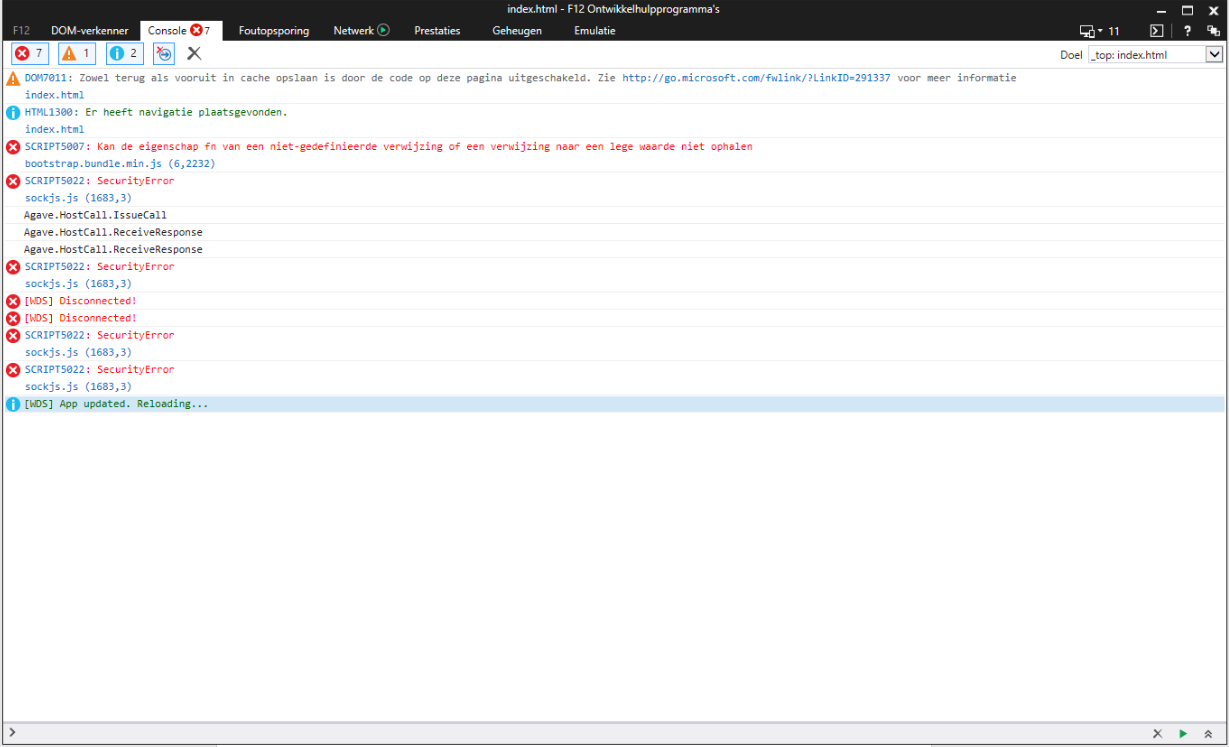
 rvanlaak
All 11 comments
cc @Zlatkovsky
rvanlaak
on 1 Aug 2018
@rvanlaak A couple of questions:
- Are you using the Angular CLI to serve the project?
- Are you serving with SSL enabled?
If the answer is yes to both questions, then try running with --live-reload false:
ng serve --live-reload false --port 44301
--ssl --ssl-key ssl\\development-certificate.key --ssl-cert ssl\\development-certificate.crt
You will have to manually reload the add-in in Word, though. If you have F12 Tools running, just hit CTRL + R while it has focus to reload the task pane. Otherwise, right-click the task pane in Word and select Reload.
 TheSamsterZA
on 3 Aug 2018
TheSamsterZA
on 3 Aug 2018
The project is plain js / Ecmascript that gets compiled using Node / webpack, and yes it's served via ssl as otherwise Word will not be able to open it.
I am working on the project for several days now, and strangely enough the problem did not occur Yesterday. So, once the problems return I will try to collect more information from the side of npm.
rvanlaak
on 3 Aug 2018
Some additional info; the SecurityError is still happening, but it's leading towards security exceptions on the websockets.
I've applied adding ws://localhost and ws://localhost:3000 to the Internet Options now: https://stackoverflow.com/a/41643700/1794894
Will report back if problems still occur, or if problems are resolved.
rvanlaak
on 8 Aug 2018
@TheSamsterZA the problems still are occurring. Some more information I've found / tried:
- https://github.com/angular/zone.js/issues/1001
- https://docs.microsoft.com/en-us/previous-versions/windows/internet-explorer/ie-developer/general-info/ee330736(v=vs.85)#websocket-maximum-server-connections
This might has to do something with the combination Webpack / In-Word IE11 (?). It is an uncaught socket.js SecurityError that starts appearing when F12 debug tools are used.
rvanlaak
on 13 Aug 2018
@rvanlaak:
I've applied adding ws://localhost and ws://localhost:3000 to the Internet Options now
Try adding wss://localhost and wss://localhost:3000 to Internet Options as well.
How exactly are you running your local server? What npm script are you using?
TheSamsterZA
on 13 Aug 2018
Added wss:// protocols now as well, it seems something slightly changed but the problems are still occurring. Another reference: https://github.com/qzind/qz-print/issues/39
The addin runs by WebStorm executing nmp run start, with the start script:
webpack-dev-server --mode development --https --key ./certs/server.key --cert ./certs/server.crt --cacert ./certs/ca.crt --port 3000
The basis of the app was generated using the Yeoman generator, and the webpack config except for adding two more entries didn't change after that: https://github.com/OfficeDev/generator-office
Could it have something to do with socket.js iframe communication?
rvanlaak
on 13 Aug 2018
Please try updating webpack-dev-server as mentioned here: https://github.com/webpack/webpack-dev-server/issues/851#issuecomment-350513764
That's an alpha build, but it might get you unstuck.
The long-term solution would be to upgrade to Webpack 4 and use https://github.com/webpack-contrib/webpack-serve since webpack-dev-server is in maintenance mode now.
TheSamsterZA
on 13 Aug 2018
Replacing webpack-dev-server with webpack-serve solved the security exceptions. Thanks @TheSamsterZA 🎉
Using webpack-serve should be advocated, as it indeed removes the socket.js dependency by native websockets, and Word addin is served via IE11 that natively supports it.
rvanlaak
on 13 Aug 2018
Problems were related to webpack-dev-server. Closing here.
rvanlaak
on 17 Aug 2018
I had the same questions.
How to remove the errors.
- Platform:___PC desktop___
- Host: ___Excel___
- Office version number: ___16.0.11001.20064___
- Operating System:___Windows 10___
- Language: ___JQuery___
 hengchengfei
on 12 Nov 2018
hengchengfei
on 12 Nov 2018
Related issues
 wsoccorsi-yw
·
4Comments
rvanlaak
·
4Comments
wsoccorsi-yw
·
4Comments
rvanlaak
·
4Comments
 tido-ms
·
3Comments
tido-ms
·
3Comments
 KantilalJadav
·
4Comments
KantilalJadav
·
4Comments
 mattblackdev
·
4Comments
mattblackdev
·
4Comments
Most helpful comment
Replacing
webpack-dev-serverwithwebpack-servesolved the security exceptions. Thanks @TheSamsterZA 🎉Using
webpack-serveshould be advocated, as it indeed removes thesocket.jsdependency by native websockets, and Word addin is served via IE11 that natively supports it.