Office-js: Automatic OneDrive saving breaks online Word if a ContentControl exists
Automatic OneDrive saving breaks online Word if a ContentControl is inserted through Office.js. Until circa Jan 18 2018, the same code worked fine both online and on desktop.
Expected Behavior
Expected behavior is not to break online Word when inserting content through Office.js.
Current Behavior
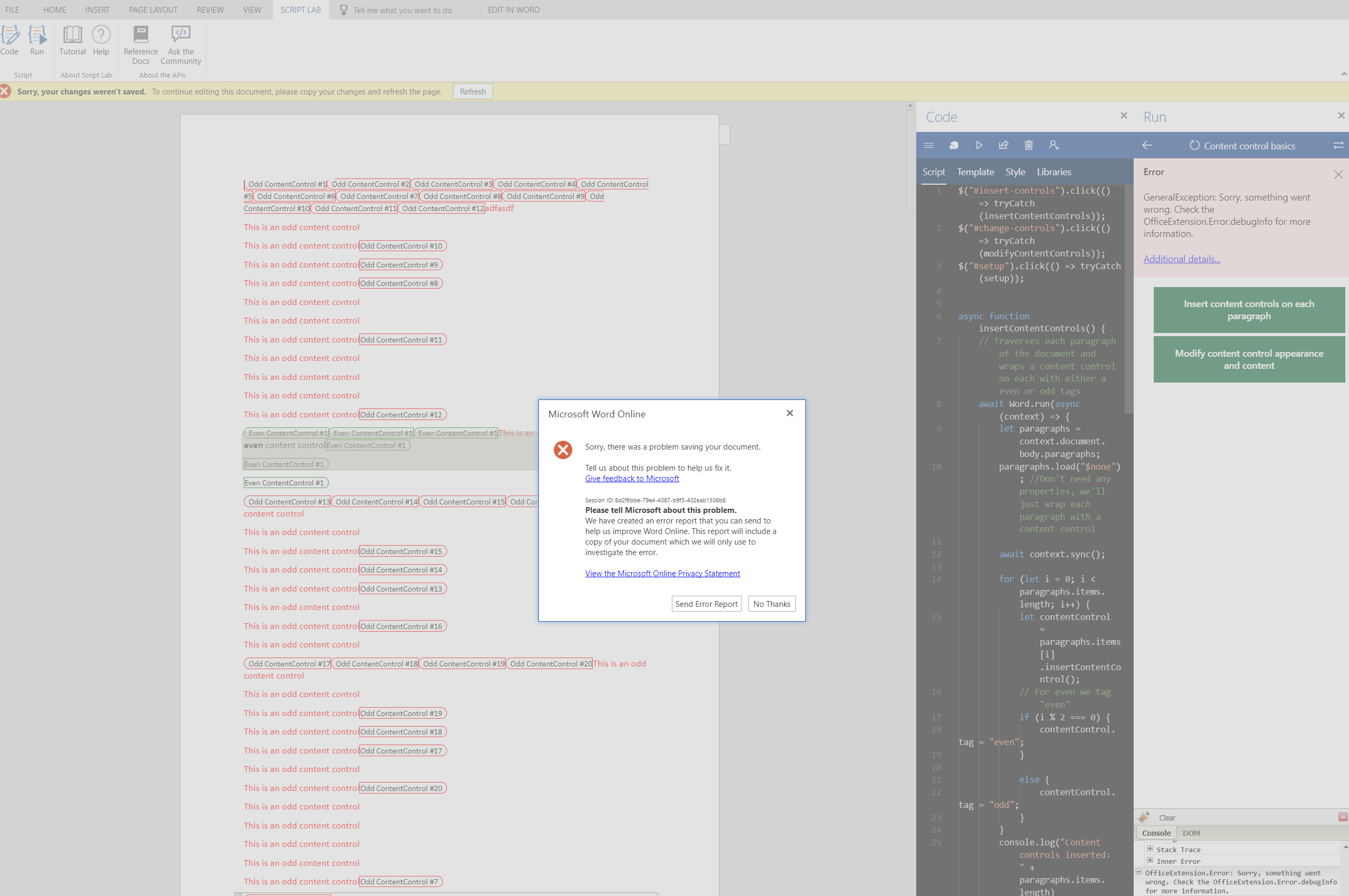
After inserting a ContentControl through Office.js code, online Word breaks: error message pops up, document cannot be handled any more until refreshed, last changes are not saved.
Steps to Reproduce, or Live Example
Code for Script Lab: https://stackoverflow.com/questions/48380951/online-word-breaks-when-inserting-a-content-control
- after running the code snippet, wait a few moments until it breaks (without doing anything else to the document), usually 10-20 seconds, sometimes less, sometimes more
Context
This issue blocks the users of our add in to use it in the online version of Word, which they were able to do so far. Ideally, both the desktop versions and online version should display the same behavior when using Office.js.
Your Environment
- Platform: Online Word
- Host: Word
- Operating System: macOS
- Browser (if using Office Online): latest Chrome and Firefox Quantum
 dinkom
All 7 comments
@dinkom -- thanks for logging this issue here for the product team. FYI, I've edited the Steps to Reproduce... section to add a link to a Script Lab gist that anyone can use to repro the issue using Script Lab and Word Online.
 kbrandl
on 23 Jan 2018
kbrandl
on 23 Jan 2018
Thanks for reporting this, we are investigating.
 JuaneloJuanelo
on 25 Jan 2018
JuaneloJuanelo
on 25 Jan 2018
Are you seeing this message?
I'm encountering the same issue and was first wondering if it was my own addin causing it or not.
I was running Chrome (Version 63.0.3239.132 (Official Build) (64-bit)) and Windows 10
 alx-andru
on 6 Feb 2018
alx-andru
on 6 Feb 2018
@alx-andru yes, that is the same message I am getting.
dinkom
on 6 Feb 2018
Could you try it again? This should be fixed now.
 weshi
on 9 Feb 2018
weshi
on 9 Feb 2018
@weshi I just tried it and it works fine :)
dinkom
on 12 Feb 2018
Awesome! closing this issue. @dinkom thanks for testing it!
JuaneloJuanelo
on 2 Jul 2019
Related issues
 wsoccorsi-yw
·
4Comments
wsoccorsi-yw
·
4Comments
 dgrudenic
·
4Comments
dgrudenic
·
4Comments
 dimitri-bourreau
·
4Comments
dgrudenic
·
3Comments
dimitri-bourreau
·
4Comments
dgrudenic
·
3Comments
 kushwahav
·
3Comments
kushwahav
·
3Comments
Most helpful comment
@dinkom -- thanks for logging this issue here for the product team. FYI, I've edited the Steps to Reproduce... section to add a link to a Script Lab gist that anyone can use to repro the issue using Script Lab and Word Online.