Office-js-docs-pr: SupportsSharedFolders not working / documentation not clear
I´m developing a addin to use it in shared mailboxes in outlook. Microsoft added the "SupportsSharedFolders" Elements last month. If i try to use it i get following error if i want to debug the plugin in my outlook client:
"Failed to deploy the manifest file to the Exchange server. This app can't be installed. The manifest file doesn't conform to the schema definition. The element 'DesktopFormFactor' in namespace 'http://schemas.microsoft.com/office/mailappversionoverrides/1.1' has invalid child element 'SupportsSharedFolders' in namespace 'http://schemas.microsoft.com/office/mailappversionoverrides/1.1'. List of possible elements expected: 'ExtensionPoint' in namespace 'http://schemas.microsoft.com/office/mailappversionoverrides/1.1'..."
The documentation doesnt say anything about a other shemata or something else.
Document Details
⚠ Do not edit this section. It is required for docs.microsoft.com ➟ GitHub issue linking.
- ID: 34a98fb0-2cc7-d013-d3c6-03d72648a5b2
- Version Independent ID: ab1f63b5-a8d1-ca05-9a4b-7a93100c3f38
- Content: SupportsSharedFolders element in the manifest file - Office Add-ins
- Content Source: docs/reference/manifest/supportssharedfolders.md
- Product: non-product-specific
- Technology: add-ins
- GitHub Login: @o365devx
- Microsoft Alias: o365devx
 xHatti
All 13 comments
Same issue here. Is there any other way to deploy Outlook add-in for users, other than uploading manifest file at https://outlook.office365.com/owa/ under my add-ins
 bubuhubu9k
on 2 Apr 2019
bubuhubu9k
on 2 Apr 2019
I am having the same issue here. I've tried deploying via OWA or the Outlook Client "Get Add-ins". In both places utilizing the "My Add-Inns" and "From File". This error is always thrown.
 securityvoid
on 2 Apr 2019
securityvoid
on 2 Apr 2019
Sorry that you're hitting this and we do appreciate that you're trying out this preview configuration (see info on the preview requirement set).
Can you confirm the following?
- Are you using an Office 365 subscription?
- You may also need to be in the Office Insider Program.
@exextoc: Are there any other requirements our users may need to meet?
Thanks.
 ElizabethSamuel-MSFT
on 2 Apr 2019
ElizabethSamuel-MSFT
on 2 Apr 2019
@ElizabethSamuel-MSFT Yes, we're using O365, no we're not in the Office Insider Program.
However, I believe the issue has been isolated. Essentially, the documentation isn't very complete and where / how this is set is complicated.
The documentation seems to suggest that the attribute can be put anywhere below:
<DesktopFormFactor>
In reality, the "SupportsSharedFolders" attribute is only valid as part of a <VersionOverrides> 1.1 schema, which apparently can't be defined a part of OfficeApp, but needs to be within a VersionOverrides 1.0 element?.
e.g. The following will function:
 <VersionOverrides xmlns="http://schemas.microsoft.com/office/mailappversionoverrides" xsi:type="VersionOverridesV1_0">
...
<VersionOverrides xmlns="http://schemas.microsoft.com/office/mailappversionoverrides/1.1" xsi:type="VersionOverridesV1_1">
      <Requirements>
        <bt:Sets DefaultMinVersion="1.3">
          <bt:Set Name="Mailbox" />
        </bt:Sets>
      </Requirements>
      <Hosts>
        <Host xsi:type="MailHost">

          <DesktopFormFactor>
            <SupportsSharedFolders>true</SupportsSharedFolders>
...
    </VersionOverrides>
  </VersionOverrides>
I don't know why this is, or what happens if you define some things in a 1.0 override and other things in a 1.1 override.
I can tell you that both published schema's haven't been updated for the attribute:
https://github.com/OfficeDev/office-js-docs-pr/blob/master/docs/overview/schemas/mail/MailAppVersionOverridesV1_0.xsd
https://github.com/OfficeDev/office-js-docs-pr/blob/master/docs/overview/schemas/mail/MailAppVersionOverridesV1_1.xsd
securityvoid
on 2 Apr 2019
For more details, please see:
https://stackoverflow.com/questions/55471281/publishing-outlook-add-in-which-uses-outlook-preview-element-supportssharedfol/55480151#55480151
securityvoid
on 2 Apr 2019
Thanks for sharing the Stack Overflow thread. We'll update the manifest element's documentation to reflect the ordering. However, we have no plans to update the schemas yet since the element is still in preview and may not ship as-is. Thanks.
ElizabethSamuel-MSFT
on 2 Apr 2019
We have faced a similar issue (and several more on top of it).
We have been trying to develop support for shared mailboxes in our add-in for some time now. We are using an O365 subscription and Insider builds. The exact desktop Outlook build we are currently testing against is the latest build (as of today) - Version 1904 (Build 11527.20004 Click-to-run).
We have managed to make the manifest file parse successfully and get registered as an add-in in two different ways:
- With _two_ nested _VersionOverride_ elements as mentioned in the linked StackOverflow article:
<VersionOverrides xmlns="http://schemas.microsoft.com/office/mailappversionoverrides" xsi:type="VersionOverridesV1_0">
        <VersionOverrides xmlns="http://schemas.microsoft.com/office/mailappversionoverrides/1.1" xsi:type="VersionOverridesV1_1">
            ...
            <Hosts>
                <Host xsi:type="MailHost">
                    <DesktopFormFactor>
                        <SupportsSharedFolders>true</SupportsSharedFolders>
                        ...
    </VersionOverrides>
</VersionOverrides>
- With _three_ nested _VersionOverride_ elements (and a 1.2 schema definition):
<VersionOverrides xmlns="http://schemas.microsoft.com/office/mailappversionoverrides" xsi:type="VersionOverridesV1_0">
        <VersionOverrides xmlns="http://schemas.microsoft.com/office/mailappversionoverrides/1.1" xsi:type="VersionOverridesV1_1">
            <VersionOverrides xmlns="http://schemas.microsoft.com/office/mailappversionoverrides/1.2" xsi:type="VersionOverridesV1_1">
                ...
                <Hosts>
                    <Host xsi:type="MailHost">
                        <DesktopFormFactor>
                            <SupportsSharedFolders>true</SupportsSharedFolders>
                            ...
        </VersionOverrides>
    </VersionOverrides>
</VersionOverrides>
The outcome is the following:
With _Approach 1_ the add-in is successfully registered and present in:
- personal mailboxes in the web Outlook (regardless of whether it is the New or Old Web Outlook view)
- shared mailboxes in the old look of the Web Outlook
- personal and shared mailboxes in the desktop Outlook
Note that there is a workaround to display the add-in in shared mailboxes in the new look of the web Outlook, but we assume that this is an unintended feature. You can do so by _pinning_ the add-in while in your personal mailbox and then navigating to the shared mailbox.
With _Approach 2_ the add-in is successfully registered and present in:
- personal mailboxes in the web Outlook (regardless of whether it is the New or Old Web Outlook view)
- shared mailboxes in the old look of the Web Outlook
It never showed up in the desktop Outlook though.
So, as a result of the above, could you give us a clue on the following:
- Which of the two manifest files, if any, is supposed to be the correct one?
- (When, if at all) Do you intend to add support for displaying add-ins in shared mailboxes in the new look of the Web Outlook (as we could not find documentation on that)?
- Do you intend to extend the scope of the EWS token retrieved via the JS API to support retrieving e-mails from a shared mailbox the user has access to (currently, it only supports the user's personal mailbox only)? If not, could you suggest a different approach?
If any of the questions above is out of the scope of this repository/documentation/issue, could you direct us to a place where we could find this information, if at all available?
 ivaylomitrev
on 3 Apr 2019
ivaylomitrev
on 3 Apr 2019
@xHatti, @bubuhubu9k, @securityvoid: I've updated the documentation based on the issues you've raised here (see the various linked PRs for more details). Let me know if you need further clarification.
@ivaylomitrev: Regarding your questions.
- 1: We recommend the first manifest, particularly as v1.2 is not an officially supported manifest version as far as I know.
- 2-3: @exextoc: Can you provide any info on these questions?
Thanks.
ElizabethSamuel-MSFT
on 3 Apr 2019
@ivaylomitrev
(When, if at all) Do you intend to add support for displaying add-ins in shared mailboxes in the new look of the Web Outlook (as we could not find documentation on that)?
Do you intend to extend the scope of the EWS token retrieved via the JS API to support retrieving e-mails from a shared mailbox the user has access to (currently, it only supports the user's personal mailbox only)?
We cannot provide any tentative date but we track Outlook add-in feature requests on our user-voice page. Please add your request there. Feature requests on user-voice are considered when we go through our planning process. https://officespdev.uservoice.com/forums/224641-general/category/131778-outlook-add-ins
- If not, could you suggest a different approach?
Yes, you can use our graph API to retrieve e-mails from a shared mail box, please refer to https://docs.microsoft.com/en-us/graph/outlook-share-messages-folders
 exextoc
on 4 Apr 2019
exextoc
on 4 Apr 2019
@exextoc: Thanks for your response.
@ivaylomitrev: exextoc's response should address your concerns. I'm closing this issue but let us know if it should be reopened and we will do so.
Thanks.
ElizabethSamuel-MSFT
on 4 Apr 2019
I upgraded my outlook to 1904 version and support shared folders worked in month of may and parly in June. Suddenly it stopped working as for delegated calendars add-in is disabled. Any one has information or ideas if it got disabled
    <DesktopFormFactor>
      <SupportsSharedFolders>true</SupportsSharedFolders>
      <!-- Location of the Functions that UI-less buttons can trigger (ExecuteFunction Actions). -->
      <FunctionFile resid="functionFile" />
      <!-- Message Compose -->
      <ExtensionPoint xsi:type="AppointmentOrganizerCommandSurface">
        <OfficeTab id="TabDefault">
          <Group id="msgComposeGroup">
            <Label resid="groupLabel" />
            <Control xsi:type="Button" id="msgComposeOpenPaneButton">
              <Label resid="paneComposeButtonLabel" />
              <Supertip>
                <Title resid="paneComposeSuperTipTitle" />
                <Description resid="paneComposeSuperTipDescription" />
              </Supertip>
              <Icon>
                <bt:Image size="16" resid="icon16" />
                <bt:Image size="32" resid="icon32" />
                <bt:Image size="80" resid="icon80" />
              </Icon>
              <Action xsi:type="ExecuteFunction">
                <FunctionName>InsertTemplate</FunctionName>
              </Action>
              <!--<Action xsi:type="ShowTaskpane">
                <SourceLocation resid="messageComposeTaskPaneUrl" />
              </Action>-->
            </Control>
          </Group>
        </OfficeTab>
      </ExtensionPoint>

      <!-- Go to http://aka.ms/ExtensionPointsCommands to learn how to add more Extension Points: MessageRead, AppointmentOrganizer, AppointmentAttendee -->
    </DesktopFormFactor>
 vamsii6116
on 17 Jul 2019
vamsii6116
on 17 Jul 2019
@vamsii6116 Sorry that you're facing an issue with shared folders. However, feedback on this repo is intended for API documentation issues. Could you open a new issue on the office-js repo where the engineering team is tracking API bugs and issues? Thanks.
ElizabethSamuel-MSFT
on 17 Jul 2019
I was facing issue while trying to add plugin to shared mailbox. Even when I used SupportsSharedFolders
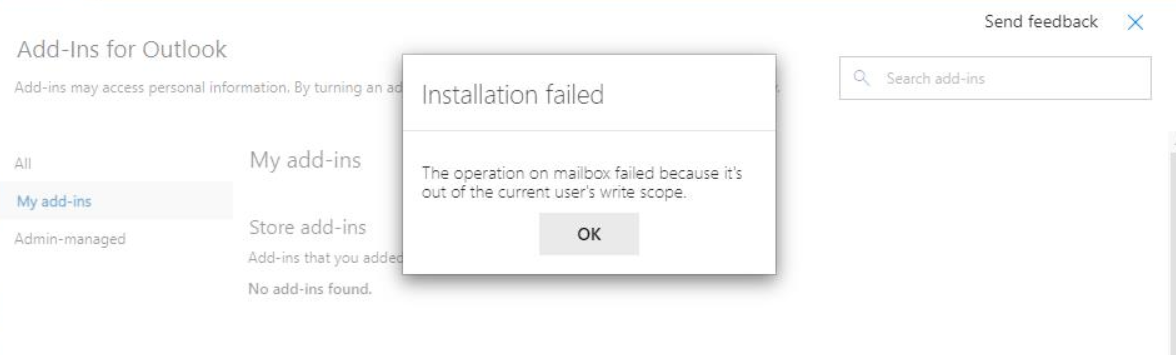
_Logging in with shared mailbox email and installing it from there helped!_
Every user who has access to shared mailbox can see the plugin now.
This article helped
https://support.clio.com/hc/en-us/articles/360034272653--You-cannot-perform-this-action-This-add-in-scenario-is-not-supported-in-this-folder-
 spoman007
on 18 May 2021
spoman007
on 18 May 2021
Related issues
 glr0221
·
6Comments
glr0221
·
6Comments
 chucklay
·
7Comments
chucklay
·
7Comments
 LevDev1
·
5Comments
LevDev1
·
5Comments
 fitojb
·
3Comments
fitojb
·
3Comments
 Scheel
·
4Comments
Scheel
·
4Comments