Office-js-docs-pr: Content add-ins lacks documentation
I have been searching for documentation on how to create content add-ins in vain. If it does exist, I feel this would be a nice place to put it since this documentation shows how to create a Task-pane add-in.
Document Details
⚠ Do not edit this section. It is required for docs.microsoft.com ➟ GitHub issue linking.
- ID: 2b1c5f9f-b9c3-d10d-2096-1f023e7be021
- Version Independent ID: 4ab72f5d-1ad6-1d82-9847-74c538957cfc
- Content: Build your first PowerPoint add-in
- Content Source: docs/powerpoint/powerpoint-add-ins-get-started.md
- Product: office
- GitHub Login: @o365devx
- Microsoft Alias: o365devx
 bruno-robert
All 10 comments
Hi @uranium78. I'm sorry to hear that you've had difficulty finding the information you need.
Here's a topic on Content add-ins and a code sample.
 Reezaali
on 5 Jun 2018
Reezaali
on 5 Jun 2018
I'll go ahead and close this issue. If you need additional information, feel free to reopen the issue or log a new one. Thanks!
Reezaali
on 12 Jun 2018
The problem was that the yo generator for add-ins doesn't generate content add-ins (or at least I couldn't get it to do it for me). Since I'm on macOS, I wasn't able to create content add-ins (without learning how to write the xml).
I ended up installing windows on a VM and installing visual studio. I used Visual Studio to generate the content add-in XML and copied the file to os X and it ran fine from there.
Thanks for the quick reply!
bruno-robert
on 12 Jun 2018
@uranium78 thanks for getting back to us on how you solved this problem. We'll add a note to the documentation so that other customers can leverage this solution. If you'd like to add the note yourself to get the contribution on your profile, feel free to make a PR. Thanks!
Reezaali
on 14 Jun 2018
按照教程新建完工程一运行就崩溃了!!!然后取文件夹里面打开Presentation1.pptx也会直接崩溃!>_<!
 fonlylovey
on 11 Oct 2018
fonlylovey
on 11 Oct 2018
Per Bing Translator, @fonlylovey's comment seems to be "Follow the tutorial after the new project is running and crashes!!! And then take the folder inside Open Presentation1.pptx will also crash directly!" in English.
 ElizabethSamuel-MSFT
on 11 Oct 2018
ElizabethSamuel-MSFT
on 11 Oct 2018
@fonlylovey I'm unable to reproduce the issue that you've described. Please ensure that you have installed the latest versions of Yeoman and the Yeoman generator for Office Add-ins globally before you try to create/test a PowerPoint add-in as described in Build your first PowerPoint add-in. You can install the latest version of these tools by running the following command:
npm install -g yo generator-office
 kbrandl
on 15 Oct 2018
kbrandl
on 15 Oct 2018
@uranium78 by design, the quick start is intended to provide a quick primer on how to build a simple _task pane_ add-in. That said, I certainly understand your predicament and appreciate the work-around that you've shared. You're absolutely correct that the doc set is currently missing detailed guidance for how to create a content add-in; we've created a work item in our backlog to create that new article (tracking internally with: 2412822) so I'm going to go ahead and close this issue.
kbrandl
on 17 Oct 2018
I see a few add-ins exist for powerpoint which use the content add-in functionality. Any idea where they got the info for developing these apps?
 butchmarshall
on 20 Nov 2018
butchmarshall
on 20 Nov 2018
@butchmarshall I'm not certain as to what learning resources the developers of content add-ins for PowerPoint may have relied upon. However, if you want to create a content add-in for PowerPoint, I'd suggest that you consider using Visual Studio to do so, as you can create a simple content add-in for PowerPoint by using a built-in Visual Studio project template.
To do so, you can follow the steps in the Create the add-in project section of the PowerPoint add-in quick start -- but when you get to step 4 in those instructions, choose the option labeled Insert content into PowerPoint slides. When you choose that template as a basis for creating your PowerPoint add-in in Visual Studio, the project that Visual Studio creates will contain the basic components for a content add-in.
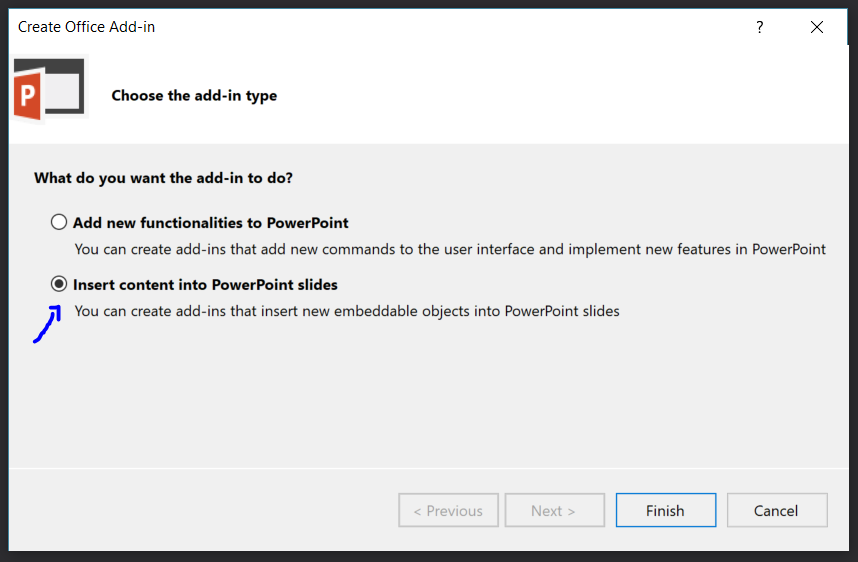
(And as mentioned previously, there's a a work item in our backlog to create a new article that contains detailed information about creating content add-ins, so that new documentation will be underway soon.)
kbrandl
on 20 Nov 2018
Related issues
 Scheel
·
4Comments
Scheel
·
4Comments
 NT-D
·
3Comments
NT-D
·
3Comments
 fitojb
·
3Comments
fitojb
·
3Comments
 thunter05
·
6Comments
thunter05
·
6Comments
 smozgur
·
8Comments
smozgur
·
8Comments
Most helpful comment
@uranium78 by design, the quick start is intended to provide a quick primer on how to build a simple _task pane_ add-in. That said, I certainly understand your predicament and appreciate the work-around that you've shared. You're absolutely correct that the doc set is currently missing detailed guidance for how to create a content add-in; we've created a work item in our backlog to create that new article (tracking internally with: 2412822) so I'm going to go ahead and close this issue.