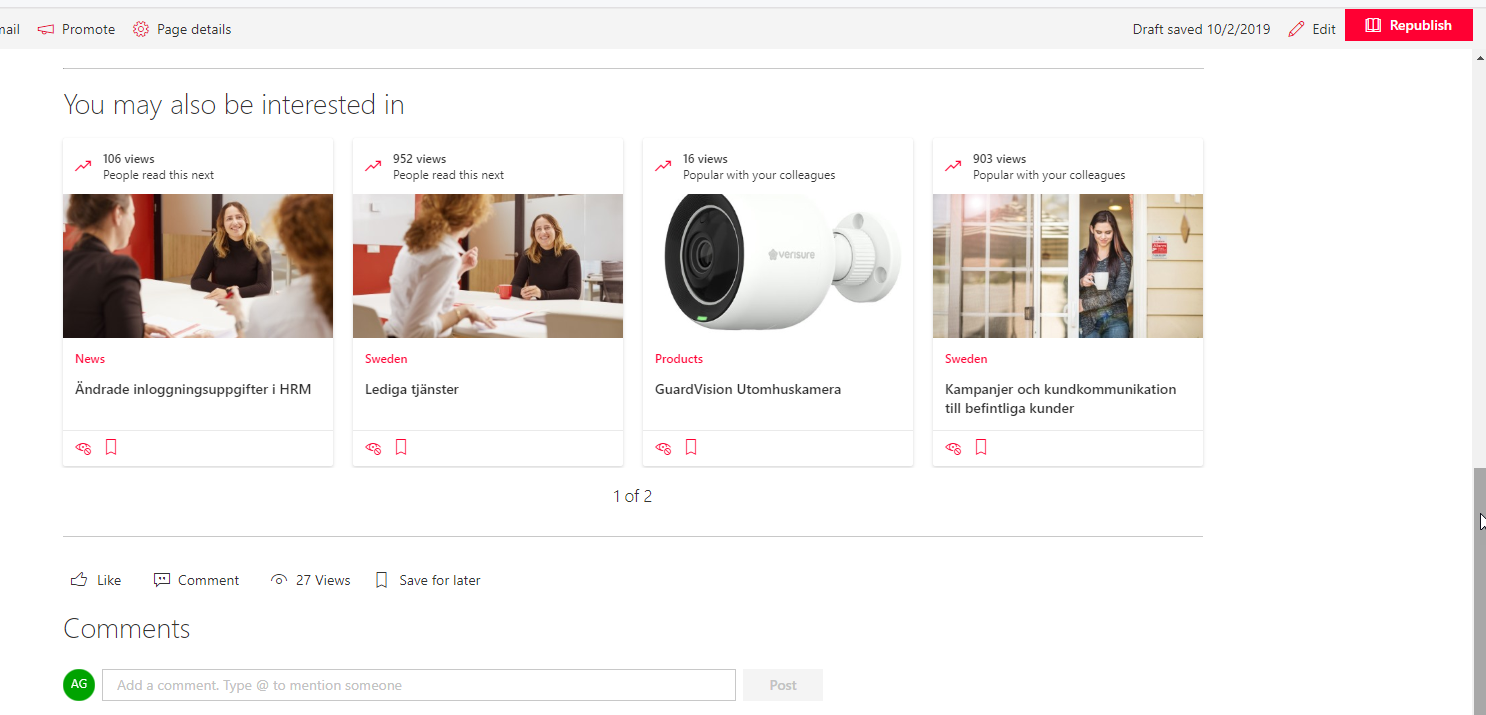
Office-docs-powershell: Disable page feature "You may also be interested in"
Please provide information on the property switch to disable the page feature "You may also be interested in".
We need to be able to turn this off via PowerShell for all/multiple specific sites, in the same way that we can with these:
Set-SPOSite
[-CommentsOnSitePagesDisabled
[-SocialBarOnSitePagesDisabled
Document Details
⚠ Do not edit this section. It is required for docs.microsoft.com ➟ GitHub issue linking.
- ID: 5d1c6b2b-5af6-acce-b7e8-bf784bb0973e
- Version Independent ID: 301586d3-ec04-c42d-4681-0bb59443d35c
- Content: Set-SPOSite (sharepoint-online)
- Content Source: sharepoint/sharepoint-ps/sharepoint-online/Set-SPOSite.md
- Service: sharepoint-powershell
- GitHub Login: @trent-green
- Microsoft Alias: trgreen
 angoo-atea
All 15 comments
@officedocsbot assign @yogkumgit
 yogkumgit
on 27 Sep 2019
yogkumgit
on 27 Sep 2019
Hello @angoo-atea can you please share a screenshot of what you see in your tenant?
Tried to reproduce in my lab tenant but the feature is not showing up.
Thank you
 get-itips
on 2 Oct 2019
get-itips
on 2 Oct 2019
@get-itips
angoo-atea
on 2 Oct 2019
Hello @trent-green is this feature called _RecommendedItems_ at SC level ?
get-itips
on 2 Oct 2019
Isn't is this under Site Features?

 whoisbex
on 3 Oct 2019
whoisbex
on 3 Oct 2019
@whoisbex - that is the feature that I suspect is the one. We need to be able to turn this off via PowerShell for all/multiple specific sites, in the same way that we can with these:
Set-SPOSite
[-CommentsOnSitePagesDisabled
[-SocialBarOnSitePagesDisabled
angoo-atea
on 3 Oct 2019
@angoo-atea @whoisbex I too suspect is the one, but as the feature is not showing up in my tenant I can not confirm, and we should wait for @trent-green confirmation.
Besides that, for any new feature for the Set-SPOSite cmdlet I suggest a user voice suggestion
get-itips
on 3 Oct 2019
@get-itips there is currently no parameter on Set-SPOSite for this. The only way to enable or disable this via powershell is with PNP
 trent-green
on 3 Oct 2019
trent-green
on 3 Oct 2019
@get-itips there is currently no parameter on Set-SPOSite for this. The only way to enable or disable this via powershell is with PNP
That is clear. What I am trying to find out for the issue creator is the name of the feature, is it RecommendedItems ?
Thanks.
get-itips
on 3 Oct 2019
@whoisbex has the correct feature above, "SharePoint Recommendations"
Thanks!
trent-green
on 3 Oct 2019
The Feature GUID is: '780AC353-EAF8-4AC2-8C47-536D93C03FD6'
trent-green
on 3 Oct 2019
The Feature GUID is: '780AC353-EAF8-4AC2-8C47-536D93C03FD6'
Ok so that is the same GUID I found out and the feature internally is called RecommendedItems as I mentioned earlier, and appears in the UI as "Sharepoint Recommendations" as @whoisbex could find out.
We will proceed closing this one. Thanks to everybody.
get-itips
on 3 Oct 2019
@get-itips and @trent-green Thank you very much for the contribution and sharing this explanation. @angoo-atea Hope this comment is helpful for you. Thanks for taking out some time to open the issue. Appreciate and encourage you to do the same in future also.
yogkumgit
on 4 Oct 2019
@get-itips there is currently no parameter on Set-SPOSite for this. The only way to enable or disable this via powershell is with PNP
@yogkumgit Thanks, the input is useful. However @get-itips @trent-green - will there be an addition to the Set-SPOSite command for this? It would make sense to include it.
angoo-atea
on 7 Oct 2019
Hello @angoo-atea for that inquiry I need to kindly redirect you to Sharepoint User Voice where your proposal can be taken care of. As this issue system is specific to address issues in documentation.
Thank you
get-itips
on 7 Oct 2019
Related issues
 LindaSchaar
·
4Comments
LindaSchaar
·
4Comments
 tomlarse
·
5Comments
tomlarse
·
5Comments
 Archehandoro
·
4Comments
Archehandoro
·
4Comments
 KevinNSTA
·
4Comments
KevinNSTA
·
4Comments
 BlasMS
·
4Comments
BlasMS
·
4Comments