Office-docs-powershell: *onlinepstngateway commands listed in incorrect module?
I was looking for these commands - I followed the "Connect to Skype for Business Online powershell" walkthrough, installed the SkypeOnlineConnector, and connected, however there were no get-csonlinepstngateway or New-csonlinepstngateway commands even though it says it applies to Teams.
I don't have a server to check with, but perhaps this command is only in the On-Prem Skype for Business Server Management Shell on a Skype on-premise server? like https://docs.microsoft.com/en-us/powershell/module/skype/Get-CsTrustedApplicationPool
Document Details
⚠ Do not edit this section. It is required for docs.microsoft.com ➟ GitHub issue linking.
- ID: eeae7e72-4eed-b35e-0a09-a4113d9006ca
- Version Independent ID: fe47ac10-32ad-7d48-20d2-aca82622483b
- Content: Get-CsOnlinePSTNGateway (skype)
- Content Source: skype/skype-ps/skype/Get-CsOnlinePSTNGateway.md
- Service: skypeforbusiness-powershell
- GitHub Login: @tomkau
- Microsoft Alias: tomkau
 KevinNSTA
All 4 comments
@officedocsbot assign @yogkumgit
 yogkumgit
on 19 Mar 2020
yogkumgit
on 19 Mar 2020
Hello @KevinNSTA Kevin 👍 how are you?
Please double check if you followed every step outlined here because those cmdlets belong to that module.
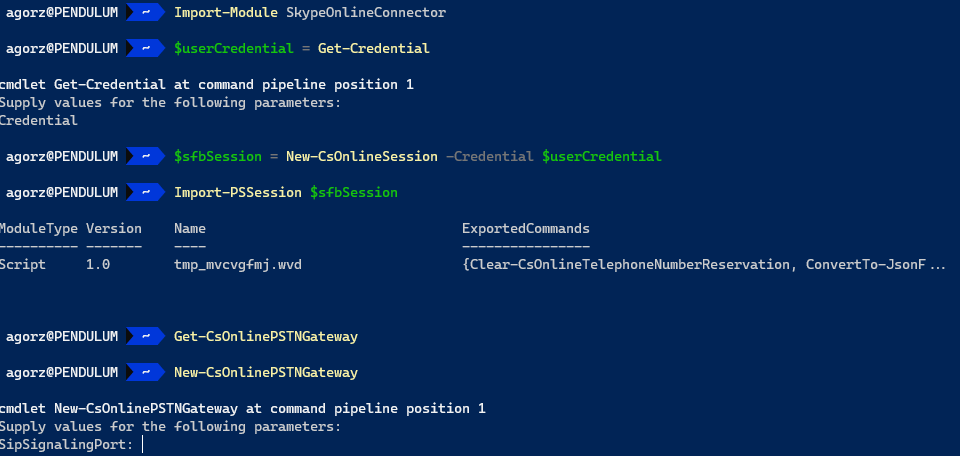
 get-itips
on 19 Mar 2020
get-itips
on 19 Mar 2020
@get-itips Thank you very much for the contribution and sharing this explanation. @KevinNSTA
Hope this comment is helpful for you. If you see a documentation update is required, please feel free to open an issue for the same. We proceed here to close it. Thanks for taking out some time to open the issue. Appreciate and encourage you to do the same in future also.
yogkumgit
on 20 Mar 2020
Ahh, yes, the walkthrough I was using from a 3rd party site didn't save a session variable and import it, so I was mixed up with their screenshots.
thanks @get-itips !
 PsychoData
on 20 Mar 2020
PsychoData
on 20 Mar 2020
Related issues
 BlasMS
·
5Comments
BlasMS
·
5Comments
 kefujino
·
5Comments
kefujino
·
5Comments
 tomlarse
·
5Comments
tomlarse
·
5Comments
 TobieFysh
·
3Comments
TobieFysh
·
3Comments
 andikrueger
·
5Comments
andikrueger
·
5Comments