Octoprint: Confusing dialogue when cancelling print
What were you doing?
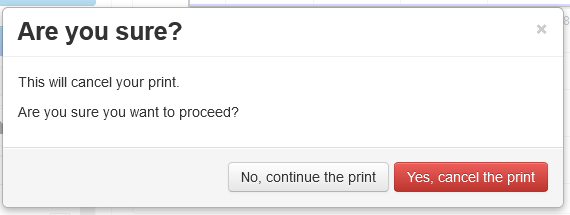
When cancelling an active print (pushing the Cancel button), the following dialogue appears:
This will cancel your print.
Are you sure you want to proceed? (Options: yes / no)
Pushing "yes" does cancel the print, while "no" resumes it. This is not exactly intuitive.
It would be better to simplify the dialogue to
Do you want to cancel your print
Options: No, resume // Yes, cancel
Thanks for considering :)
What did you expect to happen?
What happened instead?
Did the same happen when running OctoPrint in safe mode?
Version of OctoPrint
1.4.0
Operating System running OctoPrint
OctoPi
Printer model & used firmware incl. version
Prusa Mk3s
Browser and version of browser, operating system running browser
Link to octoprint.log
Link to contents of terminal tab or serial.log
Link to contents of Javascript console in the browser
Screenshot(s)/video(s) showing the problem:
I have read the FAQ.
 FilmMartin
All 7 comments
Hi @FilmMartin,
It looks like there is some information missing from your bug report that will be needed in order to solve the problem. Read the Contribution Guidelines which will provide you with a template to fill out here so that your bug report is ready to be investigated (I promise I'll go away then too!).
If you did not intend to report a bug but wanted to request a feature or brain storm about some kind of development, please take special note of the title format to use as described in the Contribution Guidelines.
Please do not abuse the bug tracker as a support forum - that can be found at discourse.octoprint.org. Go there for any kind of issues with network connectivity, webcam functionality, printer detection or any other kind of such support requests or general questions.
Also make sure you are at the right place - this is the bug tracker of the official version of OctoPrint, not the Raspberry Pi image OctoPi nor any unbundled third party OctoPrint plugins or unofficial versions. Make sure too that you have read through the Frequently Asked Questions and searched the existing tickets for your problem - try multiple search terms please.
I'm marking this one now as needing some more information. Please understand that if you do not provide that information within the next two weeks (until 2020-03-18 20:10 UTC) I'll close this ticket so it doesn't clutter the bug tracker. This is nothing personal, so please just be considerate and help the maintainers solve this problem quickly by following the guidelines linked above. Remember, the less time the devs have to spend running after information on tickets, the more time they have to actually solve problems and add awesome new features. Thank you!
Best regards,
~ Your friendly GitIssueBot
PS: I'm just an automated script, not a human being, so don't expect any replies from me :) Your ticket is read by humans too, I'm just not one of them.
 GitIssueBot
on 4 Mar 2020
GitIssueBot
on 4 Mar 2020
P.S. This concerns the file "messages.io" and these lines, I don´t know enough about Github to suggest the changes directly. sorry.
: src/octoprint/plugins/softwareupdate/static/js/softwareupdate.js:528
: src/octoprint/static/js/app/helpers.js:736
msgid "Are you sure you want to proceed?"
msgstr "Bist Du sicher, dass du fortfahren willst?"
FilmMartin
on 4 Mar 2020
"are you sure you want to proceed"
"yes I want to proceed"
seems to work for me. "yes, cancel" seems like an improvement, but does that mean "I wish to cancel canceling" or "I wish to cancel the print"? "resume" isn't as problematic.
 tedder
on 5 Mar 2020
tedder
on 5 Mar 2020
The first time I saw that dialogue, I was not sure how to interpret it; "Do you want to proceed" could either mean "Do you want to proceed with the print (i.e. not cancel)" or "Do you want to proceed with canceling (i.e. cancel)."
Not a biggie for me anymore, as I have learned it now, but for new users it might be a hiccup.
FilmMartin
on 5 Mar 2020
How about:
 foosel
on 5 Mar 2020
foosel
on 5 Mar 2020
Perfect. Vielen Dank :)
On Thu, 5 Mar 2020, 12:58 Gina Häußge notifications@github.com wrote:
How about:
[image: image]
https://user-images.githubusercontent.com/83657/75979535-fb4c7a80-5ee0-11ea-899e-06131b72efad.png—
You are receiving this because you were mentioned.
Reply to this email directly, view it on GitHub
https://github.com/foosel/OctoPrint/issues/3471?email_source=notifications&email_token=AFAZ2I4AVUZOQKS7HTRECZTRF6HVZA5CNFSM4LBQX6N2YY3PNVWWK3TUL52HS4DFVREXG43VMVBW63LNMVXHJKTDN5WW2ZLOORPWSZGOEN465AI#issuecomment-595193473,
or unsubscribe
https://github.com/notifications/unsubscribe-auth/AFAZ2IY3LG5YVM6B3FLCY23RF6HVZANCNFSM4LBQX6NQ
.
FilmMartin
on 5 Mar 2020
Implemented by the above commit, to be released with 1.4.1
foosel
on 5 Mar 2020
Related issues
 gege2b
·
64Comments
foosel
·
67Comments
gege2b
·
64Comments
foosel
·
67Comments
 bbatchelder
·
120Comments
foosel
·
50Comments
bbatchelder
·
120Comments
foosel
·
50Comments
 dm3942
·
49Comments
dm3942
·
49Comments
Most helpful comment
How about: