Octolapse: Logitech c615 calibration issues?
Version of Octolapse
Octolapse Version: 0.3.1
Version of OctoPrint
OctoPrint Version: 1.38
When you ran into the problem, did you have diagnostic logging enabled?
Diagnostic Logging was Enabled: NO
What were you doing when the problem occurred
- Trying to "calibrate" my c615 cam for timelapses
What should have happened?
Calibration
What happened instead?
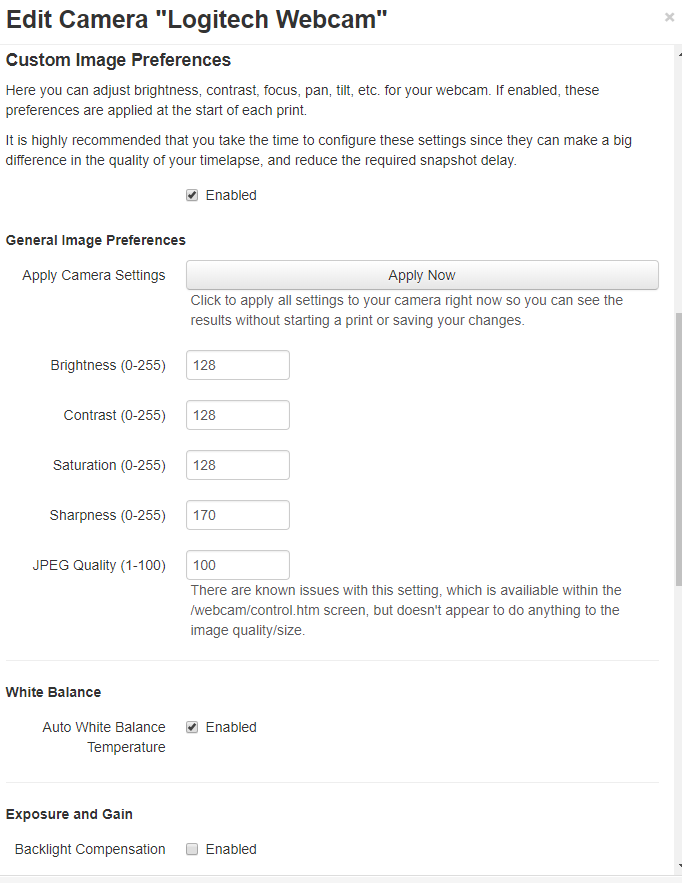
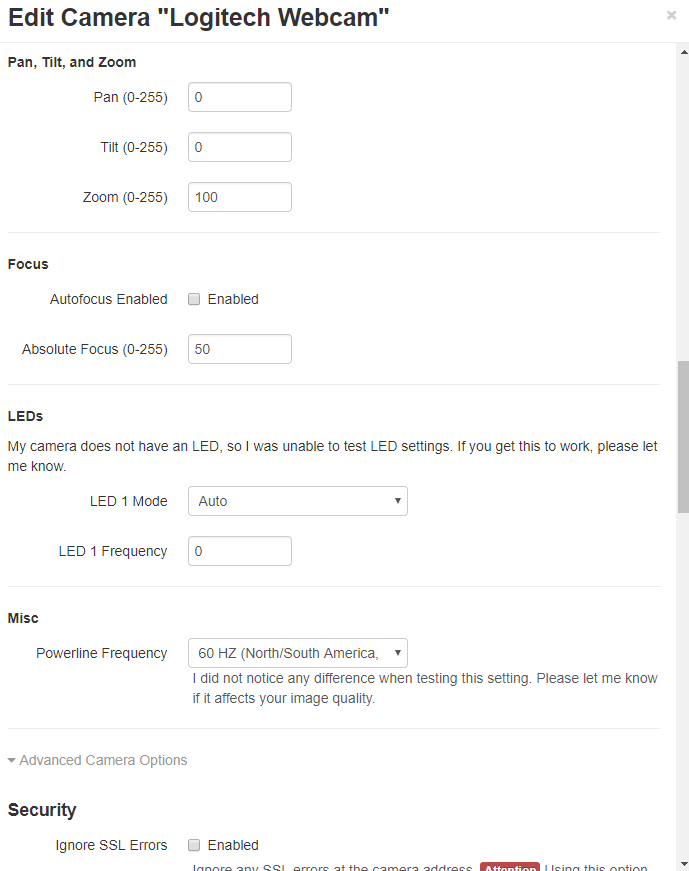
I can not get any of the cam controls to work.
Operating System running OctoPrint and Octolapse
OS Name: OctoPi
Os Version: 0.15.1
Printer model & used firmware incl. version
Printer Model: PRUSA i3 MK3
Browser and version of browser, operating system running browser
Browser: Chrome
Browser OS: Google
Link to plugin_octolapse.log
Link to plugin_octolapse.log: https://gist.github.com/Psyc0Flyer/807df57687b707b02bb2635c5b5ef1d7
Link to octoprint.log
Link to octoprint.log: https://gist.github.com/Psyc0Flyer/807df57687b707b02bb2635c5b5ef1d7
Please consider becoming a patron
If you like this project, please support my work by becoming a patron, and consider adding a 'star' to the repository. It takes a lot of time and effort to maintain the project and respond to issues. The cost of test prints, software, cameras, printer parts, etc. can quickly add up, so every bit helps. I'm currently saving for some additional test cameras in preparation for develiping multi-camera support.
 Psyc0Flyer
All 28 comments
I ran into some Issues with 1.3.8 and a total failuren on 1.3.9 RC1, I went back to 1.3.7and its working better now, try it maybe it helps.
The command for the shell is:
~/oprint/bin/pip install https://github.com/foosel/OctoPrint/archive/1.3.7.zipsudo service octoprint restart
 simpson1991
on 21 Jun 2018
simpson1991
on 21 Jun 2018
How would I type this out to update?

Psyc0Flyer
on 21 Jun 2018
Sorry i dont understand your question.
If you want to update pip, you have to type:
~/oprint/bin/pip install --upgrade pip
So everytime you want to use a pip command you have to enter ~/oprint/bin/pip instead of just pip.
But im sure updating pip wont change anything.
Try to get back to 1.3.7
simpson1991
on 21 Jun 2018
I have reverted to 1.3.7 and still have the same issues.
Psyc0Flyer
on 21 Jun 2018
But do you get a picture under the control tab? Do you get a positive feedback when you click the octolaps Camera test button?
simpson1991
on 21 Jun 2018
Yes, I have always had a picture, just the controls are not working.
Psyc0Flyer
on 21 Jun 2018
what excactly do you mean with camera controls?
simpson1991
on 21 Jun 2018
Psyc0Flyer
on 21 Jun 2018
Having the same problem, none of the custom camera settings work
If there were directions on how to get the commands needed in the advanced tab I could try it myself
 GeorgesGadgets
on 25 Jun 2018
GeorgesGadgets
on 25 Jun 2018
Revert back to Octoprint .13 and it will work.
GeorgesGadgets
on 29 Jun 2018
Tried it, still doesn't.
On Thu, Jun 28, 2018 at 8:34 PM GeorgesGadgets notifications@github.com
wrote:
Revert back to Octoprint .13 and it will work.
—
You are receiving this because you authored the thread.
Reply to this email directly, view it on GitHub
https://github.com/FormerLurker/Octolapse/issues/180#issuecomment-401213117,
or mute the thread
https://github.com/notifications/unsubscribe-auth/ALBnoUfXZAXXuEJTL7JVlUUOHAXx0Iltks5uBXYXgaJpZM4UxS6W
.
--
Best regards!
Prometheus-3D
This electronic transmission contains information which may be confidential
and/or privileged. This information is intended for use only by the
individual or entity named above and may not be shared elsewhere or
otherwise. If you are not the intended recipient (or the employee or agent
responsible for delivering this information to the intended recipient), you
are hereby notified that any use, dissemination, distribution, or copying
of this communication is prohibited. If you have received this information
in error, please notify me by electronic mail and delete all copies of the
transmission.
Thank you.
Psyc0Flyer
on 29 Jun 2018
what the heck.....I am sorry dude I just went through at least 3 days of troubleshooting. Not sure why yours is not working :\
GeorgesGadgets
on 29 Jun 2018
So the camera controls as currently implement will only work if the MJpegStreamer control webpage is installed and accessible from the machine that is running Octoprint. Octolapse sends some GET requests to the camera server that mimic those available on the MJpegStreamer page. If the control pages does not exist (not running mjpegstreamer, or page not accessible), the controls will not work. The default Octopi instance should have this correctly configured.
Can you get to a page that looks like this:
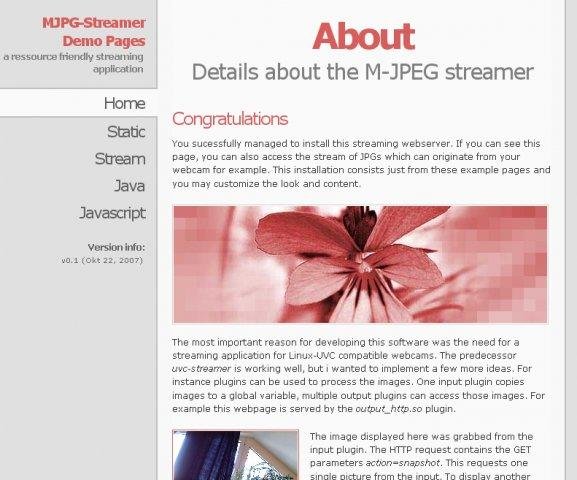
I can check my own instance for the URL to the above page if you need it. Let me know.
The 'Control' link on that page has all of the values that can be controlled with Octolapse. If you have access, there is probably something slightly off with your camera address (perhaps a missing / at the end?)
Soon I hope to switch the camera control so that it can directly adjust the settings without going through the web service, but have been having trouble making it work cross platform.
Let me know if any of this helps, and sorry for the late response (been out of the country)!
 FormerLurker
on 29 Jun 2018
FormerLurker
on 29 Jun 2018
@simpson1991 - I have heard that some people need to update PIP before installing the newest version of Octoprint.
Edit: I did not read the entire comment history as I should have before replying to you, sorry. I see that you are way ahead of me :)
FormerLurker
on 29 Jun 2018
@FormerLurker , I have only tried to access the cam controls from remotely. I have the Octopi connected to my Prusa i3 MK3 printer so there is not a computer directly connected. If you have that URL, please LMK and I would give it a try. I would rather try to get it working by software other than buying parts and modifying my cam to stay in focus at such a close range.
Psyc0Flyer
on 29 Jun 2018
Hey, I think I figured it out. Apparently something changed in the default boot/octopi.txt file that turned off the control.htm access. So, open up the boot/octopi.txt file and change the last two lines to the following:
camera_http_webroot="./www"
camera_http_options=""
Then save and reboot. Let me know if you need help editing this file, but here are instructions that might save you time. Pardon me if this is second nature to you :)
Once you have rebooted see if the following page loads:
http://[YourOctopiInstanceUrlHere]/webcam/control.htm
If it does, try out the octolapse camera settings again and let me know if it works!
FormerLurker
on 29 Jun 2018
@FormerLurker mine looks like this (I just uncommented the lines before posting this):
camera_http_webroot="./www-octopi"
camera_http_options="-n"
Psyc0Flyer
on 29 Jun 2018
Here is my octopi.txt file @FormerLurker
octopi.txt
Psyc0Flyer
on 29 Jun 2018
Yeah, change those last two to this:
camera_http_webroot="./www"
camera_http_options=""
and that should (fingers crossed) fix it for now.
FormerLurker
on 29 Jun 2018
Hey lurker, thanks for making this amazing app
I was trying to troubleshoot this last night and I ended up moving the new wwwoctopi out of that directory and moving the www into where the index is.
I still couldn’t get it to work but maybe I messed it up
GeorgesGadgets
on 29 Jun 2018
@GeorgesGadgets, OctoPi also includes the following in octopi.txt, which prevents access to control.htm capabilities (presumably for security/performance reasons):
camera_http_options="-n"
That must be changed to
camera_http_options=""
to allow the config.htm controls.
Take a look at this PR from Gina for more info.
FormerLurker
on 29 Jun 2018
Works. You are the man Lurker
thank you very much! Glad to have you back
GeorgesGadgets
on 30 Jun 2018
It DOES in fact work but now my camera image sux a$$.. LOL
Psyc0Flyer
on 30 Jun 2018
Lol!! Play with the settings in split screen, stream on one side and the settings on the other. Unfortunately the defaults aren't reported, so it may take some time to figure them all out.
FormerLurker
on 30 Jun 2018
Ok, one more issue I ran into related to this. I can not edit the resolution. If I mess with the resolution of the camera in octoprint.txt then it does not change :\
GeorgesGadgets
on 30 Jun 2018
I don't think this is related to Octolapse, but if you post your txt file and let me know what cam you have, I'll take a look.
FormerLurker
on 30 Jun 2018
Ahem. I’m dumb. I fixed it
GeorgesGadgets
on 30 Jun 2018
I'm going to close this out. Let me know if you have any additional related problems and I can open it back up.
Thanks for posting!
FormerLurker
on 23 Jul 2018
Related issues
FormerLurker
·
16Comments
 jccf07
·
9Comments
jccf07
·
9Comments
 ulitiy
·
3Comments
ulitiy
·
3Comments
 gege2b
·
17Comments
gege2b
·
17Comments
 Kesiunas
·
13Comments
Kesiunas
·
13Comments