Octolapse: [Request] Add an option to not cancel print on snapshot failure
Hi there
If this is a feature request describe it here
Is it possible to add an option to choose the behaviour Octolapse should do when starting a print and getting an error with the snapshots ?
Let me explain : I don't run mjpeg streamer automatically, it's a choice (to save some processing power when I don't want a timelapse)
With the default timelapse bundled in octoprint, the timelapse is simply not created but the print run fine
With Octolapse, I get a red popup
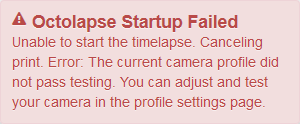
And print is canceled
It could be cool to tell Octolapse to simply disable itself during the print if something is wrong with the snapshot and let the print continue flawlessly
If it's possible, an option in the main settings is the right place IMHO, what do you think ?
Version of Octolapse
Octolapse Version: 0.3.1
Version of OctoPrint
OctoPrint Version: 1.4.0.dev1274+gf8e6e4e3
 gege2b
All 17 comments
Is it not acceptable to just disable Octolapse via the toggle button on the tab if you don't want it to run? Or maybe I could add a button to continue the print after the failure to the popup error message? If possible I'd like to limit options that create a 'silent failure' since lots of people are having trouble getting Octolapse to run at all. Let me know what you think of these options, and I'll continue to think about possibilities.
 FormerLurker
on 8 Jun 2018
FormerLurker
on 8 Jun 2018
I agree, and it's actually what I do most of the time, but sometime I just forget, click print and get out to do something else, and when I'm back I get mad because I'm dumb enough to forget this behaviour :D
More generally, from my point, the main goal of a 3D printer is doing 3D prints, not especially timelapses, so cancelling a print because the timelapse can't be done seems wrong to me
When you say silent failure, I'm more prone to say unintended operation but it's a matter of point of view :D
That's why having such an option (disabled by default to avoid any unwanted feedback) makes sense to me
BTW, I totally get your point and I would understand if you prefer not to add this
gege2b
on 8 Jun 2018
Ok, I'll consider adding an option to the camera profile advances settings. Should be easy enough!
FormerLurker
on 8 Jun 2018
Any progress on this? I just smashed my print head full load into the endstop and broke it because I ran my filament change script while octolapse was active. Since my filament change script (not during a print) doesn't home it triggers gcode I entered in octoprint to move the print head to the side when cancelling a print.
 Tronnic
on 3 Aug 2018
Tronnic
on 3 Aug 2018
@Tronnic, Ouch.... What version of OctoPrint/Octolapse? Prior to OctoPrint 1.3.9 and Octolapse 0.3.3rc2 there was no capability for Octolapse to monitor gcodes from custom OctoPrint scripts. In the newer versions (as of yet unreleased) Octolapse receives gcode from OctoPrint scripts, and is able to stop the print job/custom script code appropriately. However, Octolapse is NOT able to reliably do this if the code is sent directly from another plugin. I'm not sure this is actually possible to do properly at the moment since I cannot prevent gcodes sent from other plugins from reaching the printer, only print job (gcode file) and OctoPrint scripts.
However, your issue seems unrelated to this particular thread. Any chance you could create a new issue? Also, where are you putting the filament change script exactly, and would you please include this if/when you create a new issue? If it's from a plugin, let me know which one. If it's built into the printer I'm not sure how it could happen, but will look into it. My Prusa blocks all serial commands when running a filament change, so I've never encountered this particular problem (but can certainly imagine it happening!)
Thanks!
FormerLurker
on 3 Aug 2018
Hey, I'm just using a simple gcode file to change filaments.
G90 ; set absolute position
M82 ; set extruder to absolute mode
M104 S230 T0 ; set nozzle temp
M109 S230 T0 ; set nozzle temp and wait
M117 Loading Filament....
G92 E0 ; reset extrusion distance
G1 E340 ; extrude 340mm
G92 E0 ; reset extrusion distance
G1 E50 F150 ; extrude 50mm
G92 E0 ; reset extrusion distance
G1 E-2 F300 ; retract 2mm
M84 ; disable motors
M117 Filament loaded!.
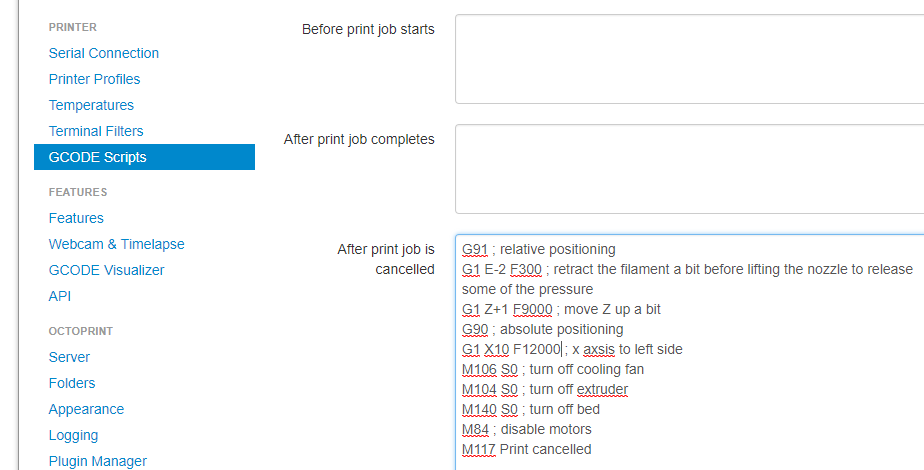
Since this gcode file doesn't change any layers Octolapse ran into an error and canceled my "print". I have octoprint setup to move my head away from the print in case I manually cancel. That's why it happend. Yeah it was totally my fault :D That's why I asked if there is an option to disable the cancellation if the timelapse failed.
Tronnic
on 3 Aug 2018
@Tronnic, I think I may have misunderstood what you were asking! You are saying your OctoPrint 'After print job is cancelled' script kicks in when Octolapse automatically cancels, correct? That def could be a problem if you are moving with relative coordinates and not taking the current position into account.
There are a few possibilities here:
- I could prevent any script from being sent, including cancel scripts, etc. if Octolapse fails the start up checks (there are MANY of these, not just the camera checks mentioned above). I think this is something that should be done in any case. I might have to wait to implement this, actually, due to the way Octolapse is forced to detect the beginning of a print right now (it is a long story, but it is unnecessarily complicated and restricts how I can handle things) . Gina is going to add a method that will allow me to more easily and flexibly detect print start, which should make this possible.
- I could add another 'main setting' to Octolapse that prevents automatic print cancellation. I think in that case I would still send an error to the client and shut down Octolapse and continue the print, which is what OP wanted. I think it is necessary to show the error, otherwise I'll get lots of 'error reports' about Octolapse mysteriously not starting properly :)
- I'm willing to do this in any case, but maybe your script could be altered a bit so that you don't have any crashing issue? This may be possible.
In short, you don't have to post another issue since I misunderstood you.
FormerLurker
on 3 Aug 2018
I could add another 'main setting' to Octolapse that prevents automatic print cancellation. I think in that case I would still send an error to the client and shut down Octolapse and continue the print, which is what OP wanted. I think it is necessary to show the error, otherwise I'll get lots of 'error reports' about Octolapse mysteriously not starting properly :)
That would be great :) Also thank you for this amazing plugin, I love the timelapses it produces! Thanks for your hard work <3
Tronnic
on 3 Aug 2018
@Tronnic, I'm glad you are enjoying it!
I am confused about how exactly the your endstop was hit. Your cancel script clearly has the movement to X10 set to absolute coordinates, and shouldn't have hit the endstop unless it wasn't homed first (no home command appears in your script, so I'm guessing this is the case). However, looking at that script, the issue could happen any time your X axis is not homed prior to start, even if Octolapse is not running, say if you cancel that gcode during warmup. You might want to add this:
G28 X; - Home X at the VERY start so that our cancel script will never hit the endstop
to your start gcode, somewhere BEFORE the warmup. Then when the cancel script hits this:
G1 X10 .....
Your printer will know where that is.
Now, Octolapse could prevent even the first line (G28 X) from being executed, which is why it will need to prevent any cancel script from running, but making that change should make your startup safer when NOT using octolapse.
Hopefully I've understood things this time!
FormerLurker
on 3 Aug 2018
FYI, I added an option in the main settings to prevent cancel. It definitely needs to be tested.
Here is a URL to install the update via the plugin manager: https://github.com/FormerLurker/Octolapse/archive/7c9c07eae3b6d1a88f079d0c2fd32565604e5f07.zip
WARNING: this is a devel version that hasn't been subjected to all of the usual tests, so treat it as such. It does include some new functionality too, so don't be surprised when things look a bit different..
I recommend the following test:
- Upgrade to OctoPrint 1.3.9. THIS IS MANDATORY, else nothing will work.
- Remove your custom cancel gcode and replace with the default:
; disable motors
M84

;disable all heaters
{% snippet 'disable_hotends' %}
{% snippet 'disable_bed' %}
;disable fan
M106 S0
- Run a print with NO CAMERAS ENABLED. The print should cancel.
- Open Octoprint settings, select 'Octolapse' and disable 'Cancel if startup errors are detected' option in the main settings.
- Try to start your test print again. Now it should show you a reasonable error message, but should continue printing.
- This is optional but highly recommended: Install Octolapse v0.3.3RC2, which is relatively stable, from the plugin manager with this URL: https://github.com/FormerLurker/Octolapse/archive/v0.3.3rc2.zip
FYI, I was NOT able to suppress the cancel scripts when Octolapse manually cancels ('Cancel if startup errors are detected' = True), but I'm working on that. It may requires some changes to OctoPrint, or some misunderstanding on my part.
Thanks, and let me know how it goes!
FormerLurker
on 3 Aug 2018
Oh ! Good to know !
Unfortunately (or fortunately :D ) I'm on vacation since today and my printer is at my office, so I could not test this new option until september
gege2b
on 3 Aug 2018
What, a month of vacation!? You must live/work someplace reasonable :)
Enjoy your time off, and be safe!
FormerLurker
on 3 Aug 2018
I must admit
but I have almost no vacation the rest of the year, so it's fair enough ? xD
Thanks !
gege2b
on 3 Aug 2018
Thanks, and let me know how it goes!
Hey, thank you a lot. :) I will try as soon as possible, problem right now is that I can't update to 1.3.9 because it would break my TouchUI installation. :< I might do a backup tomorrow and try it out anyways. Thanks :-)
Tronnic
on 4 Aug 2018
@FormerLurker I just did a fresh install of Octopi, updated Octoprint to the latest version and installed my usual stuff & the file you provided. Everything seems to be working, my print continued and I saw the message in my browser. Thank you <3
Tronnic
on 6 Aug 2018
Sweet! V glad it is working. Unless @gege2b objects, I'll close the ticket soon.
FormerLurker
on 6 Aug 2018
Closed! Enjoy :)
FormerLurker
on 11 Aug 2018
Related issues
 yoyo42
·
4Comments
yoyo42
·
4Comments
 jccf07
·
9Comments
jccf07
·
9Comments
 Simrien
·
10Comments
Simrien
·
10Comments
 adcurtin
·
4Comments
adcurtin
·
4Comments
 bradcozine
·
10Comments
bradcozine
·
10Comments