Obs-mac-virtualcam: I don't see obs virtual camera on Google Chrome meets
 kam1092
All 21 comments
i clicked on start virtual camera an i don't see the option to click on OBS virtual camera on google meets i closed an reopened my browser nothing showed up
kam1092
on 27 Apr 2020
Could you please provide further information?
 gxalpha
on 27 Apr 2020
gxalpha
on 27 Apr 2020

kam1092
on 27 Apr 2020

kam1092
on 27 Apr 2020
so my virtual camera is on but i don't see it in google meets
kam1092
on 27 Apr 2020
that's on google chrome
kam1092
on 27 Apr 2020
Does it work in other programs like QuickTime?
 johnboiles
on 27 Apr 2020
johnboiles
on 27 Apr 2020
yes it works on QuickTime
kam1092
on 27 Apr 2020
And you're sure you completely closed Chrome (CMD-Q) and then reopened it _after_ starting the virtualcam output?
johnboiles
on 27 Apr 2020
i closed chrome and even restarted my computer
kam1092
on 27 Apr 2020
👍 Do you see anything in Console.app that might be relevant? Maybe search obs-mac-virtualcam in Console.app. If nothing comes up, then maybe paste the log when you open Chrome and try to access the virtual camera. For comparison sake also paste the log from when you open QuickTime and open the virtual camera.
johnboiles
on 27 Apr 2020
I don't have Chrome, but tried a couple of other browsers on https://meet.google.com
- FireFox: doesn't work. None of the my other virtual cams (such as Snap camera, CamTwist) show up either
- Safari: same as FireFox, only the built in webcam is available
- Brave: works fine
- Edge: works fine
It's probably a security issue, similar to latest Zoom app breaking third party virtual cameras due to driver signing?
You could try this tip (replace Zoom with Chrome): https://github.com/johnboiles/obs-mac-virtualcam/issues/4#issuecomment-612152106
 carlmes
on 29 Apr 2020
carlmes
on 29 Apr 2020
Though covered in previous discussion, I use google meet as well and just wanted to share my experience. I went through a couple iterations here.
- You must restart chrome when you turn on the virtualcam, it doesn't pick it up other wise (see snap camera who have this recommendation on their setup page) https://snapcamera.snapchat.com/guides/getting-started/
- If you turn off virtualcam / obs, then when you come back later and want to use it again, you probably need to restart your browser again. This contrasts with zoom and applications like camtwist, epoccam which leave some kind of server process running:
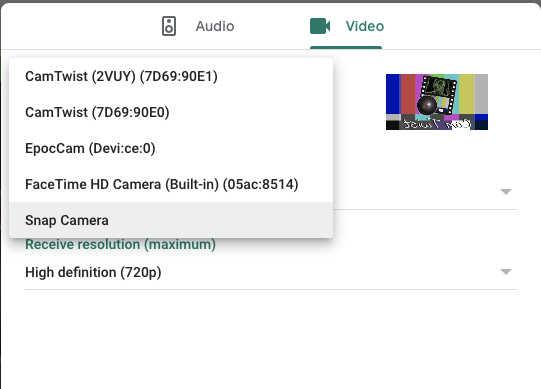
I'd recommend for future use, to just leave the server running, and being able to turn it off in obs, so that I don't have to restart my browser whenever I turn on obs
 ayroblu
on 2 May 2020
ayroblu
on 2 May 2020
This is a known issue. It is going to be fixed once the new DAL plugin is implemented, though that might take some more time
gxalpha
on 2 May 2020
Same happens here. I can use it on Hangouts, but not in Meet. Besides that the images is horizontally flipped (when sharing Desktop/App).
Tks for the great work till now. :)
 ssjunior
on 7 May 2020
ssjunior
on 7 May 2020
+1 on reversed video output. Both using Google Hangouts (in Chrome or Safari), or Skype.
 mrichmon
on 12 May 2020
mrichmon
on 12 May 2020
Can y'all post a screenshot of OBS next to the meet window where it's reversed?
johnboiles
on 12 May 2020
You can flip horizontally in obs. Some cameras are selfie / mirror style,
and some are normal. You can pick the style.
All websites use webrtc, so you can find a site like
https://webrtc.github.io/samples and try some out and see if they work for
you.
On Tue, 12 May 2020 at 07:29, Michael Richmond notifications@github.com
wrote:
+1 on reversed video output.
—
You are receiving this because you commented.
Reply to this email directly, view it on GitHub
https://github.com/johnboiles/obs-mac-virtualcam/issues/52#issuecomment-627138276,
or unsubscribe
https://github.com/notifications/unsubscribe-auth/ABFQDYWWFPF3PX2J7NITSWDRRDUEZANCNFSM4MSD3K5A
.
ayroblu
on 12 May 2020
Regarding reversed output:
The preview on some apps will reverse the output of cameras. This is done so that if you move your hand to the left in reality, it will also move to the left on the screen. However, you shouldn't need to worry about that:
While the preview is reversed, the screen that your meeting partners see isn't. Simply make sure that you didn't flip it in OBS (Your partner will see what you see in the OBS-preview).
May need to add this to readme.
gxalpha
on 12 May 2020
I think this is all fixed up right now. Reversed (mirrored) output is expected in the preview of most video conferencing apps.
johnboiles
on 14 May 2020
Tks @johnboiles!
ssjunior
on 16 May 2020
Related issues
 alexandr-
·
14Comments
alexandr-
·
14Comments
 wookayin
·
3Comments
wookayin
·
3Comments
 czhowl
·
11Comments
czhowl
·
11Comments
 technovangelist
·
4Comments
technovangelist
·
4Comments
 clemkn
·
12Comments
clemkn
·
12Comments
Most helpful comment
Tks @johnboiles!