Obs-mac-virtualcam: Virtual Camera is started in OBS but the video output is still "OBS Virtual Cam is inactive"

My video output is always the default image even if I stop and restart the virtual cam, restart QuickTime/Firefox InstaScan etc.
OBS-mac-virtualcam 1.0.0
OBS Studio 25.0.8
MacOS Catalina 10.15.2
 clemkn
All 12 comments
Hey, could you please provide an OBS log with the problem? First reproduce it, then go to Help -> Log files -> Upload current log file and post the link)
 gxalpha
on 13 May 2020
gxalpha
on 13 May 2020
Yesterday things were fine, but today I too only got the animated status screen. I restarted to no avail. I then deleted everything and reinstalled OBS and the latest .pkg for Virtual Cam. Now running as expected.
 teacherguy2020
on 13 May 2020
teacherguy2020
on 13 May 2020
here's my log file https://obsproject.com/logs/-YqBiV_ByWTklB5i
clemkn
on 13 May 2020
~Did you reproduce the problem before uploading it? It is only 2 seconds long~
Nevermind, my bad
gxalpha
on 13 May 2020
@clemkn @teacherguy2020 can y'all open the Console.app, then try to create a recording in QuickTime and post any logs that mention obs-mac-virtualcam?
 johnboiles
on 13 May 2020
johnboiles
on 13 May 2020
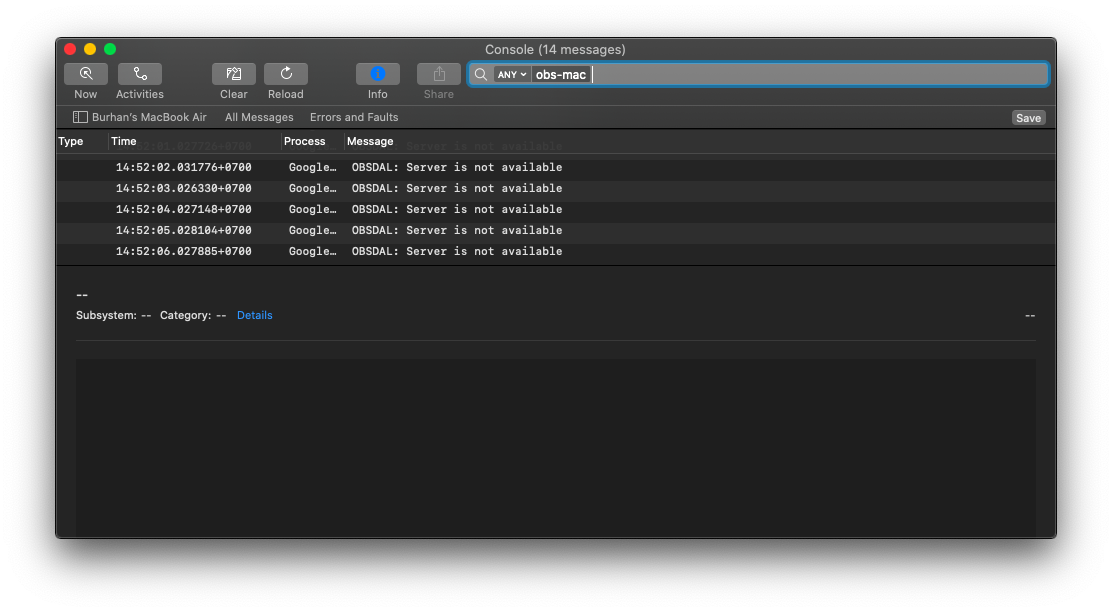
it said server unavailable
 Fray117
on 14 May 2020
Fray117
on 14 May 2020
@Fray117 Try rebooting. I had to reboot for the plugin to show live video in Quicktime. Haven't tested other applications yet. Unfortunately recording the stream in Quicktime doesn't work yet.
 denwald
on 14 May 2020
denwald
on 14 May 2020
@denwald @johnboiles It's working after rebooting. Thanks!
clemkn
on 14 May 2020
@Fray117 does it work for you as well?
gxalpha
on 14 May 2020
Baffling to me why some people need to reboot and not others 🤷♂️
johnboiles
on 14 May 2020
Just a quick word about the new Messenger Rooms...if OBS is running before I open the "room" it results in an error. I think this is because OBS has control of my webcam and Chrome wants to use it. If I quit OBS, then open the Messenger Room, and THEN start OBS/turn on virtual camera, it works fine!
teacherguy2020
on 14 May 2020
@teacherguy2020 add it to the wiki https://github.com/johnboiles/obs-mac-virtualcam/wiki/Compatibility
I think we're all solved here with a reboot right? @gxalpha added a note about rebooting to the recent release as well. I will add to the readme also.
johnboiles
on 14 May 2020
Related issues
 emmecirm
·
3Comments
emmecirm
·
3Comments
 Dyphen
·
5Comments
Dyphen
·
5Comments
 technovangelist
·
4Comments
technovangelist
·
4Comments
 czhowl
·
11Comments
gxalpha
·
3Comments
czhowl
·
11Comments
gxalpha
·
3Comments
Most helpful comment
@Fray117 Try rebooting. I had to reboot for the plugin to show live video in Quicktime. Haven't tested other applications yet. Unfortunately recording the stream in Quicktime doesn't work yet.