Notepad3: FR: Dark theme for the frame and the menus
Hi
I am guessing this is a feature request. It would be nice if the dark theme also makes everything else like menus and the frames dark too.
thanks
 gerroon
All 11 comments
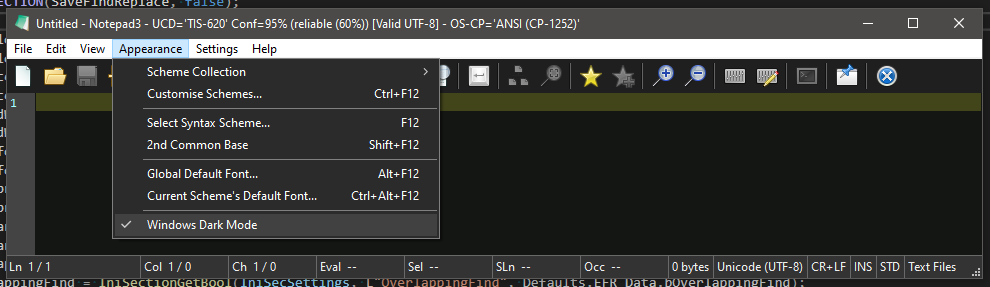
I think you refer to the "Dark Mode" (Menu->Appearance->Windows Dark Mode).
The "Dark Themes" are only related to the Edit-Area of the window.
Unfortunately, the "Dark Mode" is a kind of "hack", cause the Win32 GUI of good old Notepad3 is not really supported for Win10 "Dark Mode" feature, so it will not be perfect. E.g. the small menu strip can't be made "dark" (w/o investing huge effort).
(see also discussion on issue #1811)
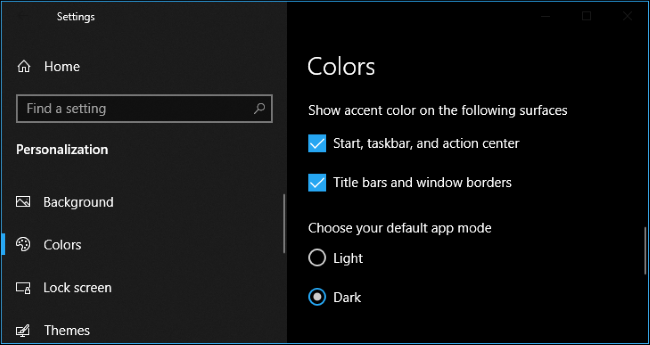
NP3's "Dark Mode" feature can only be used if "Win10 Dark Mode" is enabled in Win10 Color Settings:
 RaiKoHoff
on 5 Feb 2021
RaiKoHoff
on 5 Feb 2021
Hi
Thanks for the reply. I am using Win 10 Dark mode already and the menus are all bright gray for me. See the image please, as you can see the explorer is using the dark mode
gerroon
on 5 Feb 2021
See my explanation above (latest beta #1129). Switch NP3 to Menu->Appearance->Windows Dark Mode.
RaiKoHoff
on 5 Feb 2021
i don't know why but it is not working anymore for me. And i can't manually enable it because option is grayed and not selectable. Is there any way to activate it with config file?
 sethazazel
on 28 Feb 2021
sethazazel
on 28 Feb 2021
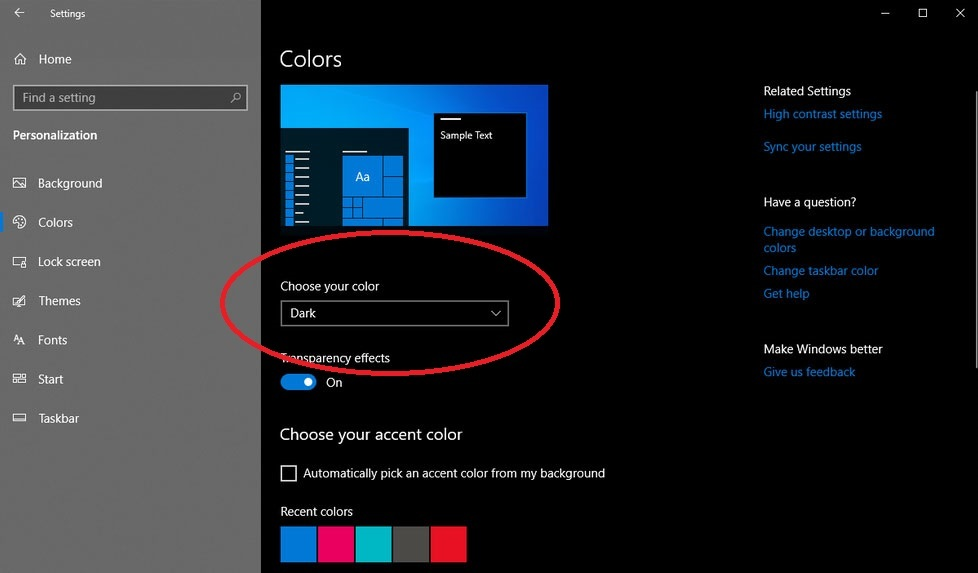
This option is only available, if the Win10 Settings Colors "Dark Mode" is chosen.
RaiKoHoff
on 28 Feb 2021
yes, i know as i said it was working but now it is not working anymore. I didn't changed anything.
sethazazel
on 28 Feb 2021
Mhh, this features uses undocumented function pointers of windows system DLLs, which locations may change in future releases.
So it checks the Win10 version and is prepared for Win10 v1809 up to Win10 v20H2(=2009) (build 19042) latest release.
Which version number do you use (use Win-Key+R type winver) ?
RaiKoHoff
on 28 Feb 2021
windows 10 insider beta channel 21h1 19043.844
sethazazel
on 28 Feb 2021
There we have the change 😉
I am going to enable the Dark Mode for insider beta version 21H1 and appreciate feedback, if this mode is still working for Win10 version 21H1.
RaiKoHoff
on 28 Feb 2021
I am going to enable the Dark Mode for insider beta version 21H1 and appreciate feedback, if this mode is still working for Win10 version 21H1.
Hello @sethazazel ,,
Feel free to test the "BETA/RC PortableApps" version "Notepad3Portable_5.21.228.1_beta.paf" or newer, see below or issue #1129.
"Notepad3Portable BETA/RC PortableApps" version can be used with or without ".7z" extension.
To update your "Notepad3 Setup" version with the latest features/fixes from the "BETA/RC" version, see issue #1105.
Also, feel free to test the "BETA/RC Setup" version "Notepad3_5.21.228.1_beta_Setup" or newer, see below or issue #1129.
- Notepad3_5.21.228.1_beta_Setup.7z -s
- Notepad3_5.21.228.1_beta_x86_Setup.7z -s
- Notepad3_5.21.228.1_beta.7z -s (portable)
Comments and suggestions are welcome... 😃
 hpwamr
on 28 Feb 2021
hpwamr
on 28 Feb 2021
Notepad3 (x64) v5.21.228.1 beta
it is working well now, thank you.
sethazazel
on 1 Mar 2021
Related issues
 wmsrww
·
3Comments
wmsrww
·
3Comments
 dlong500
·
3Comments
dlong500
·
3Comments
 ggordon-vispero
·
3Comments
hpwamr
·
4Comments
ggordon-vispero
·
3Comments
hpwamr
·
4Comments
 craigo-
·
4Comments
craigo-
·
4Comments
Most helpful comment
Notepad3 (x64) v5.21.228.1 beta
it is working well now, thank you.