Notepad3: Wrong encoding detection
Here attached a test file (encoding is UTF-8 without BOM).
Notepad3 (64-bit) v5.20.722.1 will treat it as UTF-16 when opening the file.
So the content shown will be garbled.
I also tried latest beta version Notepad3 (x64) v5.20.825.2 beta, result is same.
 xiesunny
All 13 comments
No, this is correct behavior!
If you have activated Parse encoding file tags (Menu->File->Encoding->Set Default... : see below),
you force Notepad3 to read the content of the file, searching for encoding file tags (in your case "encoding='utf-16'"), and use this for decoding (in your case, you provide a wrong encoding file tag!)
Just delete the file from File History... (because the wrong encoding is stored there) and disable the file encoding tag reading:

You should get the correct encoding detection.
 RaiKoHoff
on 26 Aug 2020
RaiKoHoff
on 26 Aug 2020
It seems to me normal because with your first line as encoding='utf-16', you force to read your file with this encoding code. 🤔
 hpwamr
on 26 Aug 2020
hpwamr
on 26 Aug 2020
Thanks for your reply @RaiKoHoff @hpwamr
After disable 'Parse encoding file' tag, the file will be OK.
Here is my original python file that I noticed this issue.
encoding='utf-16' is not in first line, and have some other words before and behind it.
If 'Parse encoding file' tag is enabled, this file will be also treated as UTF-16, and show garbled.
Should Notepad3 not only simply search encoding='utf-16' keyword?
What will happen if I use encoding='utf-8' in first line, but have code open(filename, 'r', encoding='utf-16') in second line?
Because Github does not allow uploading python file, I changed the filename to txt.
xiesunny
on 26 Aug 2020
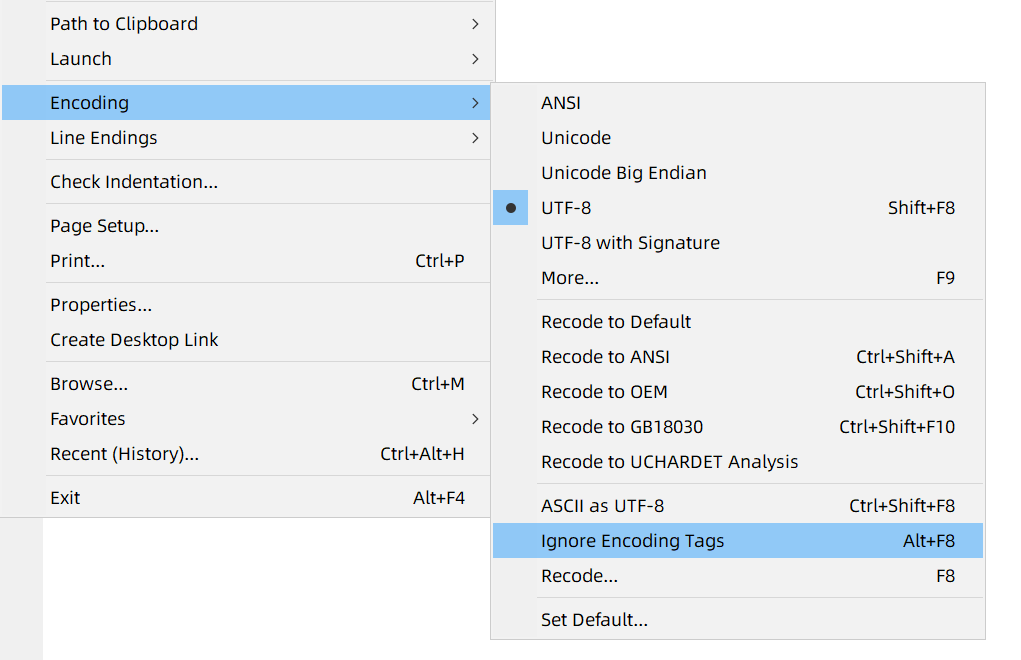
Alt+F8 for "Ignore Encoding Tags" temporarily
@xiesunny
 lanzhiquan
on 26 Aug 2020
lanzhiquan
on 26 Aug 2020
What will happen if I use encoding='utf-8' in first line, but have code open(filename, 'r', encoding='utf-16') in second line?
Hello @xiesunny ,
I think Notepad3 looks for an "Encoding Tag" in the first 512 characters and also takes the first one it finds.
Adding a commented line like # encoding: UTF-8 in the first or second line will solve your problem. 😃
hpwamr
on 26 Aug 2020
@lanzhiquan @hpwamr
Thanks for your suggestion.
It seems Notepad3 does not support default Python magic comment "# -- coding: utf-8 --", but "# encoding: utf-8" is OK.
xiesunny
on 26 Aug 2020
It seems Notepad3 does not support default Python magic comment "# -_- coding: utf-8 -_-", but "# encoding: utf-8" is OK.
Hello @RaiKoHoff ,
Question: Is it possible to use "coding: utf-8" or "# -- coding: utf-8 --" or "# -*- coding: utf-8 -*-" for ".py" file ? 🤔
hpwamr
on 26 Aug 2020
Notepad3 searches the the first 512 bytes of the file-buffer for "encoding", "charset" and "coding" (ASCII Bytes).
If not found, the last 512 bytes of the file-buffer are also searched (both case insensitive).
If string is found, search is continued (blanks are ignored) for a ':'(colon) or '='(equal) followed (blanks ere ignored) by an _encoding_ string (raw, single-quoted or double-quoted).
So encoding = utf-8 , encoding: 'utf-8' , coding="utf8" are all valid recognized encoding file tags.
If "encoding" is searched first, then "charset", at least "coding", so if "encoding" tag is before "coding" tag, the "encoding" tag is used.
The encoding tags can be escaped by a preceding alpha-numeric character or a '-'(minus) or a '_'(underscore).
So -coding: utf-16 or _coding: CP1252 are ignored but @coding: utf-16 is not ignored.
@hpwamr : so "coding: utf-8" or "# -- coding: utf-8 --" or "# -*- coding: utf-8 -*-" should work perfectly ?
Ed.: For UTF-8 some checks are made, if it is really valid UTF-8 encoding, before applying requested UTF-8 encoding.
(Same for file encoding with BOM - if I remember correctly).
RaiKoHoff
on 26 Aug 2020
Recognized encoding file-tags are:
",ASCII,ascii,"
",ANSI,ansi,SYSTEM,system" ENC_PARSE_NAM_ASCII
",OEM,oem,"
",UTF-16LE-BOM,"
",UTF-16BE-BOM,"
",UTF-16LE,UTF-16,utf16,utf16le,unicode,"
",UTF-16BE,utf16be,unicodebe,"
",UTF-8,utf8,"
",UTF-8-SIG,utf8sig,"
",UTF-7,utf7,"
",DOS-720,dos720,"
",ISO-8859-6,iso88596,arabic,csisolatinarabic,ecma114,isoir127,"
",x-mac-arabic,xmacarabic,mac-arabic,macarabic,"
",Windows-1256,windows1256,CP-1256,cp1256,ansiarabic"
",CP-500,cp500,ibm775,"
",ISO-8859-4,iso88594,csisolatin4,isoir110,l4,latin4,"
",Windows-1257,windows1257,CP-1257,cp1257,ansibaltic,"
",CP-852,cp852,ibm852,"
",ISO-8859-2,iso88592,csisolatin2,isoir101,latin2,l2,"
",x-mac-ce,xmacce,mac-ce,xmaccentraleurope,maccentraleurope,"
",Windows-1250,windows1250,CP-1250,cp1250,xcp1250,"
",CP-936,cp936,gb,gbk,gbk-936,chinese,cngb,cngbk,chinese_gb,chinese_gbk,"
",gb2312,csgb2312,EUC-CN,euccn,gb2312-80,gb231280,gb231280,csgb231280,"
",x-mac-chinesesimp,xmacchinesesimp,mac-chinesesimp,macchinesesimp,"
",big5,cnbig5,csbig5,xxbig5,chinese_big5,"
",x-mac-chinesetrad,xmacchinesetrad,mac-chinesetrad,macchinesetrad,"
",x-mac-croatian,xmaccroatian,mac-croatian,maccroatian,"
",CP-866,cp866,ibm866,"
",ISO-8859-5,iso88595,csisolatin5,csisolatincyrillic,cyrillic,isoir144,"
",KOI8-R,koi8r,cskoi8r,koi,koi8,"
",KOI8-U,koi8u,koi8ru,"
",x-mac-cyrillic,xmaccyrillic,mac-cyrillic,maccyrillic,"
",Windows-1251,windows1251,CP-1251,cp1251,xcp1251,"
",ISO-8859-13,iso885913,"
",CP-863,cp863,ibm863,"
",CP-737,cp737,ibm737,"
",ISO-8859-7,iso88597,csisolatingreek,ecma118,elot928,greek,greek8,isoir126,"
",x-mac-greek,xmacgreek,mac-greek,macgreek,"
",Windows-1253,windows1253,CP-1253,cp1253,"
",CP-869,cp869,ibm869,"
",DOS-862,dos862,"
",ISO-8859-8-I,iso88598i,logical,"
",ISO-8859-8,iso88598,csisolatinhebrew,hebrew,isoir138,visual,"
",x-mac-hebrew,xmachebrew,mac-hebrew,machebrew,"
",Windows-1255,windows1255,CP-1255,cp1255,"
",CP-861,cp861,ibm861,"
",x-mac-icelandic,xmacicelandic,mac-icelandic,macicelandic,"
",x-mac-japanese,xmacjapanese,mac-japanese,macjapanese,"
",CP-932,cp932,shift-jis,shift_jis,shiftjis,shiftjs,csshiftjis,cswindows31j,mskanji,xmscp932,xsjis,"
",x-mac-korean,xmackorean,mac-korean,mackorean,"
",Windows-949,windows949,uhc,EUC-KR,euckr,CP-949,cp949,ksx1001,ksc56011987,csksc5601,isoir149,korean,ksc56011989,"
",ISO-8859-3,iso88593,latin3,isoir109,l3,"
",ISO-8859-15,iso885915,latin9,l9,"
",CP-865,cp865,ibm865,"
",CP-437,cp437,ibm437,437,codepage437,cspc8,"
",CP-858,cp858,ibm858,ibm00858,"
",CP-860,cp860,ibm860,"
",x-mac-romanian,xmacromanian,mac-romanian,macromanian,"
",x-mac-thai,xmacthai,mac-thai,macthai,"
",Windows-874,windows874,dos874,CP-874,cp874,iso885911,TIS-620,tis620,isoir166,"
",CP-857,cp857,ibm857,"
",ISO-8859-9,iso88599,latin5,isoir148,l5,"
",x-mac-turkish,xmacturkish,mac-turkish,macturkish,"
",Windows-1254,windows1254,CP-1254,cp1254,"
",x-mac-ukrainian,xmacukrainian,mac-ukrainian,macukrainian,"
",Windows-1258,windows1258,CP-1258,cp1258,ansivietnamese"
",CP-850,cp850,ibm850,"
",ISO-8859-1,iso88591,CP-819,cp819,latin1,ibm819,isoir100,latin1,l1,"
",macintosh,macintosh,"
",Windows-1252,windows1252,CP-1252,cp1252,CP-367,cp367,ibm367,us,xansi,"
",ebcdic-cp-us,ebcdiccpus,ebcdiccpca,ebcdiccpwt,ebcdiccpnl,ibm037,cp037,"
",x-ebcdic-International,xebcdicinternational,"
",x-ebcdic-GreekModern,xebcdicgreekmodern,"
",CP-1026,cp1026,ibm1026,csibm1026,"
",GB-18030,gb18030,"
",euc-jp,euc_jp,eucjp,xeuc,xeucjp,"
",euc-kr,euckr,cseuckr,"
",ISO-2022-CN,iso2022cn,"
",HZ-GB-2312,hzgb2312,hz,"
",ISO-2022-JP,iso2022jp,"
",ISO-2022-KR,iso2022kr,csiso2022kr,"
",X-CHINESE-CNS,xchinesecns,"
",johab,"
",big5hkscs,cnbig5hkscs,xxbig5hkscs,"
If "encoding" is searched first, then "charset", at least "coding", so if "encoding" tag is before "coding" tag, the "encoding" tag is used.
so
"coding: utf-8"or"# -- coding: utf-8 --"or"# -*- coding: utf-8 -*-"should work perfectly ?
Hi @RaiKoHoff ,
In the following case, it's NOT working because with the precedence of searching in the first 512 bytes of the file-buffer, it finds "encoding" before "coding" ? 🤔
filename = 'a.txt'
# -- coding: utf-8 --"
with open(filename, 'r', encoding='utf-16') as f:
    for s in f.readlines():
        print(s)
Edit: I've tested this above file with 12 Text Editor and only Notepad3 has an issue ? 😬
hpwamr
on 26 Aug 2020
@hpwamr : did you enable the encoding file-tag parsing in these editors ? (else you are comparing apples and oranges)
Ed.: If they don't have this feature, we should consider to turn OFF that feature by default?
I am going to change the parsing priority to swap "encoding"(->2nd) and "coding"(->1st).
RaiKoHoff
on 26 Aug 2020
Hello @xiesunny , @lanzhiquan ,
Feel free to test the "BETA/RC" version "Notepad3Portable_5.20.826.1_beta.paf" or higher, see below or issue #1129.
"Notepad3Portable BETA/RC paf" version can be used with or without ".7z" extension.
To update "Notepad3 Setup" version with the latest features/fixes from the "BETA/RC" version, see issue #1105.
Also, feel free to test the "BETA/RC" version "Notepad3_5.20.822.1_Setup_beta" or higher, see below or issue #1129.
Comments and suggestions are welcome... 😃
hpwamr
on 27 Aug 2020
@RaiKoHoff @hpwamr
With the latest beta version 5.20.826.1, the python file with "# -- coding: utf-8 --" could be recognized correctly.
Thanks
xiesunny
on 27 Aug 2020
Related issues
 blackcrack
·
3Comments
blackcrack
·
3Comments
 ggordon-vispero
·
3Comments
ggordon-vispero
·
3Comments
 bravo-hero
·
3Comments
bravo-hero
·
3Comments
 rizonesoft
·
4Comments
blackcrack
·
3Comments
rizonesoft
·
4Comments
blackcrack
·
3Comments
Most helpful comment
@RaiKoHoff @hpwamr
With the latest beta version 5.20.826.1, the python file with "# -- coding: utf-8 --" could be recognized correctly.
Thanks