Notepad3: Can make a hotkey for "browser file" ? (abrir explorador de archivos)
So, that:
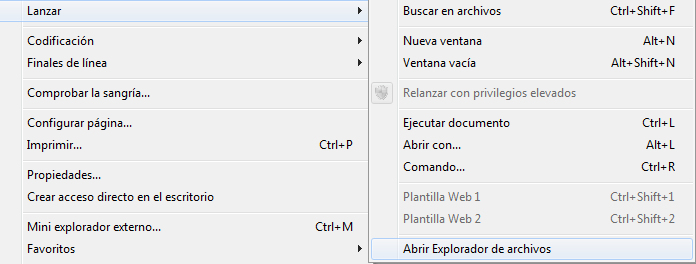
(be nice have a toolbar button too =d) (aunque @hpwamr no quiere muchos botones XD)
Regards
 Mitezuss
All 4 comments
Unfortunately, we are running out of Shortcuts/Hotkeys within Notepad3 🤔.
On the other hand, our preferred file browser is MiniPath.exe (Menu->File->Browse... Ctrl+M) + Toolbar-Button.
If you don't like it, you can configure e.g. [Settings2] filebrowser.exe=Explorer++.exe (https://explorerplusplus.com/)
or [Settings2] filebrowser.exe=Q-Dir_x64+.exe (https://www.softwareok.de/?seite=Freeware/Q-Dir/).
(side-by-side Notepad3).
 RaiKoHoff
on 12 Aug 2020
RaiKoHoff
on 12 Aug 2020
... need a bug-fix: if [Settings2] filebrowser.exe=explorer.exe (system's file explorer) it should behave like Menu->File->Launch->Open File Explorer - will be fixed in next beta ...
RaiKoHoff
on 12 Aug 2020
Hello @Mitezuss ,
PD: La traducción española se realizará lo antes posible. 🤔
Feel free to test the "Portable BETA/RC paf" version "Notepad3Portable_5.20.812.1_beta.paf" or higher.
See the issue "Notepad3 BETA/RC-channel access #1129" or hereunder:
_Note1:_ The "Notepad3Portable_paf" version can be used in "2 flavors", see with or without extension ".7z".
_Note2:_ If you follow the instructions of #1105 , you can update your "Notepad3 Setup" version with the latest features/fixes of the "Portable BETA/RC paf" version (see #1129).
Also, feel free to test the "Setup BETA/RC" version "Notepad3_5.20.805.1_Setup_beta" or higher.
See the issue "Notepad3 BETA/RC-channel access #1129" or hereunder:
Your comments and suggestions are welcome... 😃
 hpwamr
on 12 Aug 2020
hpwamr
on 12 Aug 2020
Hello @Mitezuss ,
As far as I'm concerned, I think you (requester) can close this issue...
hpwamr
on 16 Aug 2020
Related issues
hpwamr
·
3Comments
 blackcrack
·
3Comments
blackcrack
·
3Comments
 ggordon-vispero
·
3Comments
blackcrack
·
3Comments
ggordon-vispero
·
3Comments
blackcrack
·
3Comments
 bravo-hero
·
3Comments
bravo-hero
·
3Comments
Most helpful comment
... need a bug-fix: if
[Settings2] filebrowser.exe=explorer.exe(system's file explorer) it should behave likeMenu->File->Launch->Open File Explorer- will be fixed in next beta ...