Notepad3: Problem showing the color when the mouse is on hover the code
Check image:

should be "black" at least
Info about the first two digits:
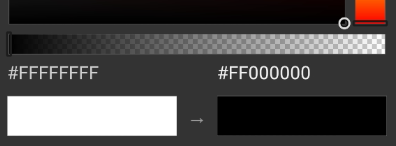
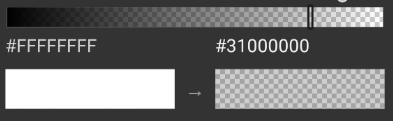
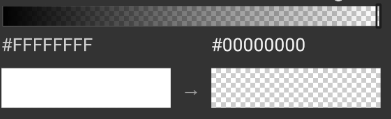
*Transparency
PD: bad english xd
 Mitezuss
All 15 comments
Hello @Mitezuss ,
- Hex: "FF" = Dec: "255"
#FFFFFF  = White   = RGB 255,255,255

#FF0000  = Red     = RGB  255,0,0

#00FF00  = Green   = RGB  0,255,0

#0000FF  = Blue    = RGB  0,0,255

#000000  = Black   = RGB  0,0,0
 hpwamr
on 10 Aug 2020
hpwamr
on 10 Aug 2020
@hpwamr
Yes, i know that. But there are problems with colors with 8 digits
Mitezuss
on 10 Aug 2020
Yes, i know that. But there are problems with colors with 8 digits
RGB versus RGBA --> (A = Transparency)
Google is your friend, no ? 🤔
8-Digit Hex Codes?
Hexadecimal color code for transparency
As far as I'm concerned, I think you (requester) can close this issue...
hpwamr
on 10 Aug 2020
@hpwamr
i understand the "work as designed".... just is annoying =/
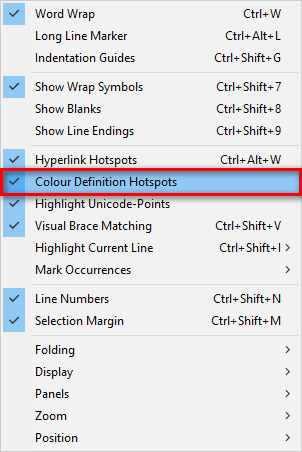
Ps: can be disabled ?
Mitezuss
on 10 Aug 2020
hpwamr
on 10 Aug 2020
Hello @Mitezuss ,
This new BETA version should respond to your request , 🤔
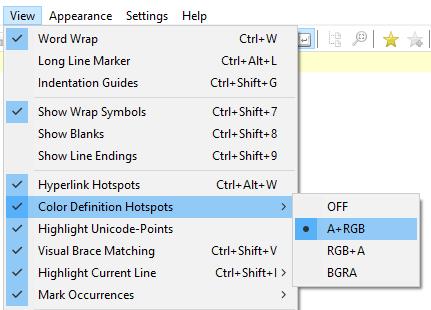
Feel free to test the "Portable BETA/RC paf" version "Notepad3Portable_5.20.811.1_beta.paf" or higher.
See the issue "Notepad3 BETA/RC-channel access #1129" or hereunder:
_Note1:_ The "Notepad3Portable_paf" version can be used in "2 flavors", see with or without extension ".7z".
_Note2:_ If you follow the instructions of #1105 , you can update your "Notepad3 Setup" version with the latest features/fixes of the "Portable BETA/RC paf" version (see #1129).
Also, feel free to test the "Setup BETA/RC" version "Notepad3_5.20.805.1_Setup_beta" or higher.
See the issue "Notepad3 BETA/RC-channel access #1129" or hereunder:
Your comments and suggestions are welcome... 😃
hpwamr
on 11 Aug 2020
Quick question regarding the rendering of colours... Is this right?
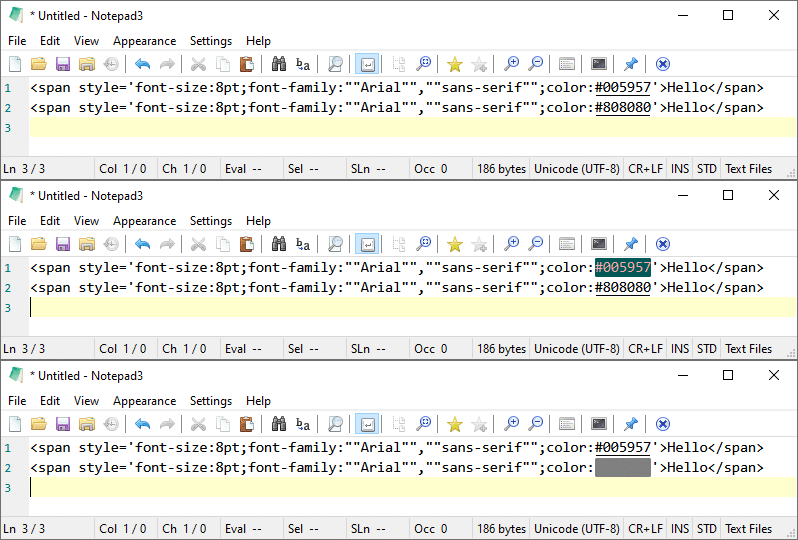
When I hover over the top RGB value (#005957), the background changes to the colour and the foreground text changes to a different colour to make it visible.
When I hover over the bottom RGB value (#808080), the background and foreground changes to the colour, making the text invisible.
Notepad3 (x64) v5.20.811.1 beta
 craigo-
on 11 Aug 2020
craigo-
on 11 Aug 2020
I'm no expert on all these colour representations, so take this with a grain of salt...
I get the feeling that RGB+A is more common than A+RGB. @Mitezuss may disagree - might depend whether you are working on web stuff or Android stuff! (How does web on Android even work?? 😄) If that is correct, does it make more sense for RGB+A to be the default setting?
Is the use of the '+' more common? Most reference material I've been looking at simply uses 'RGBA' rather than 'RGB+A'.
If so, perhaps the menu options might be better as:
- OFF
- RGBA // the default
- ARGB
- BGRA
craigo-
on 11 Aug 2020
Quick question regarding the rendering of colours... Is this right?
Hello @craigo- ,
You're are right, the background seems to be correct but not the text color ? 😬
- NP3_v722.1
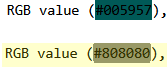
- NP3_v811.1
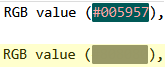
hpwamr
on 11 Aug 2020
it make more sense for RGB+A to be the default setting?
Hello @RaiKoHoff ,
I agree with @craigo- , it make sense that the default should be "RGB+A" (Web Browsers default).
Why the "+" ?
Well, our intention is to show that the "Color Indicator works with both 6 digits "RGB" and with 8 digits +"A", and for the "BGRA" that it only works with 8 digits! 🤔
hpwamr
on 11 Aug 2020
Well, our intention is to show that the "Color Indicator works with both 6 digits "RGB" and with 8 digits +"A", and for the "BGRA" that it only works with 8 digits! 🤔
I see. That makes sense.
craigo-
on 12 Aug 2020
Ok, I will switch the default to "RGB+A"
The changing text colors on hovering over Color Hotspots is to maximize contrast between shown color and text.
The "bug" for #808080 has to be fixed.
 RaiKoHoff
on 12 Aug 2020
RaiKoHoff
on 12 Aug 2020
Hello @craigo- ,
Feel free to test the "Portable BETA/RC paf" version "Notepad3Portable_5.20.812.1_beta.paf" or higher.
See the issue "Notepad3 BETA/RC-channel access #1129" or hereunder:
_Note1:_ The "Notepad3Portable_paf" version can be used in "2 flavors", see with or without extension ".7z".
_Note2:_ If you follow the instructions of #1105 , you can update your "Notepad3 Setup" version with the latest features/fixes of the "Portable BETA/RC paf" version (see #1129).
Also, feel free to test the "Setup BETA/RC" version "Notepad3_5.20.805.1_Setup_beta" or higher.
See the issue "Notepad3 BETA/RC-channel access #1129" or hereunder:
Your comments and suggestions are welcome... 😃
hpwamr
on 12 Aug 2020
Thanks, team. Text is visible.
craigo-
on 13 Aug 2020
@craigo- : Thanks for reporting.
RaiKoHoff
on 13 Aug 2020
Related issues
 valhristov
·
3Comments
hpwamr
·
4Comments
valhristov
·
3Comments
hpwamr
·
4Comments
 rizonesoft
·
4Comments
rizonesoft
·
4Comments
 zb-z
·
3Comments
zb-z
·
3Comments
 tzleon
·
3Comments
tzleon
·
3Comments
Most helpful comment
Thanks, team. Text is visible.