Notepad3: [feature req] Search multifiles or path
- search [find,replace] with multifiles or path
- show search result in independent panel for choice
 virtualyw
All 14 comments
Nice, i wanna this feature too :d
Adding a contextmenu for notepad3 with "Search" (on folder)
 Mitezuss
on 1 Mar 2020
Mitezuss
on 1 Mar 2020
I tried to integrate a small (yet powerful) 3rd-party tool to serve this feature request:
The tool is called "grepWin" by Stefan Küng from Switzerland:
GitHub: https://github.com/stefankueng/grepWin
Website: https://tools.stefankueng.com/grepWin.html
It is started from Notepad3 by "File -> Launch -> Search in Files (Ctrl+Alt+F)".
Currently only available in the portable (New Feature (NF)) version.
Notepad3 starts the tool pre-configured for plain (not RegEx) file content search.
Search root-path is taken from current file, Search Pattern is current selection.
Double click on found files starts Notepad3 with this file, jumping to corresponding line number.
Upd:
Feel free to test the NF version "Notepad3Portable_5.20.319.1_NF.paf.exe.7z" or higher.
See "Notepad3 BETA-channel access #1129" or here Notepad3Portable_5.20.319.1_NF.paf.exe.7z.7z
Note: "Notepad3Portable NF" can be used in "2 flavors", see with or without extension ".7z".
Your comments and suggestions are welcome... 😃
 RaiKoHoff
on 18 Mar 2020
RaiKoHoff
on 18 Mar 2020
Hello @RaiKoHoff ,
It's really a Powerful and Fast Search Tool in files. 👍
 hpwamr
on 18 Mar 2020
hpwamr
on 18 Mar 2020
@hpwamr : Needs definitely more testing and I am not sure about the redistribution conditions with it's GPL v3.0 license (currently I provide the corresponding source code zip too), maybe @rizonesoft knows more about this.
A setup/installer version has to consider: Notepad3 writes the path to itself into the grepwin.ini file of the portable version of this tool, so it has to be deployed to a place, were Notepad3 can write (User's Apps Data, Installation for all Users ???)...
RaiKoHoff
on 18 Mar 2020
another [more labor-intensive option] would be to make a UI over https://github.com/BurntSushi/ripgrep
ripgrep is is dual-licensed under the Unlicense and MIT licenses:
https://github.com/BurntSushi/ripgrep/blob/master/LICENSE-MIT
 leeoniya
on 18 Mar 2020
leeoniya
on 18 Mar 2020
@leeoniya : Thank you for the hint. Still have no time to make an own UI to wrap this powerful tool 😞
RaiKoHoff
on 19 Mar 2020
The following Notepad3 is a "Xperimental" version and deploys a customized (and optimized (async)) version (grepWinNP3) of Stefan Küng's "grepWin".
GitHub: https://github.com/stefankueng/grepWin
Website: https://tools.stefankueng.com/grepWin.html
Feel free to test this version "Notepad3Portable_5.20.401.2_NF.paf.exe.7z" or higher.
See "Notepad3 BETA-channel access #1129" or here Notepad3Portable_5.20.401.2_NF.paf.exe.7z.7z
Note: "Notepad3Portable NF" can be used in "2 flavors", see with or without extension ".7z".
Your comments and suggestions are welcome... 😃
RaiKoHoff
on 1 Apr 2020
Thank you @RaiKoHoff
Search is usefull with grepWinNP3.
By the way, Ctrl+Shift+F may be better then Ctrl+Alt+F like other editors or IDE, VS、VSCode、notepad++, etc.
virtualyw
on 26 Jul 2020
Ctrl+Shift+F is currently associated with "Toggle Folds" - but lets discuss to exchange this with "Open Grepwin" (Ctrl+Alt+F), since this is more common with other editors ?
RaiKoHoff
on 27 Jul 2020
Ctrl+Shift+Fis currently associated with "Toggle Folds" - but lets discuss to exchange this with "Open Grepwin" (Ctrl+Alt+F), since this is more common with other editors ?
I have no objection ? 🤔
hpwamr
on 27 Jul 2020
Hello @RaiKoHoff ,
A quick search in other text editors validates the request of @virtualyw . 👍
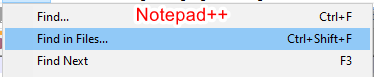

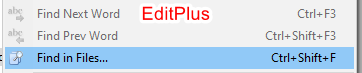
So, I recommend switching between Ctrl+Shift+F and Ctrl+Alt+F too. 🤔
hpwamr
on 28 Jul 2020
By the way, Ctrl+Shift+F may be better then Ctrl+Alt+F like other editors or IDE, VS、VSCode、notepad++, etc.
Hello @virtualyw ,
Feel free to test the "Portable BETA/RC paf" version "Notepad3Portable_5.20.729.1_BETA.paf" or higher.
See the issue "Notepad3 BETA/RC-channel access #1129" or hereunder:
_Note1:_ The "Notepad3Portable_paf" version can be used in "2 flavors", see with or without extension ".7z".
_Note2:_ If you follow the instructions of #1105 , you can update your "Notepad3 Setup" version with the latest features/fixes of the "Portable BETA/RC paf" version (see #1129).
Your comments and suggestions are welcome... 😃
hpwamr
on 29 Jul 2020
Hello @virtualyw ,
As far as I'm concerned, I think you (requester) can close this issue...
hpwamr
on 30 Jul 2020
Thank you again, guys
virtualyw
on 31 Jul 2020
Related issues
 craigo-
·
3Comments
craigo-
·
3Comments
 vvyoko
·
3Comments
vvyoko
·
3Comments
 ggordon-vispero
·
3Comments
ggordon-vispero
·
3Comments
 wmsrww
·
3Comments
hpwamr
·
3Comments
wmsrww
·
3Comments
hpwamr
·
3Comments
Most helpful comment
Thank you @RaiKoHoff
Search is usefull with grepWinNP3.
By the way, Ctrl+Shift+F may be better then Ctrl+Alt+F like other editors or IDE, VS、VSCode、notepad++, etc.