Notepad3: What is wrong with auto detect encoding ?
On Win7 x64 with v5.20.127.2715
I don't know if the problem is when i (firefox) save the file or when open...
Check image
1° Just " í "

2° "Subtítulos"

3° Now change again, writing (bad gramatic) "Súbtitulos"

2 and 3 with same text, just changing two letters...
With notepad++

With notepad 2 fork is working fine.
Files for test
files.zip
 Mitezuss
All 9 comments
Hello @RaiKoHoff ,
I's the same issue with a "Single UTF-8 Character" like #1831 and #1848 😟

 hpwamr
on 28 Jan 2020
hpwamr
on 28 Jan 2020
The Encoding Detection is based on byte-sequence analysis (frequency counts of occurrences in typical text-files of this encoding) and probabilities for unknown text to fit their byte-sequences into that encoding.
To base a probability on a single character in the text will be a bad idea. So if you have lots of those kind of text, it would make sense to switch OFF the the ANSI Encoding Detection (ore at least increase the confidence threshold).
So if you work mostly witrh UTF-8 files, it makes sense to switch OFF the ANSI Encoding Detection.
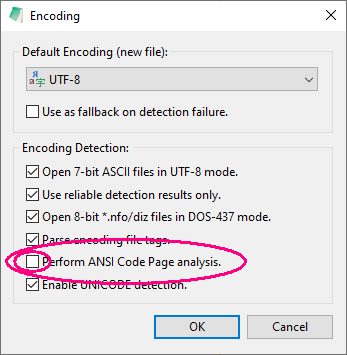
or
[Settings2] AnalyzeReliableConfidenceLevel=85
 RaiKoHoff
on 28 Jan 2020
RaiKoHoff
on 28 Jan 2020
With [Settings2] AnalyzeReliableConfidenceLevel=85 work fine.
Mitezuss
on 28 Jan 2020
With [Settings2] AnalyzeReliableConfidenceLevel=85 work fine.
Hello @Mitezuss ,
I read your previous message (deleted) with the problem that the bad encoding remains after having changed the parameter "AnalyzeReliableConfidenceLevel=85" in Notepad3.ini.
This is due to the setting "Remember Recent Files" ("Recordar archivos recientes"), that Notepad3.ini keeps a list with the name, path and encoding (incorrect or correct) of each file that has been opened.
To resolve this issue, it is not necessary to manually modify Notetepad3.ini.
Simply empty this list by "unchecking" "Remember Recent Files", quit Notepad3, then reopen Notepad3.
After that, if you wish, you can again "check" "Remember Recent Files".

hpwamr
on 28 Jan 2020
@hpwamr Oh, i see. Good know that.
Mitezuss
on 29 Jan 2020
Hello @Mitezuss ,
Feel free to test the BETA version "Notepad3Portable_5.20.131.2720_BETA.paf.exe.7z" or higher.
See "Notepad3 BETA-channel access #1129" or here Notepad3Portable_5.20.131.2720_BETA.paf.exe.7z.
Note: "Notepad3Portable BETA" can be used in "2 flavors" (with or without the extension ".7z").
Your comments and suggestions are always welcome... 😃
hpwamr
on 31 Jan 2020
So, do not need set that setting?
Mitezuss
on 31 Jan 2020
Increasing the "out-of-the-box" default confidence threshold (reliability of detection) means:
Using only "Encoding Detector" results if it is very sure of that encoding.
This is related to the fact, that the Encoding Detector is optimized on prosaic texts, but Notepad3 is targeting more scripting and development source code, mostly a mix of ASCII keywords with (sometimes) language related strings ...
RaiKoHoff
on 31 Jan 2020
So, do not need set that setting?
AnalyzeReliableConfidenceLevel=92 is now the new internal value by default.
hpwamr
on 31 Jan 2020
Related issues
 bravo-hero
·
3Comments
bravo-hero
·
3Comments
 RaffaeleBianc0
·
3Comments
RaffaeleBianc0
·
3Comments
 zb-z
·
3Comments
bravo-hero
·
3Comments
zb-z
·
3Comments
bravo-hero
·
3Comments
 craigo-
·
3Comments
craigo-
·
3Comments