Notepad3: Problem with auto-complete words (Win7)
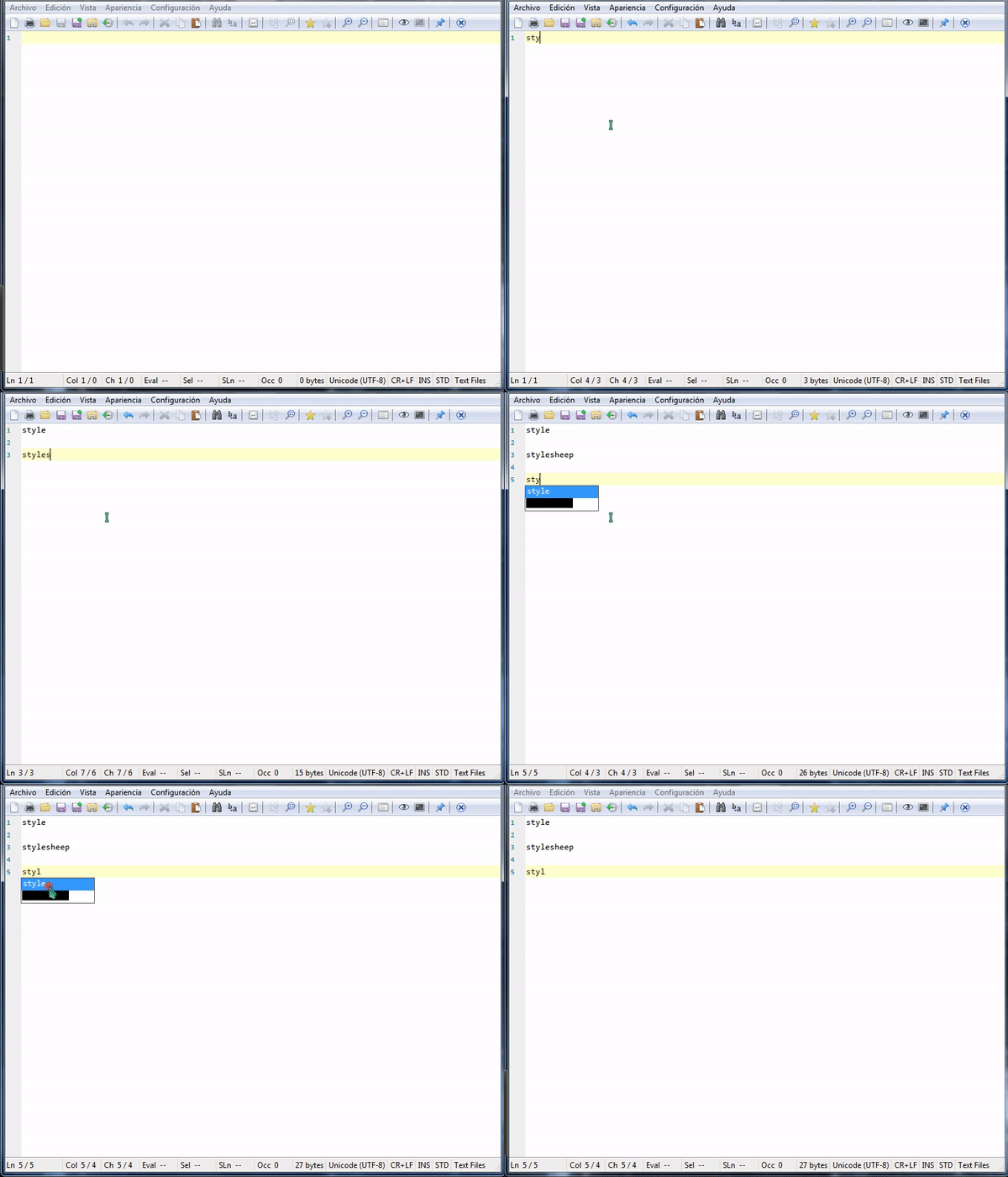
Hi, check this

Can not see the words properly.
*v5.20.124.2713 *
 Mitezuss
All 17 comments
I can not reproduce your problem, need more details and workflow description...
 RaiKoHoff
on 27 Jan 2020
RaiKoHoff
on 27 Jan 2020
Hi, on windows 7 x64 with anyone syntax
With notepad 2 fork is working the auto-complete
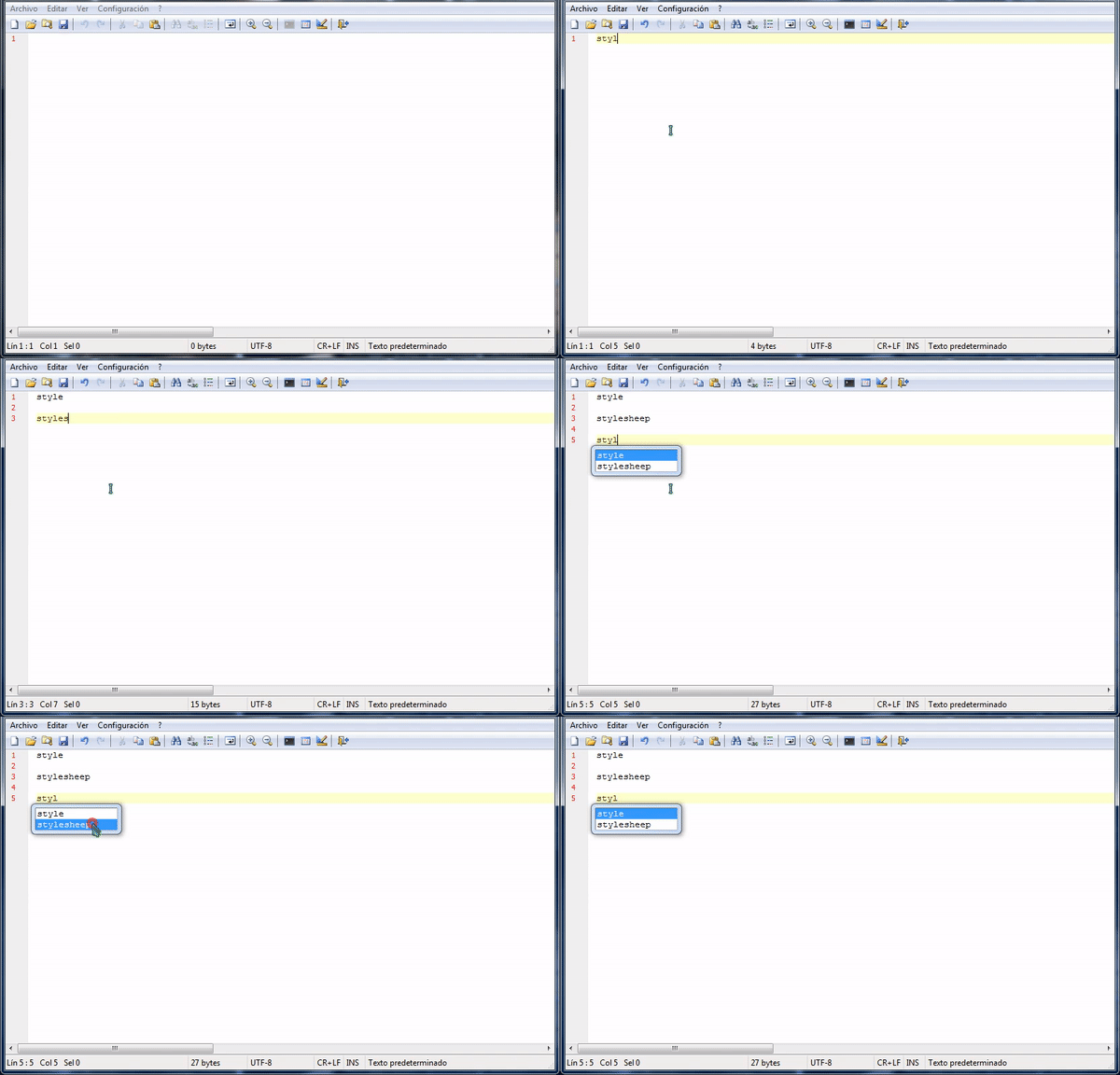
Mitezuss
on 27 Jan 2020
Seems to be a problen on Win7 (Win10) works fine.
RaiKoHoff
on 27 Jan 2020
Question: have you tried with a Notepad3Portable BETA --> "Out-of-the-Box" ? 🤔
Feel free to test the BETA version "Notepad3Portable_5.20.127.2715_BETA.paf.exe.7z" or higher.
See "Notepad3 BETA-channel access #1129" or here Notepad3Portable_5.20.127.2715_BETA.paf.exe.7z.
Note: "Notepad3Portable BETA" can be used in "2 flavors" (with or without the extension ".7z").
Your comments and suggestions are always welcome... 😃
 hpwamr
on 27 Jan 2020
hpwamr
on 27 Jan 2020
@hpwamr Sorry but do not understand what mean "Out-of-the-Box"; maybe without portable ? (just the exe?) (the English is not my language) (if that: yes)
with last beta the problem persist.
PS: are there any documentation with changelog for the betas ? be nice know what change.
Mitezuss
on 27 Jan 2020
Current beta(s) have this problem ... (maybe Scintilla 4.3.0 update) ...
RaiKoHoff
on 27 Jan 2020
@hpwamr Sorry but do not understand what mean "Out-of-the-Box"; maybe without portable ? (just the exe?) (the English is not my language) (if that: yes)
Out-of-the-Box (Fuera de la caja): es una expresión usada para decir aquí, la versión "Beta" instalada en "versión portátil" sin ninguna otra configuración que en este caso "Auto completar palabras" 📦
PS: are there any documentation with changelog for the betas ? be nice know what change.
See the file Changes.txt :
- in: \Notepad3Portable\Other\Help\Changes.txt
- or in: https://github.com/rizonesoft/Notepad3/blob/master/Build/Changes.txt
hpwamr
on 27 Jan 2020
@hpwamr Ok. si, tambien lo probe.
@RaiKoHoff Right, the problem is only in the beta(s). With last release, the auto-complete, work fine.
Mitezuss
on 27 Jan 2020
@hpwamr : could you please test a beta-version before Scintilla 4.3.0 update with AutoCompletion on Win7?
RaiKoHoff
on 28 Jan 2020
@hpwamr : could you please test a beta-version before Scintilla 4.3.0 update with
AutoCompletionon Win7?
Hello @RaiKoHoff, It will not be easy because I no longer have Win7 at home? 😟
I will try to find an old PC/Laptop with Win7, not sure?
hpwamr
on 28 Jan 2020
@hpwamr : Maybe a Virtual Machine (VM) ?
RaiKoHoff
on 28 Jan 2020
I will have access to a Windows 7 machine tomorrow, will test then.
 craigo-
on 28 Jan 2020
craigo-
on 28 Jan 2020
@RaiKoHoff
With v5.20.117.2710 -> Scintillia 4.2.3 the autocomplete work.
With v5.20.117.2711 -> Scintillia 4.3.0 the autocomplete NOT work.
Mitezuss
on 28 Jan 2020
I concur with @Mitezuss.
Testing with Windows 7 Pro x86...
Build 2710 works:
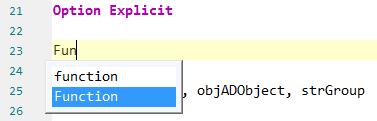
Builds 2711-2715 do this:
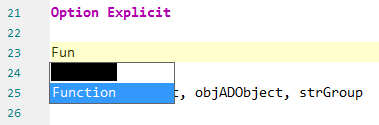
Build 2716 does this:
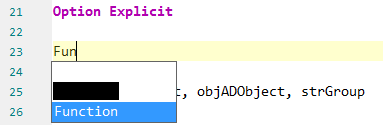
craigo-
on 28 Jan 2020
ac.lb->SetColour(vs.styles[STYLE_DEFAULT].fore, vs.styles[STYLE_DEFAULT].back); is missing from void ScintillaBase::AutoCompleteStart(Sci::Position lenEntered, const char *list).
related changes:
https://sourceforge.net/p/scintilla/feature-requests/1284/
https://sourceforge.net/p/scintilla/feature-requests/1283/
expected appearance (made by Notepad2 with WS_BORDER in ac-frame.png on https://sourceforge.net/p/scintilla/feature-requests/1284/):

 zufuliu
on 30 Jan 2020
zufuliu
on 30 Jan 2020
Win7 with WS_THICKFRAME is nice xd
Mitezuss
on 30 Jan 2020
Thanks to @zufuliu .
Feel free to test the BETA version "Notepad3Portable_5.20.130.2719_BETA.paf.exe.7z" or higher.
See "Notepad3 BETA-channel access #1129" or here Notepad3Portable_5.20.130.2719_BETA.paf.exe.7z.
RaiKoHoff
on 30 Jan 2020
Related issues
 wmsrww
·
3Comments
wmsrww
·
3Comments
 blackcrack
·
3Comments
blackcrack
·
3Comments
blackcrack
·
3Comments
blackcrack
·
3Comments
 bravo-hero
·
3Comments
bravo-hero
·
3Comments
 tzleon
·
3Comments
tzleon
·
3Comments