Notepad3: [Find/Replace : Feature request to improve] When select a text with transform backslashes
Hi, I am comparing Notepad2 fork (https://github.com/zufuliu/notepad2) with Notepad3, and wish have this characteristic (or improve) on Notepad3.
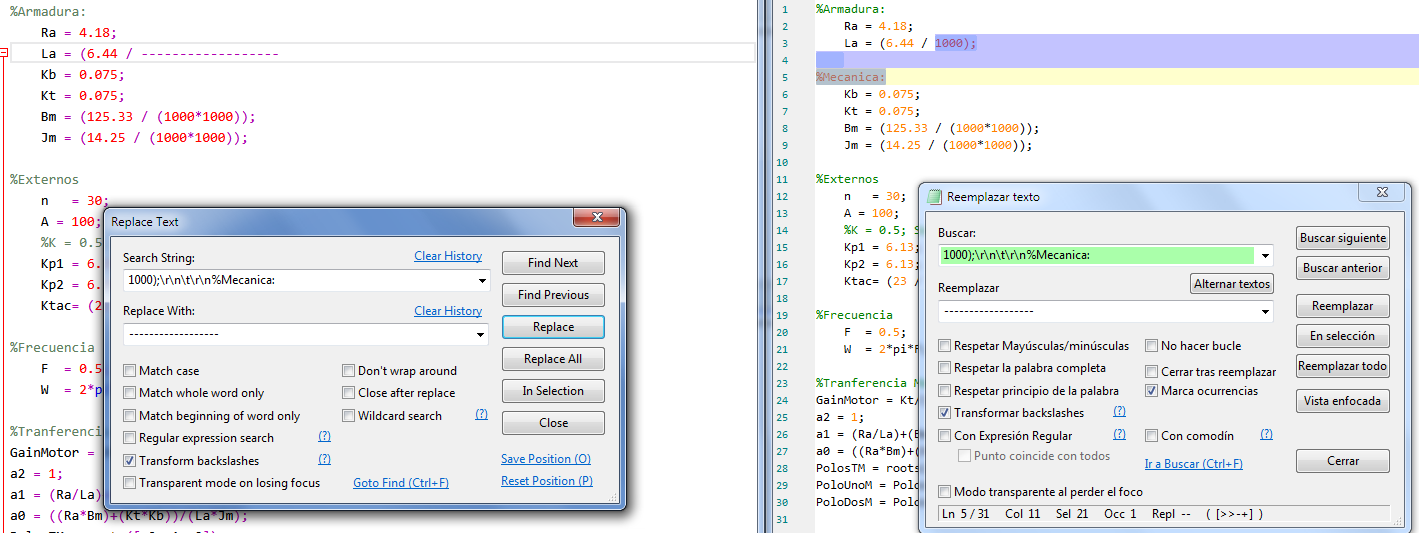
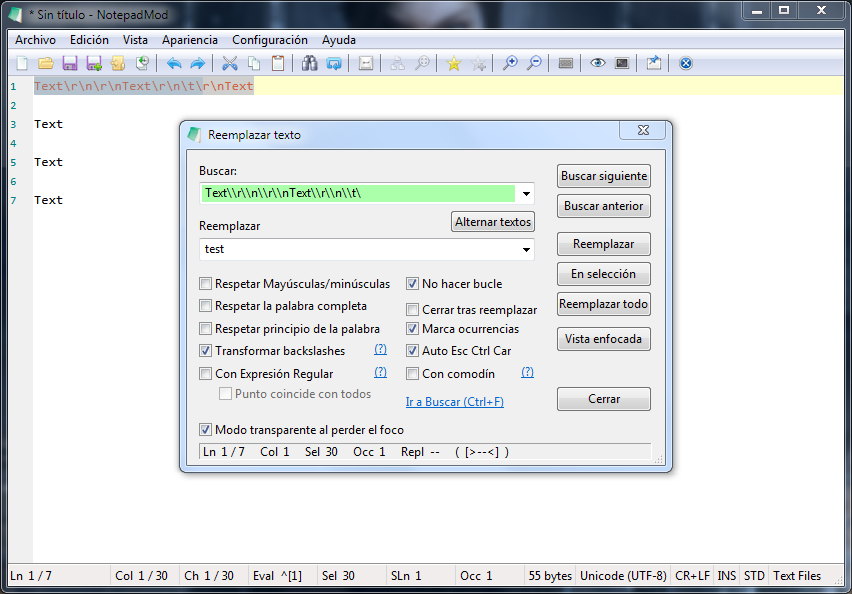
When select a text with backslashes expressions and push Find or Replace, the first text is only selected and not the backslashes expressions (in Notedpad3).
Check first image, for fast explain.

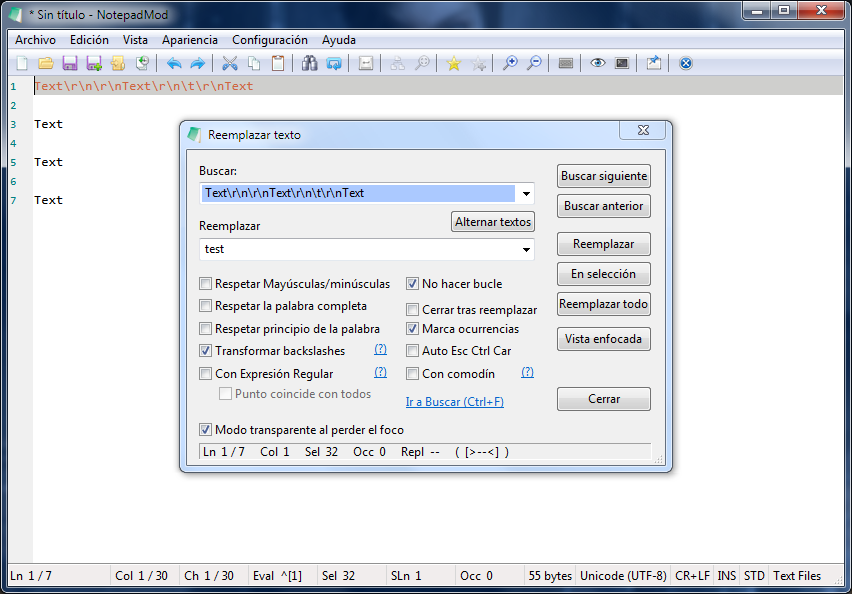
Now, if i write (manually) the full text with transform backslashes, the text is selected but if i push replace the text is not replaced
Check second image.
Regards
 Mitezuss
All 21 comments
Hello @Mitezuss,
It seems to work correctly with the latest BETA version. (see issue #1789 ) 🤔
Test file e.g.: (Test_Replace.zip)
Feel free to test the BETA version "Notepad3Portable_5.20.118.2711_BETA.paf.exe.7z" or higher.
See "Notepad3 BETA-channel access #1129" or here Notepad3Portable_5.20.118.2711_BETA.paf.exe.7z.
Note: "Notepad3Portable BETA" can be used in "2 flavors" (with or without the extension ".7z").
If you follow #1105 , you can also update your installer version with the last Beta version #1129 (for more information, see the 3 pinned issues on top of this "Issues Tab").
Your comments and suggestions are always welcome... 😃
 hpwamr
on 21 Jan 2020
hpwamr
on 21 Jan 2020
@hpwamr : @Mitezuss has another request: currently Notepad3 does not allow a multi-line selection to be fed into the Find/Replace search field ...
 RaiKoHoff
on 22 Jan 2020
RaiKoHoff
on 22 Jan 2020
@hpwamr
Thank, the replace is working, but can not select multiple lines. Can improve that ?

Mitezuss
on 22 Jan 2020
Hello @Mitezuss ,
We are busy implementing the multi-lines Search/Replace...
Feel free to test the BETA version "Notepad3Portable_5.20.123.2712_BETA.paf.exe.7z" or higher.
See "Notepad3 BETA-channel access #1129" or here Notepad3Portable_5.20.123.2712_BETA.paf.exe.7z.
Note: "Notepad3Portable BETA" can be used in "2 flavors" (with or without the extension ".7z").
Your comments and suggestions are always welcome... 😃
hpwamr
on 23 Jan 2020
GJ thank, is working with that beta.
Mitezuss
on 24 Jan 2020
There's been a change in behaviour in builds 2712-2715 that has broken one of my workflows. In builds 2711 and prior, my Configure_Notepad3.au3 script (older version here) would make some changes to Notepad3.ini by:
- Opening the Replace dialogue
- Populating the 'Search String' field with a multiline string (e.g.
;LineCommentPostfixStrg=\r\n;) - Populating the 'Replace with' field with a multiline string (e.g.
;LineCommentPostfixStrg=\r\nLineCommentPostfixStrg=" "\r\n;) - Selecting
Transform backslashes - Clicking
Replace All
...which found the specified multiline string, and replaced it with another multiline string.
With builds 2712-2715, selecting Transform backslashes does this:
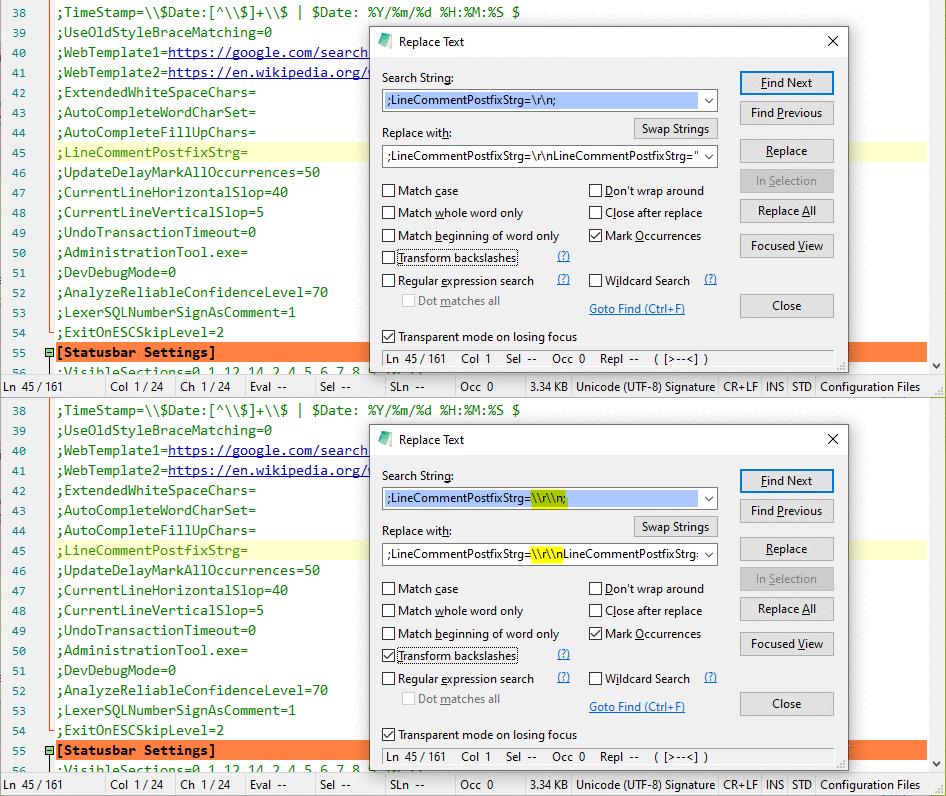
...which results in double backslashes, the string not being found, and general chaos.
Is this a bug? Or do I need to change my workflow?
 craigo-
on 28 Jan 2020
craigo-
on 28 Jan 2020
@craigo- : Sorry for the change. With solving this issue (paste multi-line search pattern into the text box (in former times, the text has been cut-off at the first line-break)), I felt the need to get an indicator of the line-breaks in the single-line text-box display. So I decide to use the Transform backslashes switch to transform the control chars in the text-box actively (also on pasting from Clipboard, if TB switch is ON).
It should be consistent with the search pattern handling (dependent on the interpretation of the TB switch on search action).
Unfortunately this breaks your workflow.
It will not help to change the order (1st set the switch, then 2nd paste the text), the result will be the same ("escaped" backslashes).
Maybe it is a symmetry-bug to support the transformation of backslashes on pasting if TB is ON but _not_ transforming the backslashes, if TB switch is OFF ... 🤔
RaiKoHoff
on 28 Jan 2020
Feel free to test the BETA version "Notepad3Portable_5.20.128.2716_BETA.paf.exe.7z" or higher.
See "Notepad3 BETA-channel access #1129" or here Notepad3Portable_5.20.128.2716_BETA.paf.exe.7z.
@craigo- : Your wokflow shoud work with this version (if you ensure, that "Transform Backslashes" is OFF before pasting your multi-line ("\r\n") text).
RaiKoHoff
on 28 Jan 2020
Thanks @RaiKoHoff, will try it in the next 24 hours.
craigo-
on 28 Jan 2020
Notepad3 (64-bit) v5.20.128.2716 BETA
OK, so that works if the data is _pasted_ into the dialogue fields from the clipboard, but it doesn't work if the text is entered directly (which is what my script does). In this case, the backslashes are doubled when you select the Transform backslashes textbox.
It does work if the Transform backslashes textbox is first selected and then the text is entered directly into the field.
I can adjust my workflow to do this, but it does seem confusing that Notepad3 behaves inconsistently depending on whether the text comes from the keyboard or the clipboard...
craigo-
on 28 Jan 2020
I tried to make the "paste-from-clipboard" behave like the "paste-from-text-selection" (consistency), including backslash transformations. Yes, this is different from manual input, where the Enter/Return-Key also does not insert (a) line-break control character(s), but starts the search...
RaiKoHoff
on 30 Jan 2020
like craigo said, is annoying the double backslashes.
Can add a option for "paste-from-clipboard" for not add double backslashes ? when the "Transform Backslashes" is checked
Mitezuss
on 31 Jan 2020
Feel free to test the BETA version "Notepad3Portable_5.20.202.2721_BETA.paf.exe.7z" or higher.
See "Notepad3 BETA-channel access #1129" or here Notepad3Portable_5.20.202.2721_BETA.paf.exe.7z.
Note: "Notepad3Portable BETA" can be used in "2 flavors" (with or without the extension ".7z").
Your comments and suggestions are welcome... 😃
hpwamr
on 2 Feb 2020
Hi, Thank.
I was testing, and have 2 feedback:
- Comparing
v2720
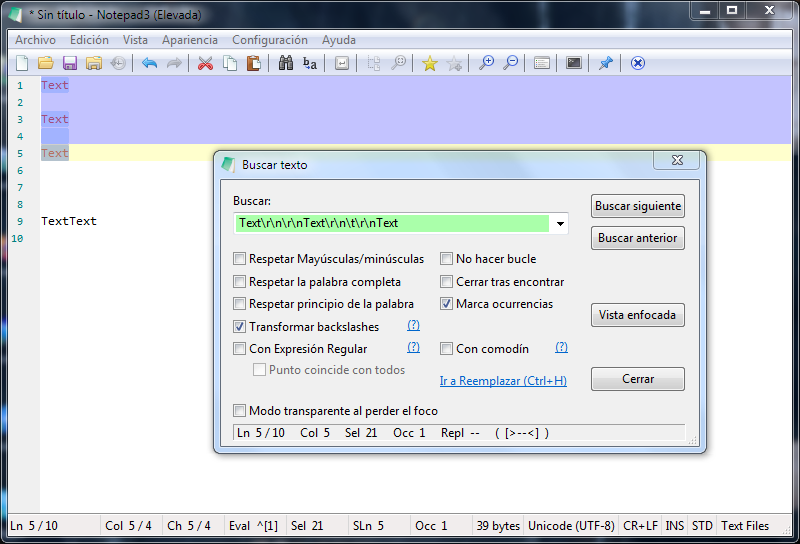
v2721
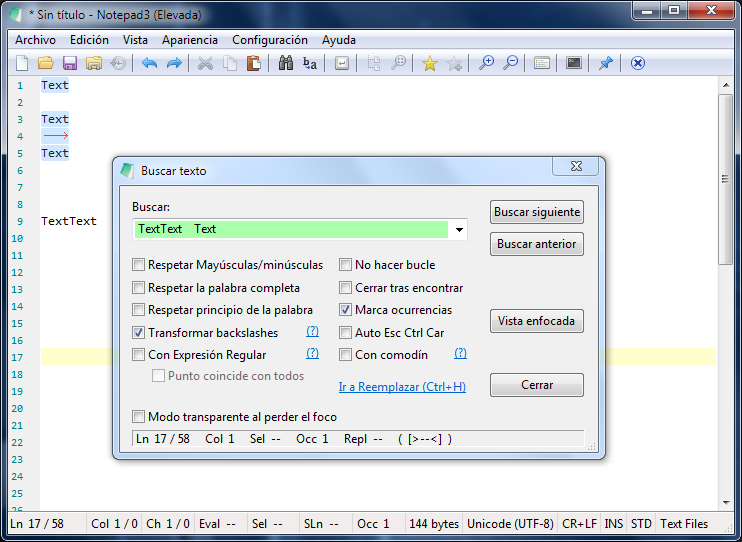
I know, can check Auto Esc Ctrl Car, for be equal. But can just had checked "transform backslashes" and see the same (the characters: \r\n ...etc)
- on last beta:
When Auto Esc Ctrl Car is checked:
When is not checked:
So, be nice do not put backslashes to copy&paste from clipboard, but put backslashes from the text selected (or will be problem when replace)
I think the "problem" is the logic. Can just different paste clipboard from text selected ?
regards
Mitezuss
on 2 Feb 2020
It must be the same result in the search box:
- Selecting Text and open Find/Replace (auto feed in selected text)
- Selecting Text, copy to clipboard, open Find/Replace and paste from clipboard
(has to be same text with and w/o "Auto Esc Ctrl Chr" checked 🤔
RaiKoHoff
on 3 Feb 2020
Hello @Mitezuss ,
Feel free to test the BETA version "Notepad3Portable_5.20.204.2722_BETA.paf.exe.7z" or higher.
See "Notepad3 BETA-channel access #1129" or here Notepad3Portable_5.20.204.2722_BETA.paf.exe.7z.
Note: "Notepad3Portable BETA" can be used in "2 flavors" (with or without the extension ".7z").
Your comments and suggestions are welcome... 😃
hpwamr
on 4 Feb 2020
@RaiKoHoff
Hi, is working "Auto Esc Ctrl Car" ?
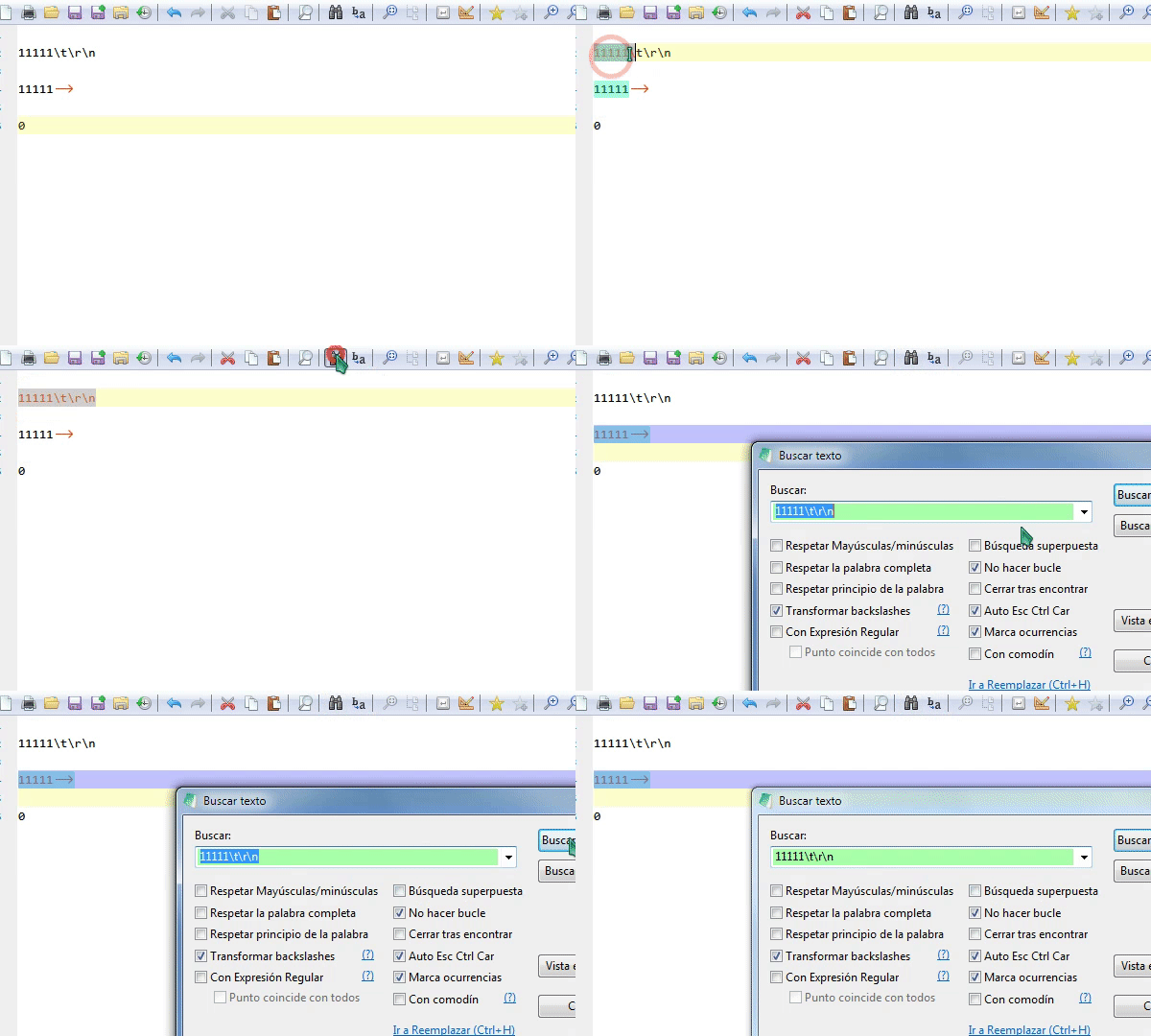
- Should put "\" when is selected from text
- Should not put "\" when paste from clipboard
And check this too:
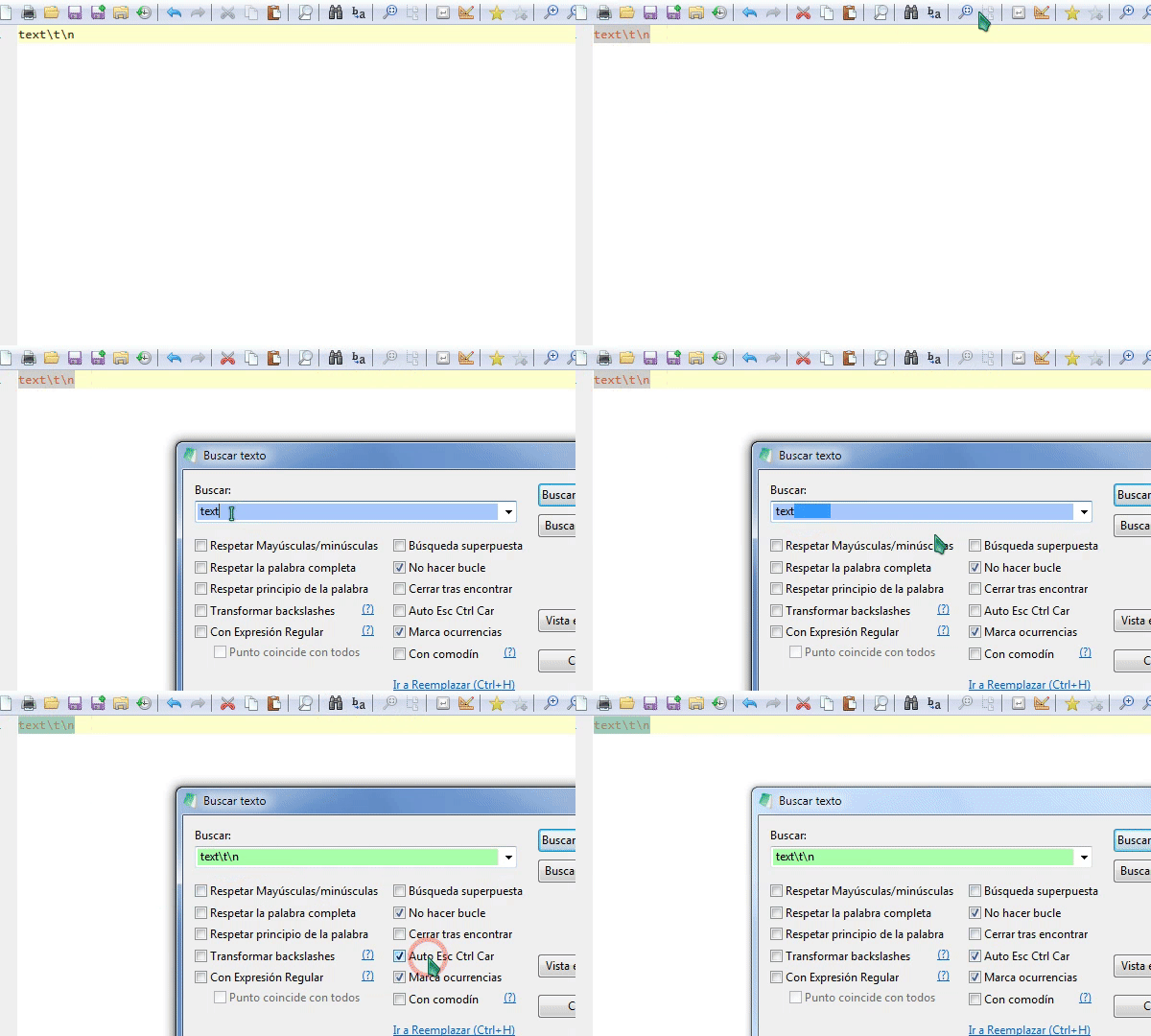
I think:
- should not "auto transform" backslashes if is uncheckd both ("Tranform..." and "Auto Esc...")
So:
Is working as spected ?
Mitezuss
on 12 Sep 2020
@Mitezuss : as @hpwamr stated in previous comment:
Note: ONLY the "en-US" and "de-DE" version are up-to-date, the other languages will follow ASAP ! 😏
In your Spanish version the new explicit manual toggle controls for escaping control character were not available 😲
RaiKoHoff
on 13 Sep 2020
Hello @Mitezuss ,
Feel free to test the "BETA/RC" version "Notepad3Portable_5.20.913.2_rc.paf" or higher, see below or issue #1129.
"Notepad3Portable BETA/RC paf" version can be used with or without ".7z" extension.
To update "Notepad3 Setup" version with the latest features/fixes from the "BETA/RC" version, see issue #1105.
Also, feel free to test the "BETA/RC" version "Notepad3_5.20.829.2_Setup_rc" or higher, see below or issue #1129.
Comments and suggestions are welcome... 😃
hpwamr
on 13 Sep 2020
@RaiKoHoff
@Mitezuss : as @hpwamr stated in previous comment:
_Note:_ ONLY the "en-US" and "de-DE" version are up-to-date, the other languages will follow ASAP ! smirk
In your Spanish version the new explicit manual toggle controls for escaping control character were not available astonished
Oh, my bad (the notepad auto set spanish lang).
Nice, Thank =d
Note: Need be clicked 2 time to see the changes.
Mitezuss
on 14 Sep 2020
@Mitezuss : It is a "toggle" switch, you can toggle between both views.
RaiKoHoff
on 14 Sep 2020
Related issues
hpwamr
·
4Comments
 zb-z
·
3Comments
zb-z
·
3Comments
 bravo-hero
·
3Comments
bravo-hero
·
3Comments
 wmsrww
·
3Comments
hpwamr
·
3Comments
wmsrww
·
3Comments
hpwamr
·
3Comments
Most helpful comment
Feel free to test the BETA version "Notepad3Portable_5.20.128.2716_BETA.paf.exe.7z" or higher.
See "Notepad3 BETA-channel access #1129" or here Notepad3Portable_5.20.128.2716_BETA.paf.exe.7z.
@craigo- : Your wokflow shoud work with this version (if you ensure, that "
Transform Backslashes" is OFF before pasting your multi-line ("\r\n") text).